在部件开发中,默认订阅功能可能不满足需求。此时可使用 自定义订阅。 通常 自定义订阅 与 static 部件类型配合使用,因其没有默认订阅逻辑。
基本信息
创建自定义订阅需使用部件订阅API 中的 createSubscription 函数:
1
widgetContext.createSubscription(options);
options 对象包含订阅的完整信息,包含以下字段:
| 字段 | 类型 | 说明 |
|---|---|---|
type |
widgetType | 设置订阅类型。 |
datasources |
Array<Datasource> | 包含要订阅的数据信息。 |
alarmSource |
Datasource | 包含要订阅的alarms信息。 |
datasourcesOptional |
Boolean | 设置 datasources 是否可选。static 部件类型始终为true。 |
hasDataPageLink |
Boolean | 设置是否使用pageLink进行订阅。 |
singleEntity |
Boolean | 决定是否仅从第一个找到的实体获取数据。 |
pageSize |
Number | 设置每页显示的实体数。 |
warnOnPageDataOverflow |
Boolean | 启用页面数据溢出警告。 |
useDashboardTimewindow |
Boolean | 若启用,订阅使用 dashboardTimewindow 的时间窗口,否则使用 timeWindowConfig(用于 time-series 订阅中修改时间窗口)。 |
dashboardTimewindow |
Timewindow | 包含dashboard的timewindow。 |
timeWindowConfig |
Timewindow | 设置自定义 timewindow。 |
legendConfig |
LegendConfig | 设置图例参数。 |
decimals |
Number | 设置所有 key的小数位数。 |
units |
String | 设置所有 key数值旁显示的单位符号。 |
callbacks |
WidgetSubscriptionCallbacks | 订阅生命周期中使用的回调集合。 |
Datasources
Datasources 对象描述要订阅的数据。 主要功能包括:
- 描述要订阅的keys;
- 指定要提取数据的实体;
- 根据指定keys和values过滤实体。
datasource 对象包含以下字段:
| 字段 | 类型 | 说明 |
|---|---|---|
type |
DatasourceType/any | 设置datasource类型。 |
aliasName |
String | Datasource名称。 |
dataKeys |
Array<DataKey> | 描述要订阅的keys。 |
latestDataKeys |
Array<DataKey> | 若为 time-series 订阅且需同时订阅部分keys的 latest 数据时使用。 |
pageLink |
EntityDataPageLink | 设置datasource的pageLink。 |
keyFilters |
Array<KeyFilter> | 按keys的值过滤要订阅的数据。Key filters详情见 此处。 |
entityFilter |
EntityFilter | 按实体参数过滤要订阅的数据。Entity filters详情见 此处。 |
Callbacks
Callbacks 对象包含在订阅生命周期不同阶段调用的回调函数,包含以下字段:
| 函数 | 说明 |
|---|---|
onDataUpdated |
数据更新后调用。 |
onLatestDataUpdated |
仅在time-series订阅中,latestDataKeys 数据更新后调用。 |
onDataUpdateError |
数据更新出错后调用。 |
onLatestDataUpdateError |
仅在time-series订阅中,latestDataKeys 数据更新出错后调用。 |
legendDataUpdated |
图例数据更新后调用。 |
timeWindowUpdated |
timewindow 更新后调用。 |
dataLoading |
数据加载后调用。 |
rpcStateChanged |
RPC状态变更后调用。 |
onRpcSuccess |
仅在RPC订阅中,RPC成功后调用。 |
onRpcFailed |
仅在RPC订阅中,RPC失败后调用。 |
Entity Filters
实体过滤器是创建自定义订阅的重要部分,用于定义订阅提取信息的实体。Entity Filter内容取决于 type 参数。下面介绍可用的实体过滤器类型,它们本质上与现有dashboard aliases一致。
- Single Entity
根据id仅过滤一个实体。例如,此实体过滤器选择特定device:
1
2
3
4
5
6
7
{
    type: "singleEntity",
    singleEntity: {
        id: "d521edb0-2a7a-11ec-94eb-213c95f54092",
        entityType: "DEVICE"
    }
}
- Group Entities Filter
根据entity group类型和id过滤多个同类实体。例如,此实体过滤器选择属于group e52b0020-2a7a-11ec-94eb-213c95f54092 的所有devices:
1
2
3
4
5
{
    type: "entityGroup",
    groupType: "DEVICE",
    entityGroup: "e52b0020-2a7a-11ec-94eb-213c95f54092"
}
- Entity List Filter
根据ids过滤多个同类实体。例如,此实体过滤器选择两台devices:
1
2
3
4
5
6
7
8
{
    type: "entityList",
    entityType: "DEVICE",
    entityList: [
        "e6501f30-2a7a-11ec-94eb-213c95f54092",
        "e6657bf0-2a7a-11ec-94eb-213c95f54092"
    ]
}
- Entity Name Filter
根据实体名称的 starts with 表达式过滤同类实体。例如,此实体过滤器选择名称以 Air Quality 开头的所有devices:
1
2
3
4
5
{
    type: "entityName",
    entityType: "DEVICE",
    entityNameFilter: "Air Quality"
}
- Entity Type Filter
根据实体类型(CUSTOMER、USER、DASHBOARD、ASSET、DEVICE等)过滤。例如,此实体过滤器选择租户下所有customers:
1
2
3
4
{
    type: "entityType",
    entityType: "CUSTOMER"
}
- Group List Filter
根据指定id返回多个同类型实体组。例如,此实体过滤器选择id为 e52b0020-2a7a-11ec-94eb-213c95f54092 和 e52b0020-2a7a-11ec-94eb-213c95f54093 的两个设备组(若系统中存在):
1
2
3
4
5
{
    type: "entityGroupList",
    groupType: "DEVICE",
    entityGroupList: ["e52b0020-2a7a-11ec-94eb-213c95f54092", "e52b0020-2a7a-11ec-94eb-213c95f54093"]
}
- Group Name Filter
按实体组类型及名称 starts with 表达式过滤。例如,此实体过滤器选择名称以 CAT 开头的所有设备:
1
2
3
4
5
{
    type: "entityGroupName",
    groupType: "DEVICE",
    entityGroupNameFilter: "CAT"
}
- Entities by Group Name Filter
按实体类型与组名称过滤属于该组的实体。可选参数 ownerId 可指定组所有者(Tenant或Customer,默认当前用户)。例如,此实体过滤器选择属于 Water Meters 组的所有设备:
1
2
3
4
5
{
    type: "entitiesByGroupName",
    groupType: "DEVICE",
    entityGroupNameFilter: "Water Meters"
}
另一示例,此实体过滤器选择属于 Water Meters 组的全部设备,且该组属于id为 e52b0020-2a7a-11ec-94eb-213c95f54093 的(子)Customer:
1
2
3
4
5
6
{
    type: "entitiesByGroupName",
    ownerId: "e52b0020-2a7a-11ec-94eb-213c95f54093",
    groupType: "DEVICE",
    entityGroupNameFilter: "Water Meters"
}
- Entity owner Filter
获取指定实体的所有者(Tenant或Customer)。例如,此实体过滤器选择id为 e52b0020-2a7a-11ec-94eb-213c95f54093 的设备的所有者:
1
2
3
4
5
6
7
{
    type: "stateEntityOwner",
    singleEntity: {
        id: "d521edb0-2a7a-11ec-94eb-213c95f54092",
        entityType: "DEVICE"
    }
}
- Asset Type Filter
按asset类型及名称的 ‘starts with’ 表达式过滤。例如,此实体过滤器选择名称以 ‘Tesla’ 开头的所有 ‘charging station’ 类型asset:
1
2
3
4
5
6
{
     type: "assetType",
     assetTypes: ["charging station"],
     assetNameFilter: "Tesla"
}
- Device Type Filter
按设备类型及名称的 ‘starts with’ 表达式过滤。例如,此实体过滤器选择名称以 ‘ABC’ 开头的所有 ‘Temperature Sensor’ 设备:
1
2
3
4
5
6
{
     type: "deviceType",
     deviceTypes: ["Temperature Sensor"],
     deviceNameFilter: "ABC"
}
- Entity View Filter
按entity view类型及名称的 ‘starts with’ 表达式过滤。例如,此实体过滤器选择名称以 ‘CAT’ 开头的所有 ‘Concrete Mixer’ 类型entity view:
1
2
3
4
5
6
{
     type: "entityViewType",
     entityViewTypes: ["Concrete Mixer"],
     entityViewNameFilter: "CAT"
}
- Edge Type Filter
按edge实例类型及名称的 ‘starts with’ 表达式过滤。例如,此实体过滤器选择名称以 ‘Nevada’ 开头的所有 ‘Factory’ 类型edge实例:
1
2
3
4
5
6
{
     type: "edgeType",
     edgeTypes: ["Factory"],
     edgeNameFilter: "Nevada"
}
- Api Usage Filter
按可选customer id查询Api Usage。未设置customer id时返回当前租户API使用量。例如,此实体过滤器选择id为 e6501f30-2a7a-11ec-94eb-213c95f54092 的customer的 Api Usage 实体:
1
2
3
4
5
6
7
{
    type: "apiUsageState",
    customerId: {
        id: "d521edb0-2a7a-11ec-94eb-213c95f54092",
        entityType: "CUSTOMER"
    }
}
- Relations Query Filter
过滤与指定根实体相关的实体。direction 可为 TO 或 FROM。maxLevel 定义递归搜索的关系层级数。若 maxLevel > 1,fetchLastLevelOnly 决定是返回所有相关实体还是仅返回最后一级。filters 数组中可定义关系类型及可接受的实体类型集合。关系查询计算所有相关实体,再只保留符合filters的实体。
例如,此实体过滤器选择与id为 e51de0c0-2a7a-11ec-94eb-213c95f54092 的asset相关的所有设备与asset:
1
2
3
4
5
6
7
8
9
10
11
12
13
14
15
16
17
18
19
{
    type: "relationsQuery",
    rootEntity: {
        entityType: "ASSET",
        id: "e51de0c0-2a7a-11ec-94eb-213c95f54092"
    },
    direction: "FROM",
    maxLevel: 1,
    fetchLastLevelOnly: false,
    filters: [
        {
            relationType: "Contains",
            entityTypes: [
                "DEVICE",
                "ASSET"
            ]
        }
    ]
}
- Asset Search Query
过滤与指定根实体相关的asset。按关系类型与asset类型集合过滤。direction 可为 TO 或 FROM。maxLevel 定义递归搜索层级。若 maxLevel > 1,fetchLastLevelOnly 决定返回范围。relationType 与 assetTypes 分别指定要搜索的关系类型和asset类型。关系查询计算所有相关实体,再仅保留符合 relationType 和 assetTypes 的asset。
例如,此实体过滤器通过 Contains 关系选择与id为 e51de0c0-2a7a-11ec-94eb-213c95f54092 的asset相关的 Charging station asset:
1
2
3
4
5
6
7
8
9
10
11
12
13
14
{
    type: "assetSearchQuery",
    rootEntity: {
        entityType: "ASSET",
        id: "e51de0c0-2a7a-11ec-94eb-213c95f54092"
    },
    direction: "FROM",
    maxLevel: 1,
    fetchLastLevelOnly: false,
    relationType: "Contains",
    assetTypes: [
        "Charging station"
    ]
}
- Device Search Query
过滤与指定根实体相关的设备。按关系类型与设备类型集合过滤。direction 可为 TO 或 FROM。maxLevel 与 fetchLastLevelOnly 同上。relationType 与 deviceTypes 分别指定要搜索的关系类型与设备类型。关系查询计算相关实体后,仅保留符合 relationType 和 deviceTypes 的设备。
例如,此实体过滤器通过 Contains 关系选择与id为 e52b0020-2a7a-11ec-94eb-213c95f54092 的asset相关的 Charging port 和 Air Quality Sensor 设备:
1
2
3
4
5
6
7
8
9
10
11
12
13
14
15
{
    type: "deviceSearchQuery",
    rootEntity: {
        entityType: "ASSET",
        id: "e52b0020-2a7a-11ec-94eb-213c95f54092"
    },
    direction: "FROM",
    maxLevel: 2,
    fetchLastLevelOnly: true,
    relationType: "Contains",
    deviceTypes: [
        "Air Quality Sensor",
        "Charging port"
    ]
}
- Entity View Query
过滤与指定根实体相关的entity view。按关系类型与entity view类型集合过滤。direction、maxLevel、fetchLastLevelOnly、relationType 含义同上。entityViewTypes 指定要搜索的entity view类型。关系查询计算相关实体后,仅保留符合 relationType 和 entityViewTypes 的entity view。
例如,此实体过滤器通过 Contains 关系选择与id为 e52b0020-2a7a-11ec-94eb-213c95f54092 的asset相关的 Concrete mixer 类型entity view:
1
2
3
4
5
6
7
8
9
10
11
12
13
14
{
    type: "entityViewSearchQuery",
    rootEntity: {
        entityType: "ASSET",
        id: "e52b0020-2a7a-11ec-94eb-213c95f54092"
    },
    direction: "FROM",
    maxLevel: 1,
    fetchLastLevelOnly: false,
    relationType: "Contains",
    entityViewTypes: [
        "Concrete mixer"
    ]
}
- Edge Search Query
过滤与指定根实体相关的edge实例。按关系类型与edge类型集合过滤。direction、maxLevel、fetchLastLevelOnly 同上。relationType 与 edgeTypes 分别指定要搜索的关系类型与edge类型。关系查询计算相关实体后,仅保留符合 relationType 和 edgeTypes 的edge实例。
例如,此实体过滤器通过 Contains 关系选择与id为 e52b0020-2a7a-11ec-94eb-213c95f54092 的asset相关的 Factory 类型edge实例:
1
2
3
4
5
6
7
8
9
10
11
12
13
14
{
    type: "edgeSearchQuery",
    rootEntity: {
        entityType: "ASSET",
        id: "e52b0020-2a7a-11ec-94eb-213c95f54092"
    },
    direction: "FROM",
    maxLevel: 2,
    fetchLastLevelOnly: true,
    relationType: "Contains",
    edgeTypes: [
        "Factory"
    ]
}
- Scheduler Event Query
按实体与scheduler事件类型过滤scheduler。例如,此实体过滤器选择事件类型为 Light switch scheduler、且与id为 e01d2630-d710-11ef-a015-9bbc9baea46f 的设备相关的所有scheduler。
1
2
3
4
5
6
7
8
{
    type: "schedulerEvent",
    originator: {
        entityType: "DEVICE",
        id: "e01d2630-d710-11ef-a015-9bbc9baea46f"
    },
    eventType: "Light switch scheduler"
}
Key Filters
Key Filter允许在实体字段、attribute或最新time series值上定义复杂逻辑表达式。过滤器由 key、valueType 和 predicate 对象定义。Single Entity Query可包含零个、一个或多个predicates。若定义多个过滤器,将按逻辑 AND 求值。以下示例检查实体温度是否高于20度:
1
2
3
4
5
6
7
8
9
10
11
12
13
14
15
{
   key: {
        type: "TIME_SERIES",
        key: "temperature"
   },
   valueType: "NUMERIC",
   predicate: {
       operation: "GREATER",
       value: {
           defaultValue: 20,
           dynamicValue: null
       },
       type: "NUMERIC"
   }
}
下面详细介绍 key、valueType 和 predicate 对象。
- Key对象
Filter Key定义实体字段、attribute或telemetry。其为由key名称和类型组成的JSON对象。支持的filter key类型如下:
| Type | 说明 |
|---|---|
CLIENT_ATTRIBUTE |
用于client attributes。 |
SHARED_ATTRIBUTE |
用于shared attributes。 |
SERVER_ATTRIBUTE |
用于server attributes。 |
ATTRIBUTE |
用于上述任意类型。 |
TIME_SERIES |
用于time-series值。 |
ENTITY_FIELD |
用于访问实体字段如 name、label 等。可用字段列表取决于实体类型。 |
ALARM_FIELD |
类似entity field,但仅用于alarm查询。 |
对象示例:
1
2
3
4
{
     type: "SERVER_ATTRIBUTE",
     key: "maxTemperature"
}
- Value Type
提示filter key中定义的实体字段数据类型。value type影响predicate中可用的操作列表。例如可使用 STARTS_WITH 或 ENDS_WITH,但不能对字符串使用 GREATER_OR_EQUAL。支持的filter value类型及对应predicate操作如下:
| 类型 | 说明 |
|---|---|
STRING |
用于过滤 String 或 JSON 值。操作:EQUAL、NOT_EQUAL、STARTS_WITH、ENDS_WITH、CONTAINS、NOT_CONTAINS。 |
NUMERIC |
用于 Long 和 Double 值。操作:EQUAL、NOT_EQUAL、GREATER、LESS、GREATER_OR_EQUAL、LESS_OR_EQUAL。 |
BOOLEAN |
用于 Boolean 值。操作:EQUAL、NOT_EQUAL。 |
DATE_TIME |
类似numeric,将值转换为自纪元的毫秒数。操作:EQUAL、NOT_EQUAL、GREATER、LESS、GREATER_OR_EQUAL、LESS_OR_EQUAL。 |
- Predicate对象
Filter Predicate定义要求值的逻辑表达式。可用操作列表取决于filter value类型,见上文。平台支持4种predicate类型:STRING、NUMERIC、BOOLEAN 和 COMPLEX。后者可在同一filter key上组合多个操作。
检查 value < 100 的简单predicate示例:
1
2
3
4
5
6
7
8
{
    operation: "LESS",
    value: {
        defaultValue: 100,
        dynamicValue: null
    },
    type: "NUMERIC"
}
检查 value < 10 或 value > 20 的复合predicate示例:
1
2
3
4
5
6
7
8
9
10
11
12
13
14
15
16
17
18
19
20
21
22
{
    type: "COMPLEX",
    operation: "OR",
    predicates: [
        {
            operation: "LESS",
            value: {
                defaultValue: 10,
                dynamicValue: null
            },
            type: "NUMERIC"
        },
        {
            operation: "GREATER",
            value: {
                defaultValue: 20,
                dynamicValue: null
            },
            type: "NUMERIC"
        }
    ]
}
检查 value < 10 或 (value > 50 && value < 60) 的更复杂predicate示例:
1
2
3
4
5
6
7
8
9
10
11
12
13
14
15
16
17
18
19
20
21
22
23
24
25
26
27
28
29
30
31
32
33
34
35
36
{
    type: "COMPLEX",
    operation: "OR",
    predicates: [
        {
            operation: "LESS",
            value: {
                defaultValue: 10,
                dynamicValue: null
            },
            type: "NUMERIC"
        },
        {
            type: "COMPLEX",
            operation: "AND",
            predicates: [
                {
                    operation: "GREATER",
                    value: {
                        defaultValue: 50,
                        dynamicValue: null
                    },
                    type: "NUMERIC"
                },
                {
                    operation: "LESS",
                    value: {
                        defaultValue: 60,
                        dynamicValue: null
                    },
                        type: "NUMERIC"
                }
            ]
        }
    ]
}
可将硬编码值(如temperature > 20)替换为动态表达式(如temperature > tenant属性 temperatureThreshold 的值)。可使用 dynamicValue 定义执行API调用的tenant、customer或user的属性。示例如下:
1
2
3
4
5
6
7
8
9
10
11
{
    operation: "GREATER",
    value: {
        defaultValue: 0,
        dynamicValue: {
            sourceType: "CURRENT_USER",
            sourceAttribute: "temperatureThreshold"
        }
    },
    type: "NUMERIC"
}
sourceType 可使用 CURRENT_USER、CURRENT_CUSTOMER 或 CURRENT_TENANT。当选定源上未定义对应属性时,使用 defaultValue。
仅对 TENANT_ADMIN 或 CUSTOMER_USER 权限用户可用。

实体过滤基于attribute或time series key的“最新”值。请勿将此功能用于“过滤”历史time series值。
示例
以下为常见的自定义订阅示例。
计数订阅
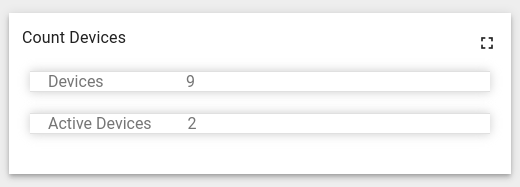
创建用于统计系统中设备总数及活跃设备数的自定义订阅:
1
2
3
4
5
6
7
8
9
10
11
12
13
14
15
16
17
18
19
20
21
22
23
24
25
26
27
28
29
30
31
32
33
34
35
36
37
38
39
40
41
42
43
44
45
46
47
48
49
50
51
52
53
54
55
56
57
58
59
60
61
62
63
64
65
66
67
68
69
70
71
72
73
74
75
76
77
78
79
80
81
82
83
84
85
...
self.onInit = function() {
    ...
    const datasources = [
        {
            type: "entityCount", //Sets that there is a subscription to the entity count
            dataKeys: [
                {
                    decimals: 0, //Number of digits after floating point for this key
                    label: "Devices", //Key label
                    name: "count", //Key name
                    settings: {},
                    type: "count" //Key type
                }
            ],
            entityFilter: //Describes entities (See Entity Filters topic)
            {
                type: "entityType", //Entity filter type
                entityType: "DEVICE"  //Entity type
            }
        },
        {
            type: "entityCount",
            dataKeys: [
                {
                    decimals: 0,
                    label: "Active Devices",
                    name: "count",
                    settings: {},
                    type: "count"
                }
            ],
            entityFilter: //Describes entities (See Entity Filters topic)
            {
                type: "entityType",
                entityType: "DEVICE"
            },
            keyFilters: //Filtering entity by keys (See Key Filters topic)
            [
                {
                    key: {
                        key: "active", //Key name
                        type: "ATTRIBUTE" //Key type
                    },
                    predicate: {
                        operation: "EQUAL", //Operation type (You can find full list of operations in Key Filters topic)
                        type: "BOOLEAN", //Predicate value type
                        value: {
                            defaultValue: true //Predicate value
                        }
                    },
                    valueType: "BOOLEAN" //Value type
                }
            ]
        }
    ];

    const subscriptionOptions = {
        type: 'latest', //Subscription type
        datasources: datasources, //Describes what data you want to subscribe
        callbacks: //Sets callbacks for subscription
        {
            onDataUpdated: () => {
                //Data ready to processing
                self.onDataUpdated();
            }
        }
    };

    self.ctx.subscriptionApi.createSubscription(subscriptionOptions, true).subscribe(
        (subscription) => {
            //Data is not available here! Code below just indicates where data will save.
            self.ctx.defaultSubscription = subscription; //Saves subscription information into widget context
            self.ctx.data = subscription.data; //Saves data into widget context
            self.ctx.datasources = subscription.datasources; //Saves datasource into widget context
            ...
        }
    );
    ...
}

self.onDataUpdated = function() {
    //Data processing logic should be place here
}
...
结果将创建用于统计系统设备总数和活跃设备数的订阅(部件为示意):
属性/遥测订阅
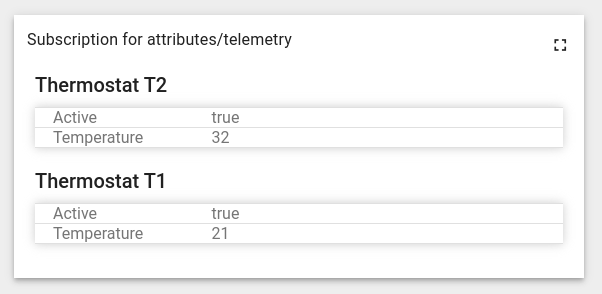
创建针对活跃设备最新 temperature 键值的自定义订阅:
1
2
3
4
5
6
7
8
9
10
11
12
13
14
15
16
17
18
19
20
21
22
23
24
25
26
27
28
29
30
31
32
33
34
35
36
37
38
39
40
41
42
43
44
45
46
47
48
49
50
51
52
53
54
55
56
57
58
59
60
61
62
63
64
65
66
67
68
69
70
71
72
73
74
75
76
...
self.onInit = function() {
    ...
    const datasources = [
        {
            type: "entity", //Indicates that there is a subscription to entity data
            dataKeys: //Describes keys
            [
                {
                    decimals: 0, //Number of digits after floating point for this key
                    label: "Temperature", //Key label
                    name: "temperature", //Key name
                    settings: {},
                    type: "timeseries" //Key type
                },
                {
                    decimals: 0,
                    label: "Active",
                    name: "active",
                    settings: {},
                    type: "attribute"
                 }
            ],
            entityFilter: //Describes entities (See Entity Filters topic)
            {
                type: "entityType", //Entity filter type
                entityType: "DEVICE" //Entity type
            },
            keyFilters: //Filtering entity by keys (See Key Filters topic)
            [
                {
                    key: {
                        key: "active", //Key name
                        type: "ATTRIBUTE" //Key type
                    },
                    predicate: {
                        operation: "EQUAL", //Operation type (You can find full list of operations in Key Filters topic)
                        type: "BOOLEAN", //Predicate value type
                        value: {
                            defaultValue: true //Predicate value
                        }
                    },
                    valueType: "BOOLEAN" //Value type
                }
            ]
        }
    ];

    const subscriptionOptions = {
        type: 'latest', //Subscription type
        datasources: datasources, //Describes what data you want to subscribe
        callbacks: //Sets callbacks for subscription
        {
            onDataUpdated: () => {
                //Data ready to processing
                self.onDataUpdated();
            }
        }
    };

    self.ctx.subscriptionApi.createSubscription(subscriptionOptions, true).subscribe(
        (subscription) => {
            //Data is not available here! Code below just indicates where data will save.
            self.ctx.defaultSubscription = subscription; //Saves subscription information into widget context
            self.ctx.data = subscription.data; //Saves data into widget context
            self.ctx.datasources = subscription.datasources; //Saves datasource into widget context
            ...
        }
    );
    ...
}

self.onDataUpdated = function() {
 //Data processing logic should be place here
}
...
结果将仅为活跃设备创建对 temperature 和 active 键的订阅(部件为示意):
带PageLink的订阅
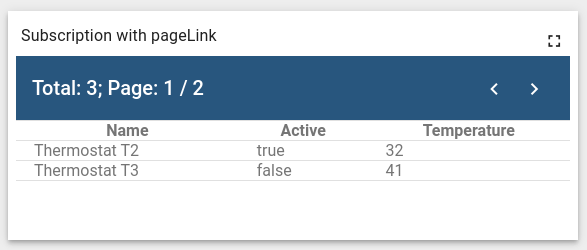
创建自定义订阅:获取 temperature 大于30的设备的 temperature 最新值,每页显示2个实体:
1
2
3
4
5
6
7
8
9
10
11
12
13
14
15
16
17
18
19
20
21
22
23
24
25
26
27
28
29
30
31
32
33
34
35
36
37
38
39
40
41
42
43
44
45
46
47
48
49
50
51
52
53
54
55
56
57
58
59
60
61
62
63
64
65
66
67
68
69
70
71
72
73
74
75
76
77
78
79
80
81
82
83
84
85
86
87
88
89
90
...
self.onInit = function() {
    ...
    const datasources = [
        {
            type: "entity", //Indicates that there is a subscription to entity data
            dataKeys: //Describes keys
            [
                {
                    label: "Temperature", //Key label
                    name: "temperature", //Key name
                    settings: {},
                    type: "timeseries" //Key type
                },
                {
                    label: "Active",
                    name: "active",
                    settings: {},
                    type: "attribute"
                }
            ],
            entityFilter: //Describes entities (See Entity Filters topic)
            {
                type: "deviceType", //Entity filter type
                deviceTypes: [
                    "thermostat" //Device type
                ]
            },
            keyFilters: //Filtering entity by keys (See Key Filter topic)
            [
                {
                    key: {
                        key: "temperature", //Key name
                        type: "TIME_SERIES" //Key type
                    },
                    predicate: {
                        operation: "GREATER", //Operation type (You can find full list of operations in Key Filters topic)
                        type: "NUMERIC", //Predicate value type
                        value: {
                            defaultValue: 30 //Predicate value
                        }
                    },
                    valueType: "NUMERIC" //Value type
                }
            ]
        }
    ];

    const subscriptionOptions = {
        type: 'latest', //Subscription type
        datasources: datasources, //Describes what data you want to subscribe
        hasDataPageLink: true, //Sets subscription into pageLink mode
        callbacks: //Sets callbacks for subscription
        {
            onDataUpdated: () => {
                //Data ready to processing
                self.onDataUpdated();
            }
        }
    };

    self.ctx.$scope.pageLink = {
        page: 0, //Page Number
        pageSize: 2, //Number of entities per page
        dynamic: true //If true, new entities will be automatically added to the widget if they meet the given parameters
    };

     self.ctx.subscriptionApi.createSubscription(subscriptionOptions, true).subscribe(
        (subscription) => {
            //Data is not available here! Code below just indicates where data will save.
            self.ctx.defaultSubscription = subscription; //Saves subscription information into widget context
            subscribeForPaginatedData(self.ctx.$scope.pageLink);
            self.ctx.data = subscription.data; //Saves data into widget context
            self.ctx.datasources = subscription.datasources; //Saves datasource into widget context
            self.ctx.dataPages = subscription.dataPages; //Saves dataPages into widget context
            self.ctx.datasourcePages = subscription.datasourcePages; //Saves datasourcePages into widget context
            ...
        }
     );
    ...
}

self.onDataUpdated = function() {
 //Data processing logic should be place here
}

function subscribeForPaginatedData(pageLink) {
    self.ctx.defaultSubscription.subscribeAllForPaginatedData(pageLink, null); //Get information by pageLink params
}
...
结果将使用PageLink创建对 temperature 和 active 键的订阅(部件为示意):
遥测时序订阅
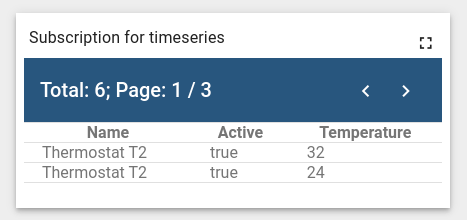
创建从 Thermostat T2 设备订阅 temperature 键time-series的自定义订阅:
1
2
3
4
5
6
7
8
9
10
11
12
13
14
15
16
17
18
19
20
21
22
23
24
25
26
27
28
29
30
31
32
33
34
35
36
37
38
39
40
41
42
43
44
45
46
47
48
49
50
51
52
53
54
55
56
57
58
59
60
61
62
63
64
65
...
self.onInit = function() {
    ...
    const datasources = [
        {
            type: "entity", //Indicates that there is a subscription to entity data
            dataKeys: //Describes time-series keys
            [
                {
                    label: "Temperature", //Key label
                    name: "temperature", //Key name
                    settings: {},
                    type: "timeseries" //Key type
                }
            ],
            latestDataKeys: //Describes latest keys
            [
                {
                    label: "Active", //Key label
                    name: "active", //Key name
                    settings: {},
                    type: "attribute" //Key type
                }
            ],
            entityFilter: //Describes entities (See Entity Filters topic)
            {
                type: "entityName", //Entity filter type
                entityType: "DEVICE", //Entity type
                entityNameFilter: "Thermostat T2" //Entity name
            }
        }
    ];

    const subscriptionOptions = {
        type: 'timeseries', //Subscription type
        datasources: datasources, //Describes what data you want to subscribe
        ignoreDataUpdateOnIntervalTick: true, //if true onDataUpdated will be triggered only when new data appears otherwise onDataUpdate will be triggered every second
        useDashboardTimewindow: true,
        callbacks: //Sets callbacks for subscription
        {
            onDataUpdated: () => {
                //Data ready to processing
                self.onDataUpdated();
            }
        }
    };

     self.ctx.subscriptionApi.createSubscription(subscriptionOptions, true).subscribe(
        (subscription) => {
            //Data is not available here! Code below just indicates where data will save.
            self.ctx.defaultSubscription = subscription; //Saves subscription information into widget context
            self.ctx.data = subscription.data; //Saves data into widget context
            self.ctx.datasources = subscription.datasources; //Saves datasource into widget context
            self.ctx.dataPages = subscription.dataPages; //Saves dataPages into widget context
            self.ctx.datasourcePages = subscription.datasourcePages; //Saves datasourcePages into widget context
            ...
        }
     );
    ...
}

self.onDataUpdated = function() {
 //Data processing logic should be place here
}
...
结果将创建对 temperature 遥测time-series的订阅(部件为示意):
告警订阅
Let’s创建从 thermostat 类型设备订阅告警的自定义订阅:
1
2
3
4
5
6
7
8
9
10
11
12
13
14
15
16
17
18
19
20
21
22
23
24
25
26
27
28
29
30
31
32
33
34
35
36
37
38
39
40
41
42
43
44
45
46
47
48
49
50
51
52
53
54
55
56
57
58
59
60
61
62
63
64
65
66
67
68
69
70
71
72
73
74
75
76
77
78
79
80
81
...
self.onInit = function() {
    ...
    const alarmSource = {
        type: 'entity', //Indicates that there is a subscription to entity data
        dataKeys: //Describes keys
        [
          {
            type: "alarm", //Key type
            name: "createdTime" //Key name
          },
          {
            type: "alarm",
            name: "originator"
          },
          {
            type: "alarm",
            name: "type"
          },
          {
            type: "alarm",
            name: "severity"
          },
          {
            type: "alarm",
            name: "status"
          }
        ],
        entityFilter: //Describes entities (See Entity Filters topic)
        {
            type: "deviceType", //Entity filter type
            deviceTypes: [
                "thermostat" //Device type
            ]
        }
    };

    const alarmDataPageLink = {
        page: 0, //Page Number
        pageSize: 10, //Number of alarms per page
        statusList: [], //Status list (all statuses if empty)
        severityList: [], //Severity list (all severities if empty)
        typeList: [], //Type list (all alarm types if empty)
        sortOrder: //Sorting params
        {
            key: {
              key: "createdTime", //Key name
              type: "ALARM_FIELD" //Key type
            },
            direction: "DESC"
        }
    };

    const subscriptionOptions = {
        type: 'alarm', //Subscription type
        alarmSource: alarmSource, //Describes what alarms data you want to subscribe
        useDashboardTimewindow: true,
        callbacks: //Sets callbacks for subscription
        {
            onDataUpdated: () => {
                //Data ready to processing
                self.onDataUpdated();
            }
        }
    };

    self.ctx.subscriptionApi.createSubscription(subscriptionOptions, true).subscribe(
        (subscription) => {
            //Data is not available here! Code below just indicates where data will save.
            self.ctx.alarmsSubscription = subscription; //Saves subscription information into widget context
            self.ctx.alarmsSubscription.subscribeForAlarms(alarmDataPageLink, null); //Get information by pageLink params
            ...
        }
    );
    ...
}

self.onDataUpdated = function() {
 //Data processing logic should be place here
}
...
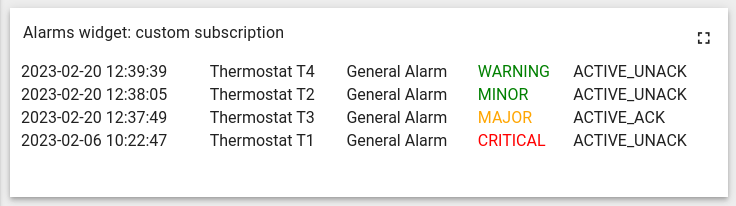
结果将创建对thermostat告警的订阅(部件为示意):
带后处理的订阅
自定义订阅支持对传入数据进行后处理。以下示例基于 属性/遥测订阅。
有时需要允许用户修改传入数据。例如:设备以千克发送重量遥测,但希望用户能转换该值,此时可使用后处理功能。
首先需创建包含用户转换重量遥测函数的自定义setting schema。使用包含JavaScript字段的简单schema:
1
2
3
4
5
6
7
8
9
10
11
12
13
14
15
16
17
18
{
    "schema":{
       "type": "object",
       "properties": {
           "weightPostProcessingFunction": {
               "title": "Weight post-processing: f(time, value, prevValue, timePrev, prevOrigValue)",
               "type": "string",
               "default": "return value;"
           }
       }
    },
    "form": [
       {
           "key": "weightPostProcessingFunction",
           "type": "javascript"
       }
   ]
 }
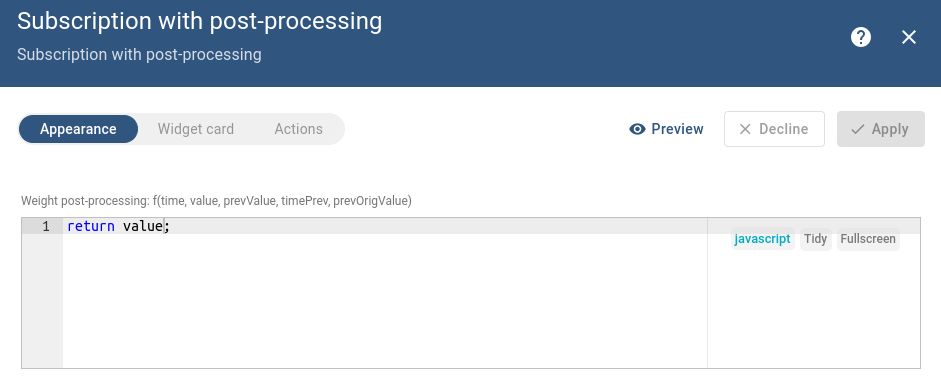
接下来创建自定义订阅。为清晰起见,添加两个字段:一个包含原始值,另一个包含处理后的值:
1
2
3
4
5
6
7
8
9
10
11
12
13
14
15
16
17
18
19
20
21
22
23
24
25
26
27
28
29
30
31
32
33
34
35
36
37
38
39
40
41
42
43
44
45
46
47
48
49
50
51
52
53
54
55
56
57
58
59
60
61
62
63
64
65
66
67
68
69
70
71
72
73
74
75
76
77
78
79
80
81
82
83
84
...
self.onInit = function() {
    ...
    const datasources = [
        {
            type: "entity", //Indicates that there is a subscription to entity data
            dataKeys: //Describes keys
            [
                {
                    decimals: 0, //Number of digits after floating point for this key
                    label: "Weight telemetry", //Key label
                    name: "weight", //Key name
                    settings: {},
                    type: "timeseries" //Key type
                },
                {
                    decimals: 0, //Number of digits after floating point for this key
                    label: "Post processing weight", //Key label
                    name: "weight", //Key name
                    settings: {},
                    usePostProcessing: true, //Enable post-processing
                    postFuncBody: self.ctx.settings.postProcessingFunction, //Set post-processing function from widget settings
                    type: "timeseries" //Key type
                },
                {
                    decimals: 0,
                    label: "Active",
                    name: "active",
                    settings: {},
                    type: "attribute"
                }
            ],
            entityFilter: //Describes entities (See Entity Filters topic)
            {
                type: "entityType", //Entity filter type
                entityType: "DEVICE" //Entity type
            },
            keyFilters: //Filtering entity by keys (See Key Filters topic)
            [
                {
                    key: {
                        key: "active", //Key name
                        type: "ATTRIBUTE" //Key type
                    },
                    predicate: {
                        operation: "EQUAL", //Operation type (You can find full list of operations in Key Filters topic)
                        type: "BOOLEAN", //Predicate value type
                        value: {
                            defaultValue: true //Predicate value
                        }
                    },
                    valueType: "BOOLEAN" //Value type
                }
            ]
        }
    ];

    const subscriptionOptions = {
        type: 'latest', //Subscription type
        datasources: datasources, //Describes what data you want to subscribe to
        callbacks: //Sets callbacks for subscription
        {
            onDataUpdated: () => {
                //Data ready to processing
                 self.onDataUpdated();
            }
        }
    };

    self.ctx.subscriptionApi.createSubscription(subscriptionOptions, true).subscribe(
        (subscription) => {
            //Data is not available here! Code below just indicates where data will save.
            self.ctx.defaultSubscription = subscription; //Saves subscription information into widget context
            self.ctx.data = subscription.data; //Saves data into widget context
            self.ctx.datasources = subscription.datasources; //Saves datasource into widget context
        ...
        }
    );
}

self.onDataUpdated = function() {
 //Data processing logic should be place here
}
...
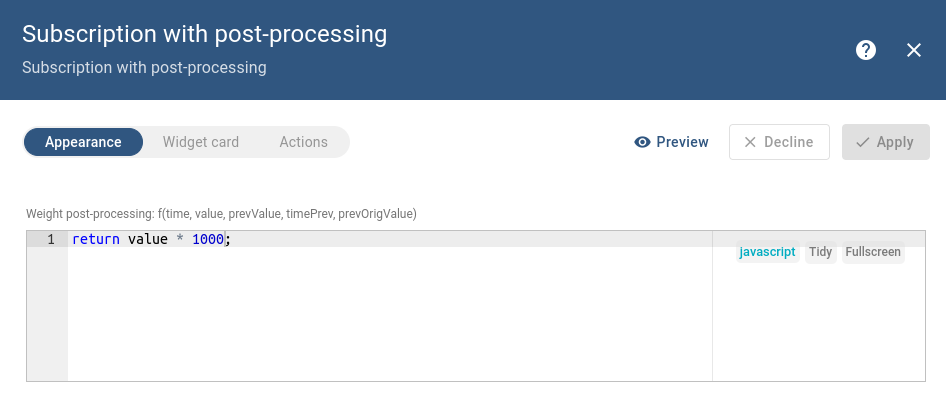
订阅已就绪,现将重量遥测从千克转换为克:
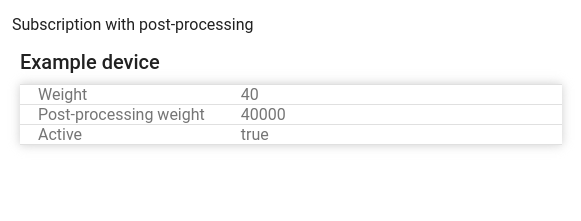
尽管对同一key订阅了两次,输出仍显示不同值,因为其中一个经过了后处理函数的转换。