产品定价 立即试用
IoT网关
文档 > 配置指南 > REST连接器
入门
安装
目录

REST连接器配置

本指南将帮助您熟悉ThingsBoard IoT Gateway的REST连接器配置。
请使用通用配置指南启用此连接器。
该连接器用于创建API端点并从收到的请求中获取数据。
连接器还可根据ThingsBoard的更新或命令将数据推送至外部HTTP(S) API。

当您的设备有HTTP(S) API端点或外部资源中有数据并希望推送至ThingsBoard时,此连接器非常有用。

下面将说明连接器配置文件。

连接器配置:rest.json

连接器配置为JSON文件,包含如何创建API端点以及如何处理数据的说明。下面通过示例说明配置文件格式。

REST 连接器配置文件示例。

下列示例将在本地5000端口创建服务器。连接器将使用用户名和密码进行基本HTTP认证,然后根据mapping部分的端点创建端点列表。更多说明见下文。

1
2
3
4
5
6
7
8
9
10
11
12
13
14
15
16
17
18
19
20
21
22
23
24
25
26
27
28
29
30
31
32
33
34
35
36
37
38
39
40
41
42
43
44
45
46
47
48
49
50
51
52
53
54
55
56
57
58
59
60
61
62
63
64
65
66
67
68
69
70
71
72
73
74
75
76
77
78
79
80
81
82
83
84
85
86
87
88
89
90
{
  "server": {
    "host": "127.0.0.1",
    "port": 5000,
    "SSL": false,
    "security": {
      "cert": "~/ssl/cert.pem",
      "key": "~/ssl/key.pem"
    }
  },
  "mapping": [
    {
      "endpoint": "/test_device",
      "HTTPMethods": [
        "POST"
      ],
      "security": {
        "type": "basic",
        "username": "username",
        "password": "password"
      },
      "converter": {
        "type": "json",
        "deviceInfo": {
          "deviceNameExpression": "Device ${name}",
          "deviceNameExpressionSource": "request",
          "deviceProfileExpressionSource": "constant",
          "deviceProfileExpression": "default"
        },
        "attributes": [
          {
            "key": "model",
            "type": "string",
            "value": "${sensorModel}"
          }
        ],
        "timeseries": [
          {
            "key": "temperature",
            "type": "double",
            "value": "${temp}"
          },
          {
            "key": "humidity",
            "type": "double",
            "value": "${hum}"
          },
          {
            "key": "combine",
            "type": "string",
            "value": "${hum}:${temp}"
          }
        ]
      }
    },
    {
      "endpoint": "/anon2",
      "HTTPMethods": [
        "POST"
      ],
      "security": {
        "type": "anonymous"
      },
      "converter": {
        "type": "custom",
        "deviceInfo": {
          "deviceNameExpression": "SuperAnonDevice",
          "deviceNameExpressionSource": "constant",
          "deviceProfileExpressionSource": "constant",
          "deviceProfileExpression": "default"
        },
        "extension": "CustomRestUplinkConverter",
        "extensionConfig": {
          "key": "Totaliser",
          "datatype": "float",
          "fromByte": 0,
          "toByte": 4,
          "byteorder": "big",
          "signed": true,
          "multiplier": 1
        }
      }
    }
  ],
  "requestsMapping": {
    "attributeRequests": [],
    "attributeUpdates": [],
    "serverSideRpc": []
  }
}

通用部分

参数 默认值 说明
host 127.0.0.1 服务器域名或 IP 地址。
port 5000 服务器端口。
SSL true 是否验证服务器 SSL 证书(若可用)。
cert path_to_the_pem_file 证书文件路径。
key path_to_the_key_file 私钥文件路径。

配置部分如下所示:

1
2
3
4
5
6
7
8
9
10
11
{
  "server": {
    "host": "127.0.0.1",
    "port": 5000,
    "SSL": true,
    "security": {
      "cert": "~/ssl/cert.pem",
      "key": "~/ssl/key.pem"
    }
  }
}
参数 默认值 说明
host 127.0.0.1 服务器域名或 IP 地址。
port 5000 服务器端口。
SSL false 是否验证服务器 SSL 证书(若可用)。

配置部分如下所示:

1
2
3
4
5
6
7
8
9
10
11
{
  "server": {
    "host": "127.0.0.1",
    "port": 5000,
    "SSL": false,
    "security": {
      "cert": "~/ssl/cert.pem",
      "key": "~/ssl/key.pem"
    }
  }
}

映射部分

本配置部分包含网关将创建的端点对象数组,也包含处理传入消息(converter)的设置。收到请求后,将分析请求中的消息以提取设备名称、类型和数据(属性和/或时序值)。默认使用Json转换器,也可提供自定义转换器。

注意:可在数组内指定多个映射对象。

参数 默认值 说明
endpoint /test_device 端点的URL地址。
HTTPMethods GET 端点允许的HTTP方法(GETPOST等)。

安全部分

本部分提供每个端点在网关上进行客户端认证的配置。

Basic 认证是一种安全配置方式。 REST Connector 等待带有 Authorization 头的 HTTP 请求,该头包含 “Basic” 后跟空格及 base64 编码的 username:password 字符串。

参数 默认值 说明
type basic 授权类型。
username username 授权用户名。
password password 授权密码。

配置文件中的 security 部分将如下所示:

1
2
3
4
5
6
7
{
  "security": {
    "type": "basic",
    "username": "username",
    "password": "password"
  }
}

另外,请确保请求中包含带有上述凭据的 Authorization 头。

若使用 cURL,请求示例为:

1
2
curl --user username:password -H "Content-Type: application/json" -X POST \
    -d '{"name": "SN-001", "sensorModel": "example"}' http://127.0.0.1:5000/test_device

若使用 Postman 或 Insomnia,只需启用 Basic 认证即可。

匿名认证是最简单的选项,适合用于测试。

参数 默认值 说明
type anonymous 授权类型。

配置文件中的 security 配置小节将如下所示:

1
2
3
4
5
{
  "security": {
    "type": "anonymous"
  }
}

转换器子节

本子节包含处理传入消息的配置。

请求转换器类型:

  1. json -默认转换器
  2. custom -自定义转换器(可自行编写,用于转换传入数据)
文档信息图标

连接器不会传递转换器返回的None值

Json converter 是默认 converter,根据本小节所述规则,在来自客户端的请求中查找 deviceName、deviceType、attribute 和 telemetry:

参数 默认值 说明
type json 指示 connector 使用默认 converter 转换来自请求的数据。
deviceNameExpression Device ${name} 用于构建设备名称的 JSON 表达式。本例中,connector 从请求 payload 的 name 字段取值,生成如 Device SensorA 的设备名称
deviceNameExpressionSource request 定义 deviceNameExpression 的值来源:request 表示从请求 payload 读取;constant 表示将表达式视为固定值(不解析 payload)。
deviceProfileExpressionSource request 定义 deviceProfileExpression 的值来源:request 表示从请求 payload 读取;constant 表示将表达式作为固定值使用。
deviceProfileExpression default 用于解析 device profile 名称的 JSON 表达式。default 表示 connector 将设备分配到默认 profile(或当 deviceProfileExpressionSourcerequest 且表达式引用某字段时使用该 payload 字段)。
attributes   本小节包含请求中将被解释为设备 attribute 的参数。
… type string 当前 attribute 的输入数据类型。
… key model 用于在输入数据中查找 key 的简单 JSON 表达式,将作为 attribute key 发送到 ThingsBoard 实例。
… value ${sensorModel} 用于在输入数据中查找 value 的简单 JSON 表达式,将作为 key 参数的值发送到 ThingsBoard 实例。
timeseries   本小节包含消息中将被解释为设备 telemetry 的参数。
… type double 当前 telemetry 的输入数据类型。
… key temperature 用于在输入消息中查找 key 的简单 JSON 表达式,将作为 attribute key 发送到 ThingsBoard 实例。
… value ${temp} 用于在输入消息中查找 value 的简单 JSON 表达式,将作为 key 参数的值发送到 ThingsBoard 实例。
… tsField ${timestampField} 可选。 携带日期时间字符串的字段的 JSON-path 表达式。若未指定,将使用输入消息中的 tstimestamp 作为数据条目时间戳。
… dayfirst false 可选。 指明第一个数字为DD.MM.YY HH:mm:ss.SSS)。
false10.11.24 10:10:10.2522024年10月11日 10:10:10.252
true10.11.24 10:10:10.2522024年11月10日 10:10:10.252
… yearfirst false 可选。 指明第一个数字为DD.MM.YY HH:mm:ss.SSS)。
false → 遵循 dayfirst 规则
true10.11.24 10:10:10.2522010年11月24日 10:10:10.252
文档信息图标

attributes 和 telemetry 部分的参数可能与上述不同,但结构相同。

此外,使用 json converter 时也可发送 multipart/form-data 请求,无需额外配置。 REST connector 会将 multipart 字段合并为单一键值对象,因此可像 application/json 一样引用。

以下是两个等效请求示例。第一个以 application/json 发送数据:

1
2
3
4
5
6
7
{
  "name": "SensorA",
  "sensorModel": "TX100",
  "temp": 23.5,
  "hum": 56.2,
  "timestampField": "10.11.24 14:30:00.000"
}

使用 POST 方法、Basic 认证凭据(user / passwd)向 /test_device 端点发送该请求:

1
2
3
4
5
6
7
8
9
10
curl -X POST http://127.0.0.1:5000/test_device \
  -H "Content-Type: application/json" \
  -u username:password \
  -d '{
        "name": "SensorA",
        "sensorModel": "TX100",
        "temp": 23.5,
        "hum": 56.2,
        "timestampField": "10.11.24 14:30:00.000"
      }'

也可使用 multipart/form-data 请求达到相同效果,每个字段作为独立 part 发送。 注意:使用 curl -F 时,curl 会自动设置 Content-Type: multipart/form-data; boundary=... 头。

1
2
3
4
5
6
7
curl -X POST "http://127.0.0.1:5000/test_device" \
  -u "username:password" \
  -F 'name=SensorA' \
  -F 'sensorModel=TX100' \
  -F 'temp=23.5' \
  -F 'hum=56.2' \
  -F 'timestampField=10.11.24 14:30:00.000'
文档信息图标

说明:

  1. 设备 attribute 或 telemetry 不支持文件上传。若 multipart 请求包含文件 part,网关将忽略并记录信息日志。
  2. Multipart 表单字段以字符串接收。 将根据 json converter 中配置的字段类型转换为 boolean、integer 或 double。

上述两个示例的 mapping 配置小节如下所示:

1
2
3
4
5
6
7
8
9
10
11
12
13
14
15
16
17
18
19
20
21
22
23
24
25
26
27
28
29
30
31
32
33
34
35
36
37
38
39
40
41
 {
  "endpoint": "/test_device",
  "HTTPMethods": [
    "POST"
  ],
  "security": {
    "type": "basic",
    "username": "username",
    "password": "password"
  },
  "converter": {
    "type": "json",
    "deviceInfo": {
      "deviceNameExpression": "Device ${name}",
      "deviceNameExpressionSource": "request",
      "deviceProfileExpressionSource": "request",
      "deviceProfileExpression": "default"
    },
    "attributes": [
      {
        "key": "model",
        "type": "string",
        "value": "${sensorModel}"
      }
    ],
    "timeseries": [
      {
        "key": "temperature",
        "type": "double",
        "value": "${temp}"
      },
      {
        "key": "humidity",
        "type": "double",
        "value": "${hum}",
        "tsField": "${timestampField}",
        "dayfirst": true
      }
    ]
  }
}
文档信息图标

说明humidity telemetry key 的 Mapping subsection 配置示例了 tsFielddayfirst 选项的用法。

此外,可在 attribute、telemetry 和 serverSideRpc 部分组合 HTTP 请求中的值,例如:

1
2
3
4
5
6
7
8
9
10
11
12
13
14
15
16
17
18
19
20
21
22
23
24
25
26
27
28
29
30
31
32
33
34
35
36
37
38
39
40
41
42
43
44
{
  "endpoint": "/test_device",
  "HTTPMethods": [
    "POST"
  ],
  "security": {
    "type": "basic",
    "username": "username",
    "password": "password"
  },
  "converter": {
    "type": "json",
    "deviceInfo": {
      "deviceNameExpression": "Device ${name}",
      "deviceNameExpressionSource": "request",
      "deviceProfileExpressionSource": "request",
      "deviceProfileExpression": "default"
    },
    "attributes": [
      {
        "key": "model",
        "type": "string",
        "value": "${sensorModel}"
      }
    ],
    "timeseries": [
      {
        "key": "temperature",
        "type": "double",
        "value": "${temp}"
      },
      {
        "key": "humidity",
        "type": "double",
        "value": "${hum}"
      },
      {
        "key": "combine",
        "type": "string",
        "value": "${hum}:${temp}"
      }
    ]
  }
}

Custom converter 是为特定设备编写的 converter:

参数 默认值 说明
type custom 指示 connector 使用 custom converter 转换请求数据。
deviceNameExpression SuperAnonDevice 设备名称。
deviceNameExpressionSource constant 设备名称来源。
deviceProfileExpressionSource constant Device profile 来源。可为 constant 或 request。
deviceProfileExpression default Device profile 名称。可为 constant 或 request。
extension CustomRESTUplinkConverter 自定义 converter 类名。
extension-config   Custom converter 的配置(可放置任意内容,初始化时会传递给 converter 对象)。
key Totaliser  
datatype float  
fromByte 0  
toByte 4  
byteorder big  
signed true  
multiplier 1  
文档信息图标

当需要从未采用常规响应结构的设备采集数据,或数据在发送到 ThingsBoard 前需处理时,通常需要 custom converter。

注意:置于 “converter” 部分的全部内容将作为配置传递给 custom converter。

配置中的 Mapping subsection 如下所示:

1
2
3
4
5
6
7
8
9
10
11
12
13
14
15
16
17
18
19
"converter": {
    "type": "custom",
    "deviceInfo": {
      "deviceNameExpression": "SuperAnonDevice",
      "deviceNameExpressionSource": "constant",
      "deviceProfileExpressionSource": "constant",
      "deviceProfileExpression": "default"
    },
    "extension": "CustomRestUplinkConverter",
    "extensionConfig": {
      "key": "Totaliser",
      "datatype": "float",
      "fromByte": 0,
      "toByte": 4,
      "byteorder": "big",
      "signed": true,
      "multiplier": 1
    }
  }
文档信息图标

使用GET请求时,也可解析URL中的查询参数。

响应

REST连接器的响应可有三种配置方式: 1.默认响应(无额外配置,仅返回HTTP状态码); 2.硬编码响应体,需指定新节和2个新的可选参数,如下例:

1
2
3
4
5
6
| **参数**                 | **默认值**                                     | **说明**                                                       |
|:-|:-|-
| response                      |                                                       | 每次请求服务器时返回的响应                                             |
| ... successResponse           | **OK**                                                | 仅在响应状态为200时                                                 |
| ... unsuccessfulResponse      | **Error**                                             | 仅在响应状态非200时                                                 |
|---
  1. 高级:由ThingsBoard返回的远程响应。 1.要配置该方式,需在配置文件中指定新节,如下例:

    1
    2
    3
    4
    5
    6
    7
    
    | **参数**                 | **默认值**                                     | **说明**                                                       |
    |:-|:-|-
    | response                      |                                                       | 是否返回响应的布尔值                                                   |
    | ... responseExpected          | **true**                                              | 是否期望响应。                                                        |
    | ... timeout                   | **120**                                               | 请求超时时间。                                                        |
    | ... responseAttribute         | **result**                                            | 将返回响应的共享属性名称                                               |
    |---
    

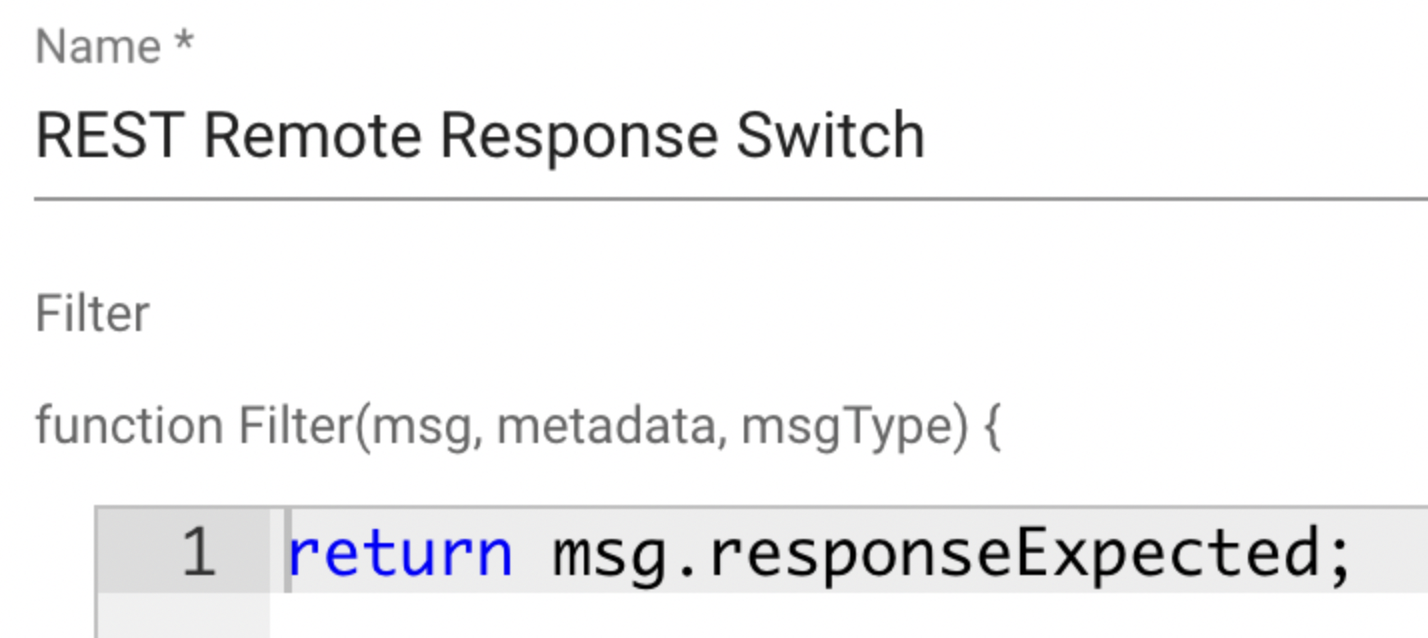
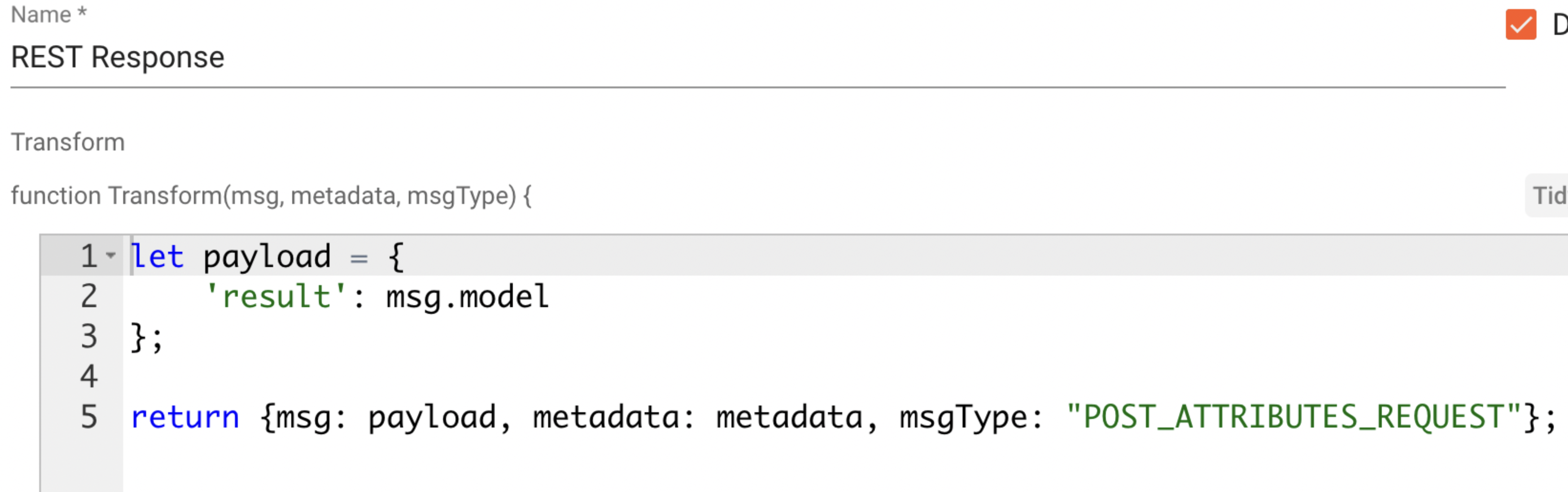
    2.在ThingsBoard中配置规则链: image 最后,需配置规则节点: 1.黄色规则节点 image 2.蓝色规则节点 image

属性请求部分

本部分配置为可选。

为向ThingsBoard服务节点请求客户端或共享设备属性,网关支持发送属性请求。

参数 默认值 说明
endpoint /sharedAttributes 端点的URL地址。
type shared 请求属性的类型,可为”shared”或”client”。
HTTPMethods [“POST”] 允许的HTTP方法。
security   请求的安全配置:
… type basic 请求服务器的安全类型(basicanonymous)。
… username user basic安全类型的用户名。
… password passwd basic安全类型的密码。
timeout 10.0 请求超时时间。
deviceNameExpression ${deviceName} JSON路径表达式,用于查找设备名称。
attributeNameExpression ${attribute} JSON路径表达式,用于查找属性名称。

attributeRequests配置部分如下所示:

1
2
3
4
5
6
7
8
9
10
11
12
13
14
15
"attributeRequests": [
  {
    "endpoint": "/sharedAttributes",
    "type": "shared",
    "HTTPMethods": [
      "POST"
    ],
    "security": {
      "type": "anonymous"
    },
    "timeout": 10.0,
    "deviceNameExpression": "${deviceName}",
    "attributeNameExpression": "${attribute}"
  }
]

此外,您也可以一次请求多个属性。只需在attributeNameExpression参数中添加更多JSON路径即可。例如,我们希望在一次请求中获取两个共享属性,配置如下:

1
2
3
4
5
6
7
8
9
10
11
12
13
14
15
"attributeRequests": [
  {
    "endpoint": "/sharedAttributes",
    "type": "shared",
    "HTTPMethods": [
      "POST"
    ],
    "security": {
      "type": "anonymous"
    },
    "timeout": 10.0,
    "deviceNameExpression": "${deviceName}",
    "attributeNameExpression": "${pduAttribute}, ${versionAttribute}"
  }
]

属性更新部分

本部分配置为可选。ThingsBoard支持预配设备属性,并可从设备应用拉取部分属性。可将其视为设备的远程配置,设备可从ThingsBoard请求共享属性。详见用户指南

attributeUpdates」配置用于设置相应属性更新消息的格式。

参数 默认值 说明
httpMethod POST 请求的HTTP方法(GETPOST等)。
SSLVerify false 是否验证服务器上的SSL证书(如有)。
httpHeaders { “CONTENT-TYPE”: “application/json” } 包含请求附加HTTP头的对象。
security   请求的安全配置:
type basic 请求服务器的安全类型(basicanonymous)。
username user basic安全类型的用户名。
password passwd basic安全类型的密码。
timeout 0.5 请求超时时间。
tries 3 发送数据的重试次数。
allowRedirects true 允许请求重定向。
deviceNameFilter .*REST$ 正则表达式设备名称过滤器,用于确定执行哪个功能。
attributeFilter data 正则表达式属性名称过滤器,用于确定执行哪个功能。
requestUrlExpression sensor/${deviceName}/${attributeKey} JSON路径表达式,用于创建发送消息的URL地址。
valueExpression {\”${attributeKey}\”:\”${attributeValue}\”} JSON路径表达式,用于创建发送到URL的消息数据。

attributeUpdates配置部分如下所示:

1
2
3
4
5
6
7
8
9
10
11
12
13
14
15
16
17
18
19
20
21
  "attributeUpdates": [
      {
        "HTTPMethod": "POST",
        "SSLVerify": false,
        "httpHeaders": {
          "CONTENT-TYPE": "application/json"
        },
        "security": {
          "type": "basic",
          "username": "user",
          "password": "passwd"
        },
        "timeout": 0.5,
        "tries": 3,
        "allowRedirects": true,
        "deviceNameFilter": ".*REST$",
        "attributeFilter": "data",
        "requestUrlExpression": "sensor/${deviceName}/${attributeKey}",
        "valueExpression": "{\"${attributeKey}\":\"${attributeValue}\"}"
      }
  ],

服务端RPC部分

ThingsBoard支持向直接连接或经网关连接的设备发送RPC命令

本部分提供的配置用于从ThingsBoard向设备发送RPC请求。

参数 默认值 说明
deviceNameFilter .* 正则表达式设备名称过滤器,用于确定执行哪个功能。
methodFilter echo 正则表达式方法名称过滤器,用于确定执行哪个功能。
requestUrlExpression http://127.0.0.1:5001/${deviceName} JSON路径表达式,用于创建发送RPC请求的URL地址。
responseTimeout 1 请求超时时间。
httpMethod GET 请求的HTTP方法(GETPOST等)。
valueExpression ${params} JSON路径表达式,用于创建发送的数据。
timeout 0.5 请求超时时间。
tries 3 发送数据的重试次数。
httpHeaders { “CONTENT-TYPE”: “application/json” } 包含请求附加HTTP头的对象。
security   请求的安全配置:
type anonymous 请求服务器的安全类型(basicanonymous)。
文档信息图标

RPC调用有两种类型:
1.带回复:发送请求后网关将等待响应并发送至ThingsBoard。 2.无回复:发送请求后网关不等待响应。

以下提供两种方法的示例。

1
2
3
4
5
6
7
8
9
10
11
12
13
14
15
16
17
18
19
20
21
22
23
24
25
26
27
28
  "serverSideRpc": [
    {
      "deviceNameFilter": ".*",
      "methodFilter": "echo",
      "requestUrlExpression": "http://127.0.0.1:5001/${deviceName}",
      "responseTimeout": 1,
      "HTTPMethod": "GET",
      "valueExpression": "${params}",
      "timeout": 0.5,
      "tries": 3,
      "httpHeaders": {
        "Content-Type": "application/json"
      },
      "security": {
        "type": "anonymous"
      }
    },
    {
      "deviceNameFilter": ".*",
      "methodFilter": "no-reply",
      "requestUrlExpression": "sensor/${deviceName}/request/${methodName}/${requestId}",
      "HTTPMethod": "POST",
      "valueExpression": "${params.hum}",
      "httpHeaders": {
        "Content-Type": "application/json"
      }
    }
  ]

此外,每个遥测和属性参数均内置GET和SET RPC方法。使用前请确保已设置所有必需参数(REST连接器中为:requestUrlExpressionresponseTimeoutHTTPMethodvalueExpression)。参见指南

下一步

探索与ThingsBoard主要功能相关的指南: