规则引擎是ThingsBoard中负责接收、转换、路由和响应来自设备及相关资产的事件与遥测数据的核心数据处理机制。
规则引擎围绕三大组件构建:
- 消息 — 任何入站事件。可以是设备入站数据、设备生命周期事件、REST API事件、RPC请求等。
- 规则节点 — 对入站消息执行的函数。有多种不同类型的节点,可对入站消息进行过滤、转换或执行特定操作。
- 规则链 — 节点之间通过关系连接,规则节点的出站消息会发送到下游连接的规则节点。
主要特性
- 流式处理。遥测、属性、RPC、事件等入站数据会被规则引擎立即处理,可进行过滤、丰富或转换。
- 规则链即工作流。数据处理被组织成规则链 — 由若干规则节点组成的工作流。每个节点执行特定操作,如过滤、写入数据库、发送通知或调用外部API。
- 灵活性与可扩展性。规则引擎支持内置节点及通过脚本(JavaScript或TBEL)实现的自定义逻辑,也可与外部系统(HTTP、Kafka、MQTT)集成。
- 集成与响应。规则引擎可根据事件触发业务逻辑,例如在超过温度阈值时发送邮件或短信,或与外部服务/平台集成。
典型用途
以下是可通过ThingsBoard规则链配置的常见场景:
- 数据校验与转换 — 在持久化到数据库前校验并修改入站遥测或属性。
- 遥测聚合 — 将遥测或属性从设备复制到关联资产以实现聚合。例如,可将多台设备的数据合并到关联资产中用于汇总分析。
- 告警管理 — 根据定义的条件创建、更新或清除告警。
- 设备生命周期监控 — 在设备状态变化时触发操作。例如,设备上线或离线时生成告警。
- 数据丰富 — 加载处理所需的额外上下文。例如,从设备所属客户或租户属性中加载设备的温度阈值。
- 外部系统集成 — 触发对外部应用和服务的REST API调用。
- 通知 — 在复杂事件发生时发送邮件告警,可在邮件模板中包含关联实体的属性。
- 用户个性化 — 在事件处理时考虑用户偏好。
- 远程控制 — 根据定义的条件对设备执行RPC调用。
- 大数据/云集成 — 连接Kafka、Spark、AWS等外部管道和平台。
规则引擎消息
规则引擎消息是一种可序列化、不可变的数据结构,用于表示系统中的各类消息。例如:
规则引擎消息包含以下信息:
- 消息ID:基于时间的全局唯一标识符;
- 消息来源:设备、资产或其他实体标识符;
- 消息类型:如“发布遥测”或“不活跃事件”等;
- 消息负载:包含实际消息内容的JSON体;
- 元数据:与消息相关的键值对列表。
规则节点
规则节点是规则引擎的基本组件,一次处理一条入站消息并产生一条或多条出站消息。 规则节点是规则引擎的主要逻辑单元,可对入站消息进行过滤、丰富、转换,执行操作或与外部系统通信。
规则节点连接
规则节点可与其他规则节点连接。每条关系都有关系类型,用于标识关系的逻辑含义。 当规则节点产生出站消息时,会指定用于将消息路由到下游节点的关系类型。
常见关系类型为“Success”和“Failure”。 表示逻辑运算的规则节点可使用“True”或“False”。 部分规则节点使用完全不同的关系类型,例如:“Post Telemetry”、“Attributes Updated”、“Entity Created”等。
部分规则节点支持自定义连接名称。输入自定义连接名并点击“Create a new one!”链接即可:
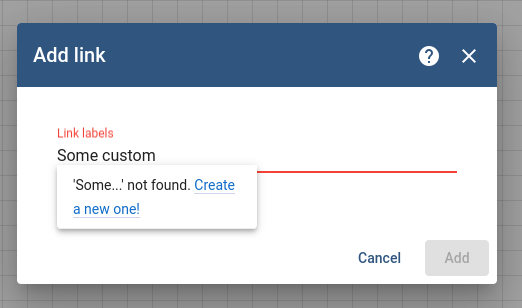
所有连接名称区分大小写。
规则链
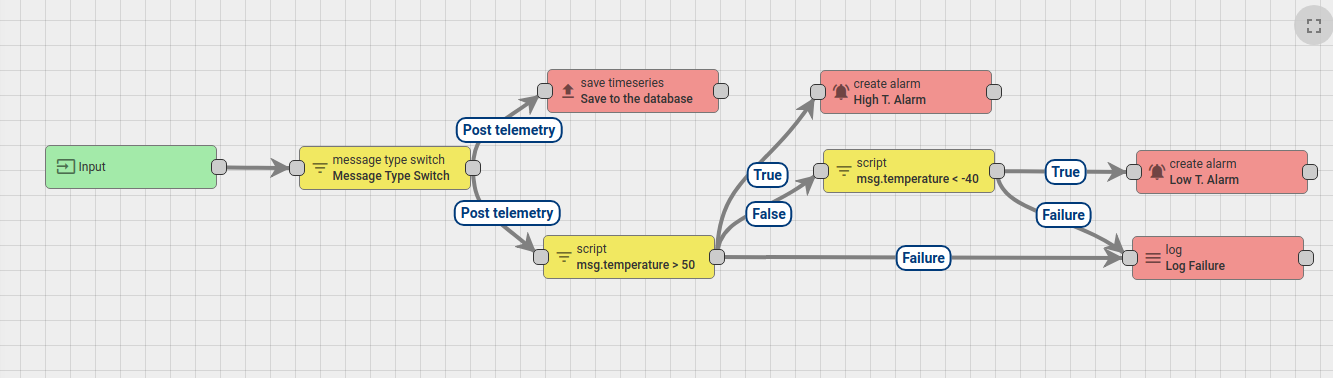
规则链是规则节点及其关系的逻辑组合。例如,以下规则链将:
- 将所有遥测消息保存到数据库;
- 当消息中温度字段高于50度时触发“高温告警”;
- 当消息中温度字段低于 -40度时触发“低温告警”;
- 当脚本存在逻辑或语法错误时,将温度检查脚本执行失败记录到控制台。
租户管理员可定义一条根规则链,并可选择定义多条其他规则链。 根规则链处理所有入站消息,并可将其转发到其他规则链进行后续处理。 其他规则链也可将消息转发到不同规则链。
例如,以下规则链将:
- 当消息中温度高于50度时触发“高温告警”;
- 当消息中温度低于50度时清除“高温告警”;
- 将告警“创建”和“清除”事件转发到负责通知相应用户的外部规则链。

消息处理结果
消息处理有三种可能结果:Success(成功)、Failure(失败)、Timeout(超时)。 当处理链中最后一个规则节点成功处理消息时,该次处理标记为“Success”。 若某规则节点产生“Failure”且没有其他规则节点处理该失败,则标记为“Failure”。 当总处理时间超过可配置阈值时,标记为“Timeout”。
下图展示了可能的场景:
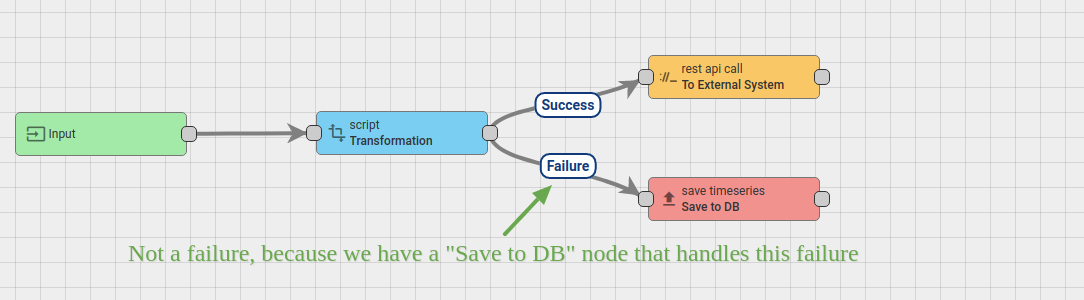
若“Transformation”脚本失败,消息不会标记为“Failed”,因为有通过“Failure”关系连接的“Save to DB”节点处理。 若“Transformation”脚本成功,将通过REST API推送到“External System”。 若外部系统过载,REST API调用可能暂时阻塞。假设消息包处理总超时为20秒,忽略Transformation脚本执行时间(< 1ms)。 若“External System”在20秒内响应,消息将被成功处理。 同样,若“Save to DB”调用成功,消息也会被成功处理。 若外部系统在20秒内未响应,该次处理将标记为“timed-out”。 若“Save to DB”调用失败,消息将标记为失败。
规则引擎队列
参见新版文档
队列提交策略
参见新版文档
队列处理策略
参见新版文档
默认队列
参见新版文档
预定义消息类型
预定义消息类型列表如下:
| 消息类型 | 显示名称 | 描述 | 消息元数据 | 消息负载 |
| POST_ATTRIBUTES_REQUEST | 发布属性 | 设备请求发布客户端属性(参见 attributes api) | deviceName - originator device name, deviceType - originator device type |
key/value json: { |
| POST_TELEMETRY_REQUEST | 发布遥测 | 设备请求发布遥测(参见 telemetry upload api) | deviceName - originator device name, deviceType - originator device type, ts - timestamp (milliseconds) |
key/value json: { |
| TO_SERVER_RPC_REQUEST | 来自设备的RPC请求 | 设备发起的RPC请求(参见 client side rpc) | deviceName - originator device name, deviceType - originator device type, requestId - RPC request Id provided by client |
json containing method and params: { |
| RPC_CALL_FROM_SERVER_TO_DEVICE | 下发至设备的RPC请求 | 服务端发往设备的RPC请求(参见 server side rpc api) | requestUUID - 系统用于识别回复目标的内部请求ID, expirationTime - 请求过期时间, oneway - 指定请求类型:true - 无响应,false - 有响应 |
json containing method and params: { |
| ACTIVITY_EVENT | 活跃事件 | 设备变为活跃状态时产生的事件 | deviceName - originator device name, deviceType - originator device type |
json containing device activity information: { |
| INACTIVITY_EVENT | 不活跃事件 | 设备变为不活跃状态时产生的事件 | deviceName - originator device name, deviceType - originator device type |
json containing device activity information, see Activity Event payload |
| CONNECT_EVENT | 连接事件 | 设备连接时产生的事件 | deviceName - originator device name, deviceType - originator device type |
json containing device activity information, see Activity Event payload |
| DISCONNECT_EVENT | 断开事件 | 设备断开时产生的事件 | deviceName - originator device name, deviceType - originator device type |
json containing device activity information, see Activity Event payload |
| ENTITY_CREATED | 实体已创建 | 系统中创建新实体时产生的事件 | userName - name of the user who created the entity, userId - the user Id |
json containing created entity details: { |
| ENTITY_UPDATED | 实体已更新 | 现有实体被更新时产生的事件 | userName - name of the user who updated the entity, userId - the user Id |
json containing updated entity details, see Entity Created payload |
| ENTITY_DELETED | 实体已删除 | 现有实体被删除时产生的事件 | userName - name of the user who deleted the entity, userId - the user Id |
json containing deleted entity details, see Entity Created payload |
| ENTITY_ASSIGNED | 实体已分配 | 现有实体被分配给客户时产生的事件 | userName - name of the user who performed assignment operation, userId - the user Id, assignedCustomerName - assigned customer name, assignedCustomerId - Id of assigned customer |
json containing assigned entity details, see Entity Created payload |
| ENTITY_UNASSIGNED | 实体已取消分配 | 现有实体从客户处取消分配时产生的事件 | userName - name of the user who performed unassignment operation, userId - the user Id, unassignedCustomerName - unassigned customer name, unassignedCustomerId - Id of unassigned customer |
json containing unassigned entity details, see Entity Created payload |
| ADDED_TO_ENTITY_GROUP | 已加入组 | 实体被加入实体组时产生的事件。该消息类型为 ThingsBoard PE 专有。 | userName - name of the user who performed assignment operation, userId - the user Id, addedToEntityGroupName - entity group name, addedToEntityGroupId - Id of entity group |
empty json payload |
| REMOVED_FROM_ENTITY_GROUP | 已移出组 | 实体从实体组中移除时产生的事件。该消息类型为 ThingsBoard PE 专有。 | userName - name of the user who performed unassignment operation, userId - the user Id, removedFromEntityGroupName - entity group name, removedFromEntityGroupId - Id of entity group |
empty json payload |
| ATTRIBUTES_UPDATED | 属性已更新 | 执行实体属性更新时产生的事件 | userName - name of the user who performed attributes update, userId - the user Id, scope - updated attributes scope (can be either SERVER_SCOPE or SHARED_SCOPE) |
key/value json with updated attributes: { |
| ATTRIBUTES_DELETED | 属性已删除 | 实体部分属性被删除时产生的事件 | userName - name of the user who deleted attributes, userId - the user Id, scope - deleted attributes scope (can be either SERVER_SCOPE or SHARED_SCOPE) |
json with attributes field containing list of deleted attributes keys: { |
| ALARM | 告警事件 | 告警被创建、更新或删除时产生的事件 |
All fields from original Message Metadata
isNewAlarm - 若刚创建新告警则为true isExistingAlarm - 若告警已存在则为true isClearedAlarm - 若告警已清除则为true |
json containing created alarm details:
{
|
| ALARM_ASSIGNED | 告警已分配 | 告警被分配给某用户时产生的事件 |
All fields from original Message Metadata
entityName - name of alarm entityType - ALARM userEmail - user email userFirstName - user first name userId - user id userLastName - user last name userName - user name |
json containing alarm details, see Alarm event |
| ALARM_UNASSIGNED | 告警已取消分配 | 告警从用户处取消分配时产生的事件 |
All fields from original Message Metadata
entityName - name of alarm entityType - ALARM userEmail - user email userFirstName - user first name userId - user id userLastName - user last name userName - user name |
json containing alarm details, see Alarm event |
| COMMENT_CREATED | 评论已创建 | 告警评论被创建时产生的事件 |
All fields from original Message Metadata
userId - user id userName - user name userFirstName - first name of user userLastName - last name of user userEmail - email of user comment - json object containing comment details and text of comment |
json containing alarm details, see Alarm event |
| COMMENT_UPDATED | 评论已更新 | 告警评论被更新时产生的事件 |
All fields from original Message Metadata
userId - user id userName - user name userFirstName - first name of user userLastName - last name of user userEmail - email of user comment - json object containing comment details and text of comment |
json containing alarm details, see Alarm event |
| REST_API_REQUEST | 发送至规则引擎的REST API请求 | 用户执行REST API调用时产生的事件 | requestUUID - the unique request id, expirationTime - the expiration time of the request |
json with request payload |
规则节点类型
所有可用规则节点按其性质分组:
- 过滤节点 — 用于消息过滤与路由
- 丰富节点 — 用数据库中的信息丰富消息
- 转换节点 — 修改消息字段,如来源、类型、数据和元数据
- 动作节点 — 根据消息执行各类操作
- 外部节点 — 与外部系统交互
- 流控节点 — 控制规则链间消息流及与队列交互
- 分析节点 — 聚合数据
配置
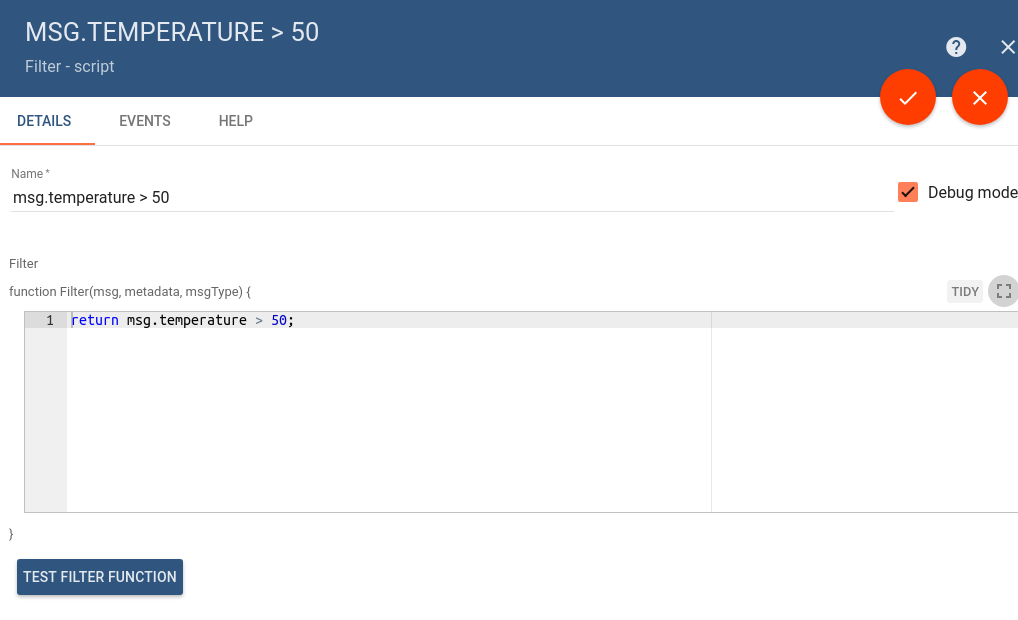
每个规则节点可有依赖其实现的特定配置参数。 例如,“Filter - script”规则节点可通过处理入站数据的自定义JS函数配置。 “External - send email”节点可配置邮件服务器连接参数。
在规则链编辑器中双击节点可打开规则节点配置窗口:
测试脚本函数
部分规则节点提供用于测试TBEL/JS函数的UI。 点击 Test Filter Function 将打开JS编辑器,可替换输入参数并验证函数输出。
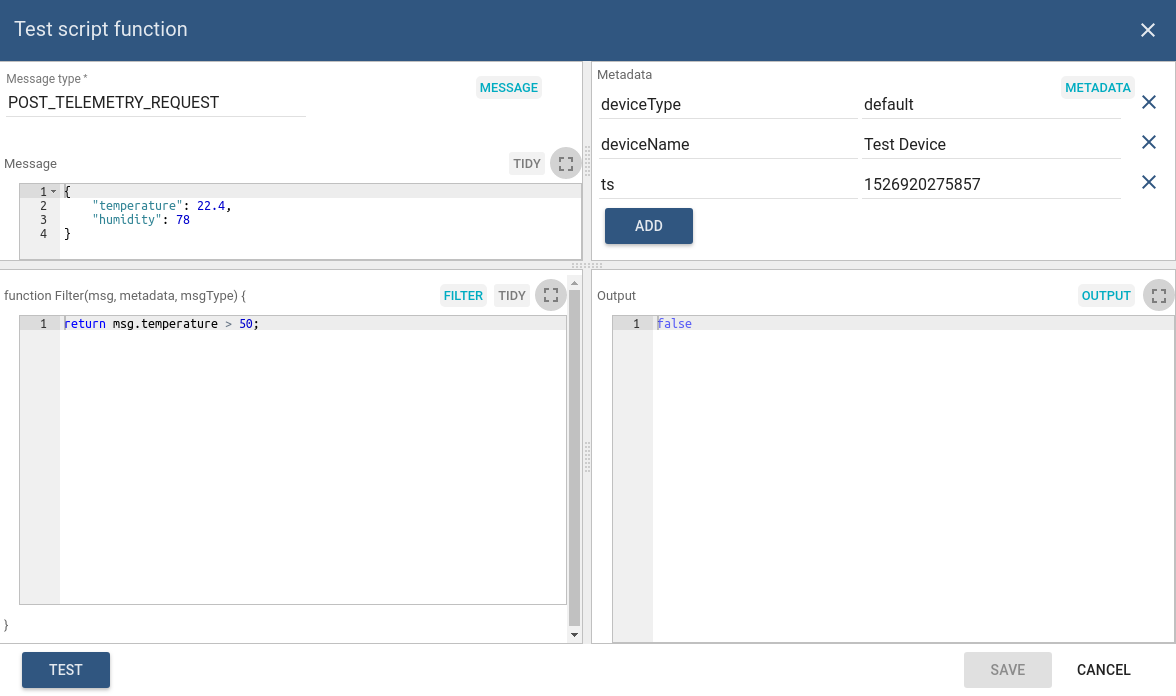
可配置:
- 左上角字段的 Message Type。
- 左侧Message区域的 Message payload。
- 右侧Metadata区域的 Metadata。
- Filter区域中的实际 TBEL/JS script。
点击 Test 后,输出将在右侧 Output 区域显示。
规则引擎统计
ThingsBoard团队已准备规则引擎的“默认”仪表板。 该仪表板会为每个租户自动加载。 可通过“Api Usage”->“View statistics”访问(见下图)。
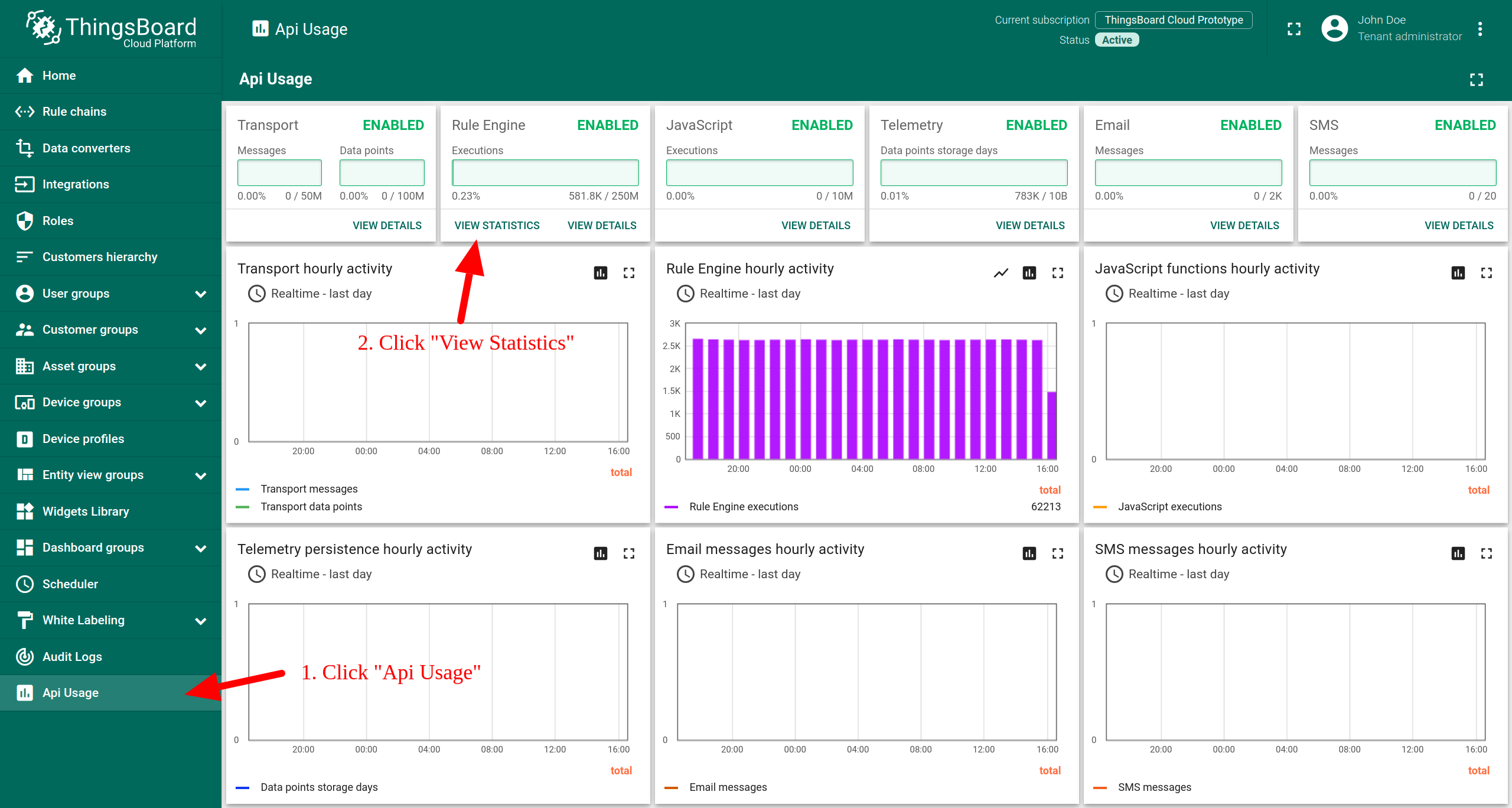
统计收集默认启用,由配置属性控制。
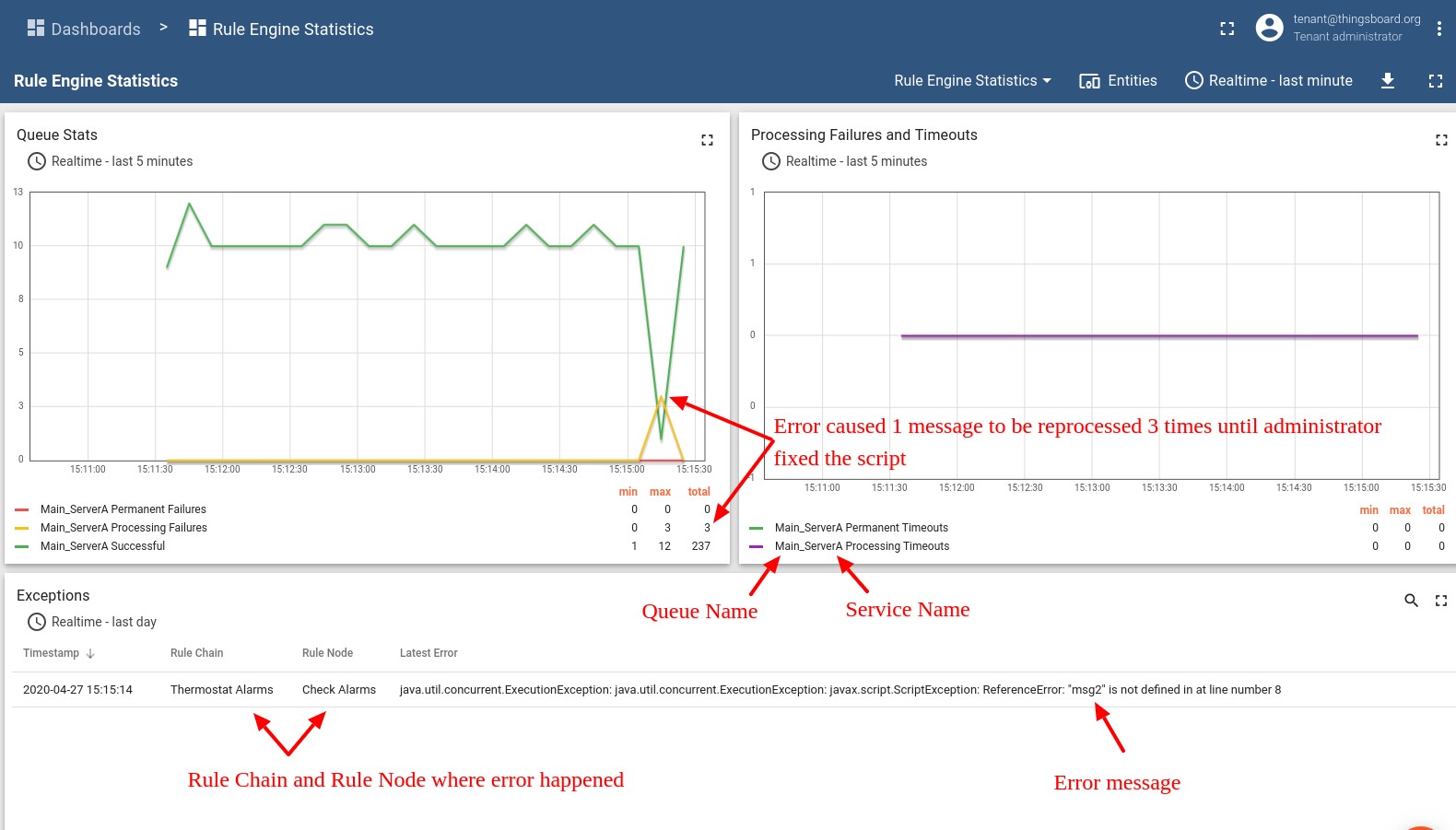
您可在下方仪表板中查看处理错误及其原因的洞察:
调试
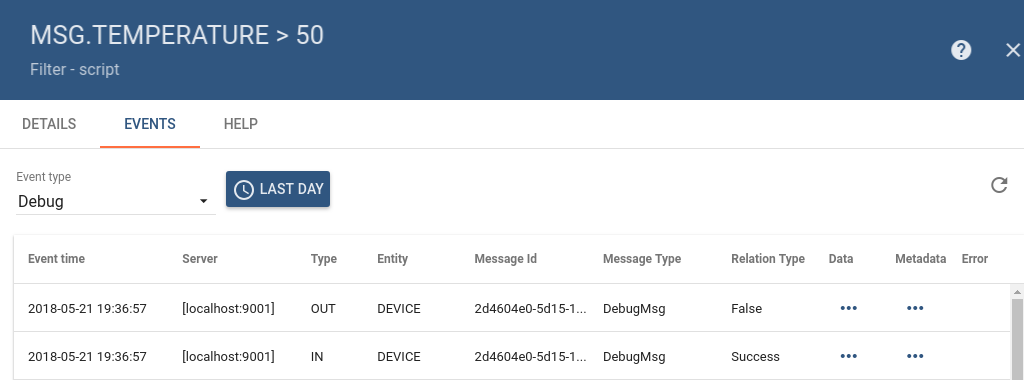
ThingsBoard支持查看每个规则节点的入站和出站消息。 要启用调试,需在主配置窗口中勾选“Debug mode”(见配置节首图)。
调试启用后,可查看入站、出站消息及对应关系类型。 下图示例为调试消息视图:
管理规则链
规则链页面展示已配置的租户规则链列表。可在此创建、导出/导入、删除规则链或将规则链设为根。
创建规则链
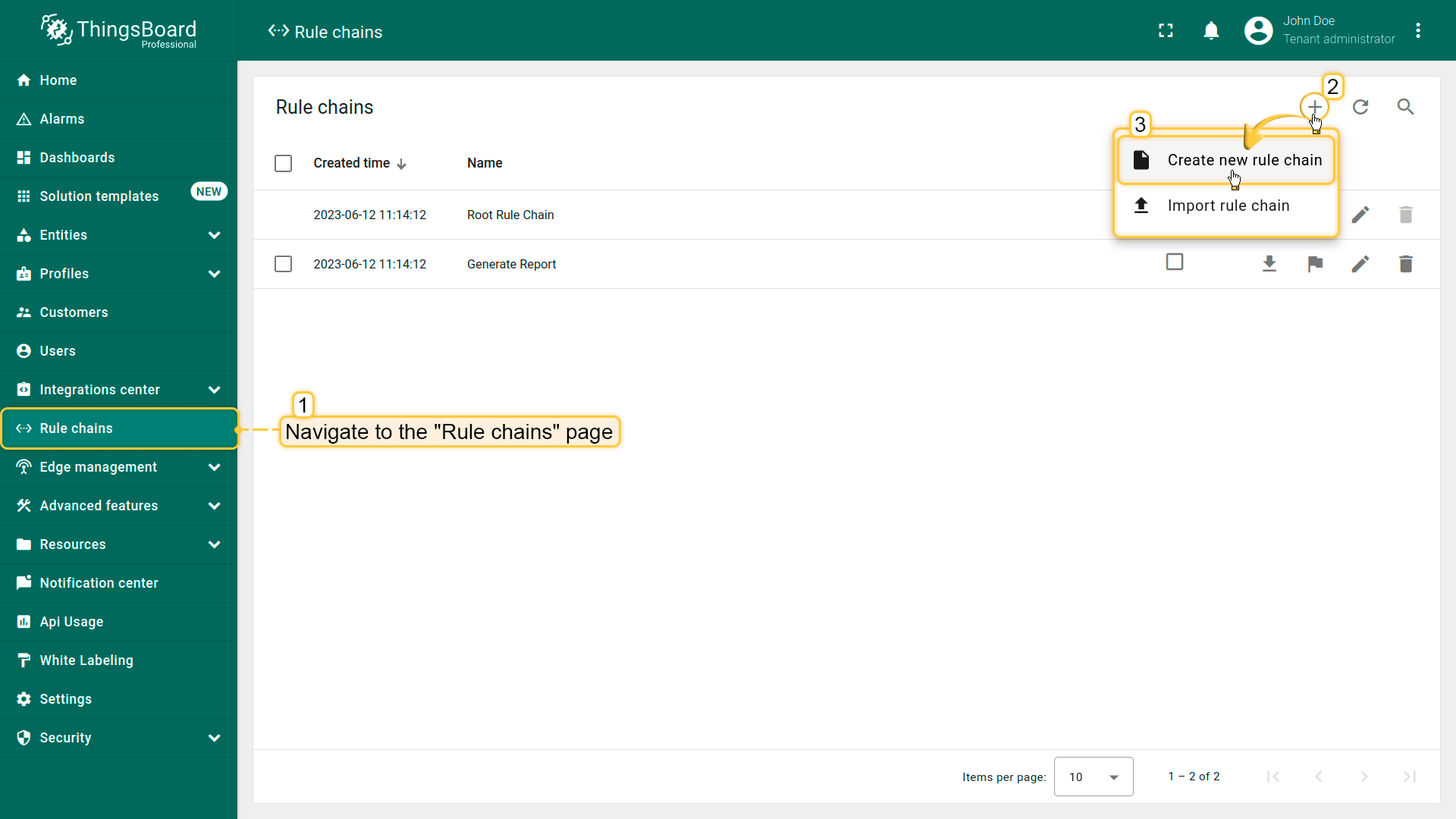
要添加新规则链,请执行:
- Navigate to the "Rule chains" page. Then click on the "plus" icon in the upper right corner, and select "Create new rule chain";
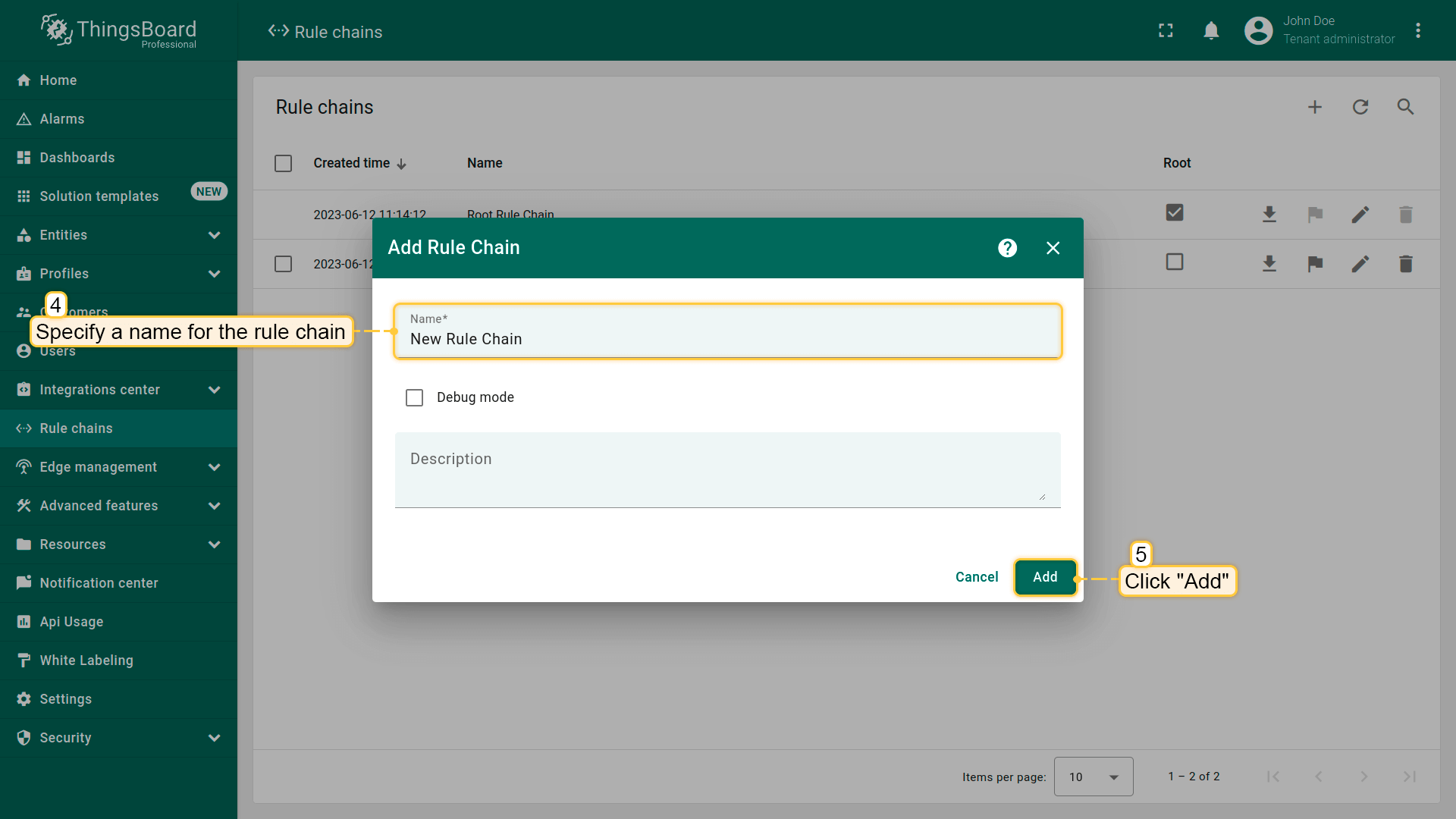
- Specify a name for the rule chain. If necessary, enable "Debug mode". Click "Add";
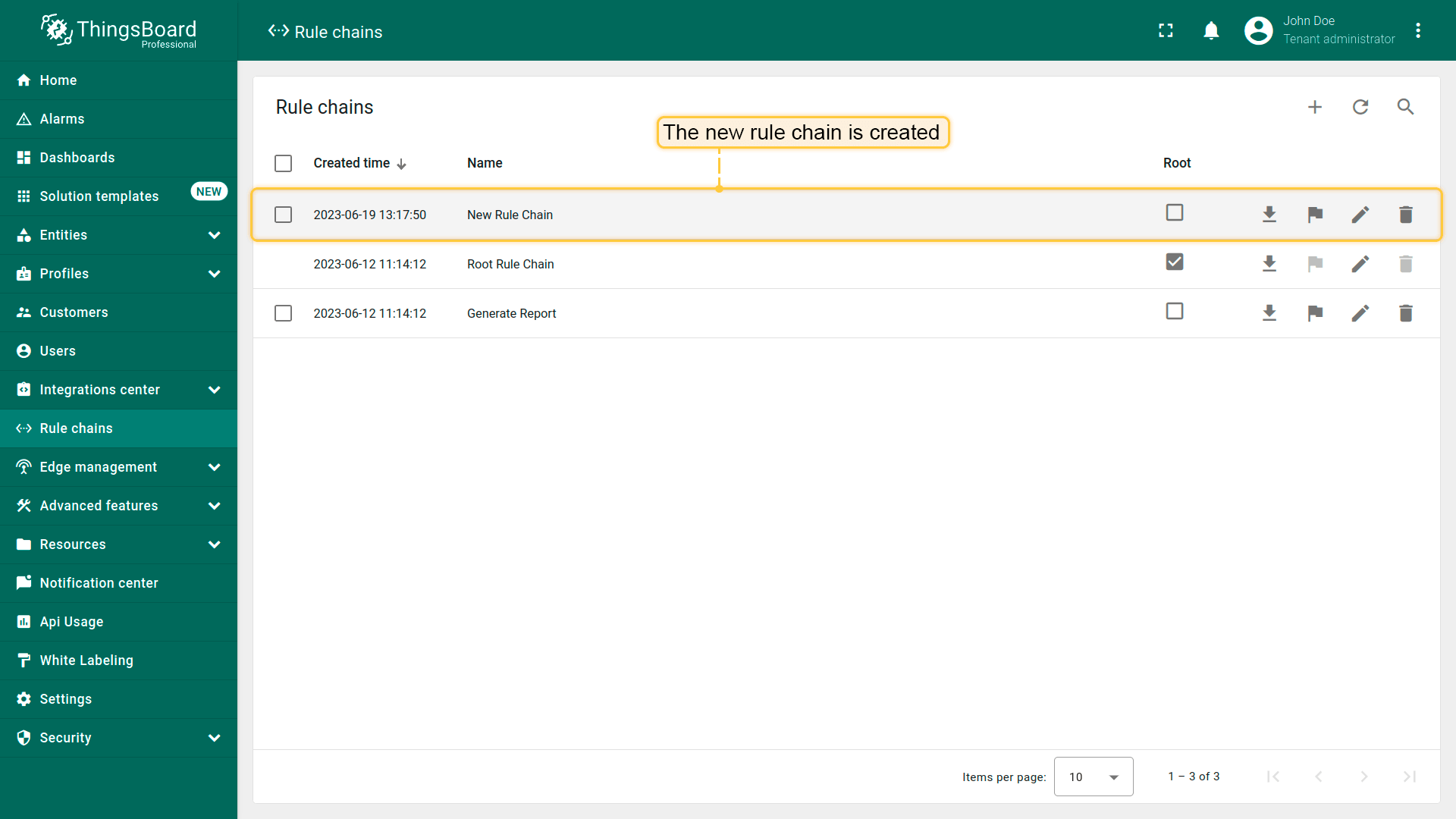
- The new rule chain is created. To open rule chain click on it.
导入/导出
可将规则链导出为JSON文件,并导入到当前或其他ThingsBoard实例。
导出规则链
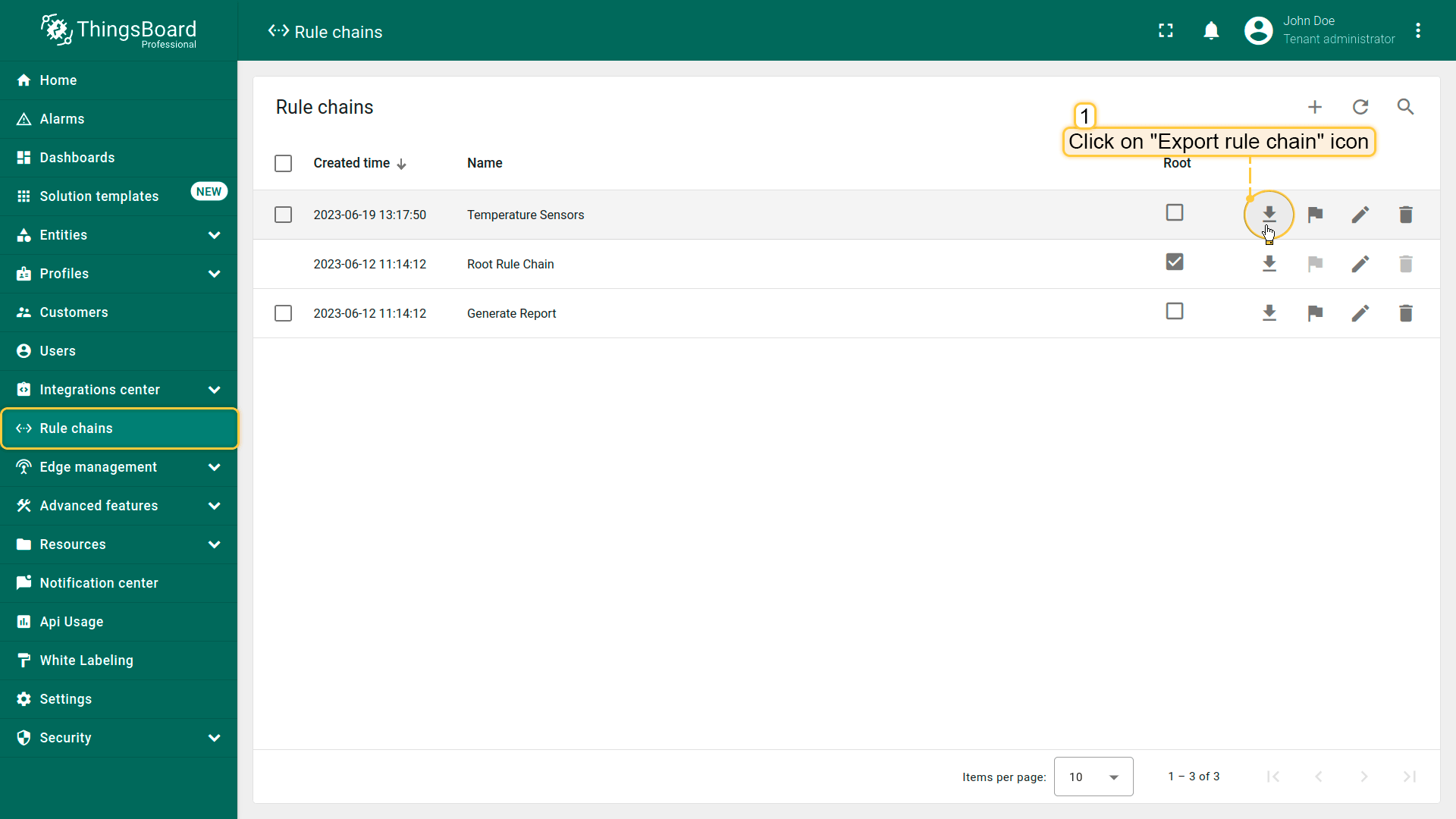
要导出规则链,请执行:
- 进入“规则链”页面。
- 点击目标规则链行的“导出规则链”图标。
包含该规则链配置的JSON文件将保存到本地。
导入规则链
要从JSON文件导入规则链,请执行:
- Navigate to the "Rule chains" page and click on the "+" button in the upper right corner of the screen and select "Import rule chain" option.
- Drag and drop the JSON file with the Rule chain configuration into the dialog and click "Import".
- The imported Rule chain will open. Save it by clicking "Apply changes" in the bottom-right corner.
- The Rule chain is now successfully imported.
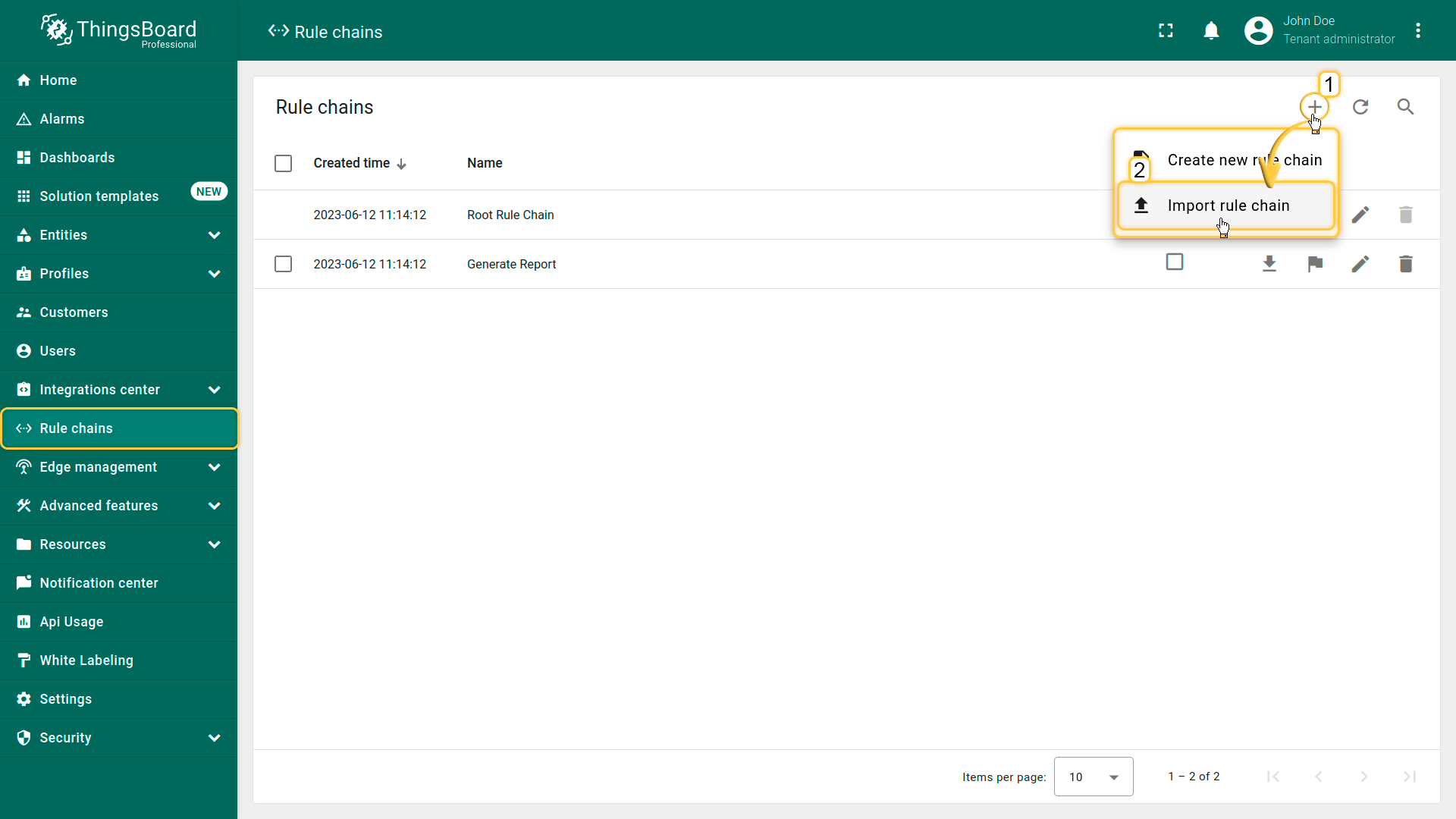
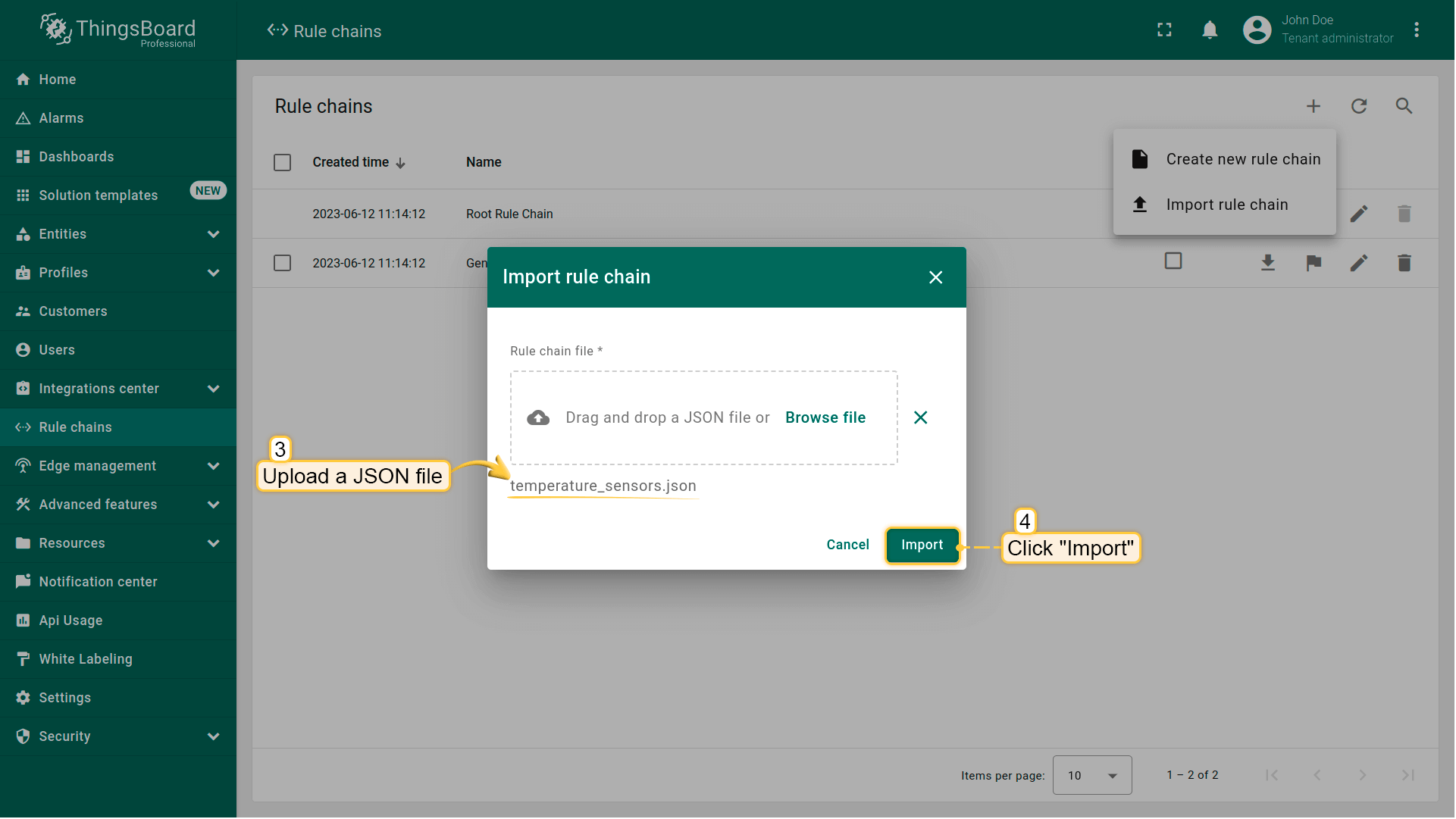
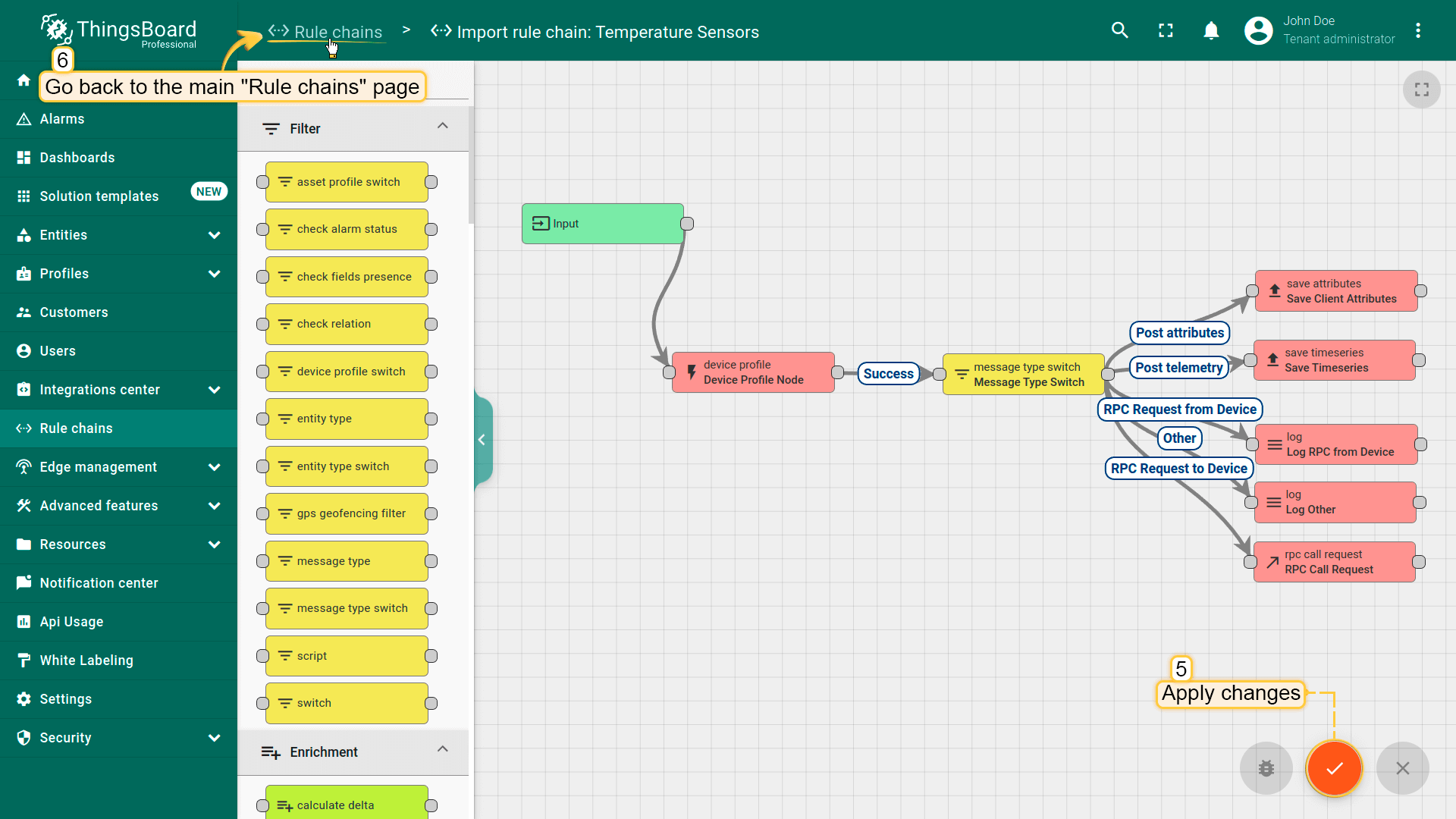
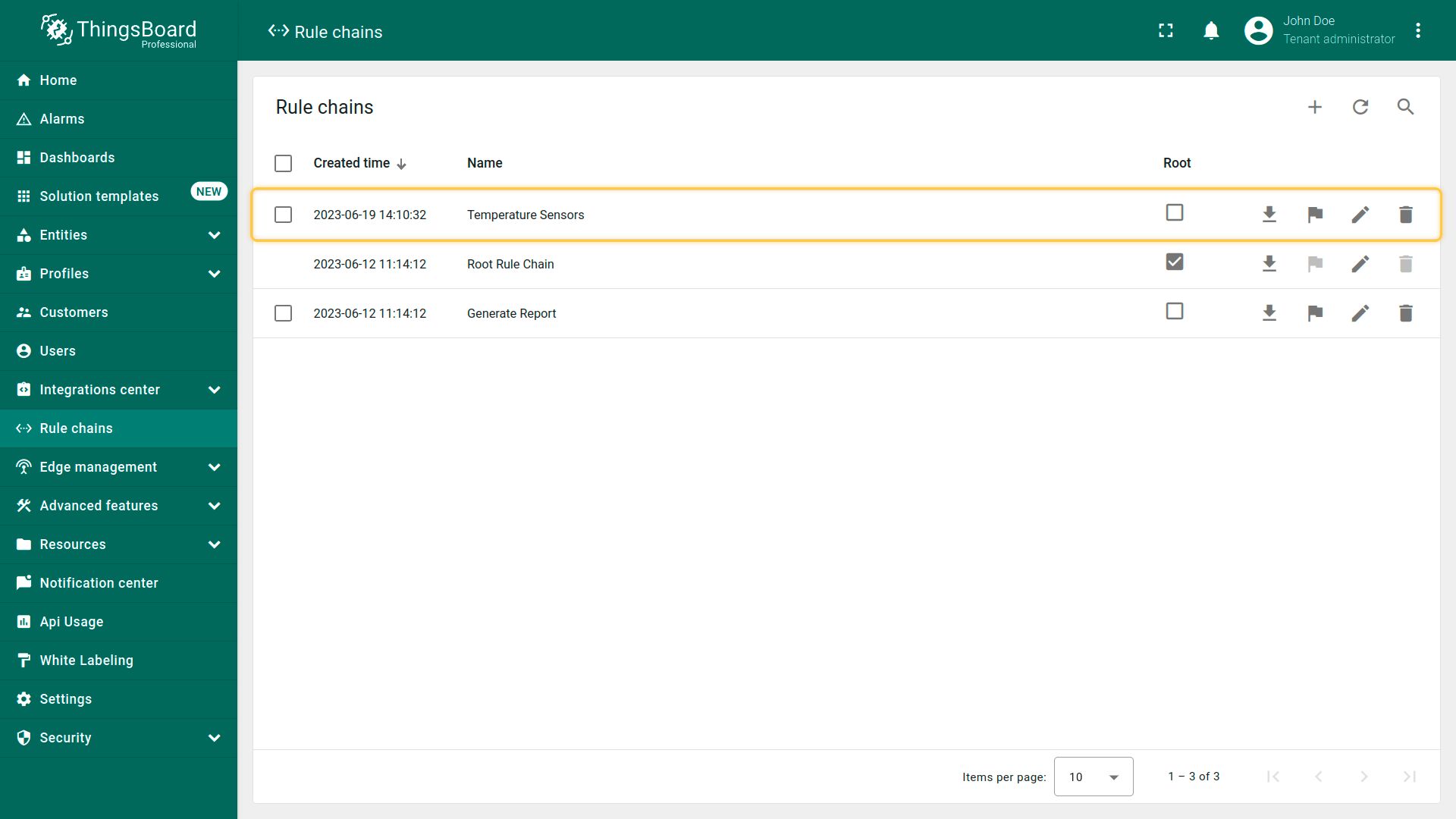

注意1:
所有导入的规则链均不是根规则链。
注意2:
若导入的规则链引用其他规则链(通过 Rule Chain 节点),保存前需更新这些引用。
设为根规则链
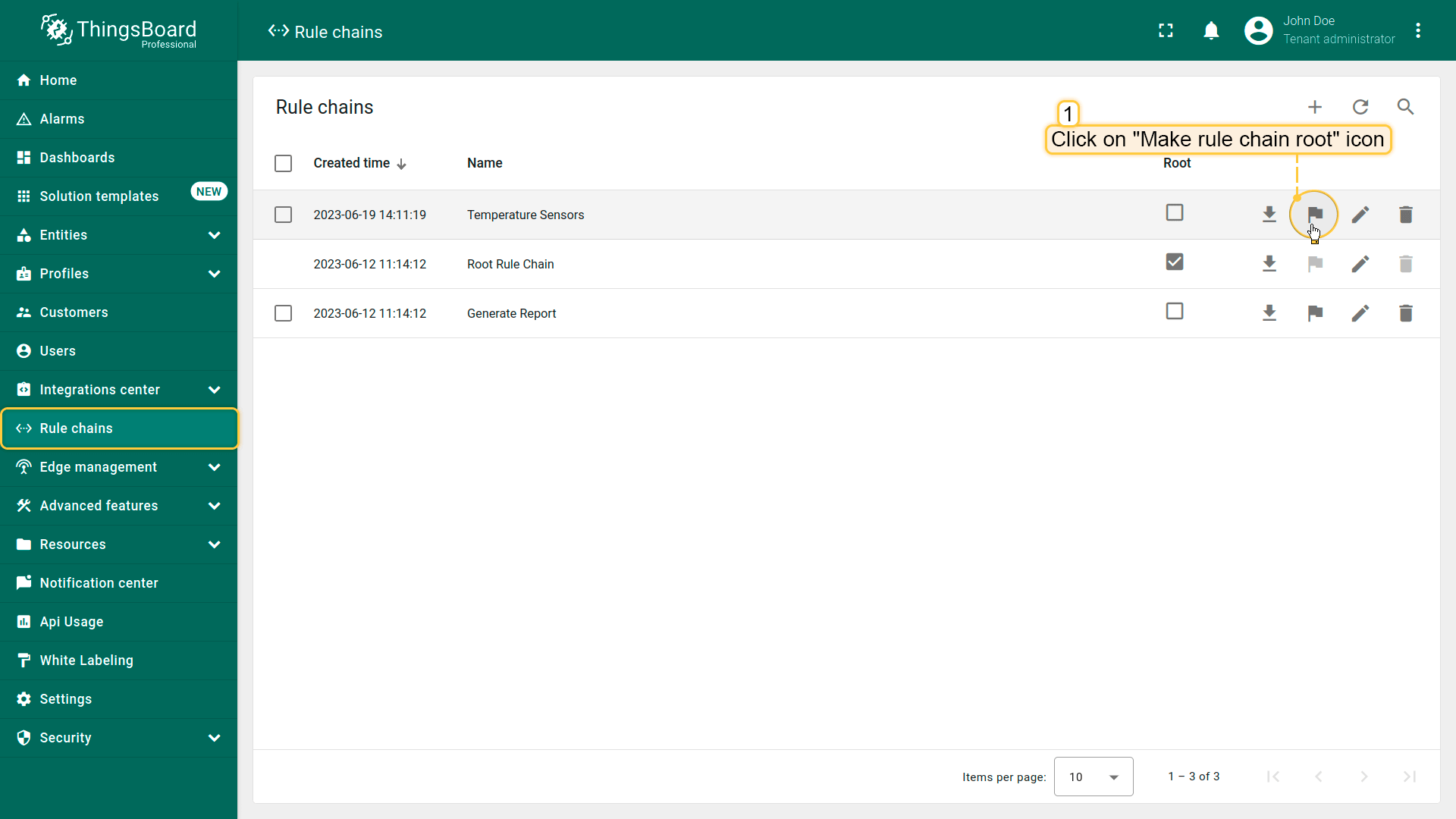
要将规则链设为根,请执行:
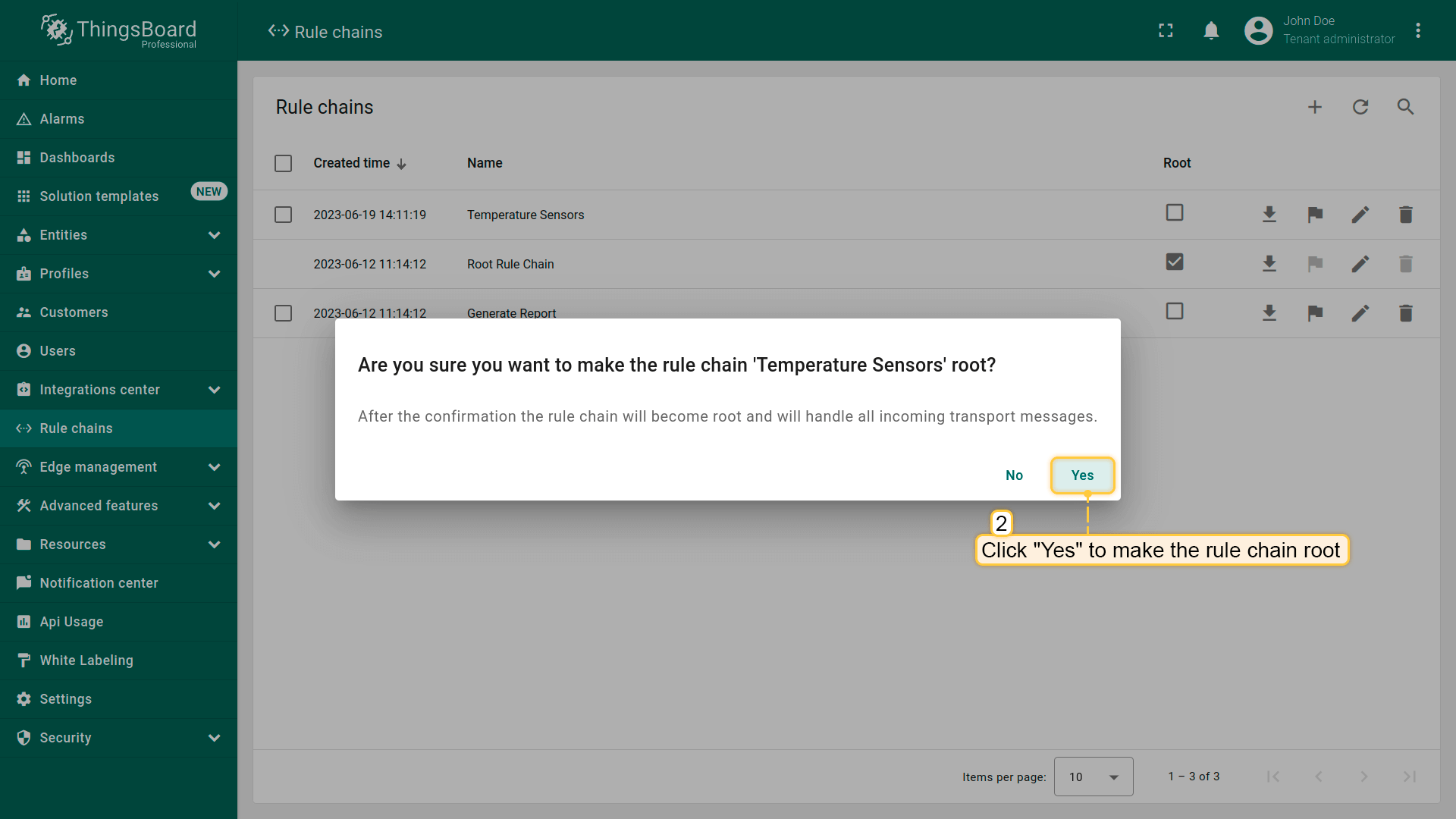
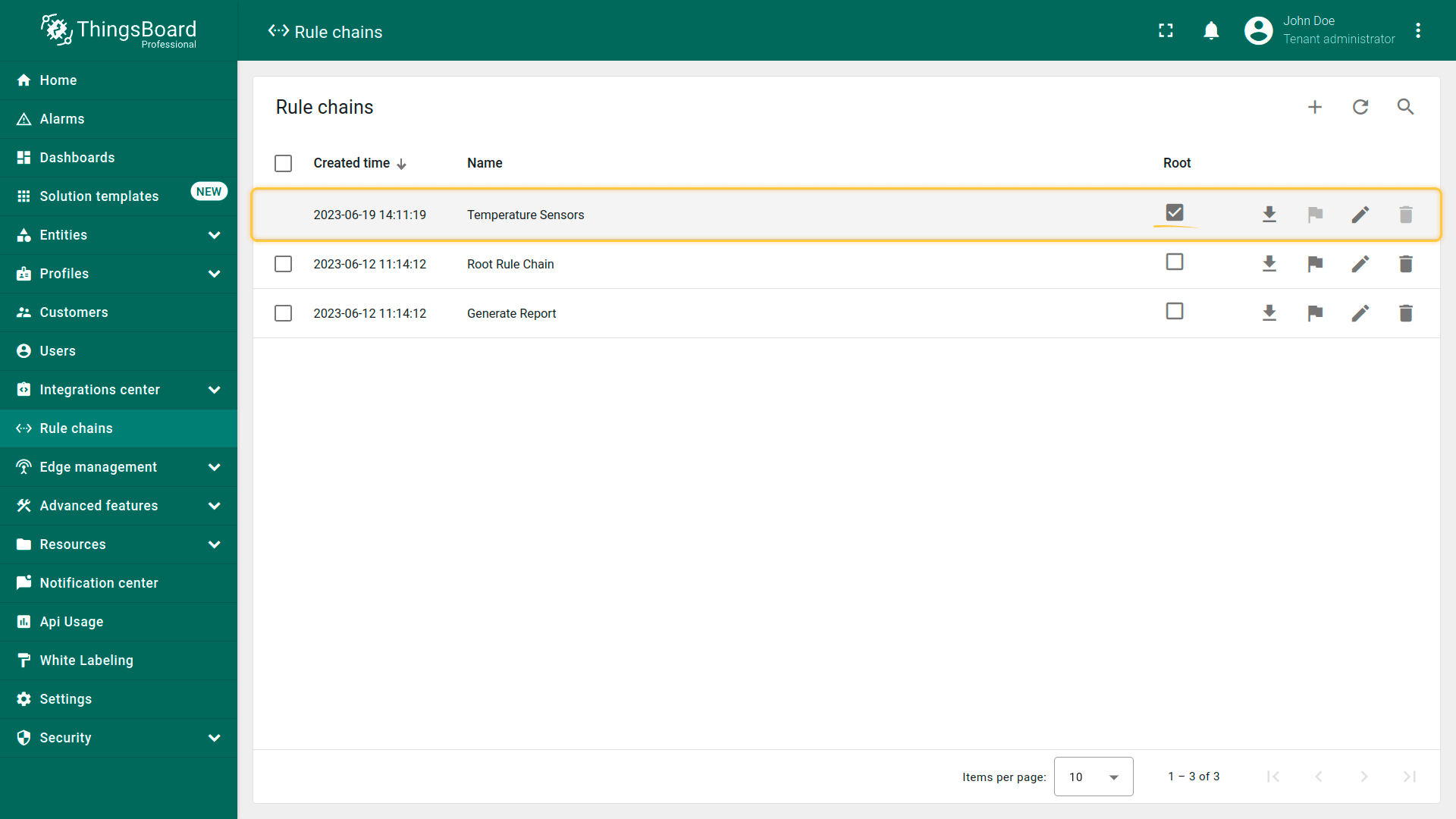
- Navigate to the "Rule chains" page and click on the "Make rule chain root" button located on the particular rule chain row;
- Please confirm your actions in the dialog box;
- The selected rule chain has now become the root.
删除规则链
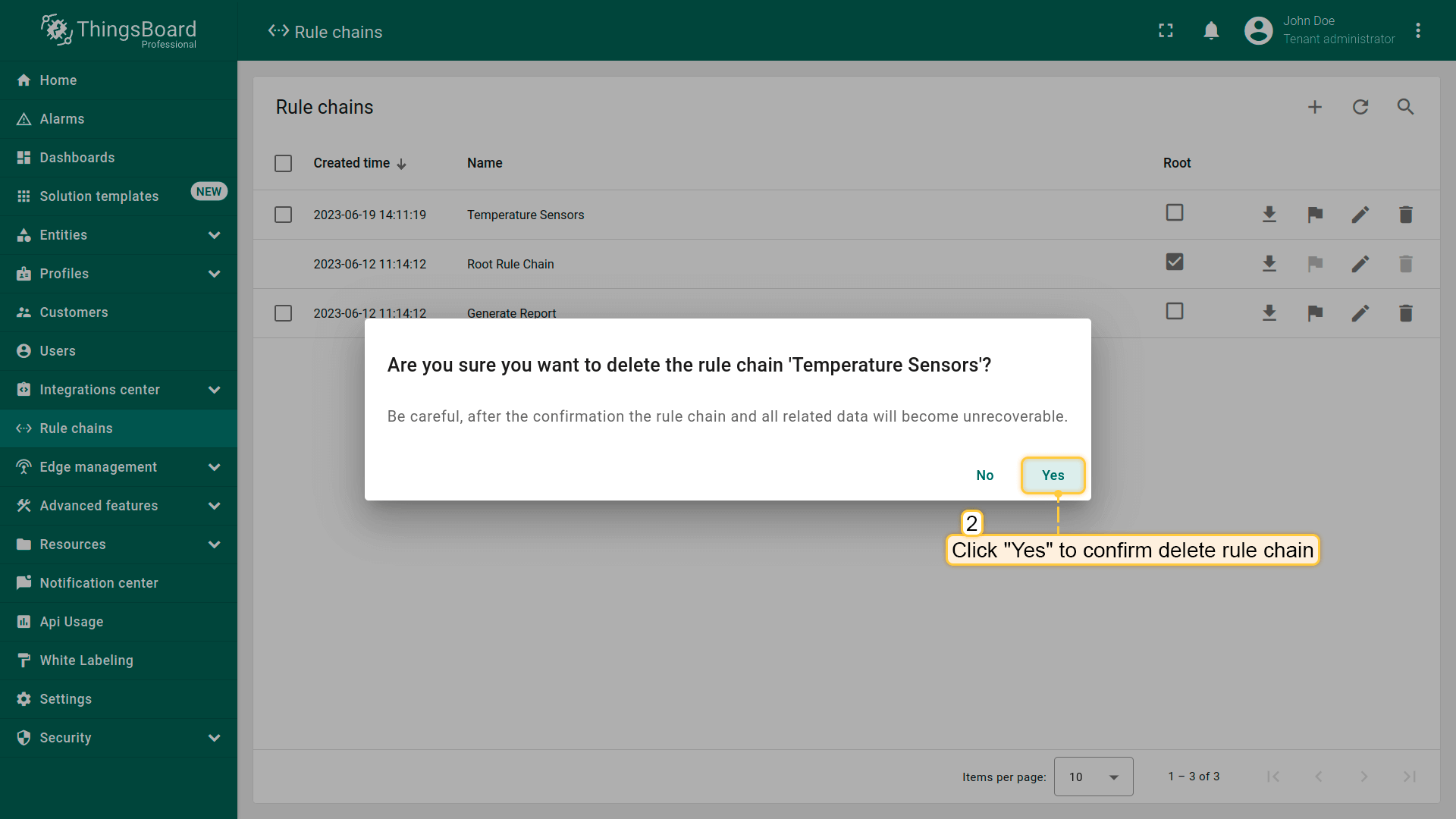
可通过以下任一方式删除规则链:
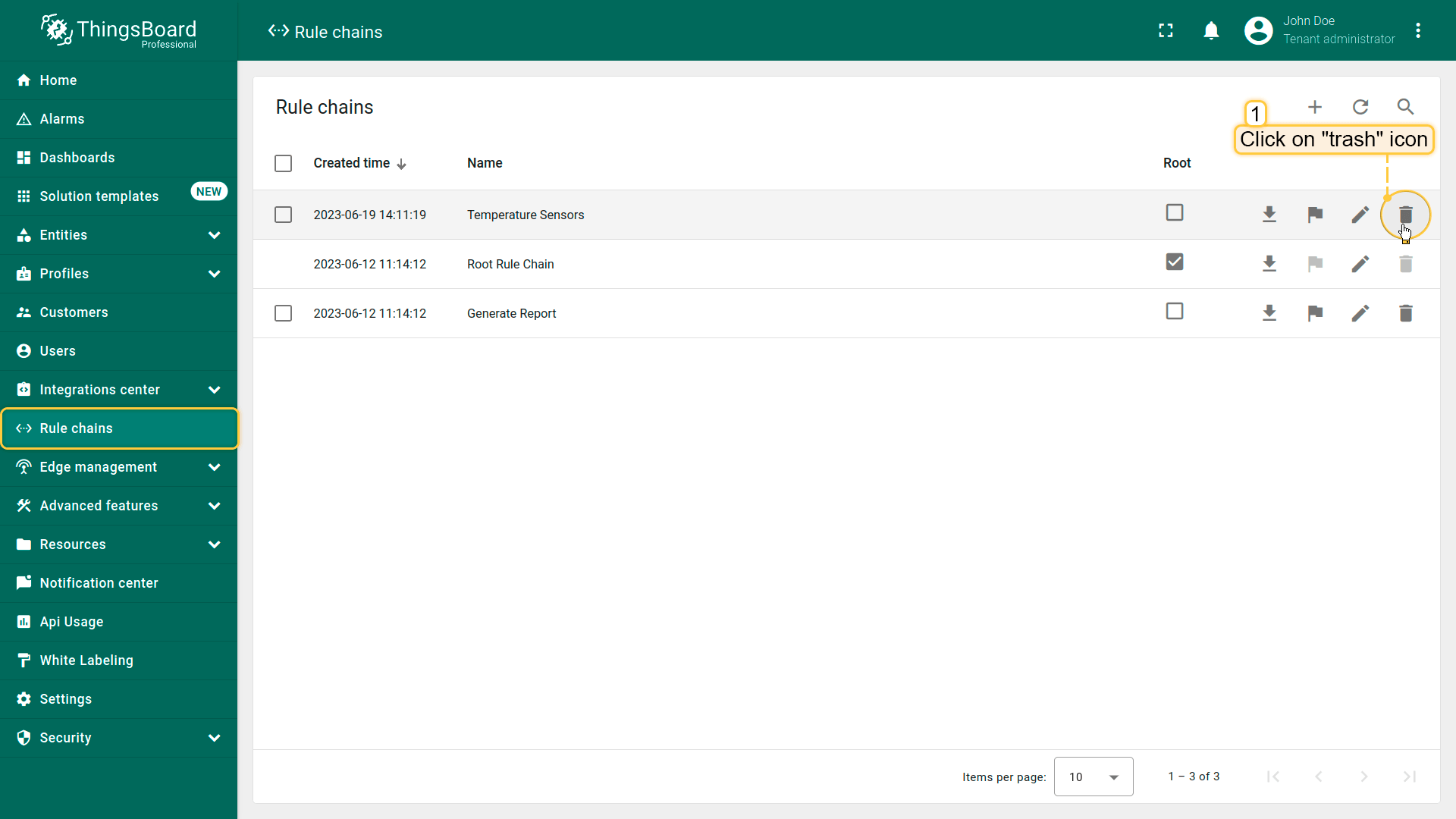
第一种方式:
- Click a trash icon can opposite the rule chains`s name you want to delete;
- Confirm deleting a rule chain in the dialog box.
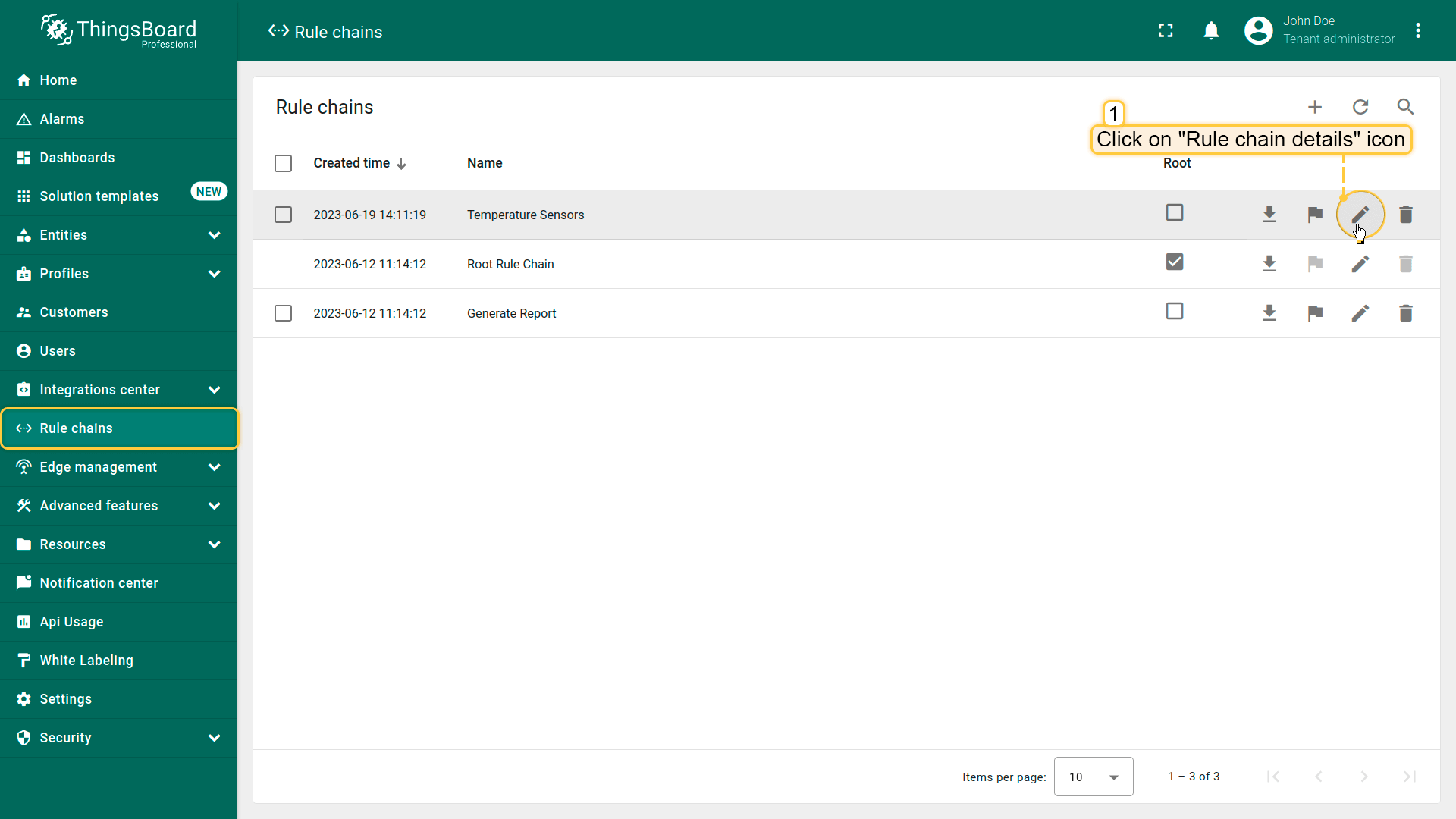
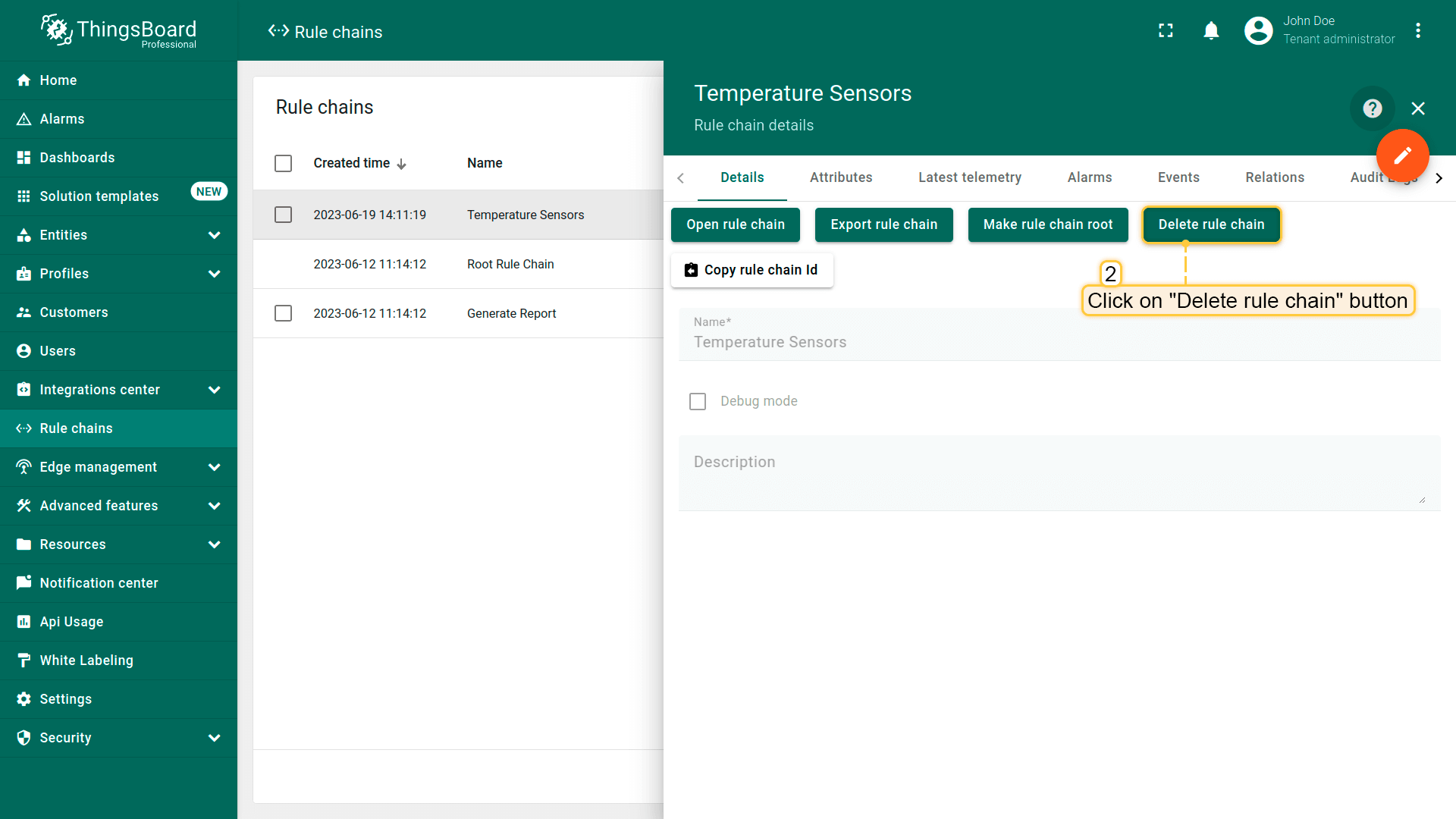
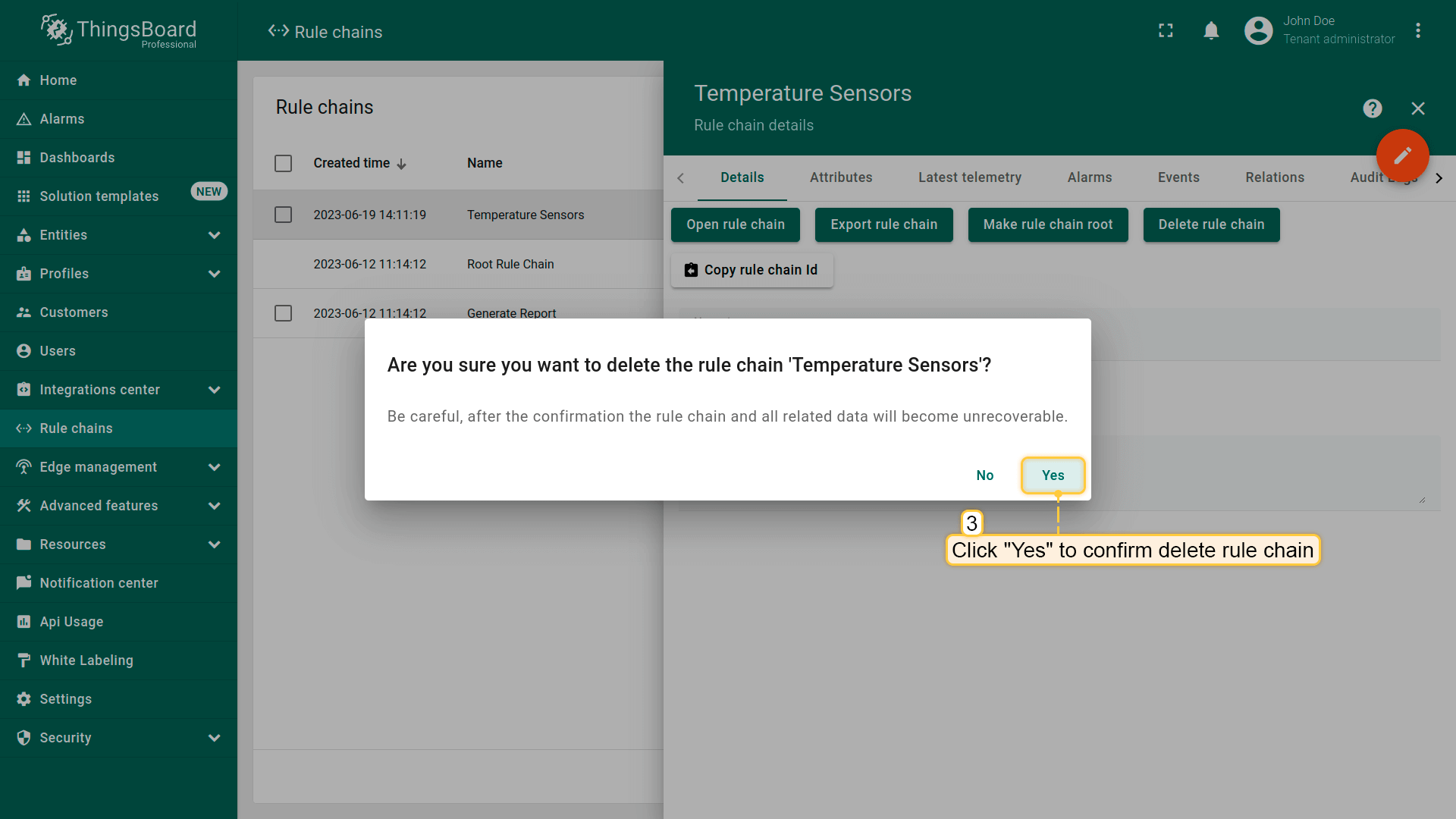
第二种方式:
- Click on the "Rule chain details" button located on the particular rule chain row;
- In the rule chain details, click on the "Delete rule chain" button;
- Confirm deleting the rule chain in the dialog box.
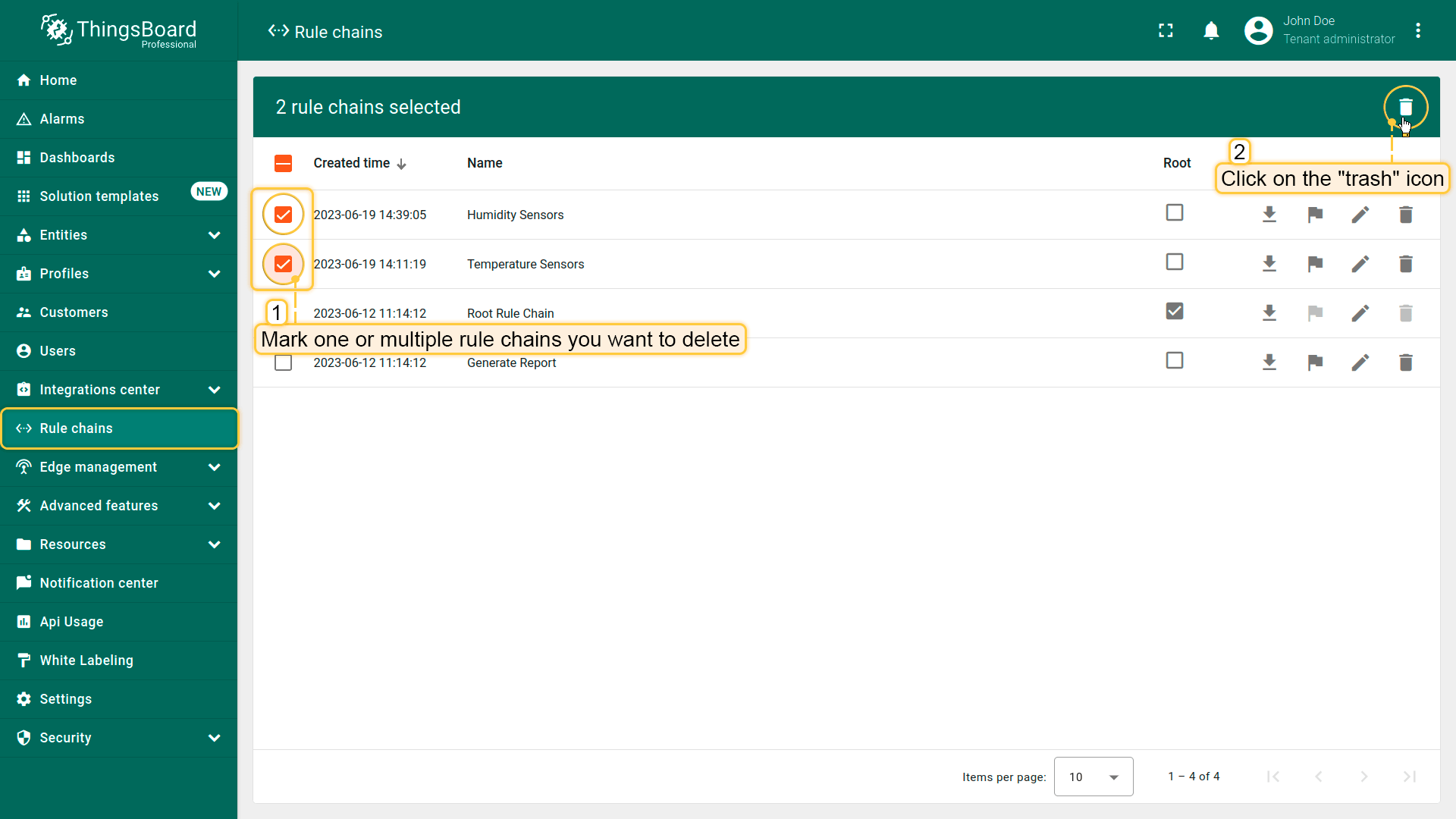
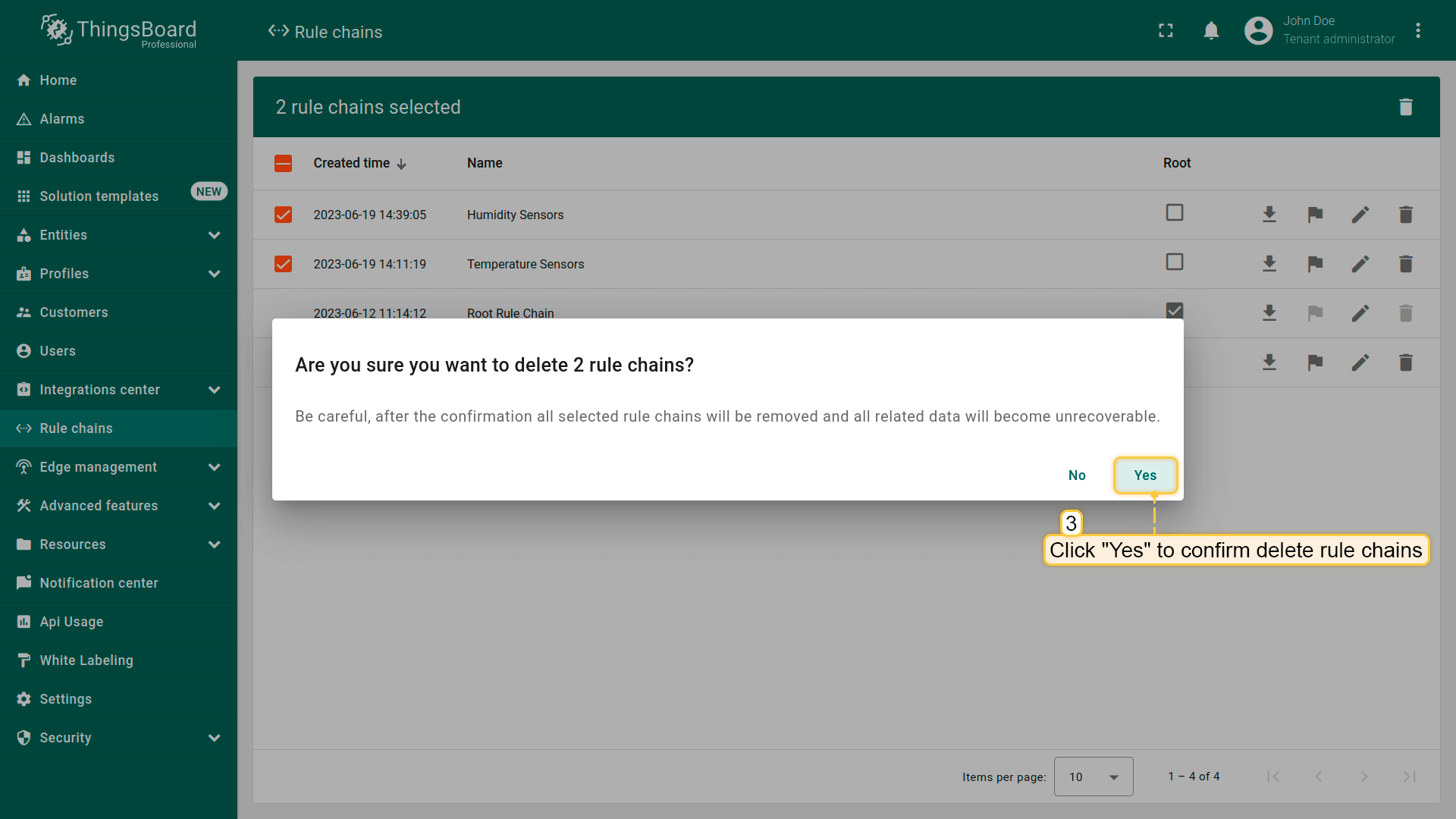
也可一次删除多条规则链。
- Mark one or multiple rule chains you want to delete. Click on the trash bin icon in the top right corner;
- Confirm deleting rule chains in the dialog box.
向规则引擎发送自定义REST API调用
仅专业版支持Custom Rule Engine REST API calls功能。
请使用ThingsBoard Cloud或自行安装平台实例。
ThingsBoard提供将自定义REST API调用发送至规则引擎的API,处理请求负载并在响应体中返回处理结果。 适用于多种场景,例如:
- 通过自定义API扩展平台现有REST API;
- 用设备/资产/客户属性丰富REST API调用并转发到外部系统做复杂处理;
- 为自定义部件提供自定义API。
要执行REST API调用,可使用rule-engine-controller的 REST APIs:

注意:调用中指定的实体ID将成为规则引擎消息的来源。若不指定实体ID参数,当前用户实体将作为消息来源。
教程
ThingsBoard提供若干教程,帮助通过示例设计规则链:
- 转换来自设备的入站消息
- 使用设备先前记录转换入站消息 {:target=”_blank”}
- 在入站设备消息时创建和清除告警
- 设备告警时向客户发送邮件 {:target=”_blank”}
- 在关联设备间发送消息
更多教程见此处。