概述
ThingsBoard 提供两种不同的部署选项:ThingsBoard Edge 和 ThingsBoard Cloud。
ThingsBoard Edge 专为本地分布式数据处理而设计,可在数据产生源头直接进行数据分析与管理。这种方式支持本地处理、存储以及对关键情况的即时响应,即使无需与中央服务器保持持续连接。更多信息,请参阅 什么是 ThingsBoard Edge 文章。
相比之下,ThingsBoard Cloud 是部署在云端的全托管平台,具备良好的可扩展性与容错能力。连接云端的设备通过互联网传输数据,适用于集中式数据采集、处理与管理。更多信息,请参阅什么是ThingsBoard文章。
Edge与Cloud的主要区别
尽管 Edge的设计与Cloud相似,主要区别在于 数据处理的部署位置:
- Edge 在边缘设备上 本地 存储和处理数据。
- Cloud 在云端 集中 存储和处理数据。
连接要求 也有所不同:
- 连接到 Edge 的设备可在局域网(LAN)内运行,无需云端连接。
- 连接到 Cloud 的设备需要 互联网连接 才能与平台通信。
集群部署 指在分布式架构中的部署方式,多个节点(实例)协同工作,以实现可扩展性、容错性和高可用性。
- 早期版本的 Edge不支持集群部署。其设计为在本地运行、处理和分析数据后再与中央ThingsBoard服务器同步。
- 从4.0版本起 Edge支持集群。多个Edge节点可组成集群以实现高可用性。若一个节点故障,其他节点可无缝继续处理工作负载。
- Cloud支持集群部署,对处理大规模物联网应用(设备众多、数据吞吐量高)至关重要。
同步架构
ThingsBoard Edge 与 ThingsBoard Cloud 通过 gRPC(远程过程调用)协议 通信。该通信通道支持边缘设备与云端服务器之间的高效数据同步,实现无缝消息流,同时最大限度地降低开销和延迟。
为优化此过程,消息使用 Protocol Buffers (ProtoBuf) 进行序列化。
从 ThingsBoard Edge 发送到 ThingsBoard Cloud 的所有消息在传输前会先存储在本地 PostgreSQL 表 (cloud_event表) 中。从 3.9版本起,这些事件可存储在 Kafka主题 中(当使用Kafka作为队列时)。这样 ThingsBoard Edge 可在无法连接Cloud时继续运行。连接建立后,本地 cloud_event/ts_cloud_event表(或Kafka主题) 中的所有消息将发送到 Cloud,并标记为已成功传输。
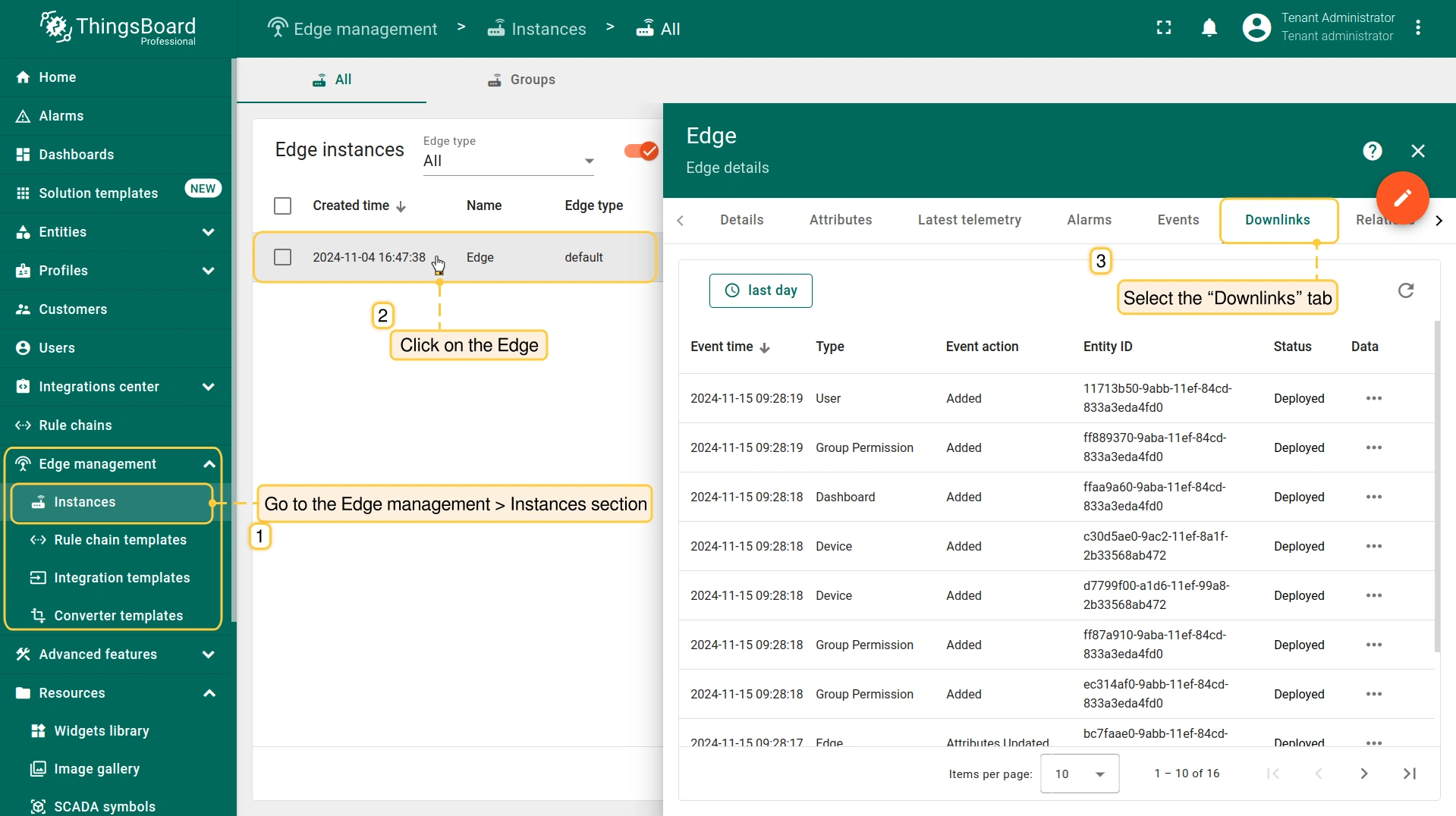
要查看从 Cloud 传输到 Edge 的消息列表,请进入Cloud(Server)的 Edge management > Instances 区域,点击 Edge 并选择 “Downlinks” 选项卡:
强制同步流程
在网络中断或其他通信故障期间,ThingsBoard Edge 可能与 Cloud 不同步。Edge实例会继续独立运行,收集遥测数据、处理设备事件并应用本地规则。然而,这些数据和状态变更无法到达Cloud,导致不一致。
为确保 ThingsBoard Edge 与 Cloud 保持一致,以提供准确高效的物联网功能,可强制执行同步流程。
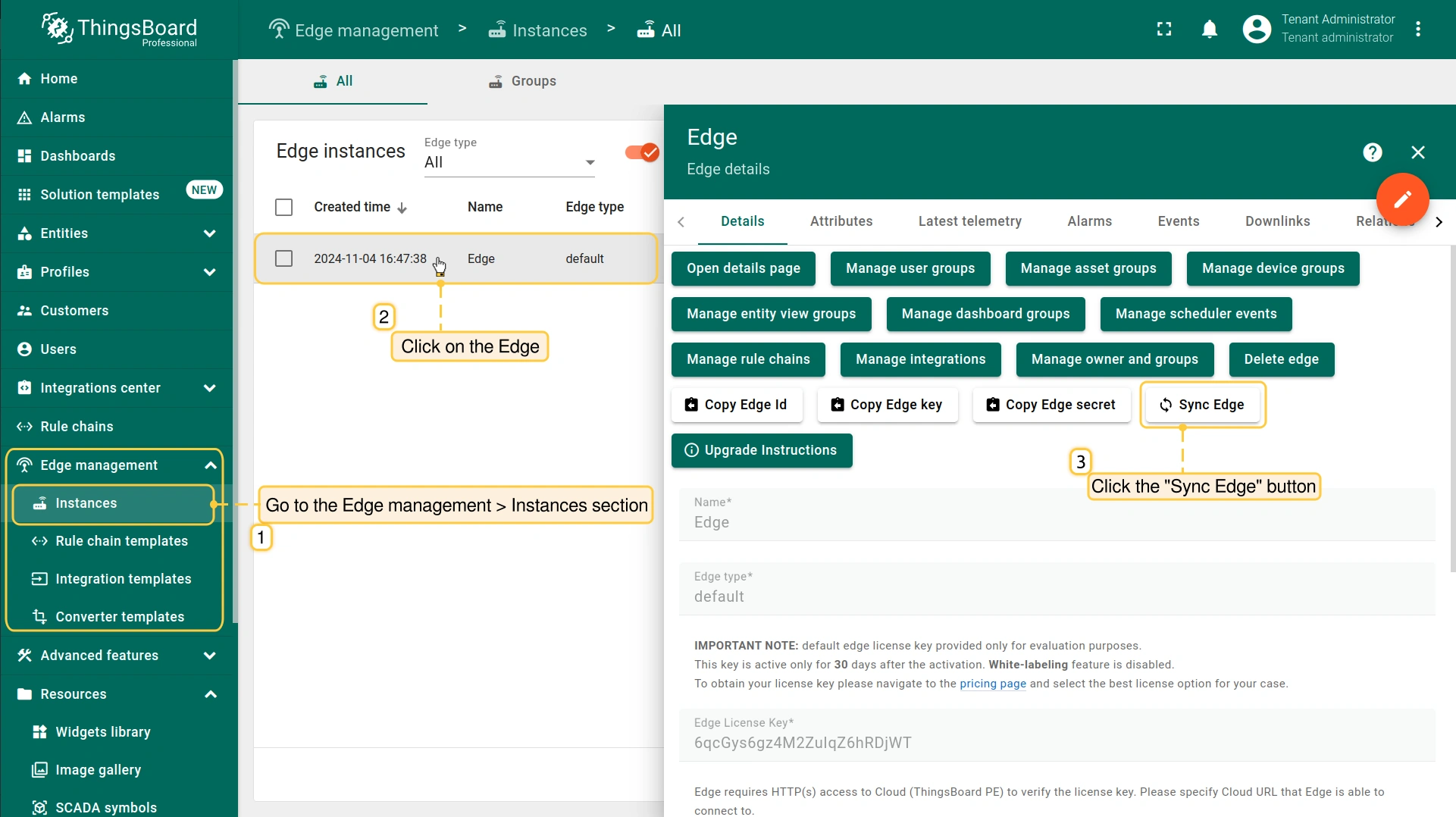
要强制执行同步,请进入Cloud(Server)的 Edge management > Instances 区域,点击 Edge,然后点击 “Sync Edge” 按钮:
实体管理
除 Customers 和 Users 外,大多数实体可在 Edge 实例上创建。要在 Edge 上使用这些实体,必须先将其 分配 给 Edge。
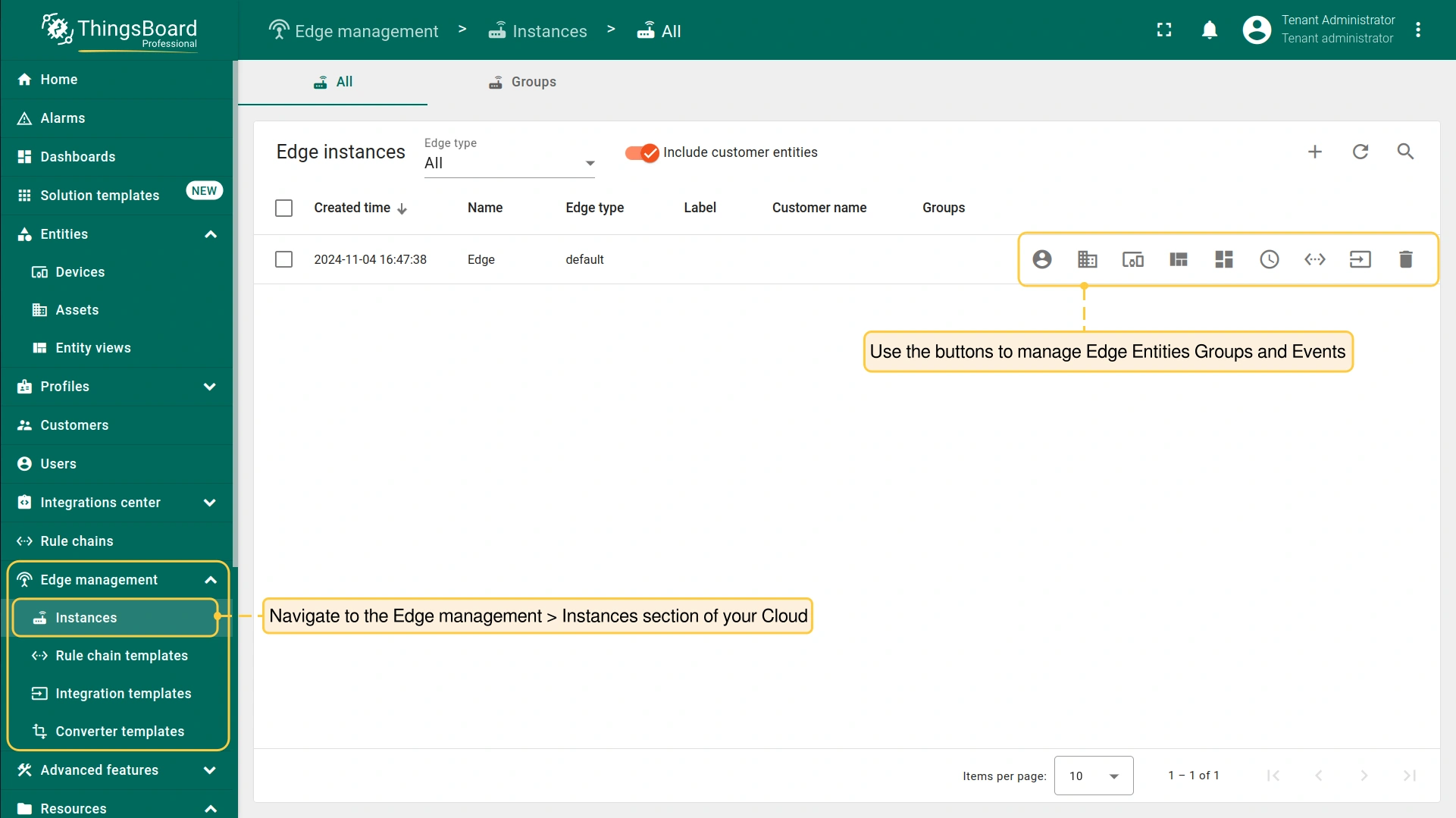
要 分配 特定实体到 Edge,请登录 Cloud 并进入 Edge management > Instances 区域:
- The following entity groups and events can be managed:
- Manage edge user groups: Organize and control user groups assigned to the Edge.
- Manage edge asset groups: Manage collections of assets (e.g., buildings, machines, or any other monitored entities) grouped at the Edge.
- Manage edge device groups: Administer groups of devices that are managed by the Edge.
- Manage edge entity view groups: Manage groups of entities filtered views (e.g., devices or assets) at the Edge to display specific subsets of data or contextual information. Read more about the Entity views in this article.
- Manage edge dashboard groups: Manage groups of dashboards available at the Edge.
- Manage edge scheduler events: Define, configure, and manage scheduled events at the Edge. Read more about the Scheduler in this article.
- Manage edge rule chains: Create, configure, and manage rule chains specifically for the Edge.
- Manage edge integrations: Configure and manage integrations at the Edge. Read more about the Platform Integrations in this article.
- Delete: Remove the Edge and all related data.
- Manage edge user groups: Organize and control user groups assigned to the Edge.
- Manage edge asset groups: Manage collections of assets (e.g., buildings, machines, or any other monitored entities) grouped at the Edge.
- Manage edge device groups: Administer groups of devices that are managed by the Edge.
- Manage edge entity view groups: Manage groups of entities filtered views (e.g., devices or assets) at the Edge to display specific subsets of data or contextual information. Read more about the Entity views in this article.
- Manage edge dashboard groups: Manage groups of dashboards available at the Edge.
- Manage edge scheduler events: Define, configure, and manage scheduled events at the Edge. Read more about the Scheduler in this article.
- Manage edge rule chains: Create, configure, and manage rule chains specifically for the Edge.
- Manage edge integrations: Configure and manage integrations at the Edge. Read more about the Platform Integrations in this article.
- Delete: Remove the Edge and all related data.
实体被分配到特定 Edge 后,将推送到 Edge事件队列。 若Edge与Cloud的 连接 处于 活动 状态,分配的实体将在Edge上 立即 创建。 若Edge实例 未连接 到 Cloud,实体将在 连接建立后 创建。
Edge详情
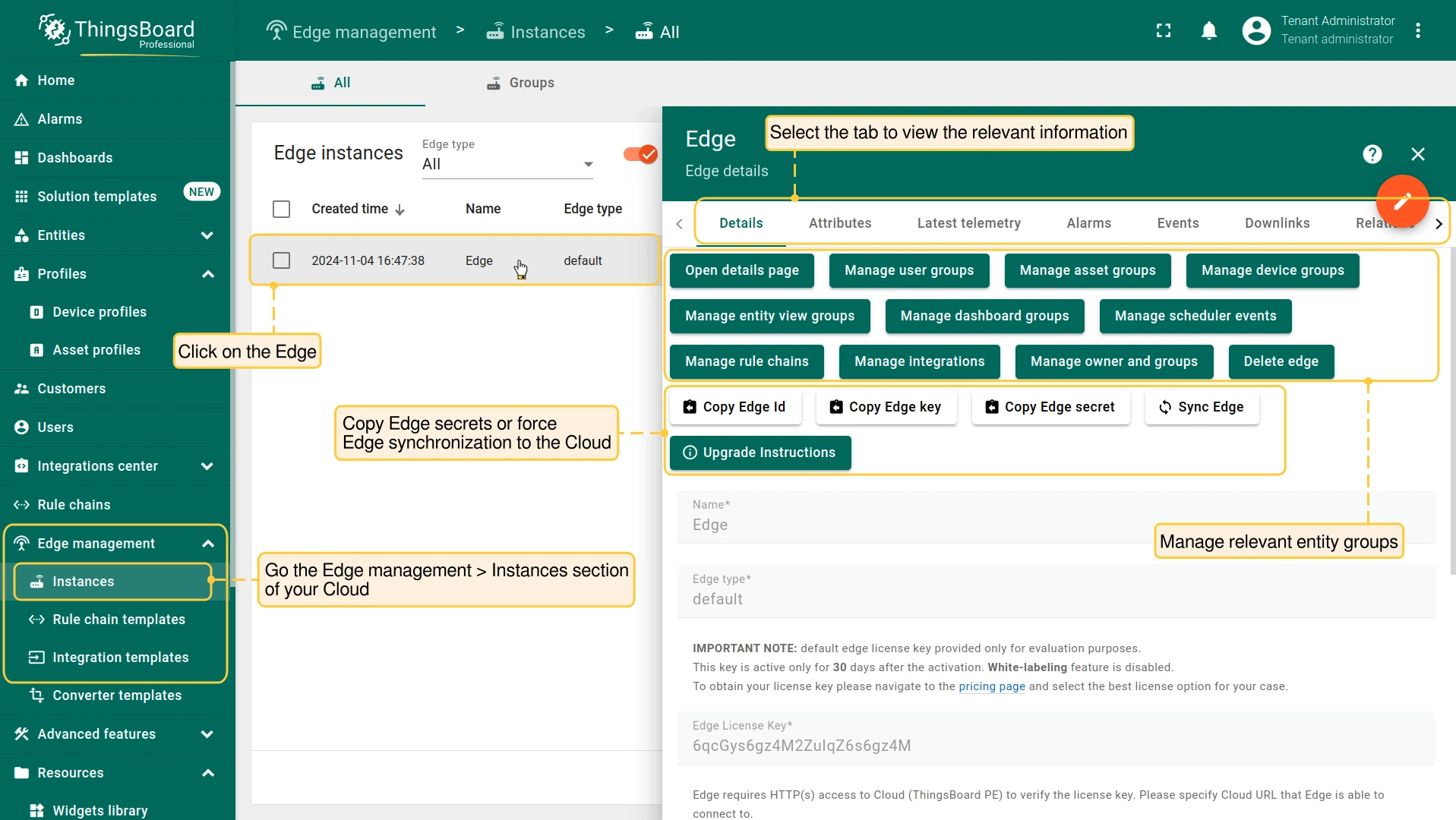
有关Edge及最新事件的更多信息可在 “Edge Details” 页面查看。 进入 Edge management > Instances 区域并点击Edge:
- “Details” 选项卡包含一般信息,如 Edge ID、Edge key 和 Edge secret。您还可在此选项卡上 分配实体 并 强制同步。
- “Attributes” 选项卡显示发布到服务器的最新属性。
- “Latest telemetry” 选项卡显示Edge的最新遥测记录。
- “Alarms” 选项卡显示告警列表。
- “Events” 选项卡显示与Edge相关的各类事件。
- “Downlinks” 选项卡显示从Cloud传输到Edge的消息列表。
- “Relations” 选项卡显示与Edge关联的其他实体记录。
- “Audit logs” 选项卡显示用于追踪用户操作的审计记录。
Edge状态页
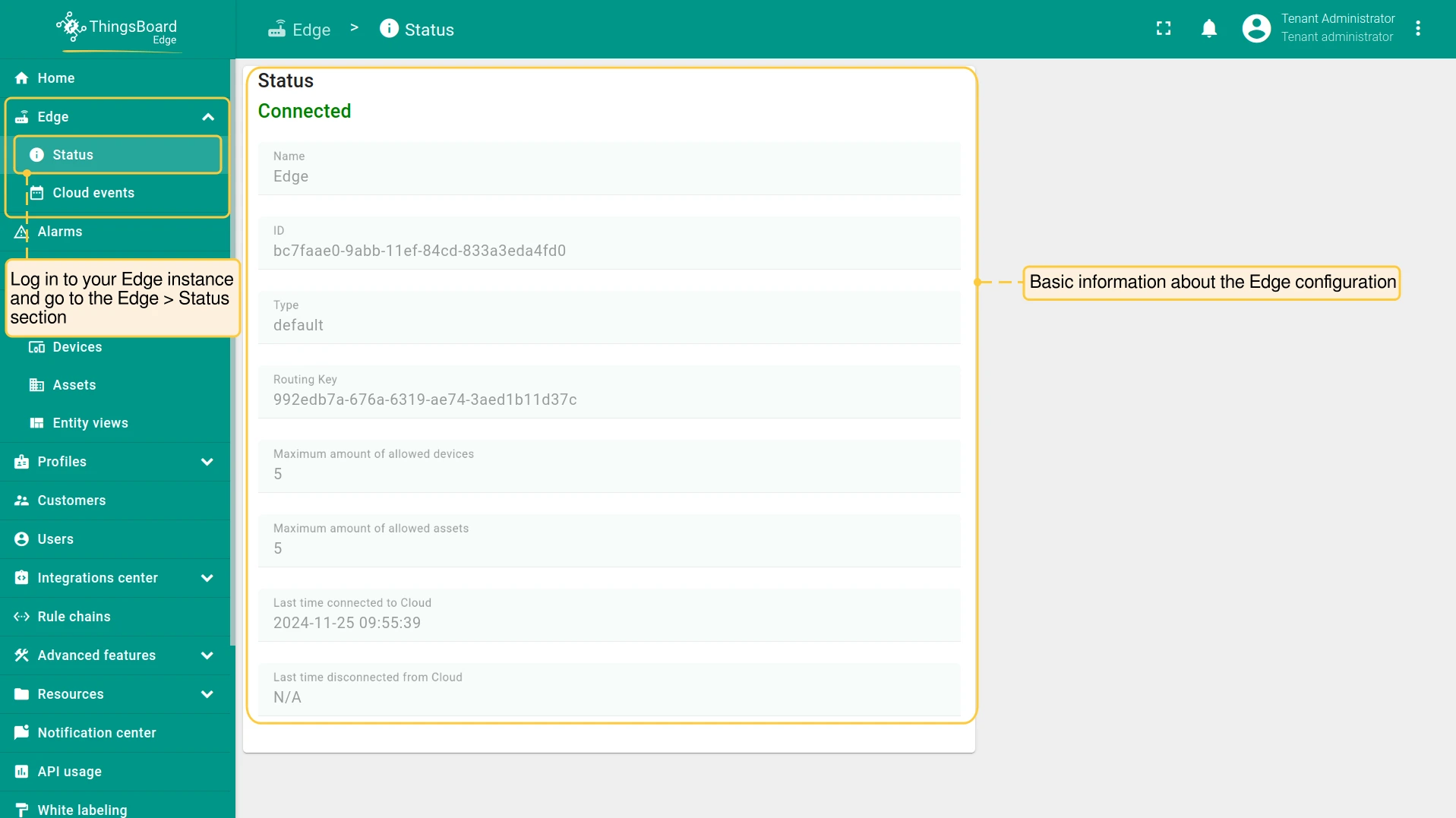
Edge实例本身提供Edge配置的基本信息。要查看此信息,请登录 Edge实例 并进入 Edge > Status 区域
- Status: Edge current status (Connected, Disconnected).
- Name: The name of the current Edge instance.
- ID: The identification code of the current Edge instance.
- Type: The "default" Edge type is by design.
- Routing Key: The Edge key used to install the instance.
- Maximum amount of allowed devices: The number of devices allowed by your price plan
- Maximum amount of allowed assets:The number of assets allowed by your price plan
- Last time connected to/disconnected from cloud: The date and time the instance is connected to/disconnected from Cloud. Displayed in a format YYYY-MM-DD H:Min:Sec.
Cloud事件
Cloud Events 页面显示ThingsBoard Edge推送到Cloud的事件。要查看此信息,请登录 Edge实例 并进入 Edge > Cloud events 区域。将显示以下信息:
- Created time: 事件创建并推送到Cloud的日期和时间。格式为YYYY-MM-DD H:Min:Sec。
- Action: 推送到Cloud的操作。可能包括:Added、Deleted、Updated、Attributes Updated、Attributes Deleted、Timeseries Deleted、Timeseries Updated、RPC Call、Credentials Updated、Relation Add or Update、Relation Deleted、Relations Deleted、Alarm Ack、Alarm Clear、Attributes Request、Rule Chain Metadata Request、Relation Request、Credential Request。
- Entity type: 创建事件的实体类型。
- Entity ID: 实体的标识代码。
- Status: 定义事件是否已推送到Cloud。
- Deployed: 事件已推送到ThingsBoard服务器。
- Pending: 事件已在ThingsBoard Edge上创建并保存到本地数据库,将在连接恢复后尽快推送到Cloud。
- Data: 点击查看推送到Cloud的详细信息。
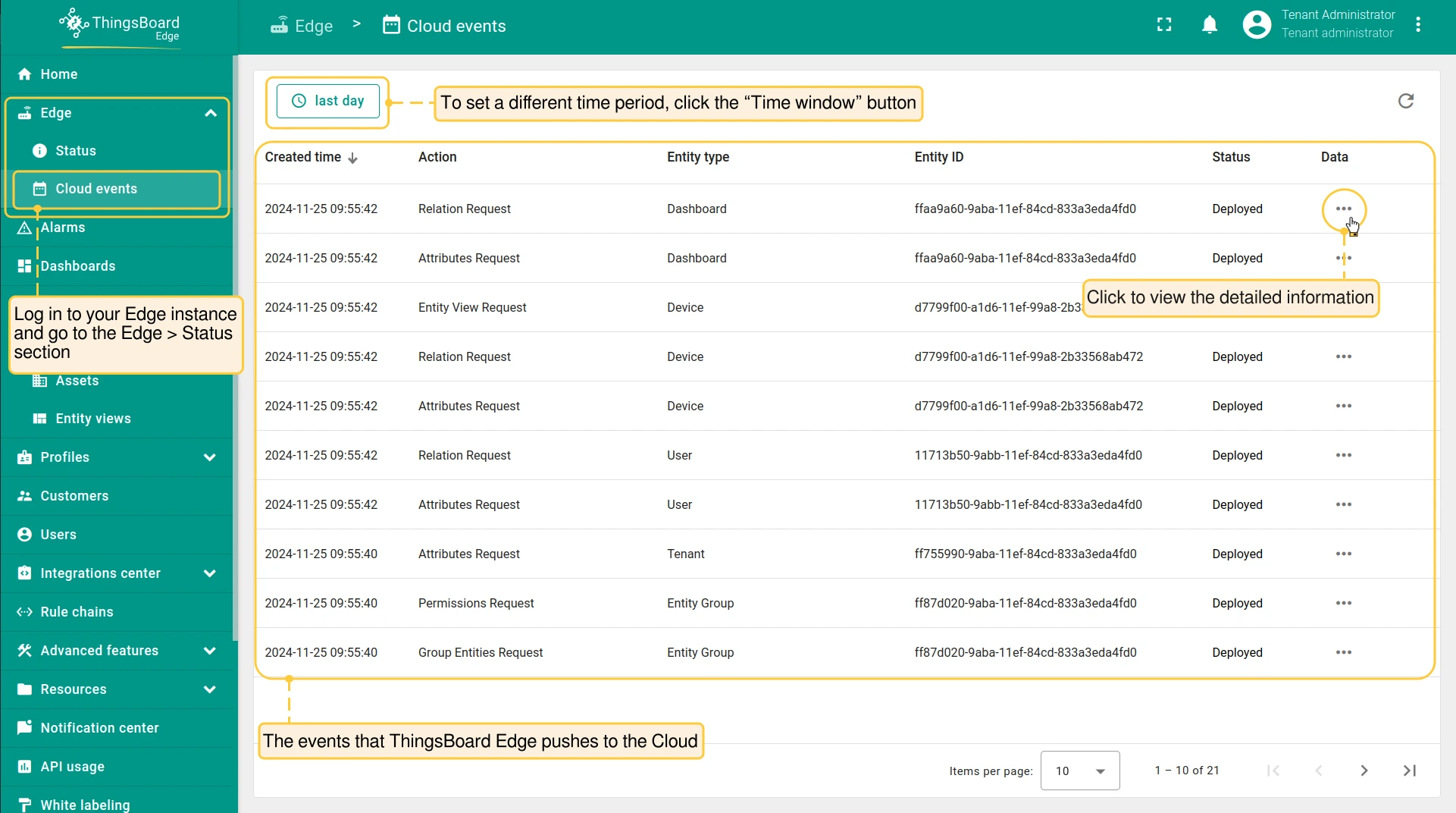
默认情况下,事件显示最近一天的数据。要设置不同的时间范围,请点击页面顶部的 “Time window” 按钮。
下一步
-
Getting started guide(入门指南)- 快速概览 ThingsBoard Edge 主要功能。预计 15–30 分钟完成:
-
Installation guides(安装指南)- 了解如何在各种操作系统上安装 ThingsBoard Edge 并连接到 ThingsBoard Server。
-
Edge 规则引擎:
-
Rule Chain Templates(规则链模板)- 了解如何使用 ThingsBoard Edge 规则链模板。
-
Provision Rule Chains from cloud to edge(从云端向 Edge 下发规则链)- 了解如何从云端向 Edge 下发边缘规则链。
-
- 安全:
- gRPC over SSL/TLS - 了解如何为 Edge 与云端之间的通信配置 gRPC over SSL/TLS。
-
功能:
-
Edge Status(Edge 状态)- 了解 ThingsBoard Edge 上的 Edge Status 页面。
-
Cloud Events(云端事件)- 了解 ThingsBoard Edge 上的 Cloud Events 页面。
-
-
使用场景:
-
Manage alarms and RPC requests on edge devices(在边缘设备上管理告警和 RPC 请求)- 本指南展示如何在 Edge 上生成本地告警并向连接到 Edge 的设备发送 RPC 请求:
-
Data filtering and traffic reduce(数据过滤与流量削减)- 本指南展示如何从 Edge 向云端仅发送过滤后的设备数据:
-
- Roadmap(路线图)- ThingsBoard Edge 路线图。