概述
Edge Devices 是能够生成遥测数据并处理RPC命令的基础物联网实体。它们通常是传感器、执行器、开关等物理设备,可在本地或近端网络中完成数据采集、处理与传输,而不必完全依赖中心化Cloud系统。
如需进一步了解ThingsBoard平台中的 Devices 实体,请参阅设备文档。
Edge实例上的设备管理
Device 实体可直接在 Edge实例 上创建,并在连接可用后自动同步到 Cloud(Server)。对 Device 的任何变更也会自动同步至 Cloud(Server),无需额外操作。
在 Edge实例 上创建 Device 后,系统会在 Cloud(Server) 侧自动创建对应实体,以保证全局一致性和管理效率。
在Edge实例上创建设备

创建 Device 前,请确保已创建并配置 Device Profile。
您可以手动创建和配置 Device,使用 Bulk Provisioning 选项从CSV文件部署多个设备,或使用 REST API 进行程序化部署。 要手动创建 Device,请按以下说明操作:
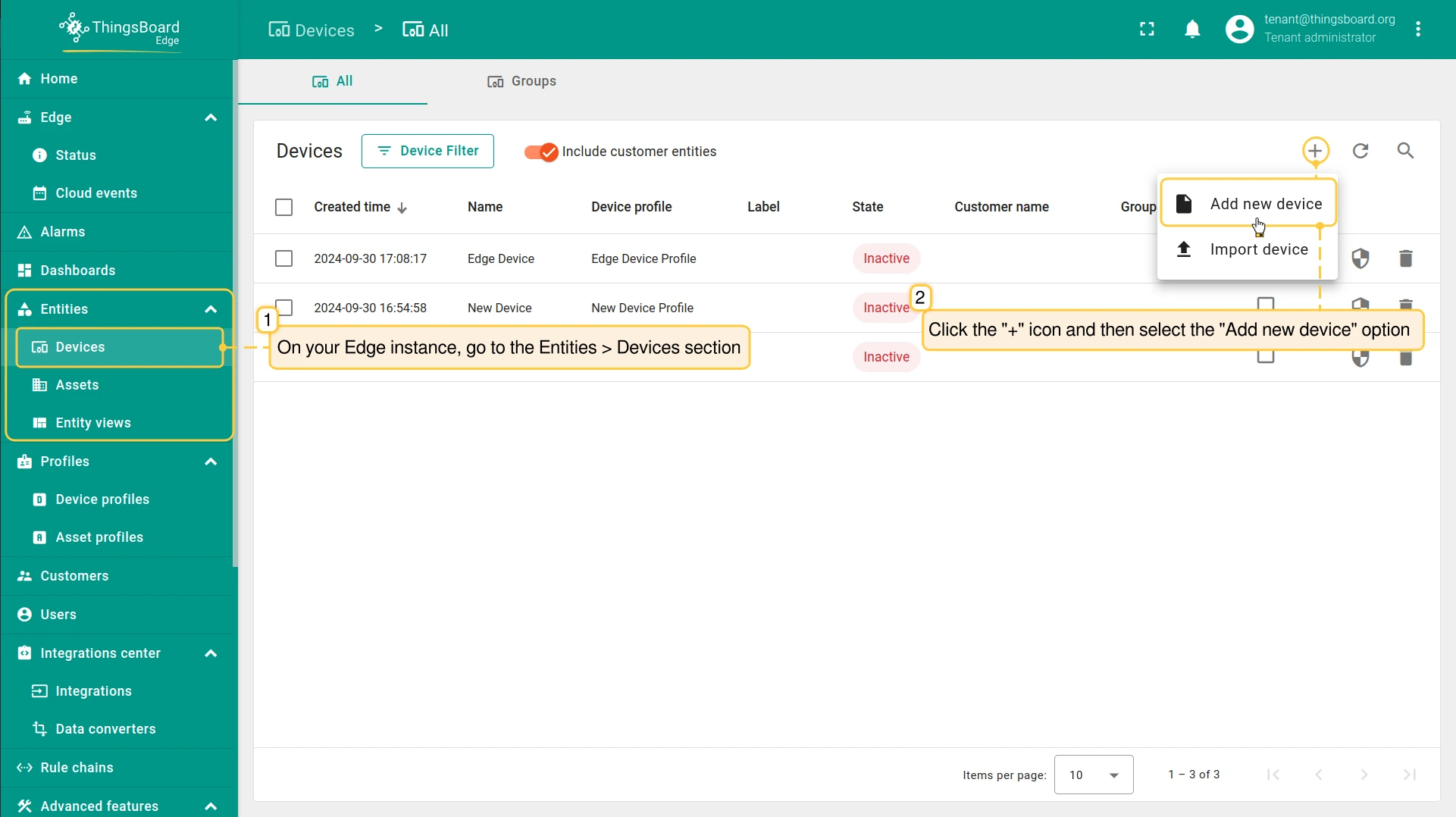
- Any user who has the "Write" operation permission for Devices is able to create Device entities on the Edge instance. Go to the Entities > Devices section and click the "Add new device" button.
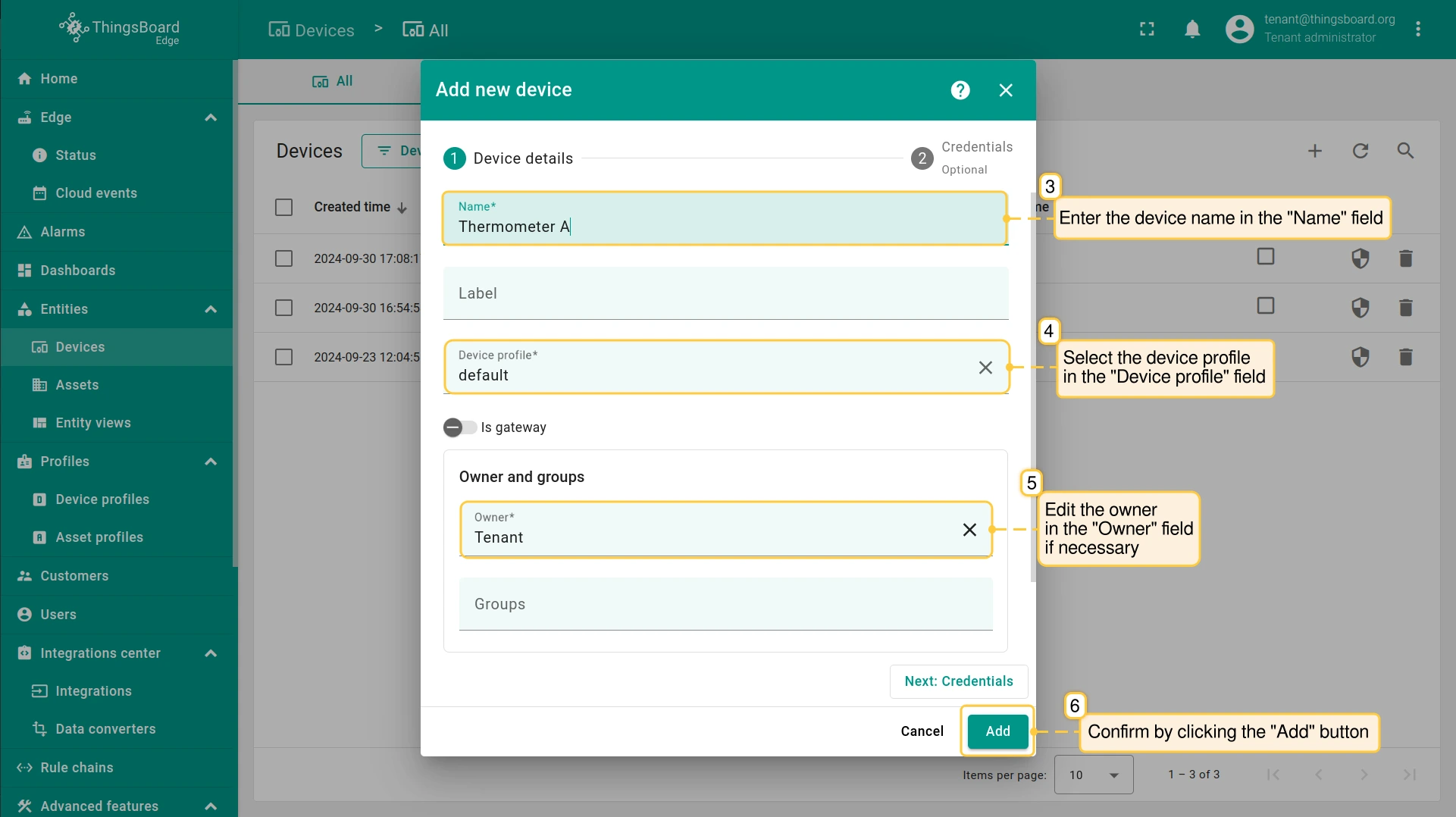
- In the pop-up window, fill in the required Device details fields, such as "Name" and "Device profile". Confirm the action by clicking the "Add" button.
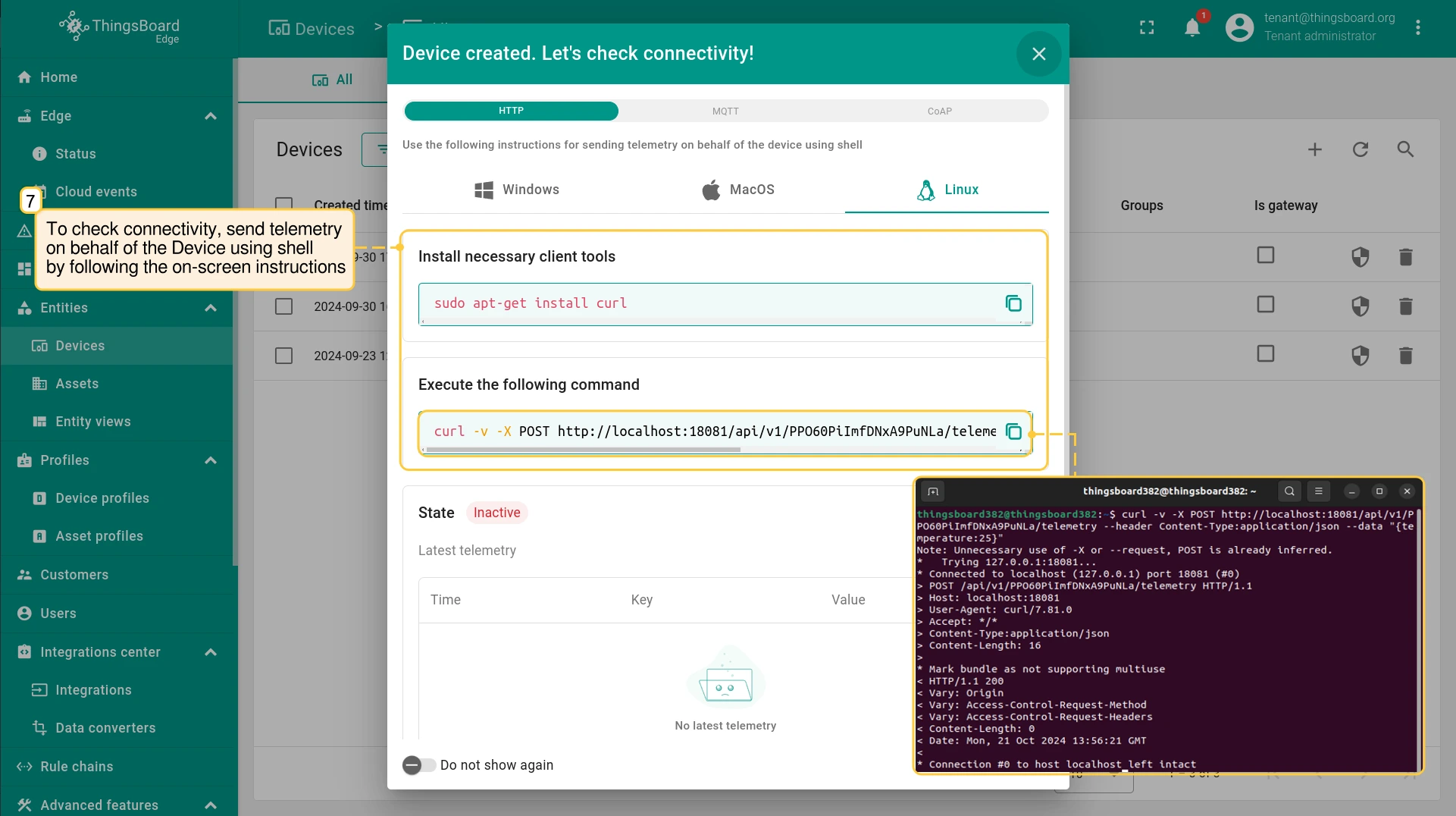
- To check connectivity, send telemetry on behalf of the Device using shell by following the on-screen instructions.
- To check if the new Device has been deployed to the Cloud (Server), log in to your Cloud (Server) and navigate to the Entities > Devices section.
For the ThingsBoard Edge Professional Edition:- A new Device entity group will be created with the "[Edge] {NAME_OF_EDGE} All" template name;
- A newly created Device will be assigned to the Cloud (Server) automatically and added to group above;
- This newly created Group will be assigned to the Edge automatically.
![To check if the new <b>Device</b> has been deployed to the <b>Cloud (Server)</b>, log in to your <b>Cloud (Server)</b> and navigate to the <b>Entities > Devices</b> section.<br>For the <b>ThingsBoard Edge Professional Edition</b>:<ul><li>A new <b>Device entity group</b> will be created with the <b>"[Edge] {NAME_OF_EDGE} All"</b> template name;</li><li>A newly created <b>Device</b> will be assigned to the <b>Cloud (Server)</b> automatically and added to group above;</li><li>This newly created <b>Group</b> will be assigned to the <b>Edge</b> automatically.</li></ul>](/images/pe/edge/config/devices/3-confirm-on-cloud.webp)
For the ThingsBoard Edge Professional Edition:
- A new Device entity group will be created with the "[Edge] {NAME_OF_EDGE} All" template name;
- A newly created Device will be assigned to the Cloud (Server) automatically and added to group above;
- This newly created Group will be assigned to the Edge automatically.
从Cloud分配设备到Edge
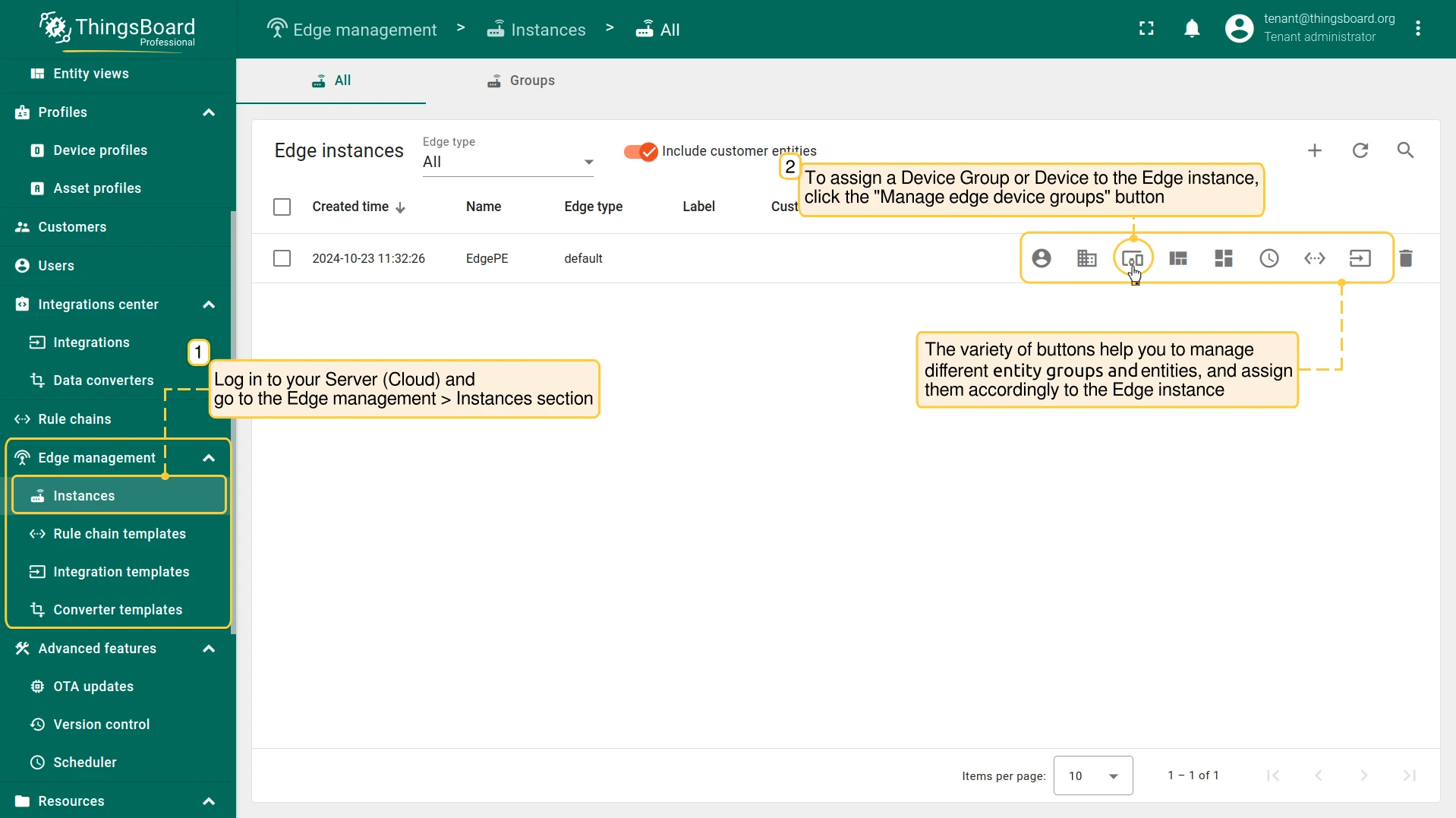
Devices 可在 Cloud (Server) 上创建,然后配置到 Edge实例。 请登录 Server (Cloud) 并进入 Edge management > Instances 区域。
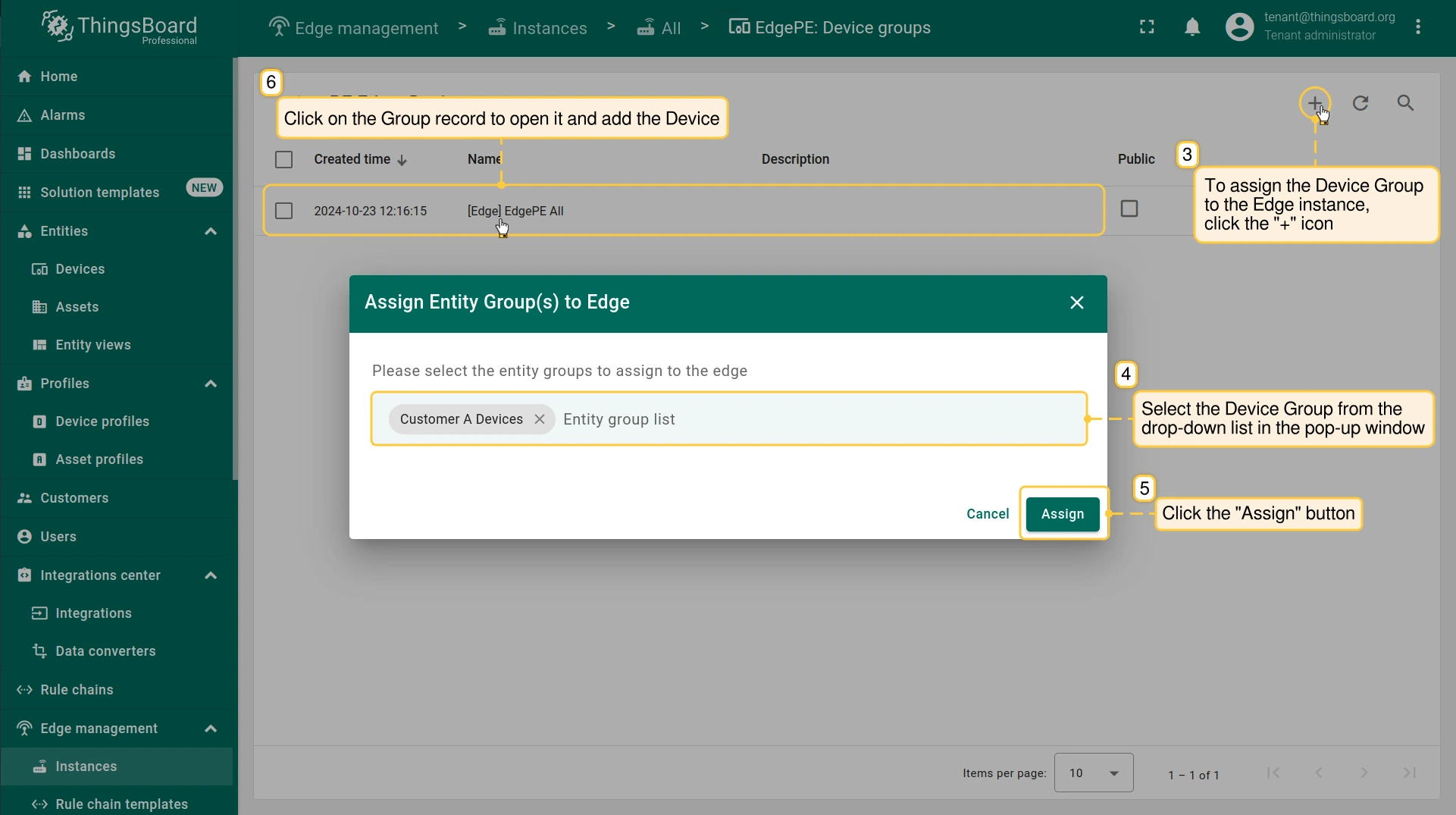
- The variety of buttons on the "Instances" page will help you to manage different entity groups and entities, and assign them accordingly to the Edge instance. To assign a Device Group, click the "Manage edge device groups" button.
- On the "Device groups" page, click the "+" icon and then select the Device group from the drop-down list in the pop-up window. Confirm the action by clicking the "Assign" button.
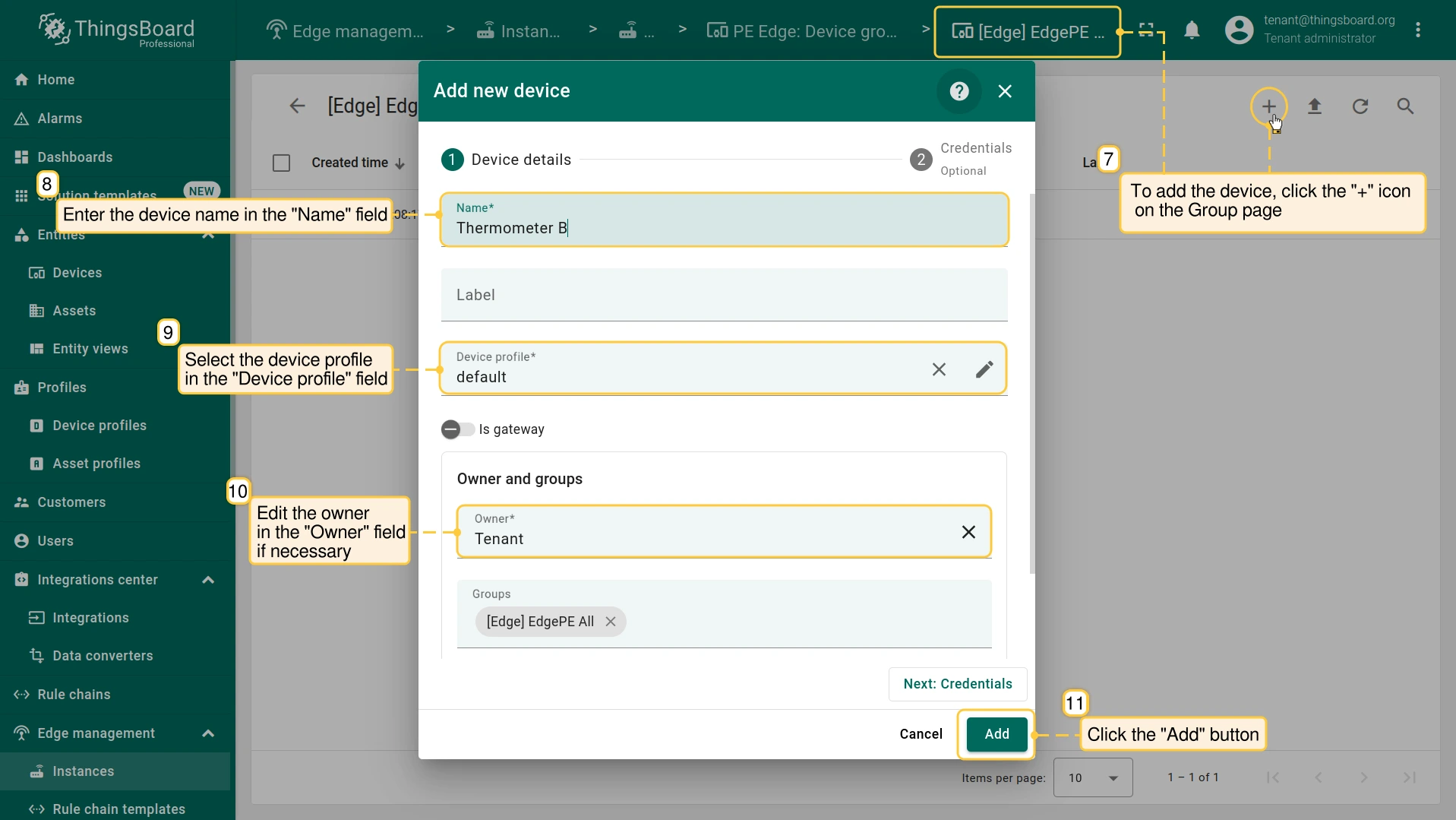
- To add the Device, click the "+" icon on the selected group page, and fill in the required Device details fields, such as "Name" and "Device profile", in the pop-up window. Confirm the action by clicking the "Add" button.
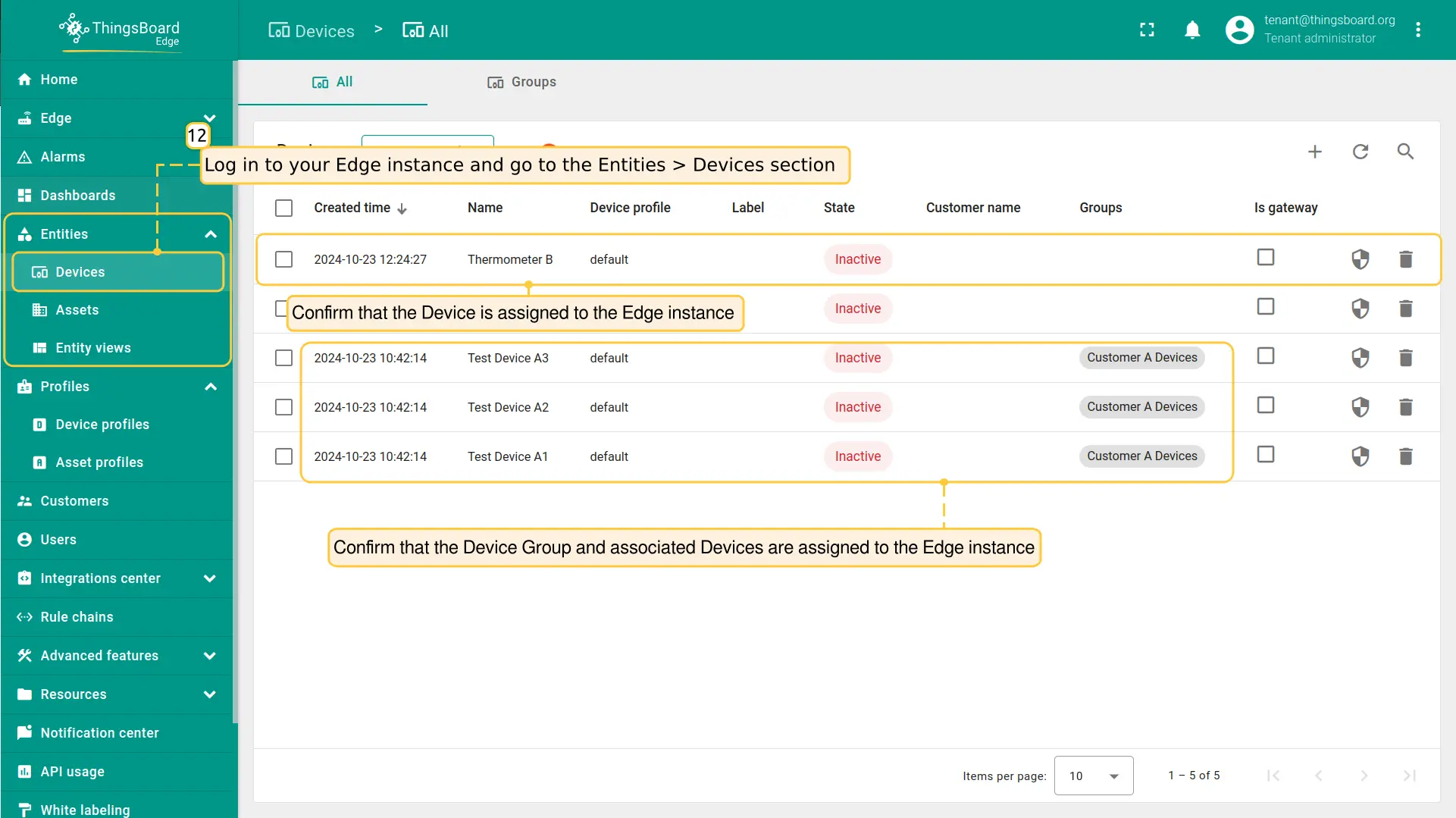
- To confirm that the Device and the Device Group have been assigned to the Edge instance, log in to your Edge instance and go to the Entities > Devices section.
下一步
-
Getting started guide(入门指南)- 快速概览 ThingsBoard Edge 主要功能。预计 15–30 分钟完成:
-
Installation guides(安装指南)- 了解如何在各种操作系统上安装 ThingsBoard Edge 并连接到 ThingsBoard Server。
-
Edge 规则引擎:
-
Rule Chain Templates(规则链模板)- 了解如何使用 ThingsBoard Edge 规则链模板。
-
Provision Rule Chains from cloud to edge(从云端向 Edge 下发规则链)- 了解如何从云端向 Edge 下发边缘规则链。
-
- 安全:
- gRPC over SSL/TLS - 了解如何为 Edge 与云端之间的通信配置 gRPC over SSL/TLS。
-
功能:
-
Edge Status(Edge 状态)- 了解 ThingsBoard Edge 上的 Edge Status 页面。
-
Cloud Events(云端事件)- 了解 ThingsBoard Edge 上的 Cloud Events 页面。
-
-
使用场景:
-
Manage alarms and RPC requests on edge devices(在边缘设备上管理告警和 RPC 请求)- 本指南展示如何在 Edge 上生成本地告警并向连接到 Edge 的设备发送 RPC 请求:
-
Data filtering and traffic reduce(数据过滤与流量削减)- 本指南展示如何从 Edge 向云端仅发送过滤后的设备数据:
-
- Roadmap(路线图)- ThingsBoard Edge 路线图。