概述
在ThingsBoard中,设备属性 是与设备关联的键值对,用于存储配置项、元数据及其他相关信息。
订阅设备属性使客户端能够在这些属性变更时收到更新。订阅方法因属性类型和使用的通信协议而异。
属性分为三种类型:
- Server-side Attributes(服务器端属性): 仅由服务器设置和使用,可通过用户界面(UI)或REST API配置。
- Shared Attributes(共享属性): 设备可订阅更新以在服务器修改时接收实时通知。可通过UI或REST API配置。
- Client-side Attributes(客户端属性): 由设备设置并存储在服务器上。只能通过UI或REST API读取。
更多说明与示例,请参阅ThingsBoard文档Working with IoT Device Attributes。
以下指南说明设备如何经由 ThingsBoard Edge 与 ThingsBoard Cloud 进行实时双向通信。
前置条件
- ThingsBoard Cloud 或本地托管 Server。
- 已安装 ThingsBoard Edge 且具备网络访问。
- 可通过MQTT、HTTP或CoAP连接到 ThingsBoard Edge 的 Device。
步骤1. 为Edge配置规则链
要自动将消息(数据或属性)从设备路由到 ThingsBoard Cloud,请为 ThingsBoard Edge 配置规则链:
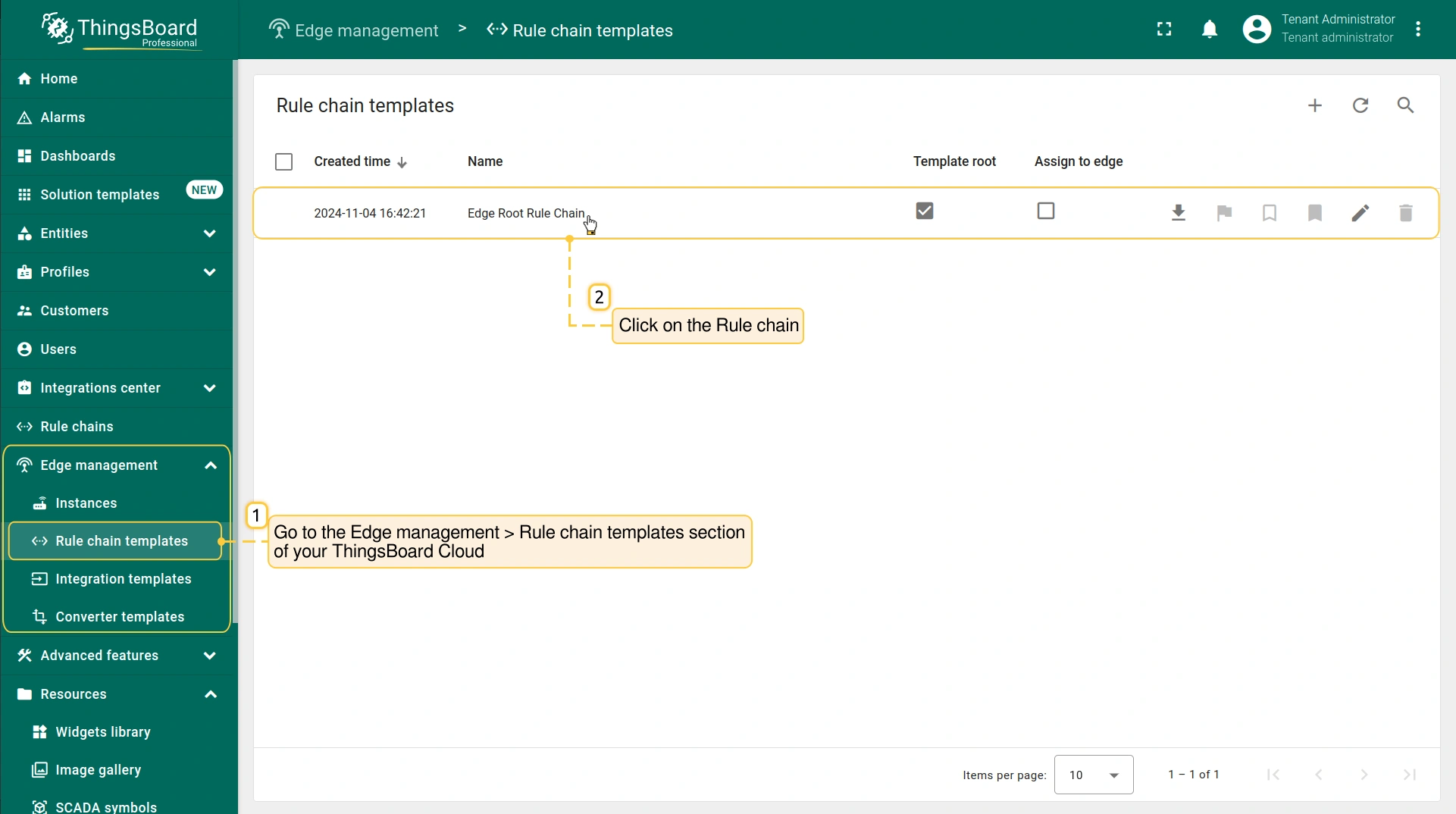
- Log in to the ThingsBoard Cloud and go to the Edge management > Rule chain templates section and click on the Rule chain assigned to your Edge instance.
- If you are using Edge 4.0 or later, stay in your Edge instance and go to the Rule chains section. To edit a rule chain, click the appropriate Rule Chain.
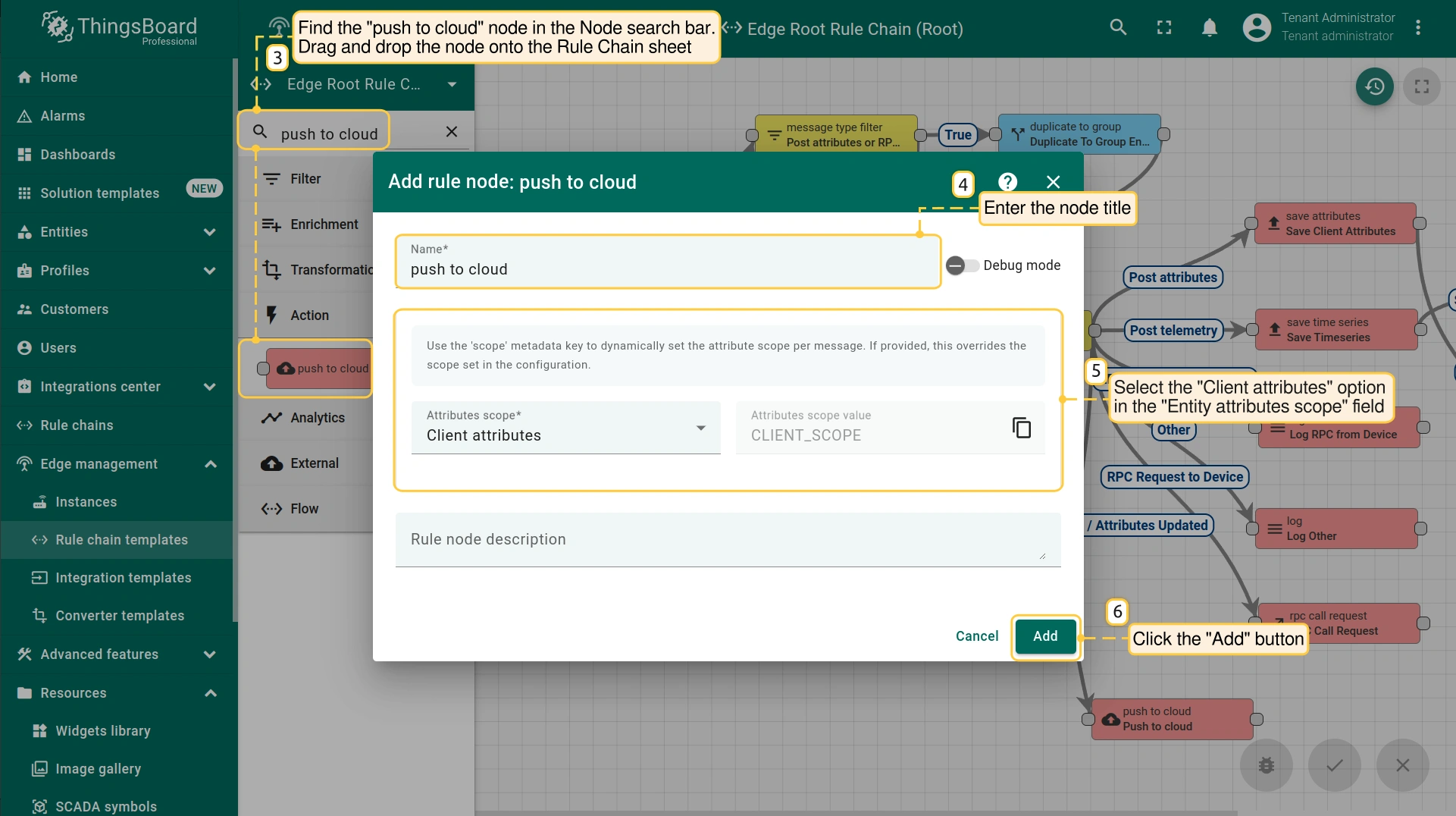
- On the Rule Chain edit page, in the Node search bar find the "push to cloud" node. It pushes messages from Edge to Cloud. Drag and drop the node onto the Rule Chain sheet. Then, in the "Add rule node" pop-up window enter the node title and select the "Client attributes" option in the "Entity attributes scope" field. Click the "Add" button to proceed.
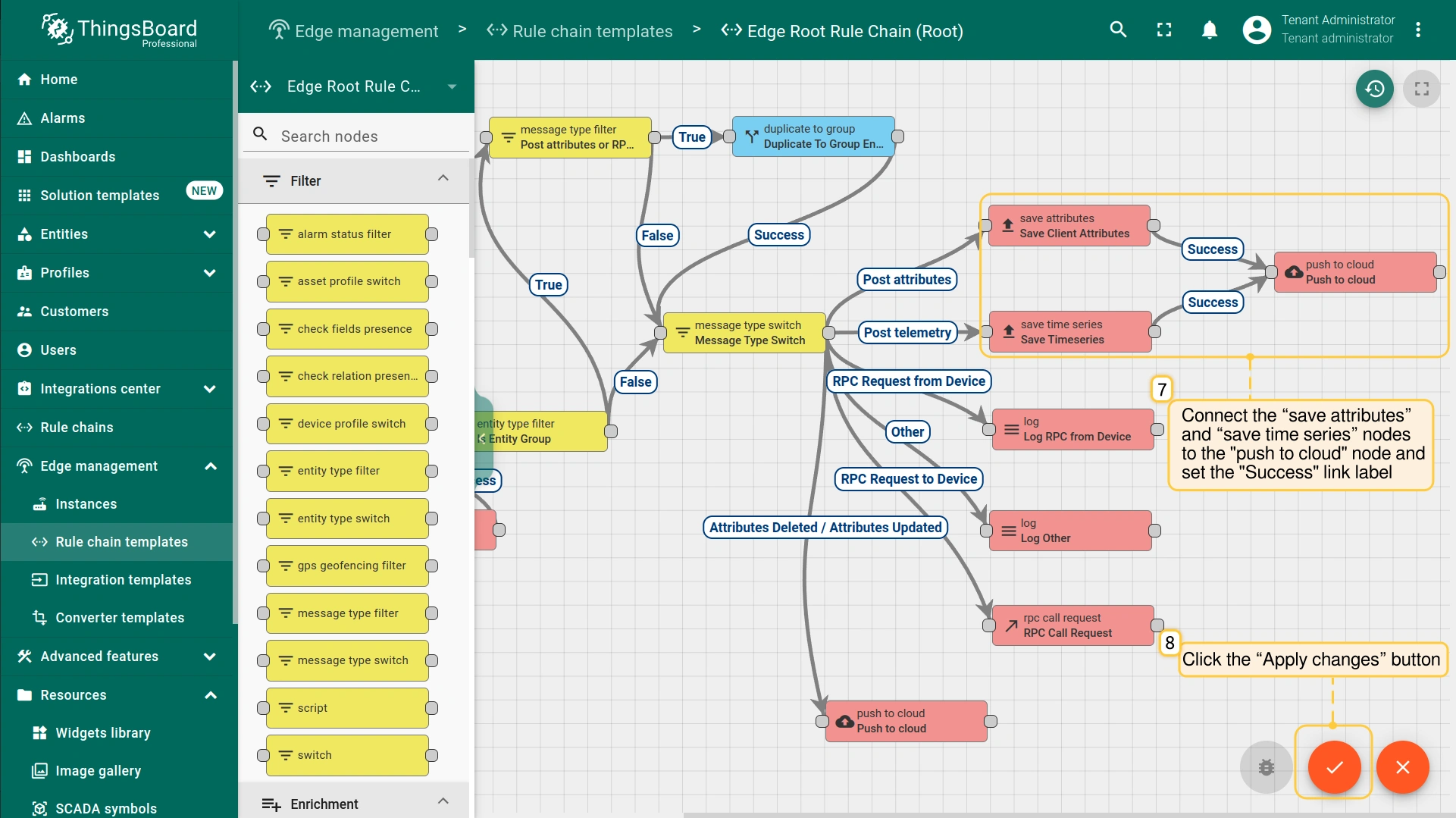
- Connect the “save attributes” node to the "push to cloud" node and set the "Success" link label. Click the “Apply changes” button in the Rule Chain sheet.
- If you are using Edge 4.0 or later, stay in your Edge instance and go to the Rule chains section. To edit a rule chain, click the appropriate Rule Chain.
步骤2. 为Cloud配置规则链
要将某些属性更新消息发回Edge,请修改Cloud的root规则链。属性更新消息到达Edge后,您应在设备上看到该消息。
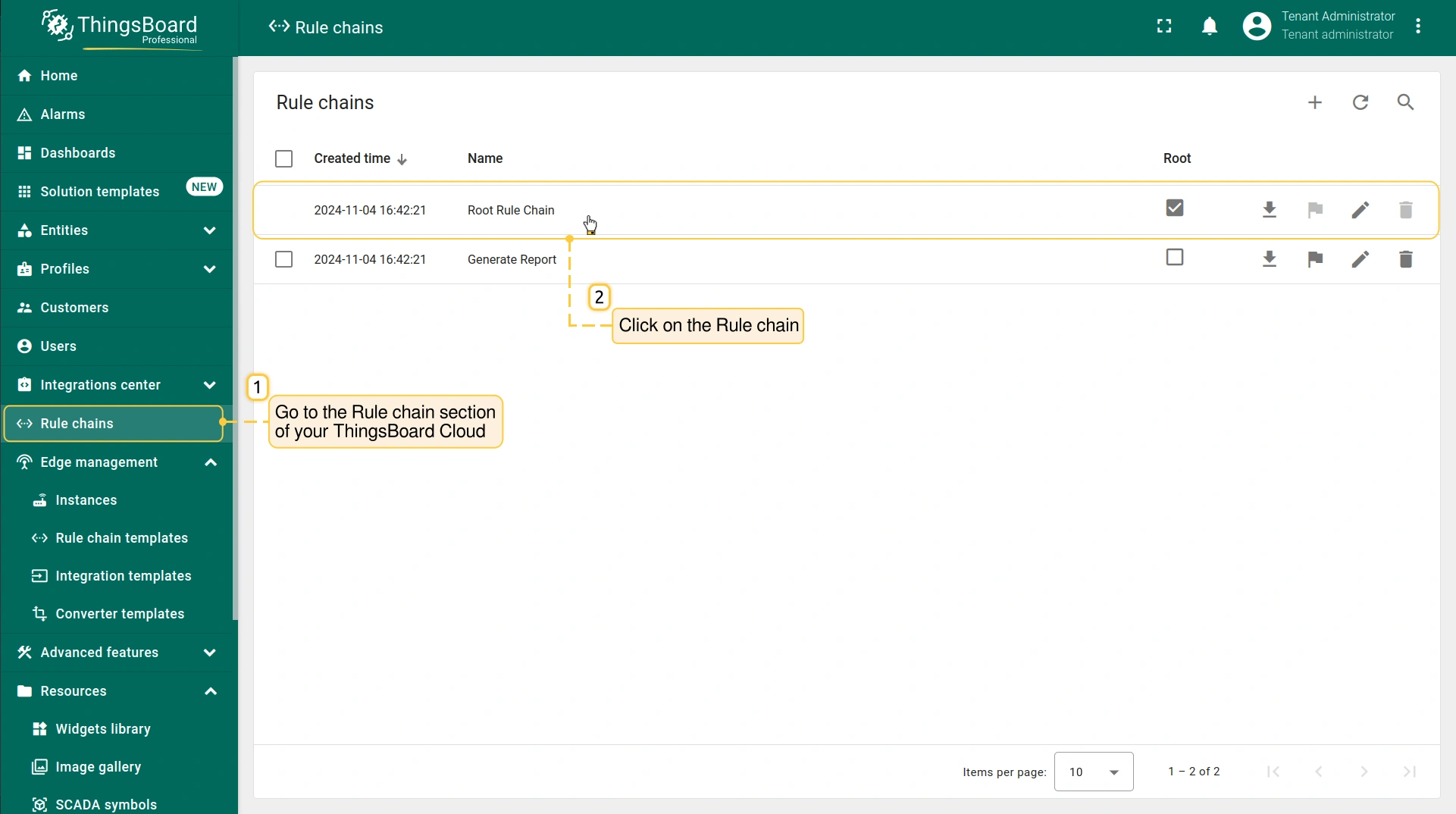
- Go to the Rule Chains section, to modify the Rule Chain.
- On the Rule Chain edit page, in the Node search bar find the "script" node. It allows modification of message payload, metadata or message type with JavaScript. Drag and drop the node onto the Rule Chain sheet. Then, in the "Add rule node: script" pop-up window enter the node title and enter the script below. Click the "Add" button to proceed.
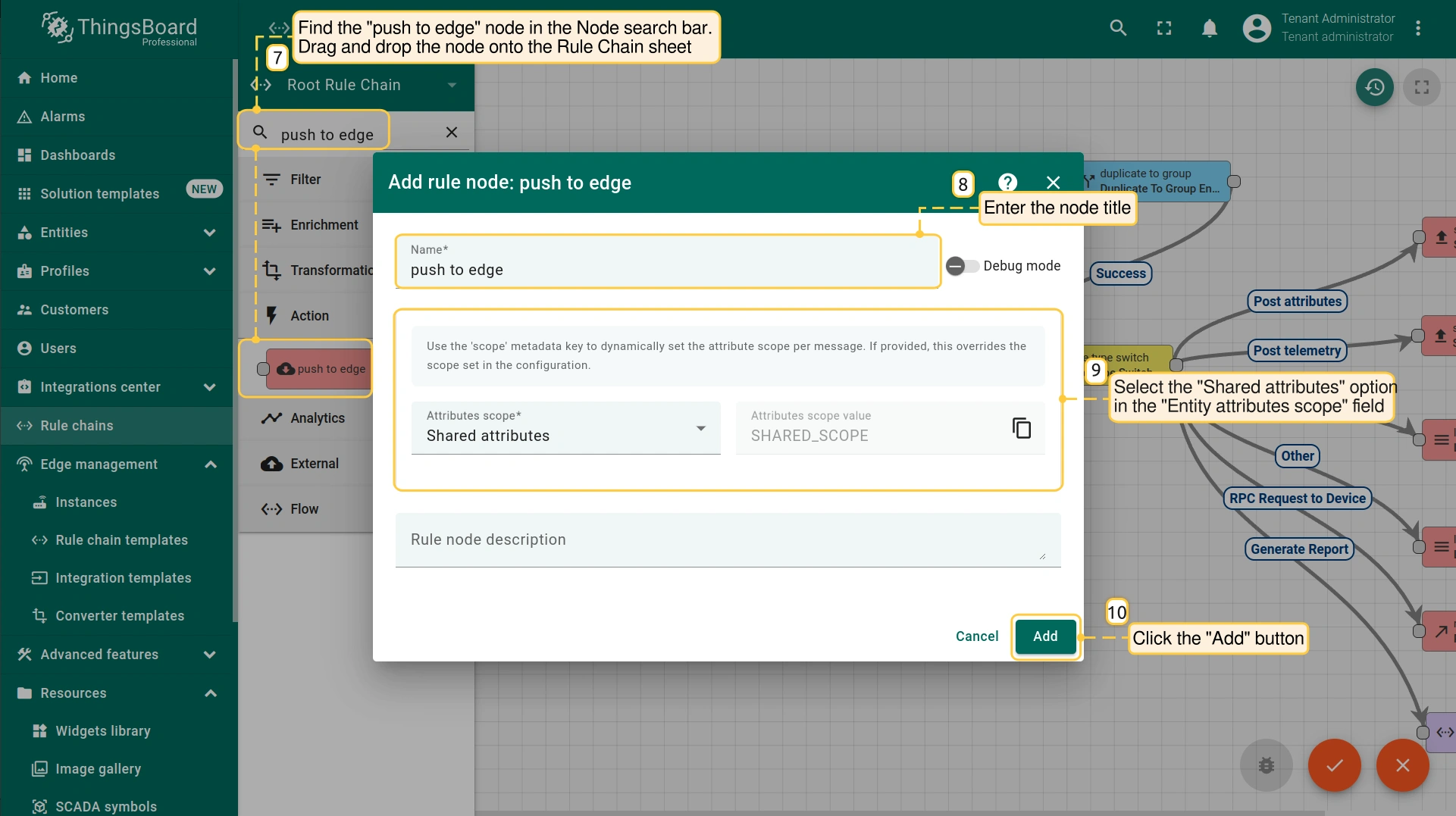
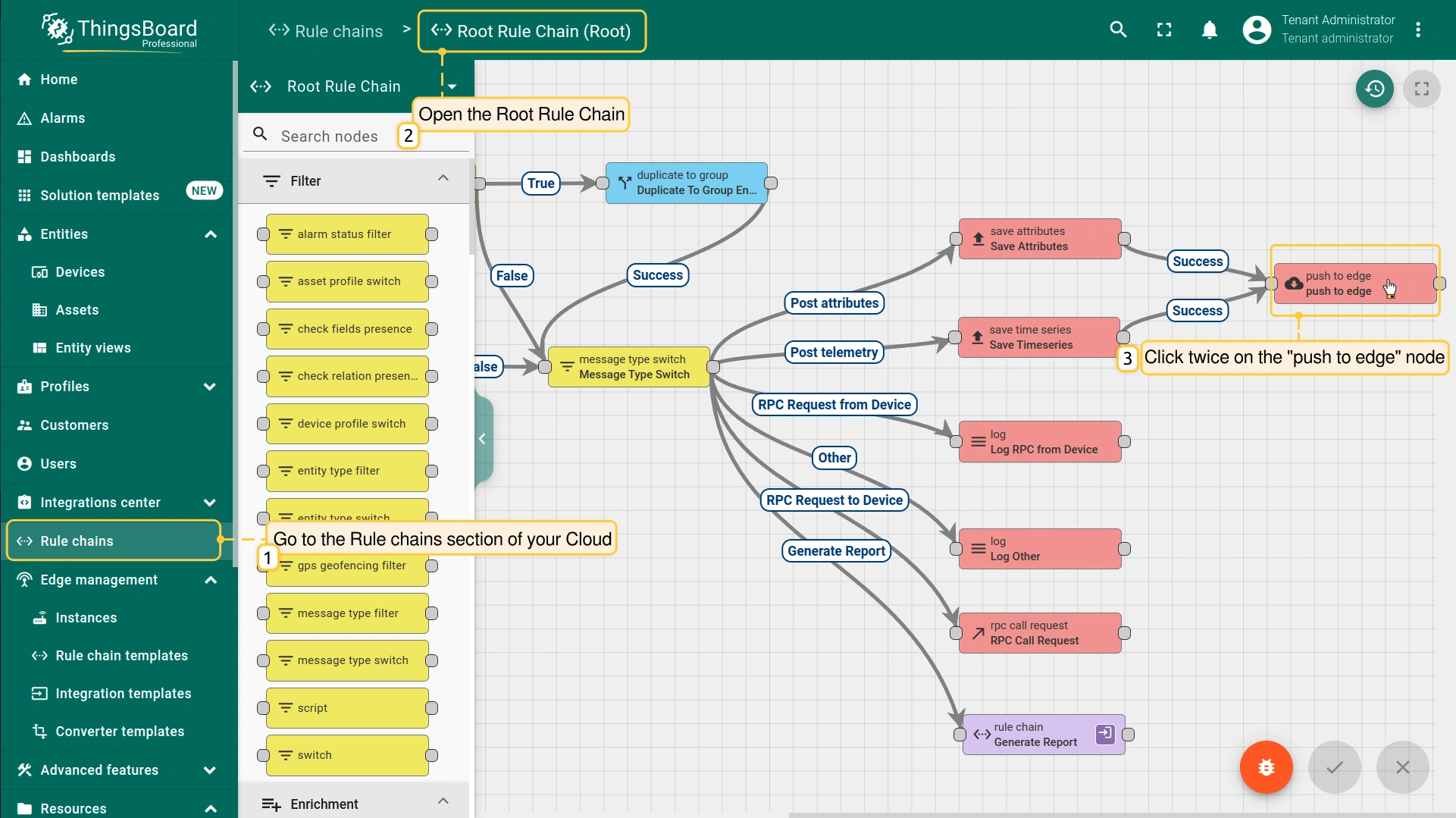
- On the Rule Chain edit page, in the Node search bar find the "push to edge" node. It pushes messages from Cloud to Edge. Drag and drop the node onto the Rule Chain sheet. Then, in the "Add rule node" pop-up window enter the node title and select the "Shared attributes" option in the "Entity attributes scope" field. Click the "Add" button to proceed.
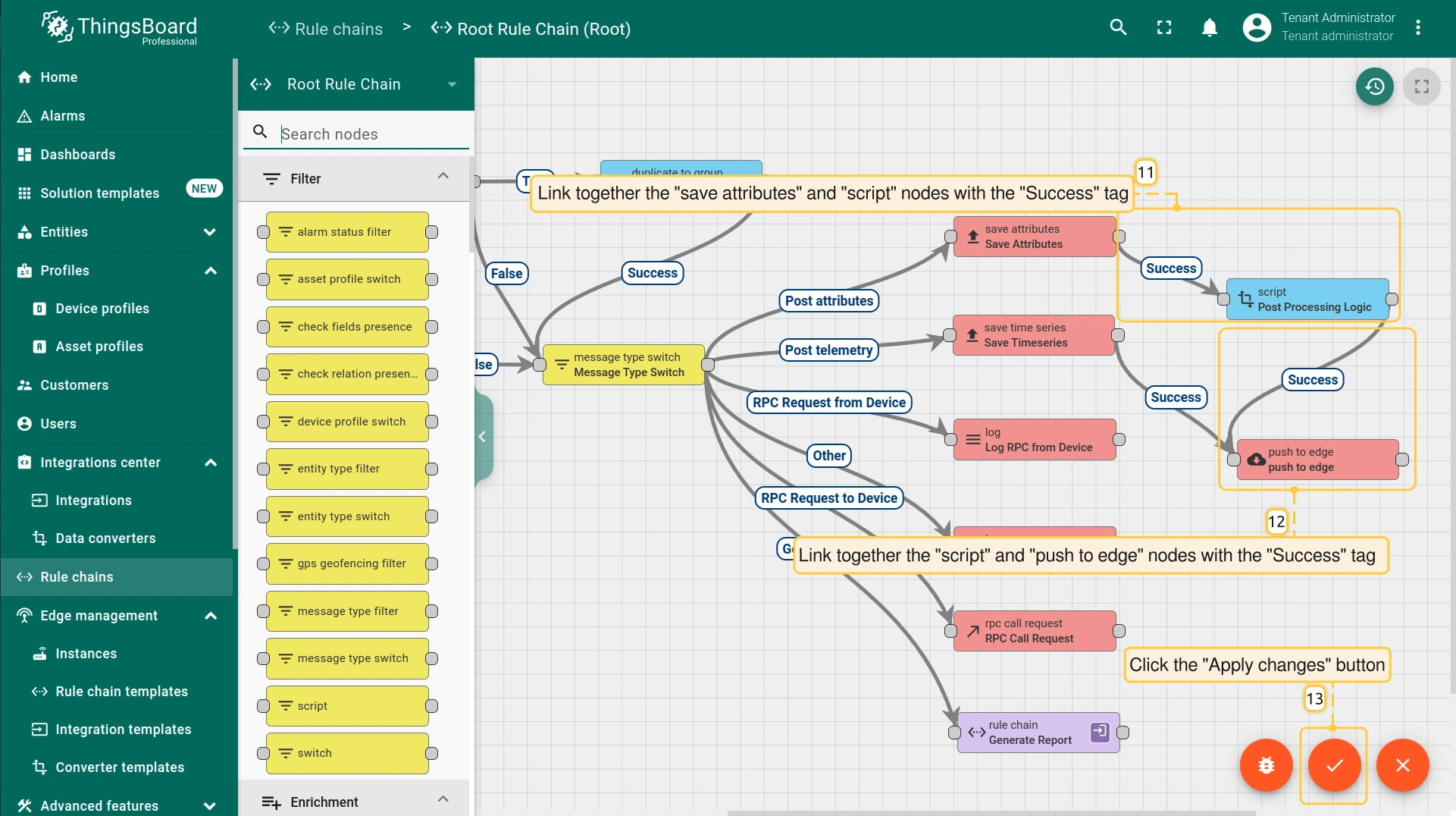
- Connect the “save attributes” node to the "push to edge" node and set the "Success" link label. Click the “Apply changes” button in the Rule Chain sheet.
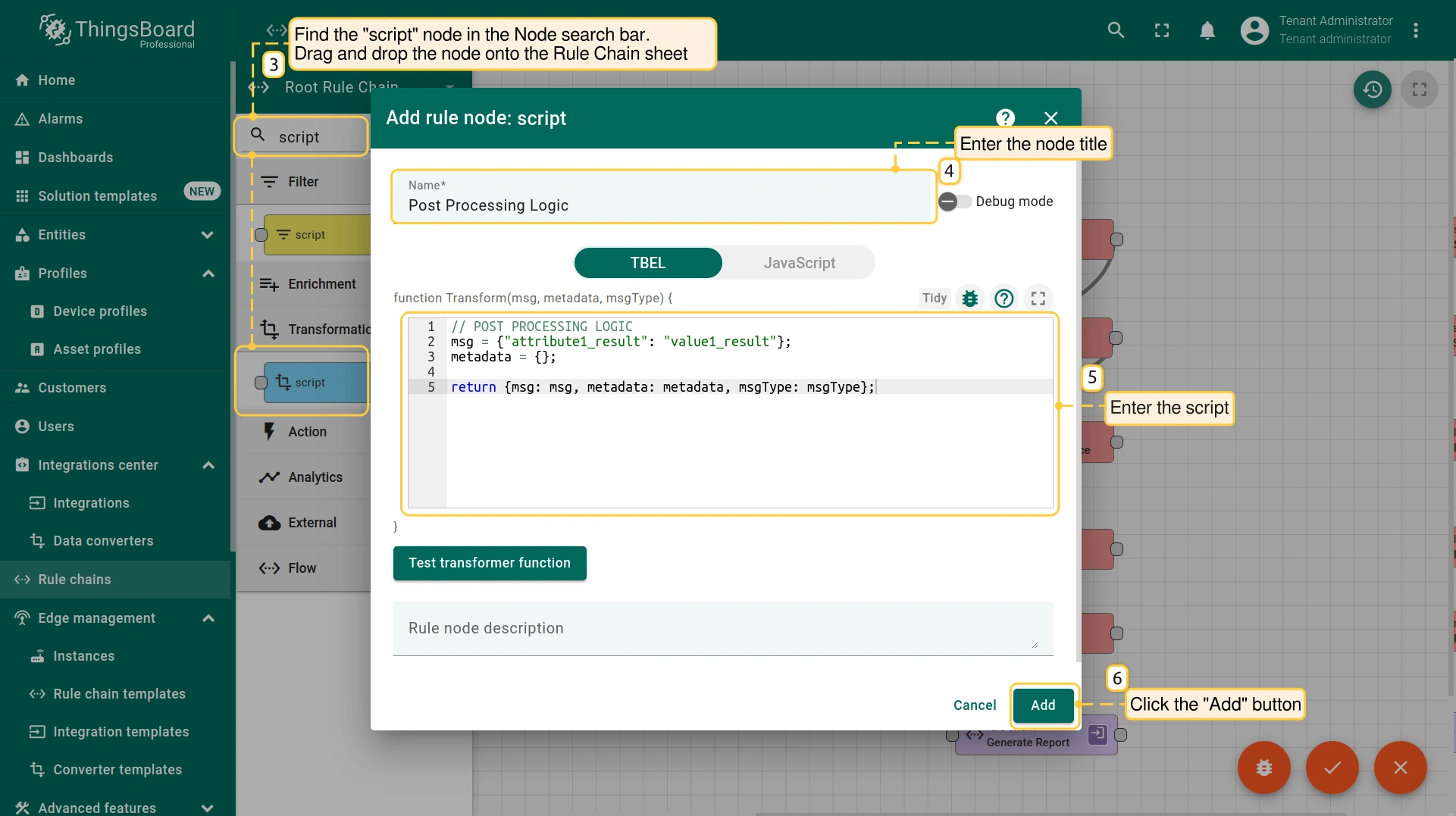
要重写并返回接收到的数据到Edge,请在 “script” 节点中添加以下脚本:
1
2
3
4
5
// POST PROCESSING LOGIC
msg = {"attribute1_result": "value1_result"};
metadata = {};

return {msg: msg, metadata: metadata, msgType: msgType};
步骤3. 订阅设备属性变更并发布设备属性消息
设备属性变更 的订阅及随后 设备属性消息 的发布流程取决于使用的协议。以下是物联网应用中遥测和属性更新的常用协议:
MQTT 是一种轻量级协议,常用于 IoT 通信。 要与 ThingsBoard Edge 通过 MQTT 通信,建议安装 MQTT Broker。这样设备即可 发布 遥测或属性消息,并 订阅 属性更新主题。 订阅共享设备属性变更要订阅共享设备属性变更,发送 SUBSCRIBE 消息:
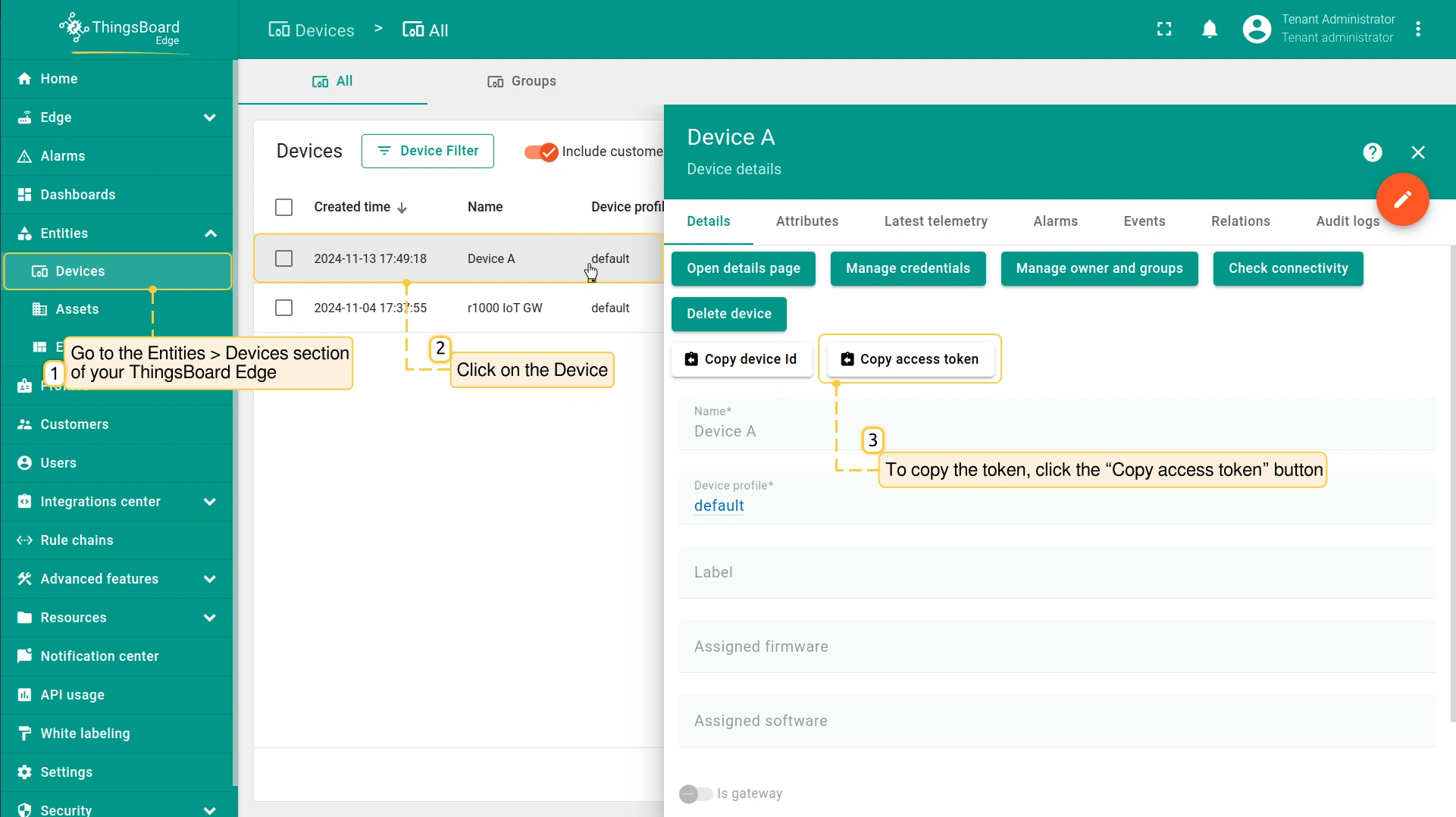 将 $ACCESS_TOKEN 替换为设备的实际访问令牌。要查找设备访问令牌,请进入 实体 > 设备 部分并点击该设备。在 「设备详情」 页面,点击 「复制访问令牌」 按钮即可复制令牌。 发布时序数据或属性消息要向 ThingsBoard Edge 发布客户端设备属性,发送 PUBLISH 消息。 可发布遥测数据:
也可使用 new-attributes-values.json 文件中的数据发布客户端属性更新: |
HTTP 是一种通用网络协议,可用于 IoT 应用。HTTP 协议基于 TCP,采用请求-响应模型。 订阅共享设备属性变更要订阅共享设备属性的变更,向以下 URL 发送 GET 请求,可带可选参数
将 $ACCESS_TOKEN 替换为设备的实际访问令牌。要查找设备访问令牌,请进入 实体 > 设备 部分并点击该设备。在 「设备详情」 页面,点击 「复制访问令牌」 按钮即可复制令牌。 执行命令:
发布时序数据或属性消息要向 ThingsBoard Edge 发布客户端设备属性,向以下 URL 发送 POST 请求:
发布客户端属性更新: 也可使用 new-attributes-values.json 文件中的数据发布客户端属性更新: |
CoAP 是一种适用于受限设备的轻量级 IoT 协议。CoAP 基于 UDP,但类似 HTTP,采用请求-响应模型。 订阅共享设备属性变更要订阅共享设备属性变更,向以下 URL 发送 GET 请求:
将 $ACCESS_TOKEN 替换为设备的实际访问令牌。要查找设备访问令牌,请进入 实体 > 设备 部分并点击该设备。在 「设备详情」 页面,点击 「复制访问令牌」 按钮即可复制令牌。 执行命令: 一旦共享属性被服务端组件(REST API 或规则链)更改,客户端将收到更新。 发布时序数据或属性消息要向 ThingsBoard Edge 发布客户端设备属性,向以下 URL 发送 POST 请求:
使用 new-attributes-values.json 文件中的数据发布客户端属性更新: |
步骤4. 确认结果
确认收到并推送的属性:
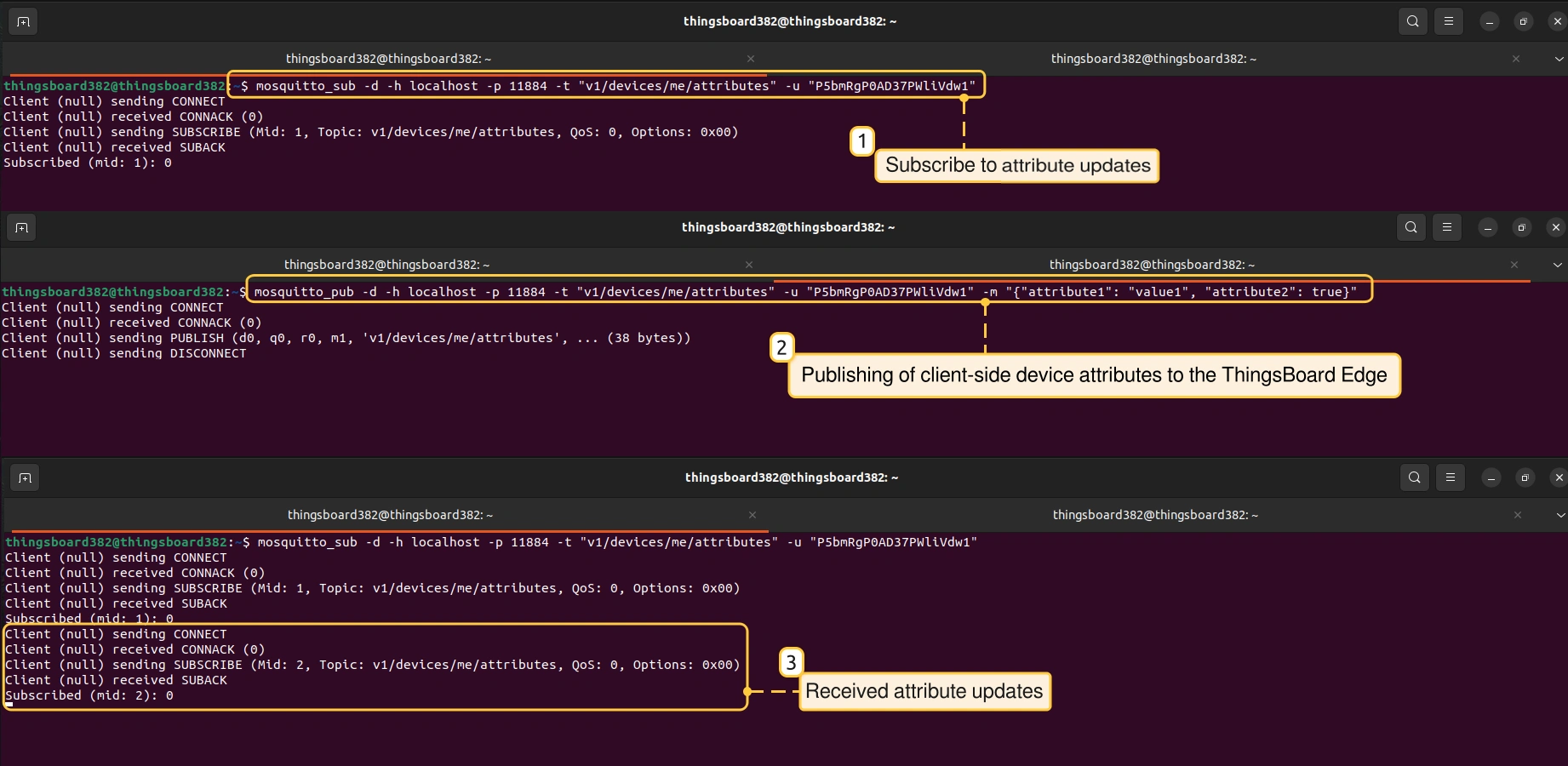
- Once you have subscribed to attribute updates, you will receive updates as the attributes change. We have used the MQTT protocol as an example. The updates were received after new attributes were published.
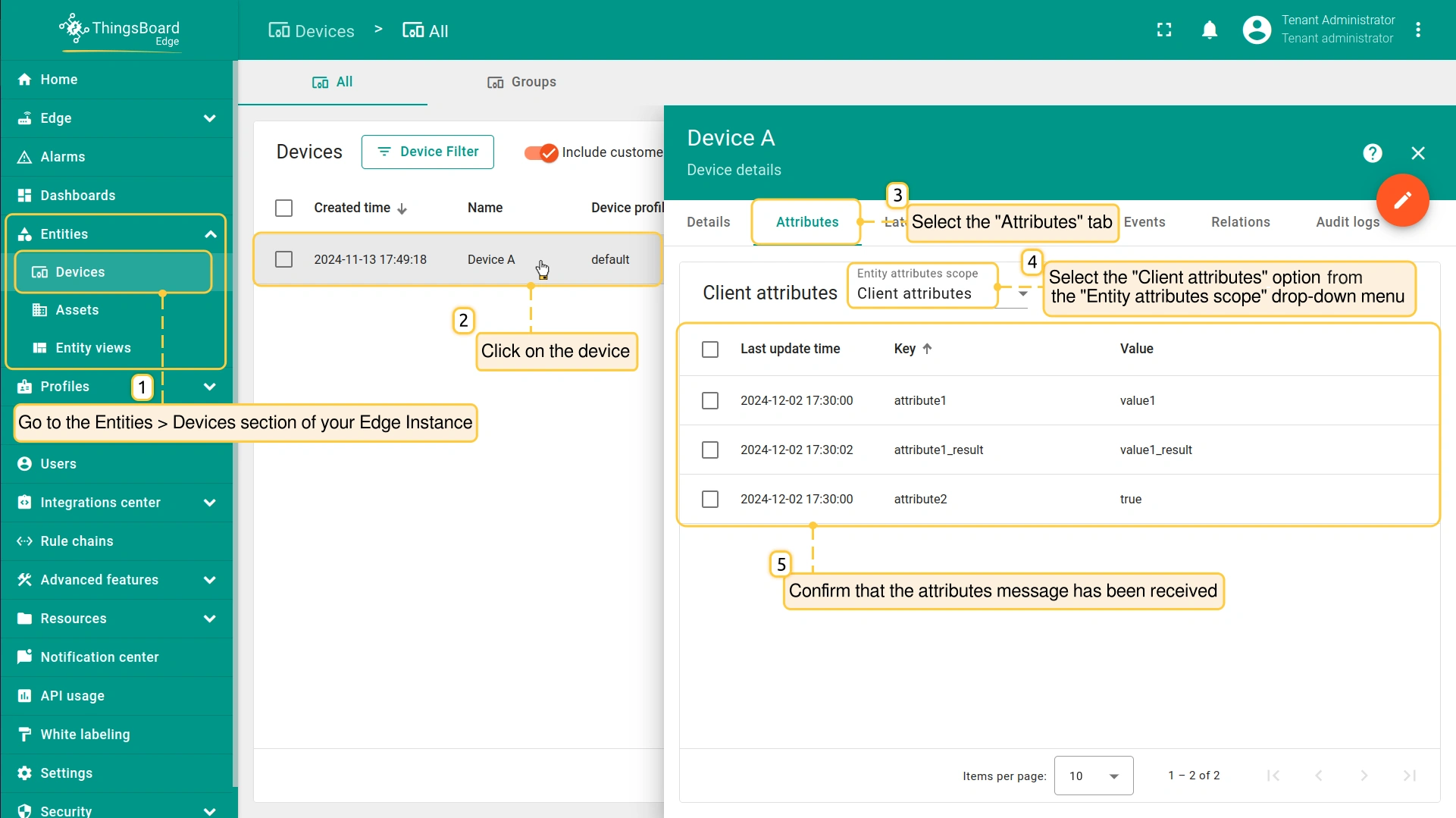
- To confirm if the attributes message is received on your Edge instance, go to the Entities > Devices section and click on the device. On the "Device details" page, select the "Attributes" tab and select the "Client attributes" option in the "Entity attributes scope" drop-down menu.
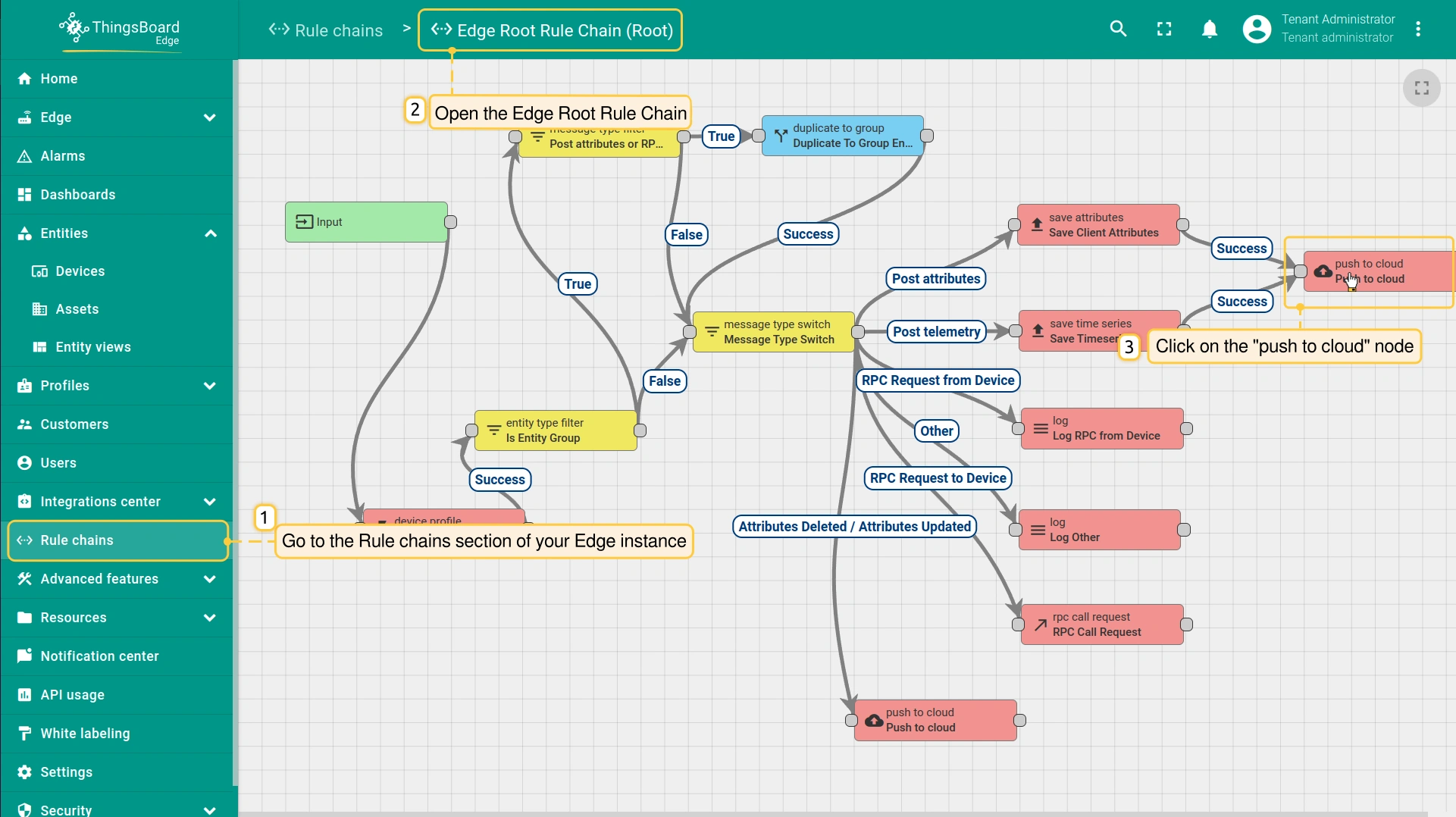
- To confirm if the attributes message is received and pushed to Cloud, go to the Rule chains section of your Edge instance and click on the Rule chain. Click on the "push to cloud" node.
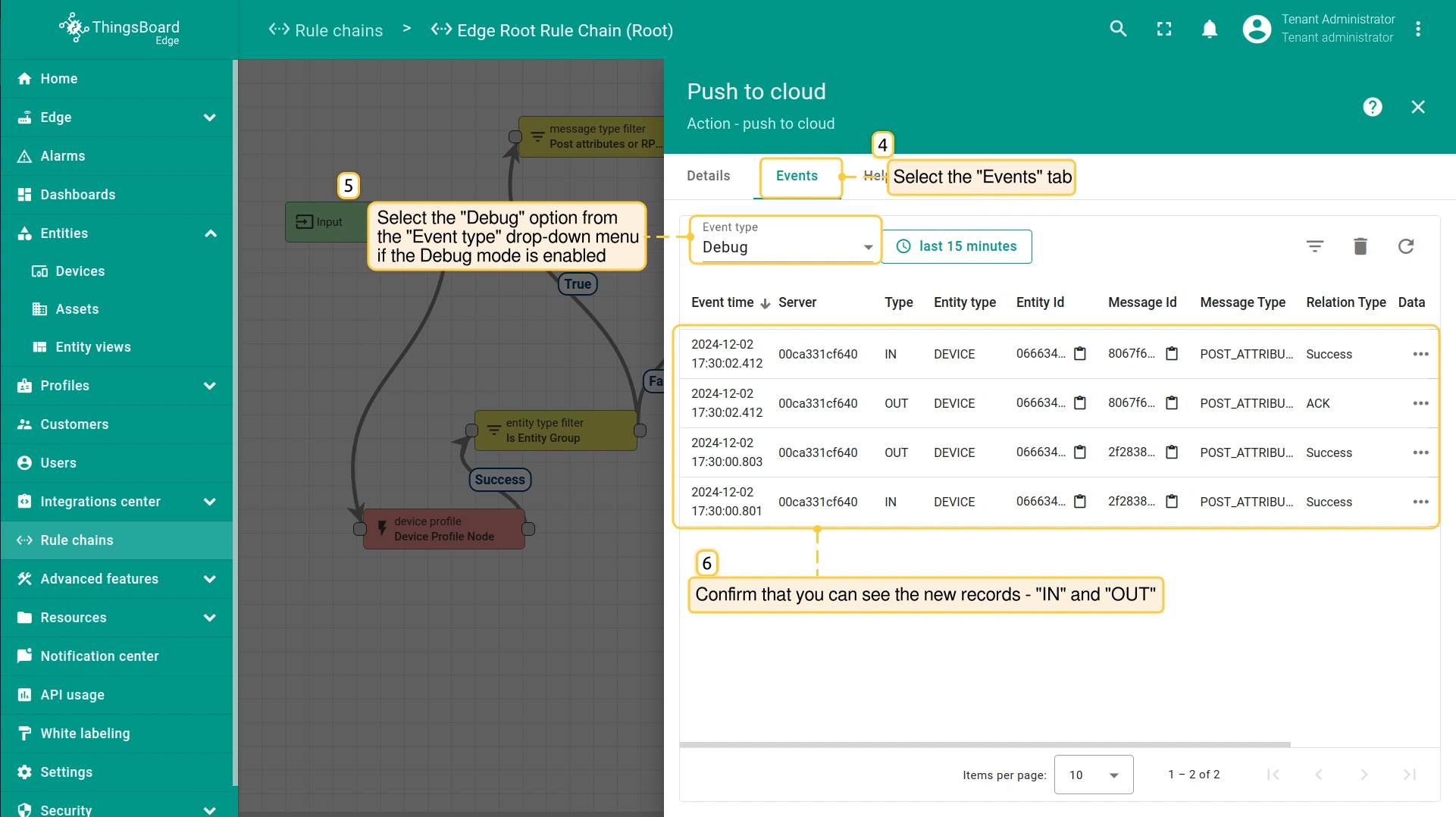
- On the "Push to cloud" page, select the "Events" tab. If you have debug mode enabled, select the "Debug" option in the "Event type" drop-down menu. You should see the new records - "IN" and "OUT", where the "IN" record defines the attributes received from the device, and the "OUT" record defines the attributes message pushed to the Cloud.
- To confirm if the attributes message is received on the Cloud and pushed back to the Edge, go to the Rule chains section of your Cloud and click on the Rule chain. Click twice on the "push to edge" node.
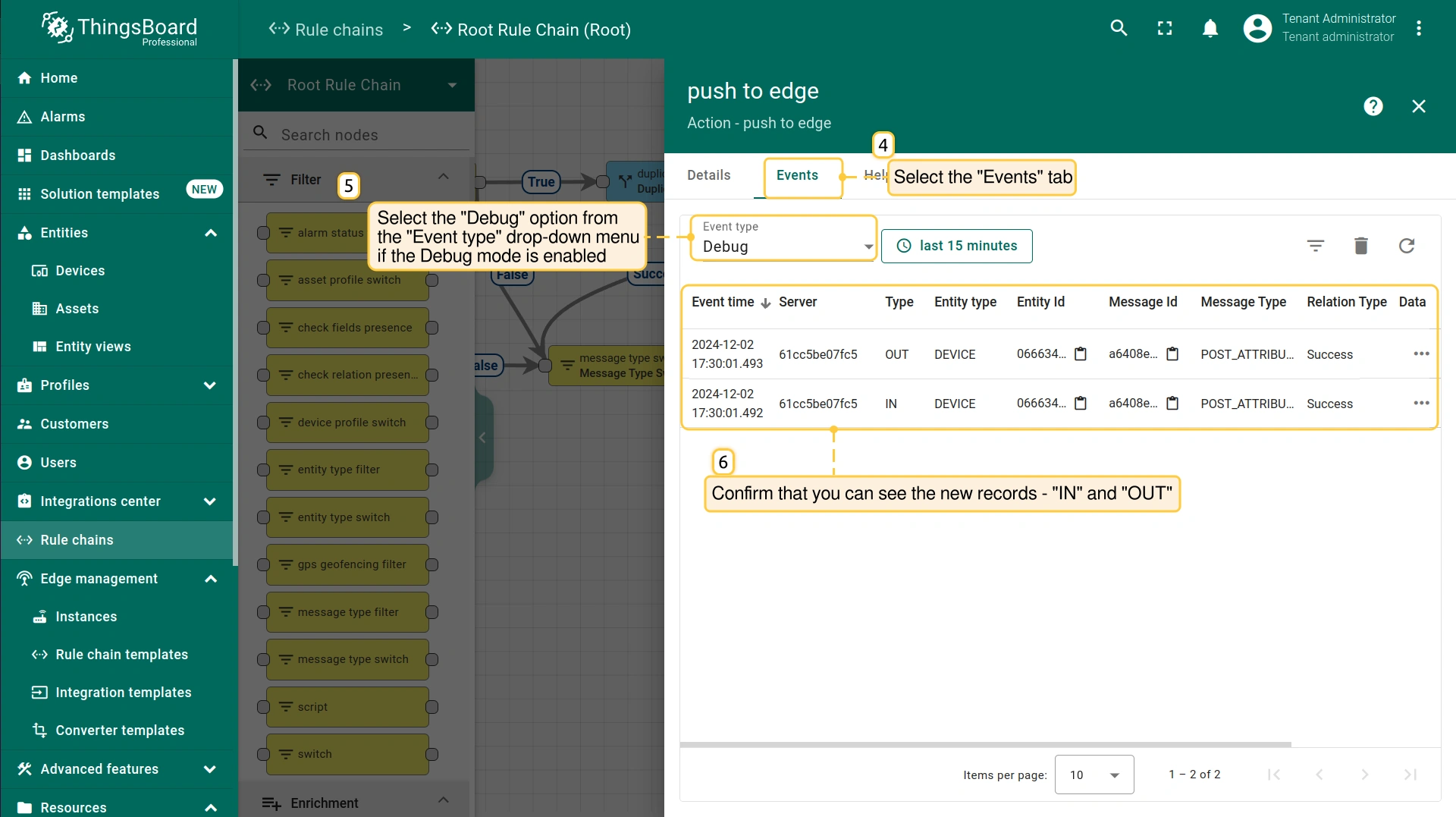
- On the "Push to edge" page, select the "Events" tab. If you have debug mode enabled, select the "Debug" option from the "Event type" drop-down menu. You should see two new records - "IN" and "OUT", where the "IN" record defines the attributes received from Edge, and the "OUT" record defines the attributes message pushed back to Edge.
下一步
-
Getting started guide(入门指南)- 快速概览 ThingsBoard Edge 主要功能。预计 15–30 分钟完成:
-
Installation guides(安装指南)- 了解如何在各种操作系统上安装 ThingsBoard Edge 并连接到 ThingsBoard Server。
-
Edge 规则引擎:
-
Rule Chain Templates(规则链模板)- 了解如何使用 ThingsBoard Edge 规则链模板。
-
Provision Rule Chains from cloud to edge(从云端向 Edge 下发规则链)- 了解如何从云端向 Edge 下发边缘规则链。
-
- 安全:
- gRPC over SSL/TLS - 了解如何为 Edge 与云端之间的通信配置 gRPC over SSL/TLS。
-
功能:
-
Edge Status(Edge 状态)- 了解 ThingsBoard Edge 上的 Edge Status 页面。
-
Cloud Events(云端事件)- 了解 ThingsBoard Edge 上的 Cloud Events 页面。
-
-
使用场景:
-
Manage alarms and RPC requests on edge devices(在边缘设备上管理告警和 RPC 请求)- 本指南展示如何在 Edge 上生成本地告警并向连接到 Edge 的设备发送 RPC 请求:
-
Data filtering and traffic reduce(数据过滤与流量削减)- 本指南展示如何从 Edge 向云端仅发送过滤后的设备数据:
-
- Roadmap(路线图)- ThingsBoard Edge 路线图。