- Last Will工作原理
- 非正常断开 — 发布遗嘱
- 正常断开 — 不发布遗嘱
- Last Will参数
- 带延迟的Last Will
- 作为保留消息的Last Will
- 使用TBMQ WebSocket Client的Last Will指南
MQTT的 Last Will(遗嘱)功能可在客户端异常断开时通知其他客户端,用于触发切换备用系统或告警等操作。
“Last Will”一词类似现实中的遗嘱。现实中,遗嘱是规定身后意愿的法律文件,通常包含资产分配、照顾家属等安排。
IoT示例:在智能家居场景中,温控器和安防摄像头等设备与中央hub通信。若摄像头异常离线,Last Will消息可触发住户告警或启动备用系统(如开灯、报警)。 农业场景中,设备监控田间状态以优化灌溉。若关键传感器断开,Last Will消息可通知农户并采取预防措施。
Last Will工作原理
- Last Will消息及其参数在客户端连接broker时通过
CONNECT包设置。broker将Last Will数据保存在会话状态中。 - 发生意外(非正常)断开时,Last Will消息会发送给订阅Will Topic的客户端。
非正常断开 — 发布遗嘱
非正常断开指客户端因网络故障、崩溃或断电等原因意外断开。
此时broker未收到 DISCONNECT 消息,会认为客户端异常断开。
根据官方文档,非正常情况包括但不限于:
- 服务器检测到的 I/O错误 或网络故障。
- 客户端在 Keep Alive 时间内未进行通信。
- 客户端 在未发送 Reason Code 0x00(正常断开)的
DISCONNECT包的情况下关闭连接。 - 服务器 在未收到 Reason Code 0x00(正常断开)的
DISCONNECT包的情况下关闭连接。
正常断开 — 不发布遗嘱
正常断开指客户端在终止连接前发送 DISCONNECT 消息。
此时broker得知客户端有意断开,不会触发Last Will消息。相当于客户端表明“主动离开,一切正常”。
以下情况会将Last Will消息从会话中移除:
- Last Will消息已发布。broker检测到意外断开并成功向订阅Will Topic的客户端发布Last Will消息后,会从会话中移除该消息。
- 正常断开。 broker收到客户端带有Reason Code 0x00(正常断开)的
DISCONNECT包时,不会发布Last Will消息,并将其从会话中移除。
Last Will参数
The feature “Last Will and Testament” was introduced in MQTT3.1 with the following parameters:
- Will Topic:发布Last Will消息的MQTT主题。
- Will Message:Last Will的内容,可为空。
- Will QoS:Last Will消息的QoS级别,参见如何选择 QoS?。
- Will Retain:若希望消息发布后新订阅该主题的客户端仍能收到,使用Retain标志。适用于需保持到更新的状态消息。
In MQTT5.0, the feature gained additional properties:
- Payload Format Indicator. If true, it indicates the payload is UTF-8 encoded text. If false or not set, it assumes binary data.
- Content Type. Describes the format of the Will Message content.
- Will Delay Interval. The amount of time the broker waits after an unexpected disconnection before sending the Will Message. If the Will Delay Interval is not set or is set to 0, the Will Message will be sent immediately.
- This helps avoid sending the Will Message if a temporary network issue occurs and the client reconnects before the delay period ends.
- Message Expiry Interval. The time limit for delivering the Will Message to subscribers. If the interval passes, the message won’t be sent to new subscribers.
- This may be useful for time-sensitive messages that lose relevance after a certain period. For example, a temperature reading that is several hours old may no longer be useful, so it should expire and not be sent to new subscribers.
- Response Topic. A topic where the broker can publish a response after sending the Will Message.
- Correlation Data. Binary data used to match a response message to the Will Message.
- User Properties. Custom metadata in the form of key-value pairs that the client can include in the Will Message.

不确定如何配置带Last Will的会话?请参阅WebSocket Client 文档中的分步说明。
带延迟的Last Will
Will Delay Interval 指定broker在非正常断开后、发布Last Will消息前需等待的时间。 该功能允许客户端在延迟内重连而不触发Last Will,适用于短暂网络中断。
If a client disconnects unexpectedly and doesn’t reconnect before the Will Delay Interval expires, the broker will publish the Last Will message to the Will Topic. If the client reconnects within the delay, the Last Will message is discarded, as the client is considered back online.
Example with Will Delay Interval:
- Clean Start = 0 (false)
- Session Expiry Interval = 1 hour
- Will Delay Interval = 2 minutes
In this case:
- If the client disconnects unexpectedly, the session will remain active for up to 1 hour, and the broker will wait for 2 minutes before sending the Last Will message.
- If the client reconnects within 2 minutes, the Last Will message will not be published, and the session will continue.
- If the client reconnects after 2 minutes but within 1 hour, the session will resume, but the Last Will message may have already been sent.
- If the client does not reconnect within the session expiry time (1 hour), the session will be discarded. However, the Last Will message should have already been sent after the 2-minute delay following the unexpected disconnection.
Note: if the Session Expiry Interval is shorter than the Will Delay Interval, the Last Will message will be delivered when the session expires.
作为保留消息的Last Will
Retain Flag 用于在broker上保留Last Will消息,使新订阅者在订阅相关主题后能立即收到,即使消息在其订阅前已发布。
If a client disconnects unexpectedly, its Last Will message indicates an important state change. By using the Retain Flag = true, this message will be stored by the broker and sent to any future subscribers of the topic. For example, if a new device joins a network after a client disconnects, it will still receive the “offline” or “disconnected” Last Will message.
使用TBMQ WebSocket Client的Last Will指南
本指南演示TBMQ中Last Will在WebSocket客户端上的工作方式。 通过模拟非正常断开,您将看到broker如何发布Last Will消息以通知其他已连接客户端。
步骤1. 添加客户端“Security Camera”
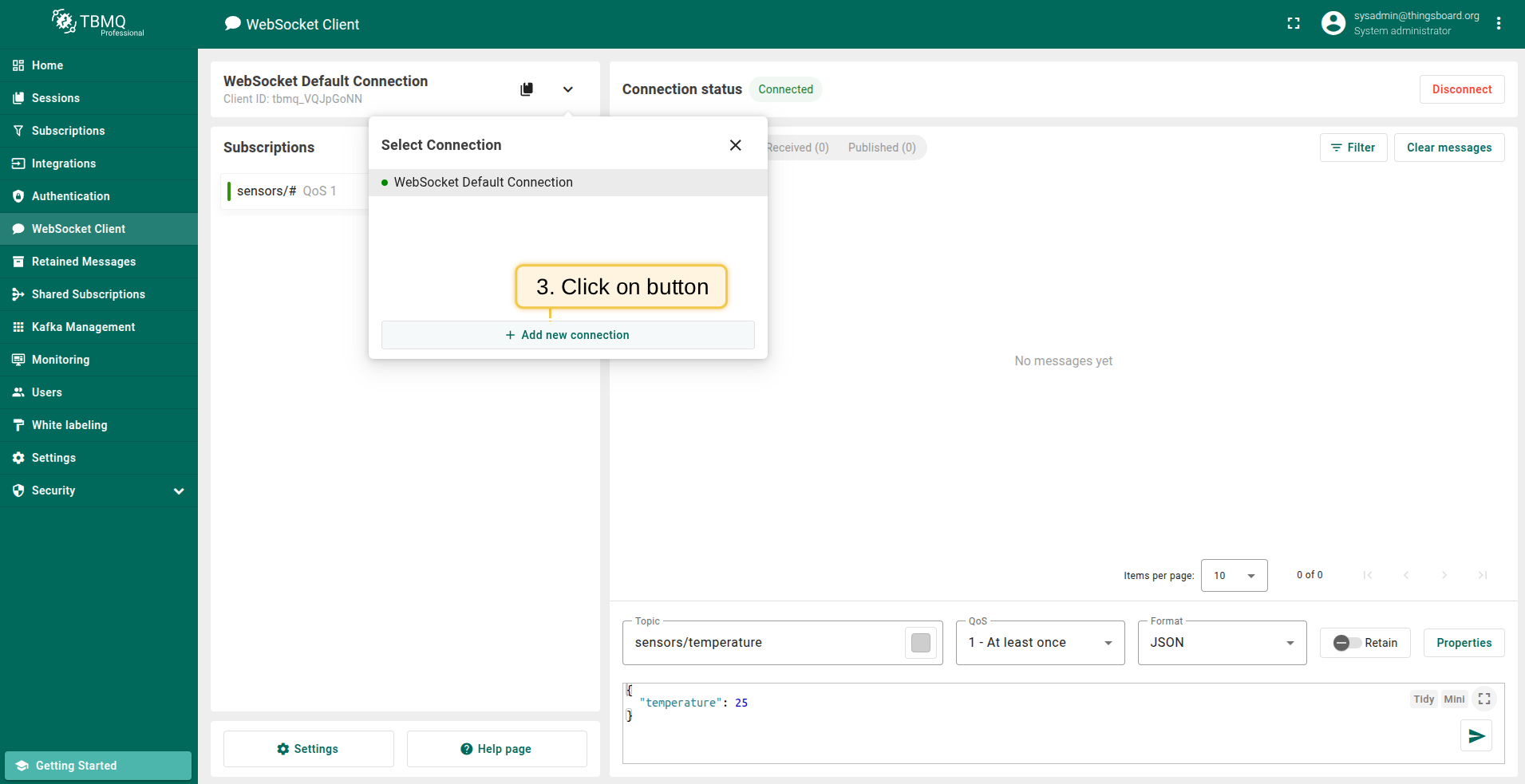
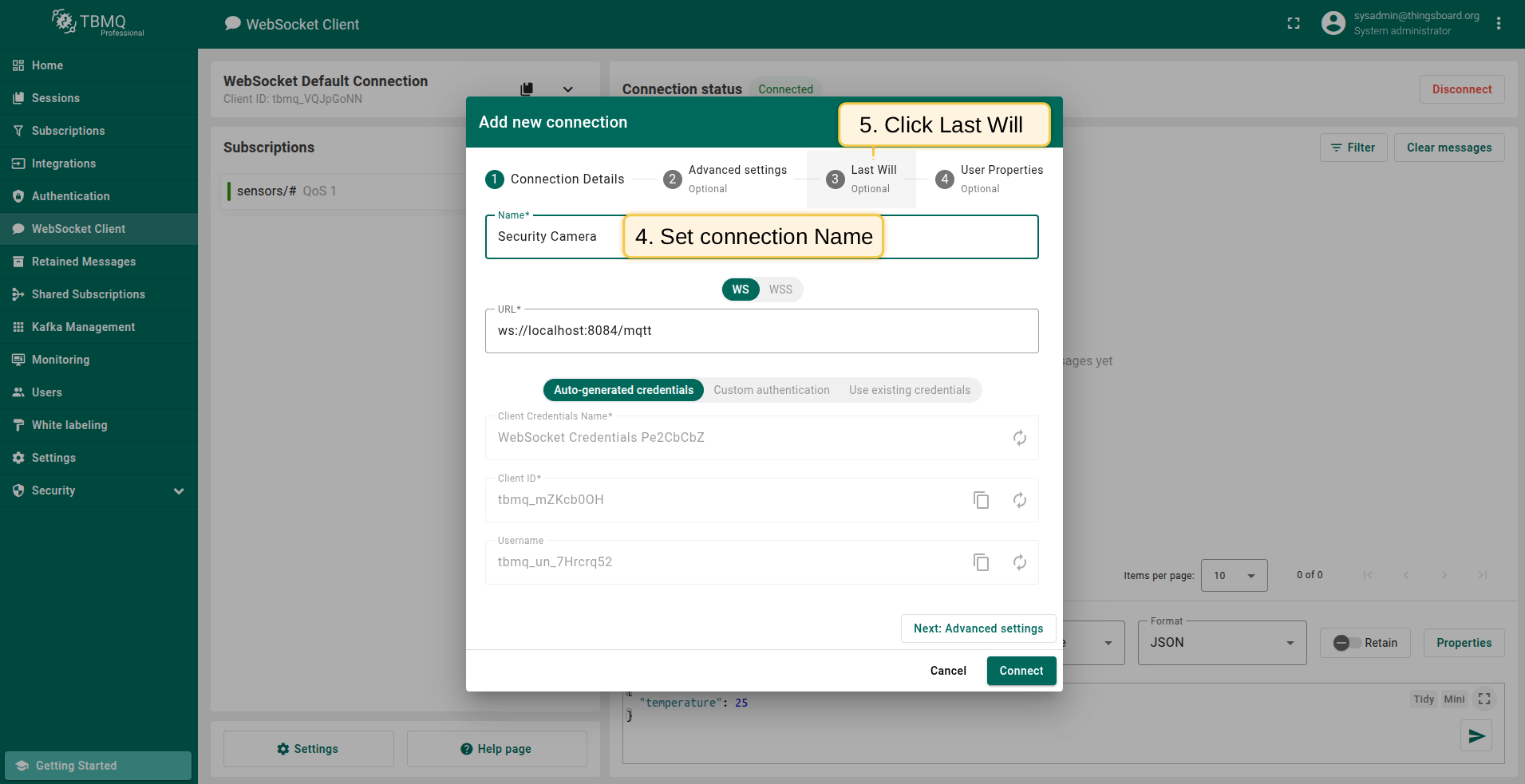
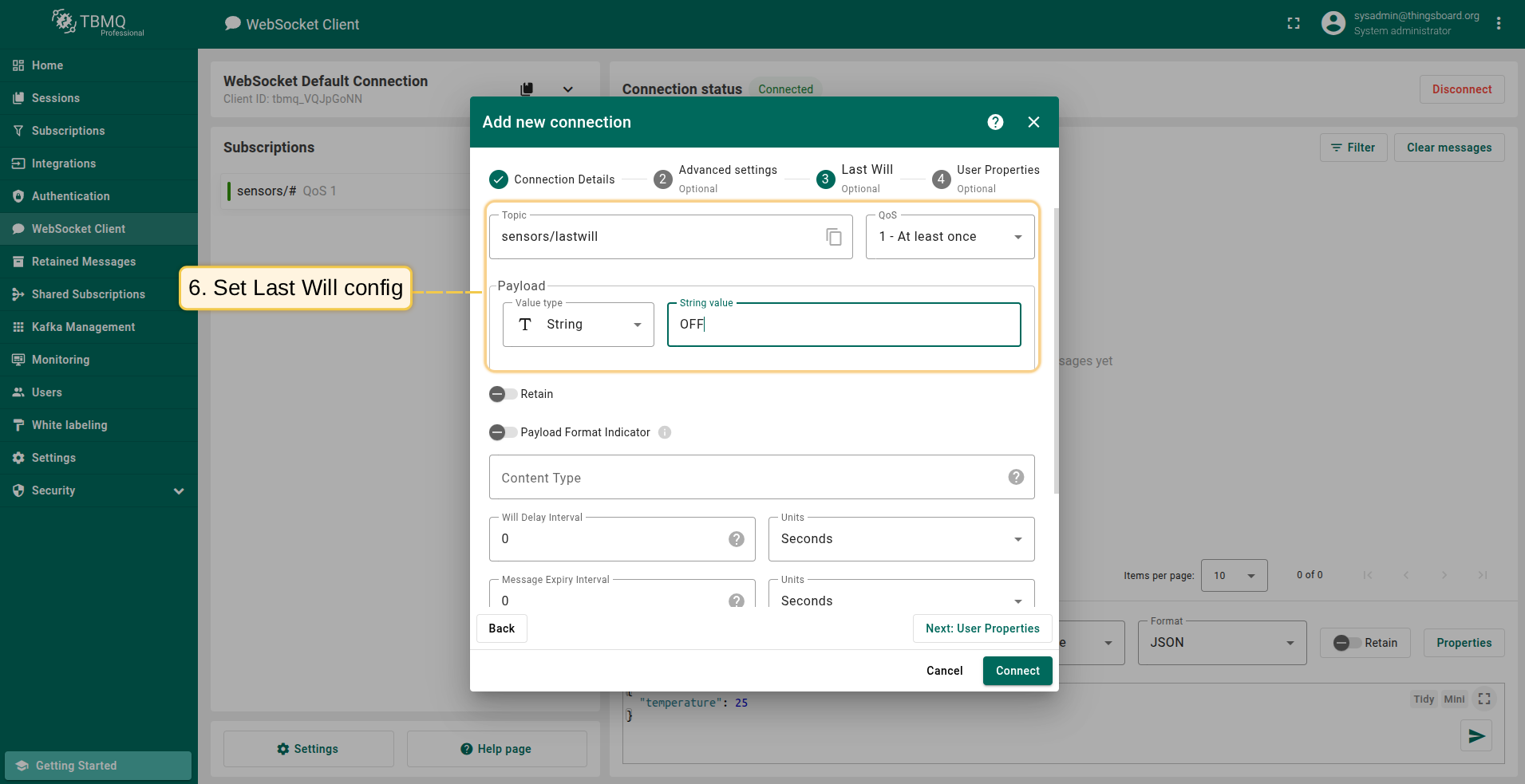
添加将发布Last Will消息的新客户端 Security Camera,按以下步骤操作:
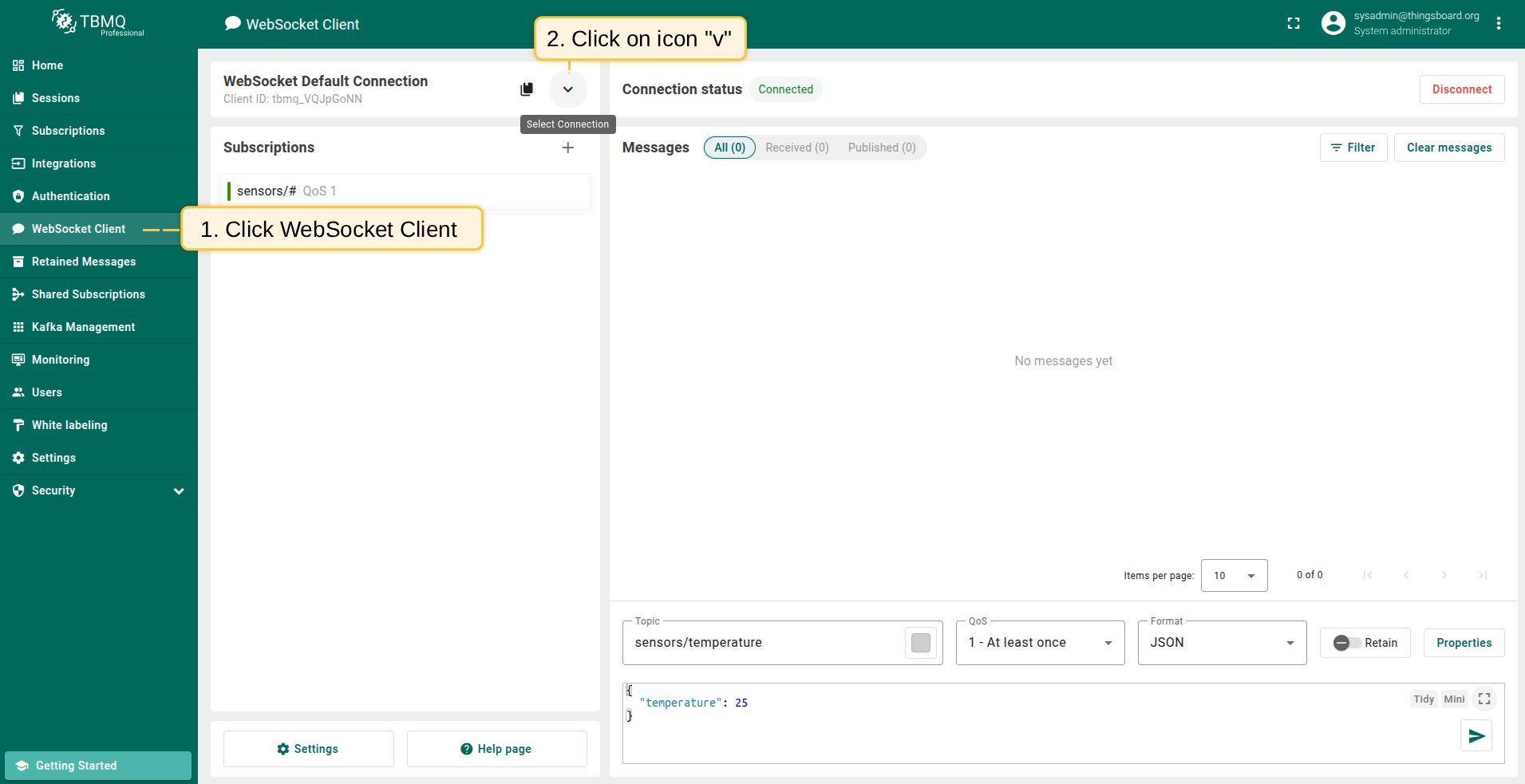
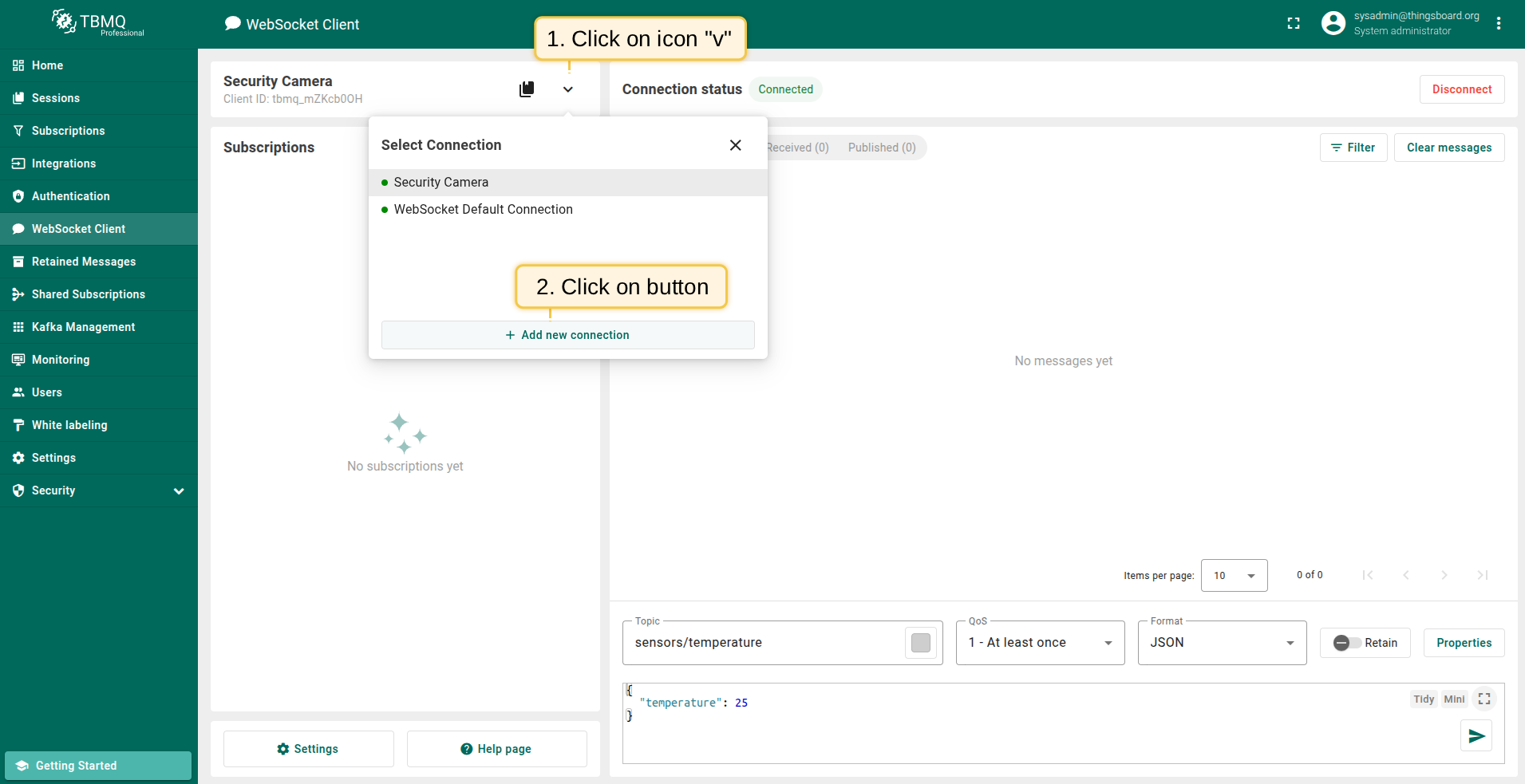
- 进入 WebSocket Client 页面并点击 Select Connection 图标。
- 点击 Add new connection 按钮。
- 将连接名称设为 Security Camera,配置Last Will主题与payload。
- 点击 Connect 建立客户端连接。
步骤2. 添加客户端“Security Hub”
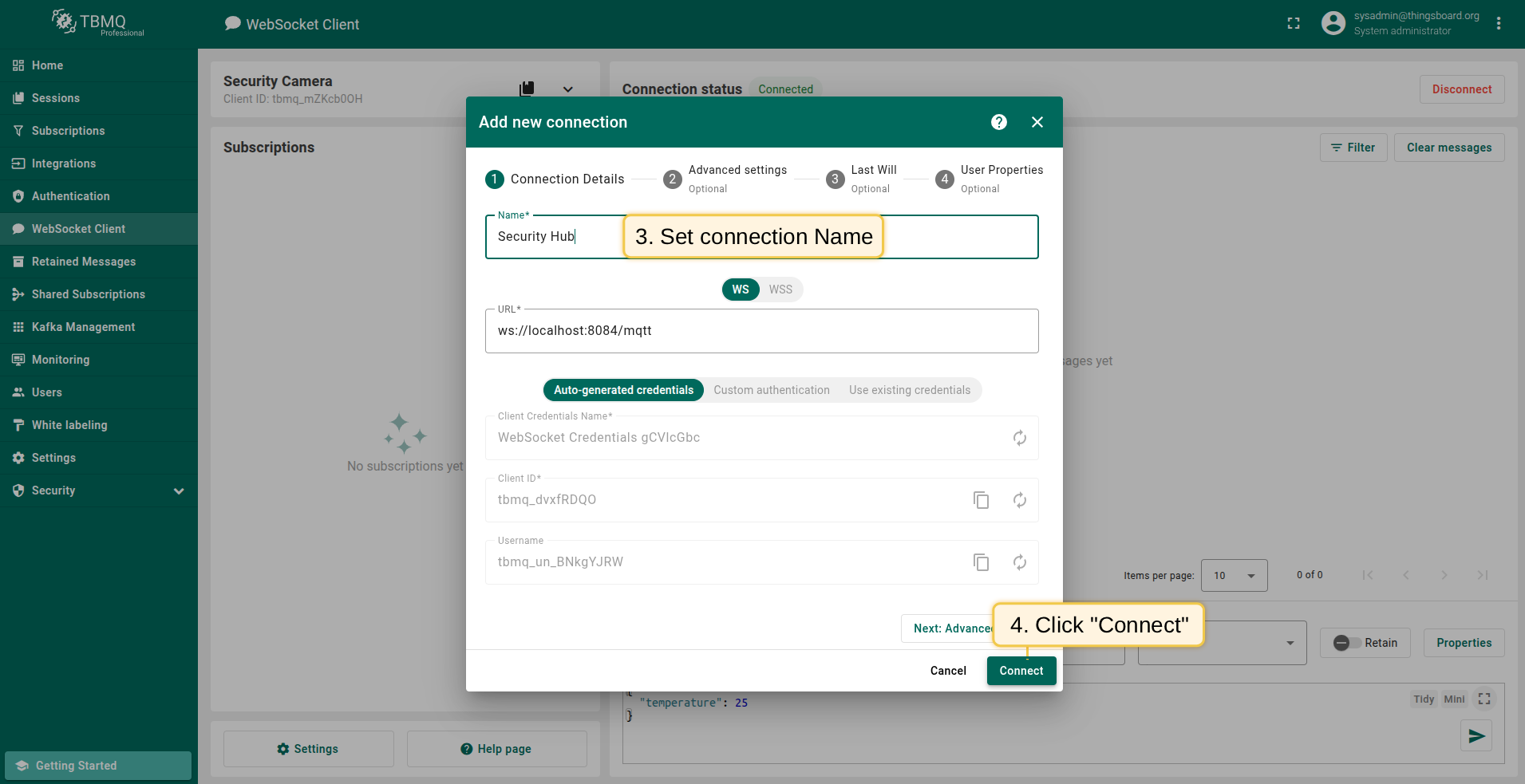
添加另一个连接 Security Hub,用于接收 Security Camera 的Last Will消息:
- 再次点击 Add new connection 按钮。
- 将连接名称设为 Security Hub。
- 点击 Connect。
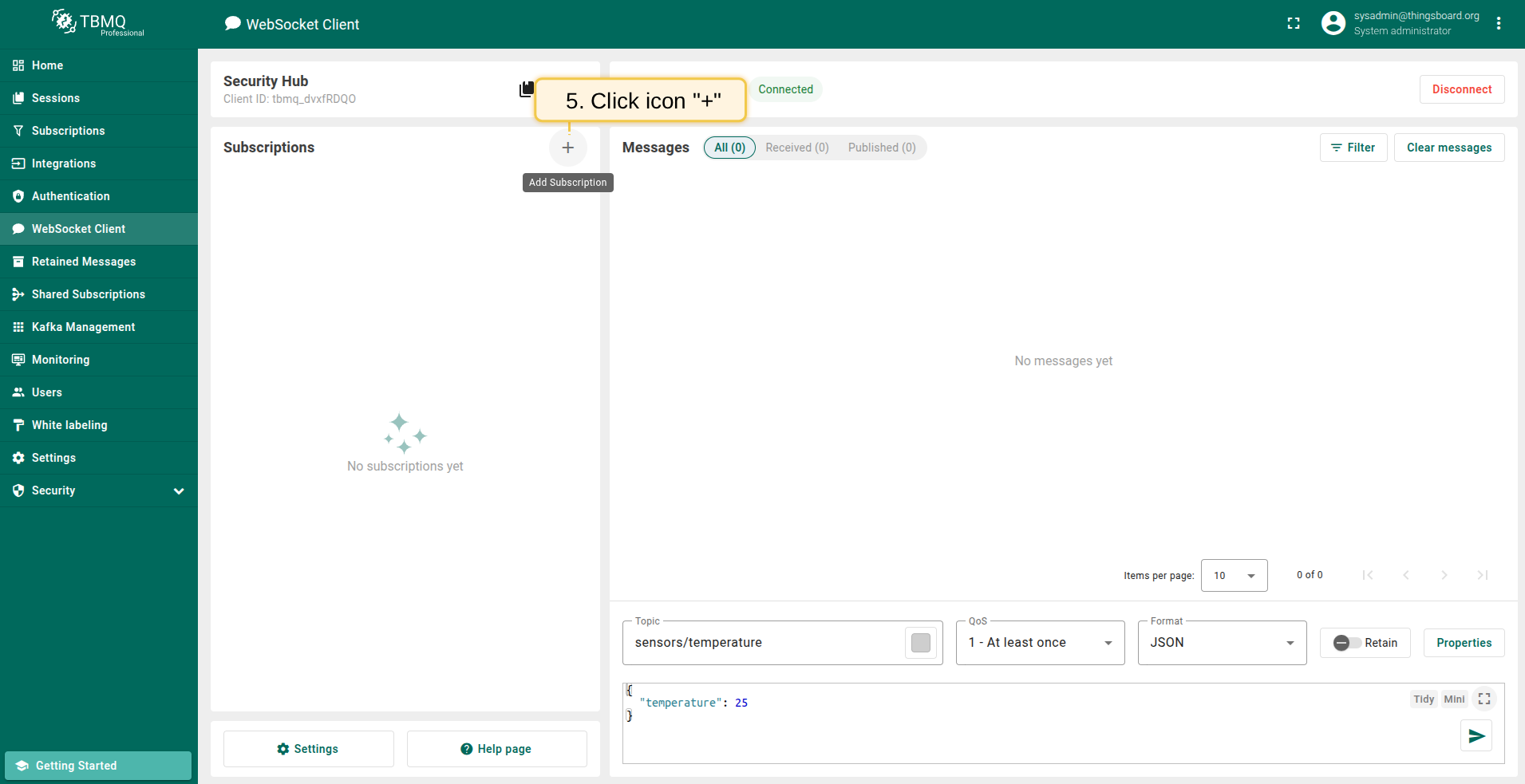
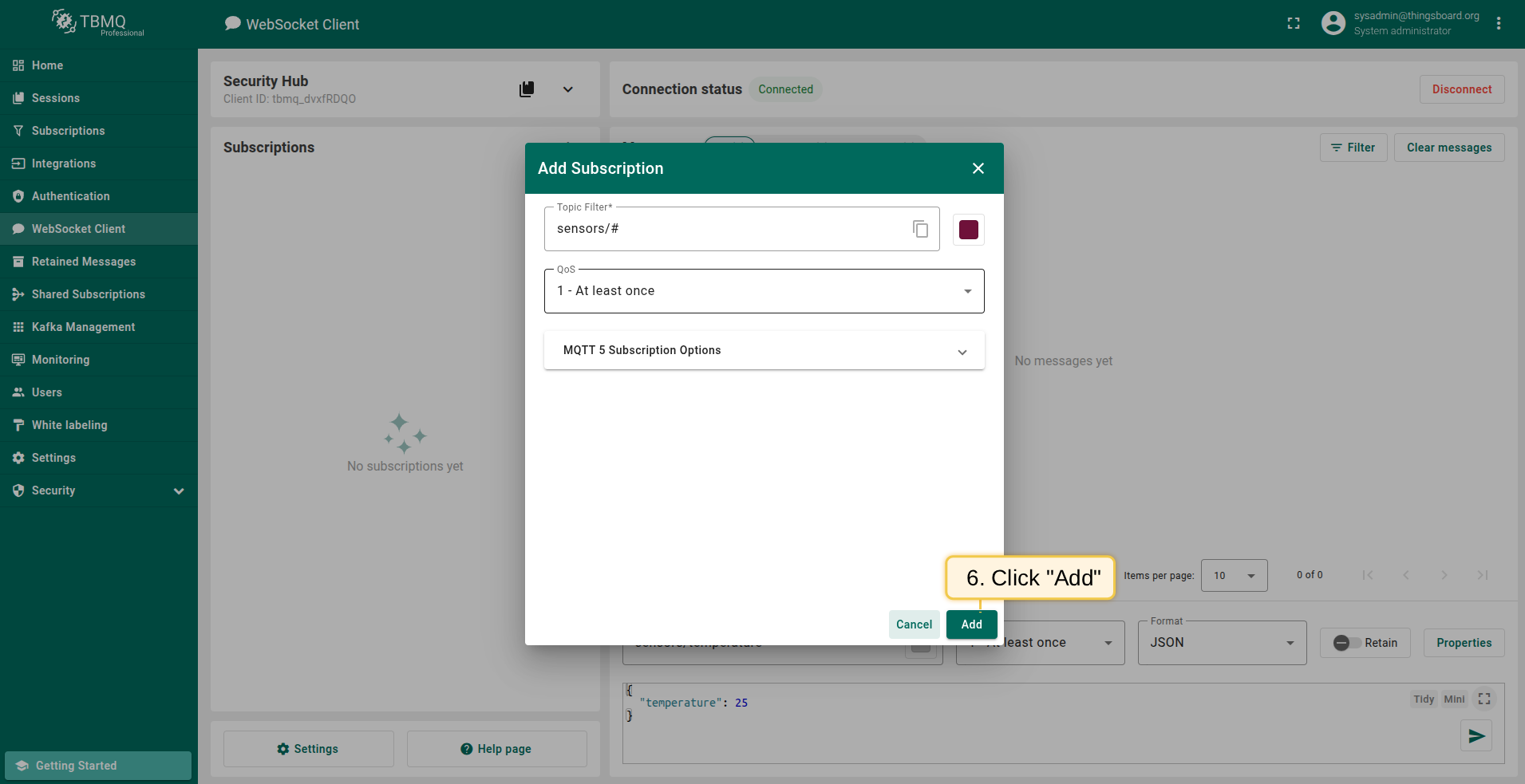
- 添加使用默认主题过滤器
sensors/#的订阅以接收Last Will消息。
步骤3. 触发非正常断开
要发布Last Will消息,客户端与broker间的连接需被非正常终止。在TBMQ中按以下步骤操作:
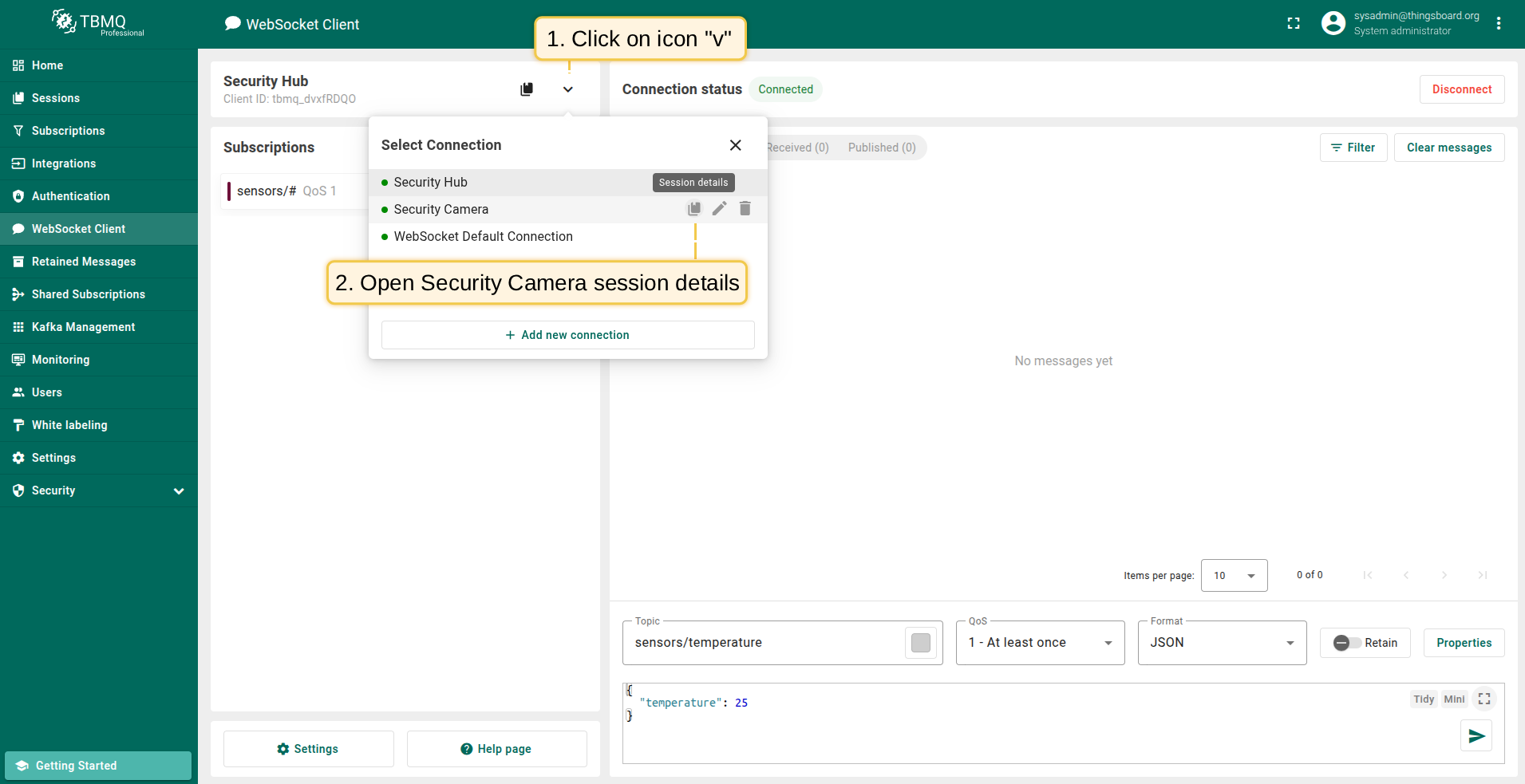
- 点击 Select Connection 图标,打开 Security Camera 会话详情窗口。
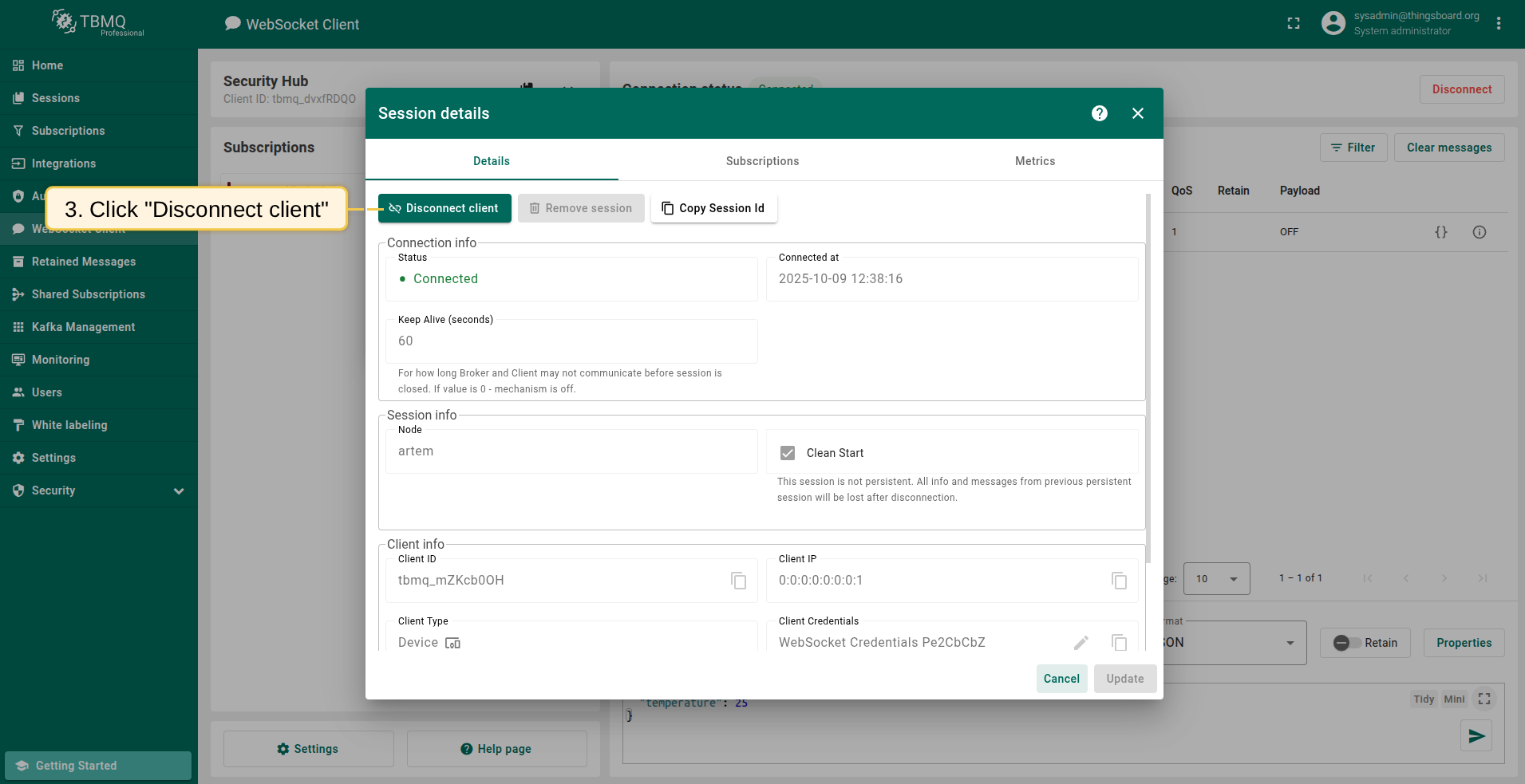
- 点击 Disconnect client 强制终止连接。
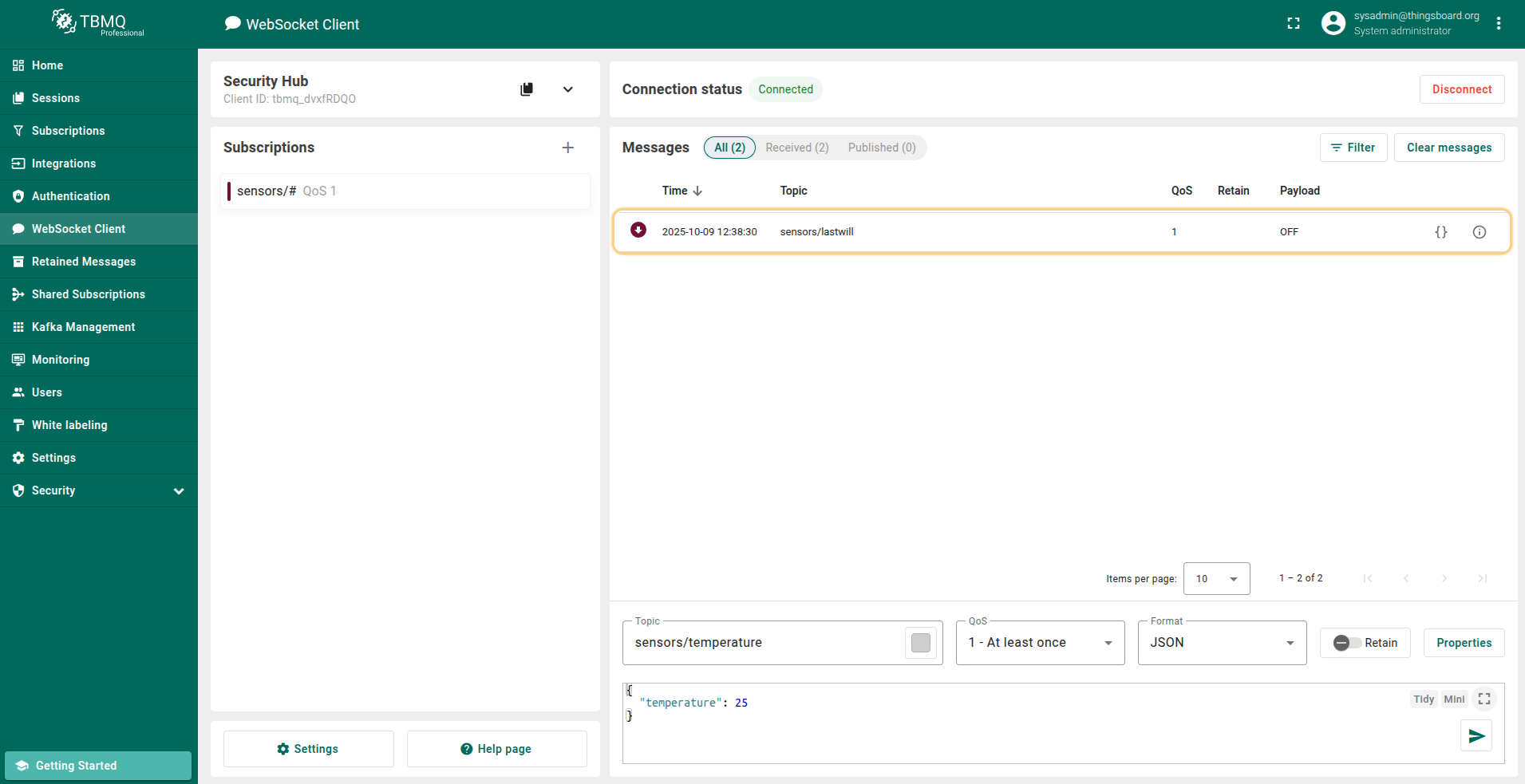
- 在WebSocket客户端 Security Hub 的 Messages 表格中应能看到收到的Last Will消息。