TBMQ的 Blocked Clients(被封禁客户端)功能允许管理员根据特定客户端标识或基于模式的规则限制对broker的访问。 增强安全、节省系统资源,并可细粒度控制谁能发起并保持与MQTT broker的连接。
Blocked Clients存储在内存中以便快速高效匹配,并通过Kafka在集群内所有broker节点间同步。 这确保在分布式部署中一致执行封禁规则。
每个Blocked Client条目可包含可选的过期时间戳。过期后,该条目被视为非活跃,并在定期清理过程中自动清除。
重要的是,Blocked Client检查在 认证阶段之前 执行。 这确保未授权或可能恶意的连接请求在评估任何凭据之前即被拒绝,从而降低系统负载并更快拒绝不允许的客户端。
Scenario: You’ve detected a client (clientId: attack-bot-23) trying to flood the broker with connection attempts or malformed packets. Action: Create a CLIENT_ID block entry to immediately prevent further connections from this client. Benefit: Immediate mitigation of malicious behavior without requiring changes to authentication logic or certificates.
支持的封禁类型
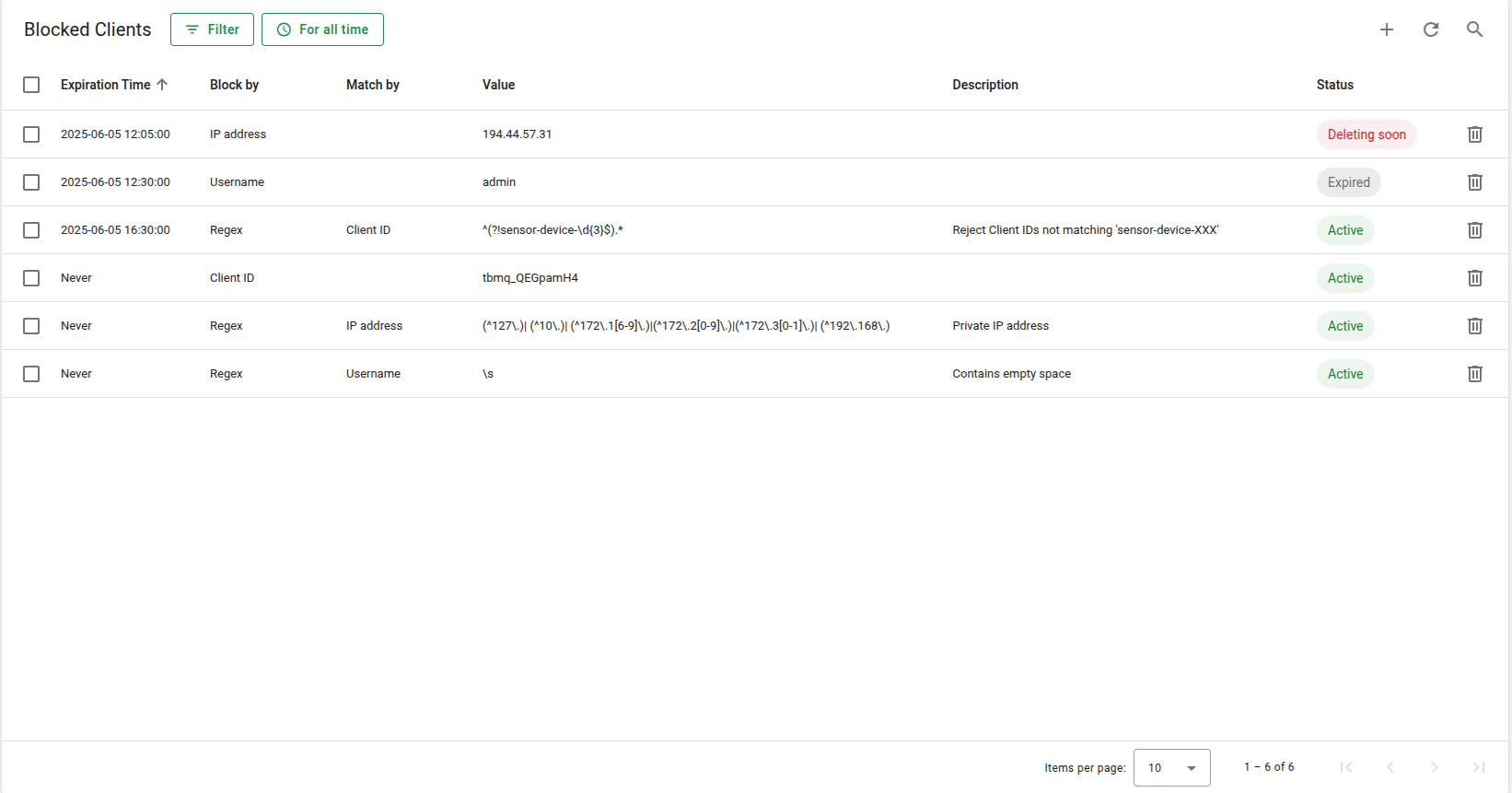
You can block a client using any of the following identifiers:
| Block by | Label on UI | Description |
|---|---|---|
CLIENT_ID |
Client ID | Block clients with specific client IDs |
USERNAME |
Username | Block based on MQTT usernames |
IP_ADDRESS |
IP address | Block by the client’s IP address |
REGEX |
Regex | Pattern-based blocking using regex |
The REGEX type supports matching based on one of:
BY_CLIENT_ID(UI label is “Client ID”).BY_USERNAME(UI label is “Username”).BY_IP_ADDRESS(UI label is “IP address”).
To block all clients whose IDs start with test- followed by digits, you can use the following regex rule:
1
2
3
Block by: REGEX
Regex Pattern Value: ^test-\d+$
Match by: BY_CLIENT_ID
这将封禁例如:
test-001test-42test-9999
但 不会 封禁:
demo-test-1test-usertest-
每个条目可处于以下 三种状态 之一:
- ✅ Active(活跃) – 条目有效且可正常使用。
- ⏳ Expired(已过期) – 条目已失效但尚未被清理。
- ⚠️ Deleting soon(即将删除) – 过期条目的过渡状态。当 超过清理宽限期的半数 时出现此状态,表示条目即将被系统移除。
工作原理
在连接阶段,每个客户端按以下顺序评估:
- 对
CLIENT_ID的精确匹配。 - 对
USERNAME的精确匹配。 - 对
IP_ADDRESS的精确匹配。 - 基于正则的匹配(若存在)。
若找到匹配且对应条目未过期,则拒绝连接。 Blocked Client事件也会被跟踪,并可通过 Unauthorized Clients 功能查看。
自动清理
过期的Blocked Clients会在后台自动清理。
1
2
3
4
5
6
blocked-client:
  cleanup:
    # The parameter to specify the period of execution cleanup task for expired blocked clients. Value set in minutes. Default value corresponds to five minutes
    period: "${BLOCKED_CLIENT_CLEANUP_PERIOD_MINUTES:5}"
    # Time to Live for expired blocked clients. After this time, the expired blocked client is removed completely. Value set in minutes. Default value corresponds to one week
    ttl: "${BLOCKED_CLIENT_CLEANUP_TTL_MINUTES:10080}"
Cleanup is performed only when the Blocked Client is expired and the TTL period has passed.
建议
使用 Blocked Clients 功能时,为确保最佳性能和可维护性,请考虑以下最佳实践:
-
除非确实需要,否则避免使用正则规则:使用正则表达式的模式匹配会降低系统速度, 因为每次客户端连接都必须检查所有正则规则。仅在按Client ID、用户名或IP地址的精确匹配不足时使用。
-
使用认证拒绝大多数客户端:最好通过标准认证方法封禁客户端。 封禁应作为补充手段,而非主要手段。
-
保持Blocked Clients数量较低:大量封禁条目,尤其是基于正则的条目,会占用更多内存并减慢查找。 保持列表较短可确保更快性能和更好可扩展性。