本指南介绍如何配置自定义移动应用,使其支持通过手机相机扫描二维码直接启动。 无论您是从GitHub使用自有源代码自定义现有应用,还是将其指向自定义主机,本文档都将引导您完成必要步骤。
Android应用设置
将Android应用指向您自己的主机
要将自定义应用指向您自己的主机,您需要修改AndroidManifest.xml文件:
- 使用VS Code或Android Studio打开Flutter项目;
- 导航至
android/app/src/main/AndroidManifest.xml文件; - 修改AndroidManifest.xml。您需要更新
android:host=为您的主机:
1
2
3
4
5
6
7
8
9
10
<!-- App Links -->
<intent-filter android:autoVerify="true">
    <action android:name="android.intent.action.VIEW" />
    <category android:name="android.intent.category.DEFAULT" />
    <category android:name="android.intent.category.BROWSABLE" />
    <data
        android:scheme="https"
        android:host="thingsboard.cloud"
        android:pathPrefix="/api/noauth/qr" />
</intent-filter>
Android移动应用二维码部件设置
要在扫描二维码时启动自定义移动应用,您需要在ThingsBoard移动应用二维码部件设置中指定”App package name“和”SHA256 certificate fingerprints“。
App package name
在android/app/build.gradle的build.gradle文件中查找应用包名applicationId:
1
2
3
4
    defaultConfig {
        // TODO: Specify your own unique Application ID (https://developer.android.com/studio/build/application-id.html).
        applicationId "org.thingsboard.pe.app"
    }
SHA256 certificate fingerprints
如果您的应用通过Google Play分发,您需要使用开发者账户中Release > Setup > App Integrity > App Signing选项卡下的SHA-256证书指纹:
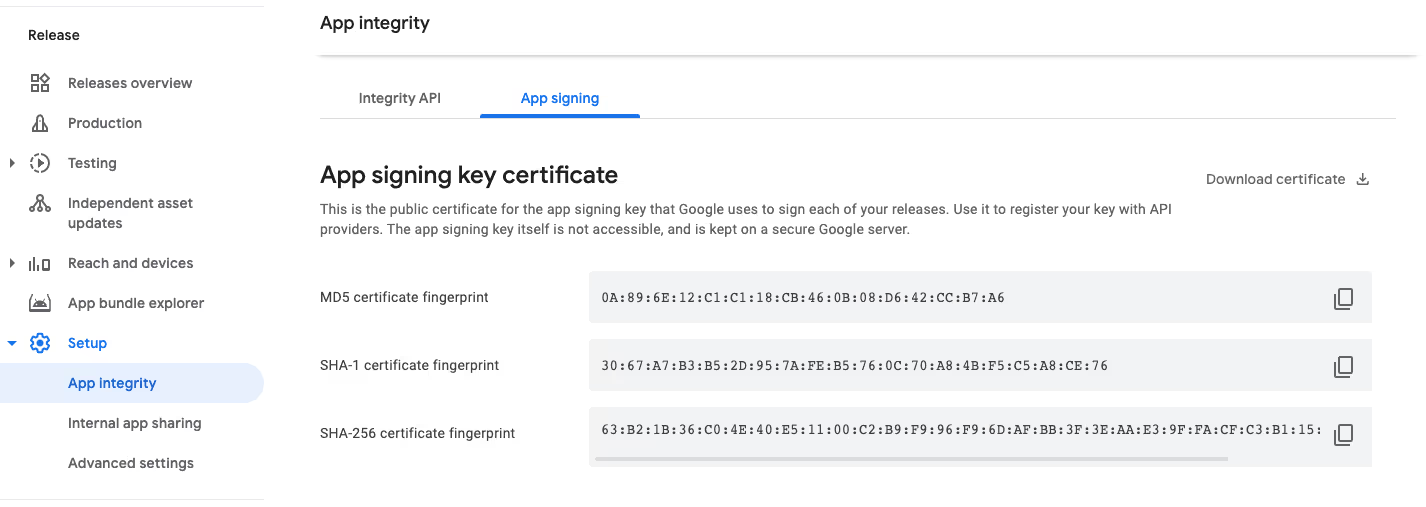
如果您的应用是本地分发,您需要使用APK签名所用的SHA-256密钥。
更多信息请参阅Firebase官方文档中的指南”Set up app links for Android“。
iOS应用设置
将iOS应用指向您自己的主机
要将iOS应用指向您自己的主机,您需要修改entitlements.xml文件:
- 在您喜欢的IDE中打开并修改
ios/YOUR_APP_NAME/YOUR_APP_NAME.entitlements.xml文件; - 使用您的域名修改entitlements.xml:您需要更新
applinks的主机:
1
2
3
4
5
6
7
8
9
10
11
12
<?xml version="1.0" encoding="UTF-8"?>
<!DOCTYPE plist PUBLIC "-//Apple//DTD PLIST 1.0//EN" "http://www.apple.com/DTDs/PropertyList-1.0.dtd">
<plist version="1.0">
<dict>
	<key>aps-environment</key>
	<string>development</string>
	<key>com.apple.developer.associated-domains</key>
	<array>
		<string>applinks:thingsboard.cloud</string>
	</array>
</dict>
</plist>
iOS移动应用二维码部件设置
要在扫描二维码时启动自定义iOS移动应用,您需要在ThingsBoard移动应用二维码部件设置中指定”App ID“。
App ID
当您从模板创建Xcode项目时,bundle ID(CFBundleIdentifier)在整个系统中唯一标识您的应用。
此ID结合了您以反向DNS格式输入的组织ID和应用名称。
例如,如果您为组织输入”Runner”作为应用名称,bundle identifier将为com.mycompany.app.Runner。
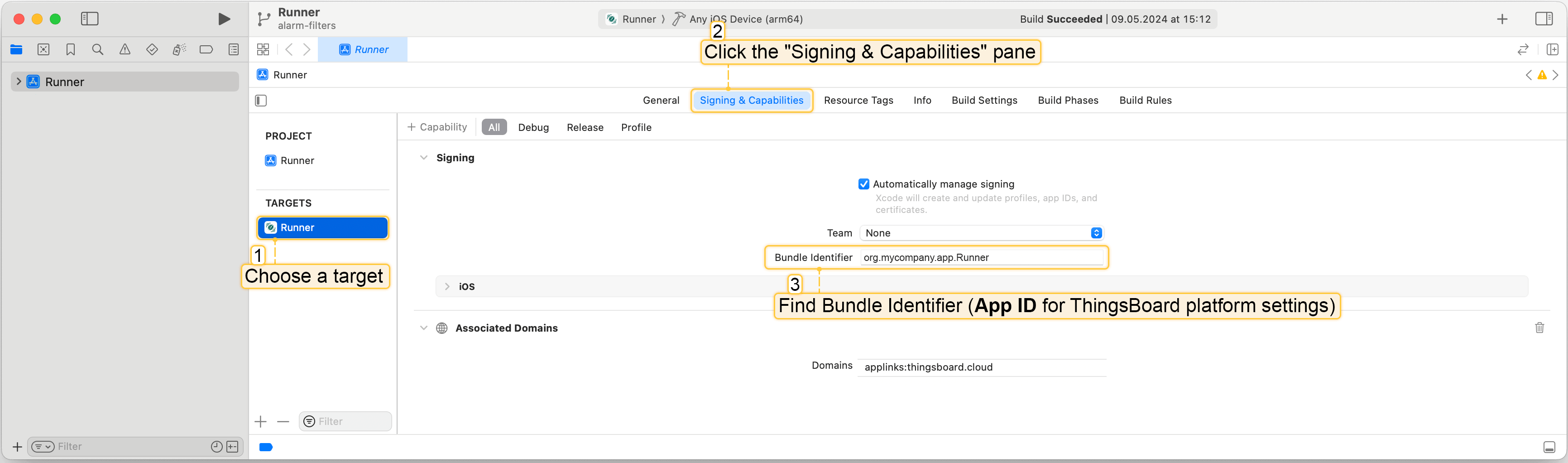
要查找bundle ID(App ID),您需要:
- 选择target;
- 点击”Signing & Capabilities”窗格;
- 在”Signing”部分找到bundle identifier(App ID)。