X.509证书链认证是企业环境和需要强身份验证的IoT部署中广泛使用的MQTT连接安全方法。 客户端在TLS握手期间提交证书,而非依赖用户名和密码,使broker能够基于证书的通用名(CN)属性进行身份认证。
X.509认证概述
使用X.509证书链认证时,客户端在TLS握手过程中提交其证书链。
TBMQ从客户端证书或证书链中的任意证书提取通用名(CN),生成credentialsId并与已配置的MQTT客户端凭据进行匹配。
TBMQ supports two matching modes:
- 精确匹配 — 证书中的CN必须与配置的模式完全匹配。
- 正则表达式(regex)匹配 — CN必须匹配regex模式,支持对证书组的灵活匹配。
匹配成功后,客户端通过认证。为提升性能并降低查询延迟,TBMQ在Redis中缓存凭证,PostgreSQL负责持久化存储。
以下各节说明提供者配置、凭证匹配、credentialsId 生成以及认证成功后的授权应用方式。
配置提供者
您可直接在TBMQ用户界面中查看认证提供者状态、启用或禁用它们,无需修改配置文件或重启broker即可轻松管理认证行为。
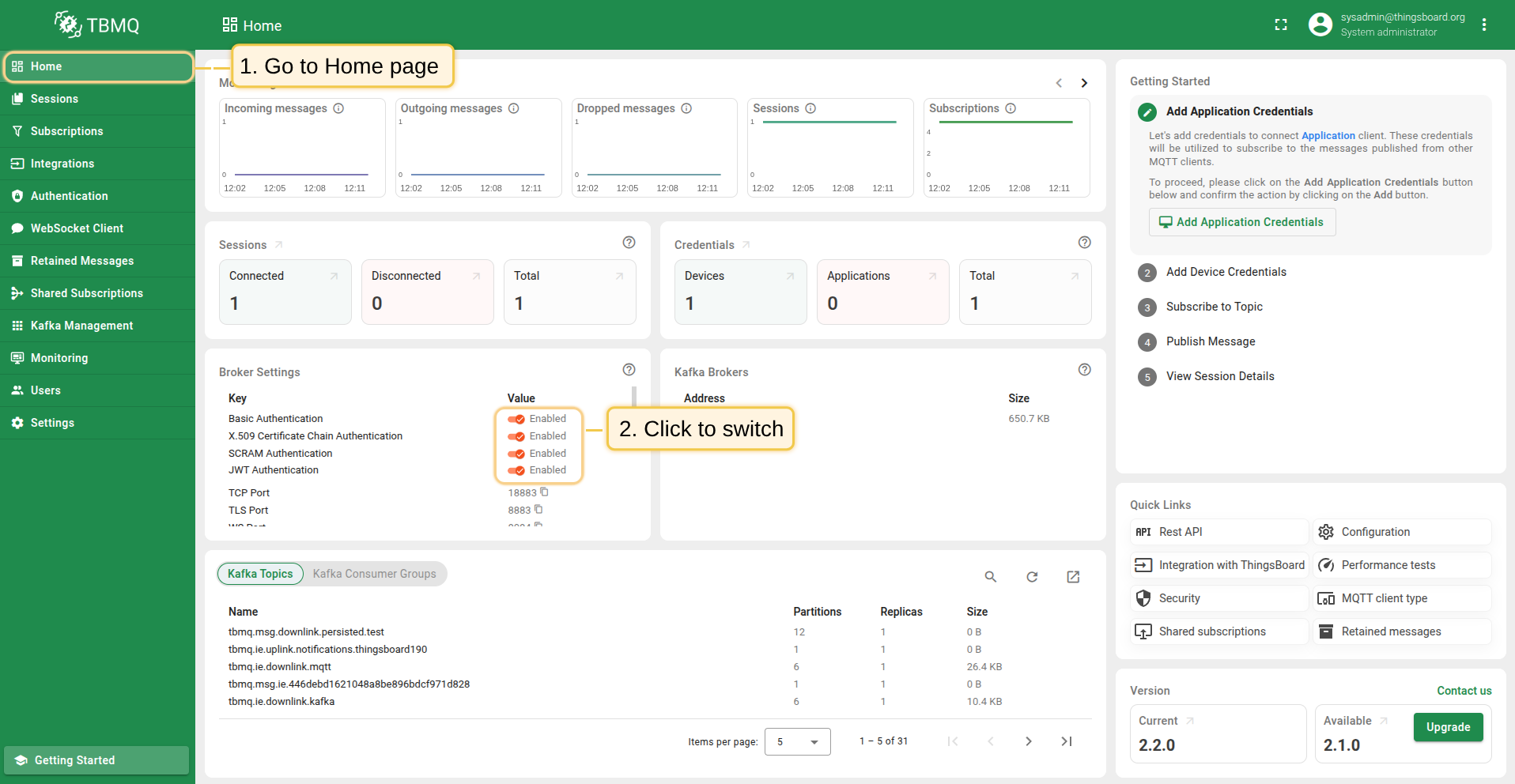
- 在首页的 Broker Settings 卡片中,可找到每个可用认证提供者的快捷切换按钮。 点击目标提供者旁的按钮即可启用或禁用。
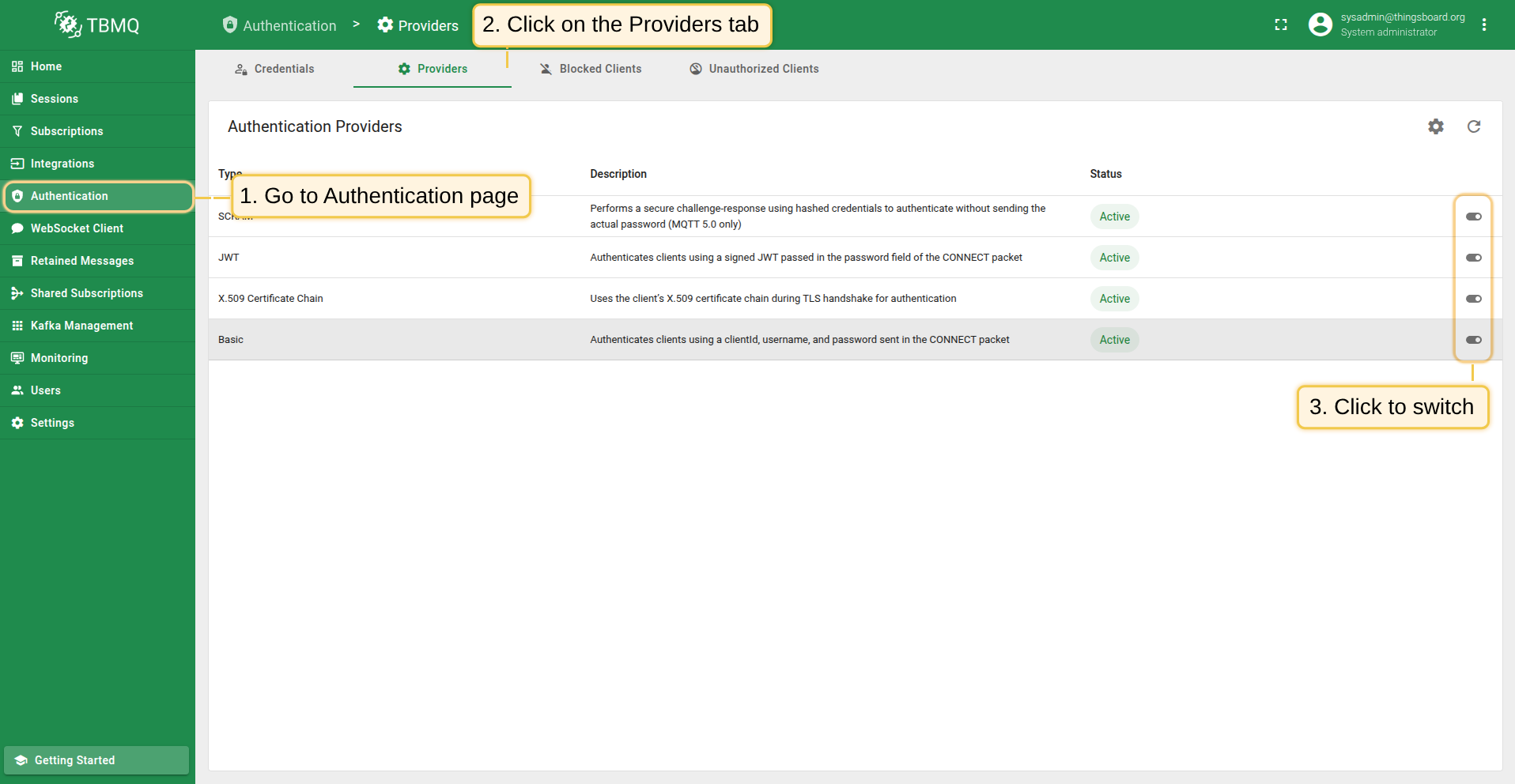
- 在 Authentication Providers 页面,可进行更精细的控制和查看:
- 通过点击表格对应行的Switch按钮,可直接启用或禁用提供者。
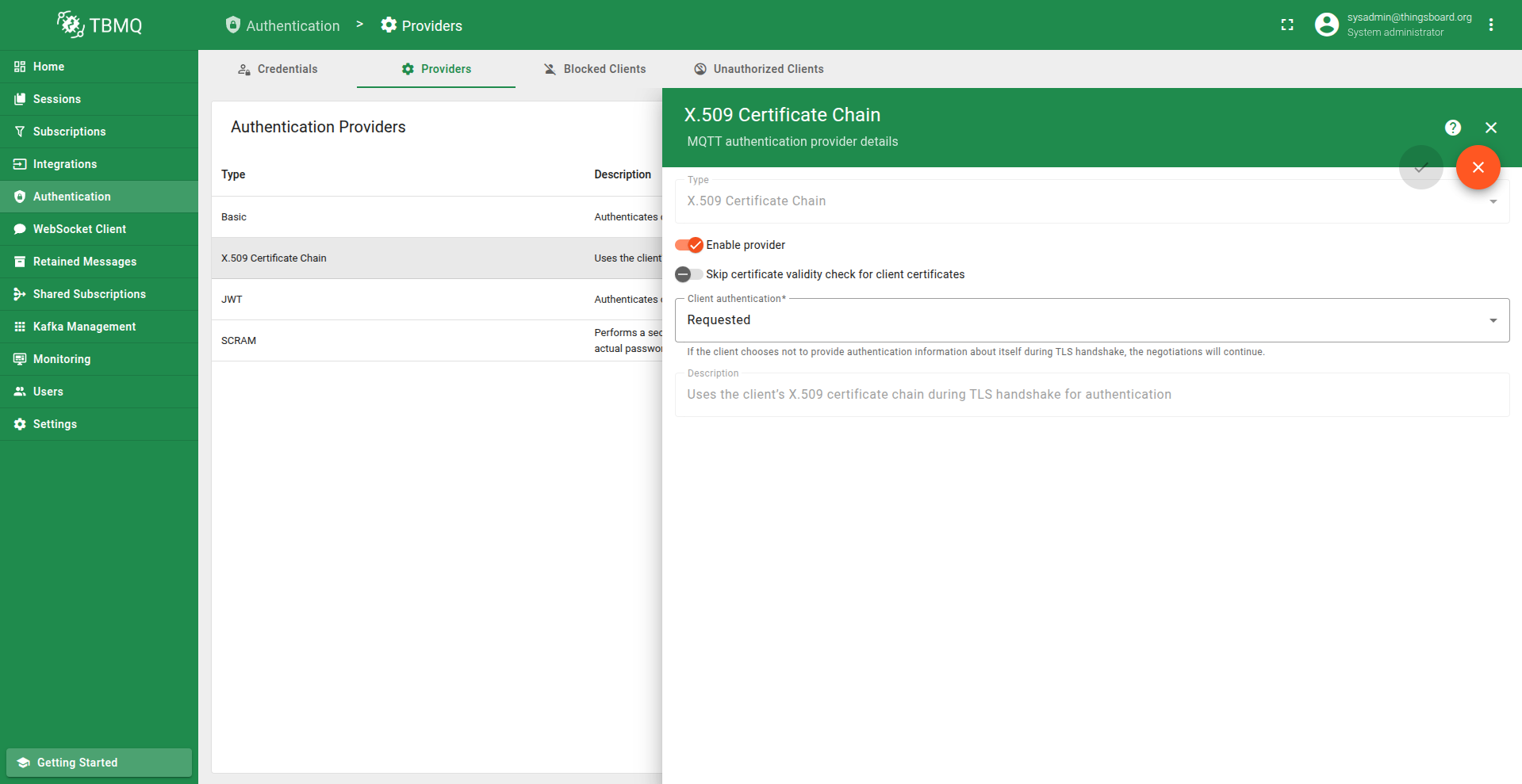
- 如需更细致的管理,点击提供者打开详情页,可修改状态或其他参数。
跳过客户端证书有效期检查
X.509证书链认证中的Skip certificate validity check for client certificates参数控制broker在认证过程中是否验证客户端证书的有效期。
- 启用时,TBMQ跳过证书中Not Before和Not After日期的验证,即过期或尚未生效的证书仍然会被接受。
- 禁用时,broker执行标准有效期检查,若证书过期或尚未生效,认证将失败。
此设置在测试或特定信任受控环境中可能有用,但在生产部署中不建议设为true,因为这会削弱基于证书的安全模型。
凭据匹配
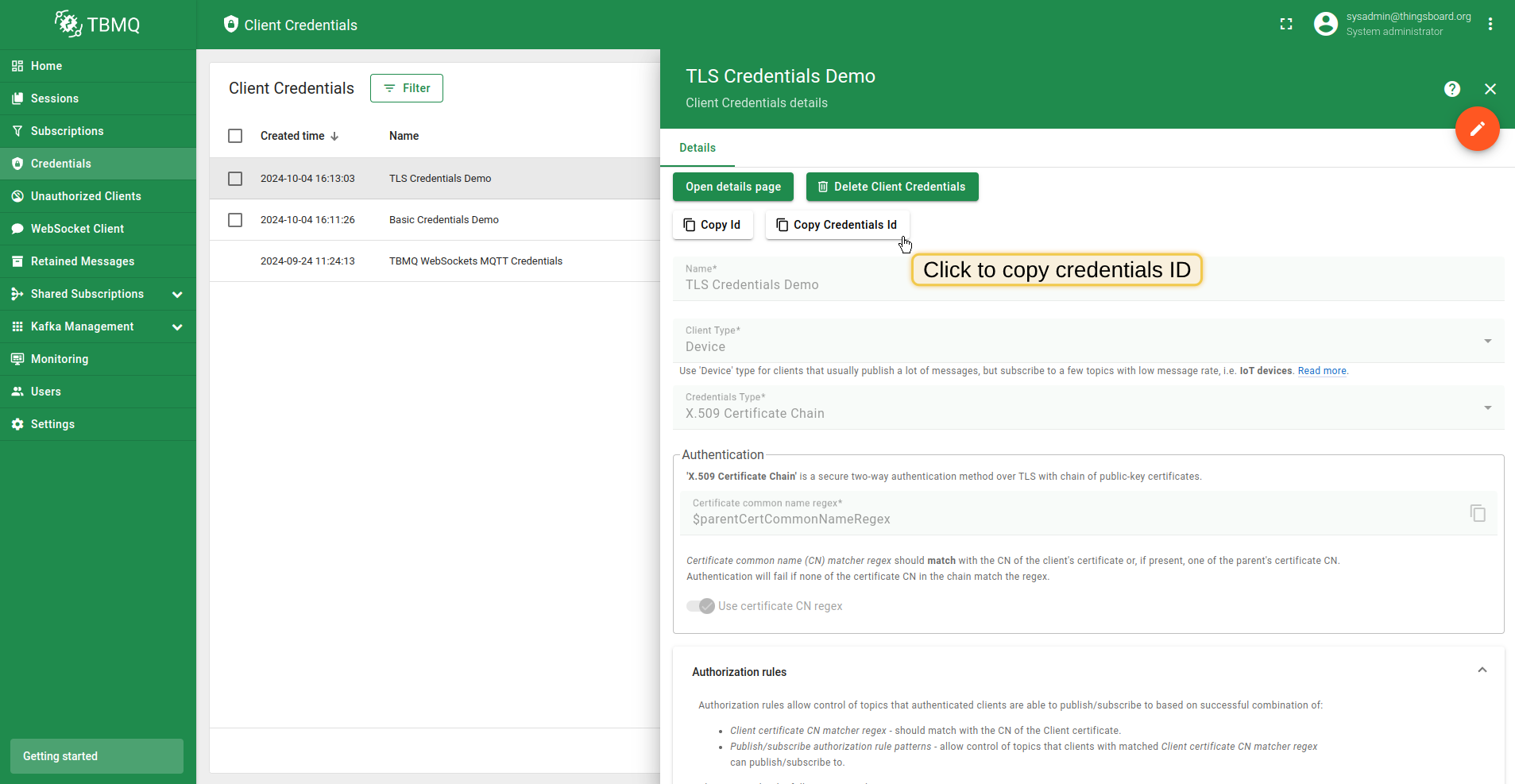
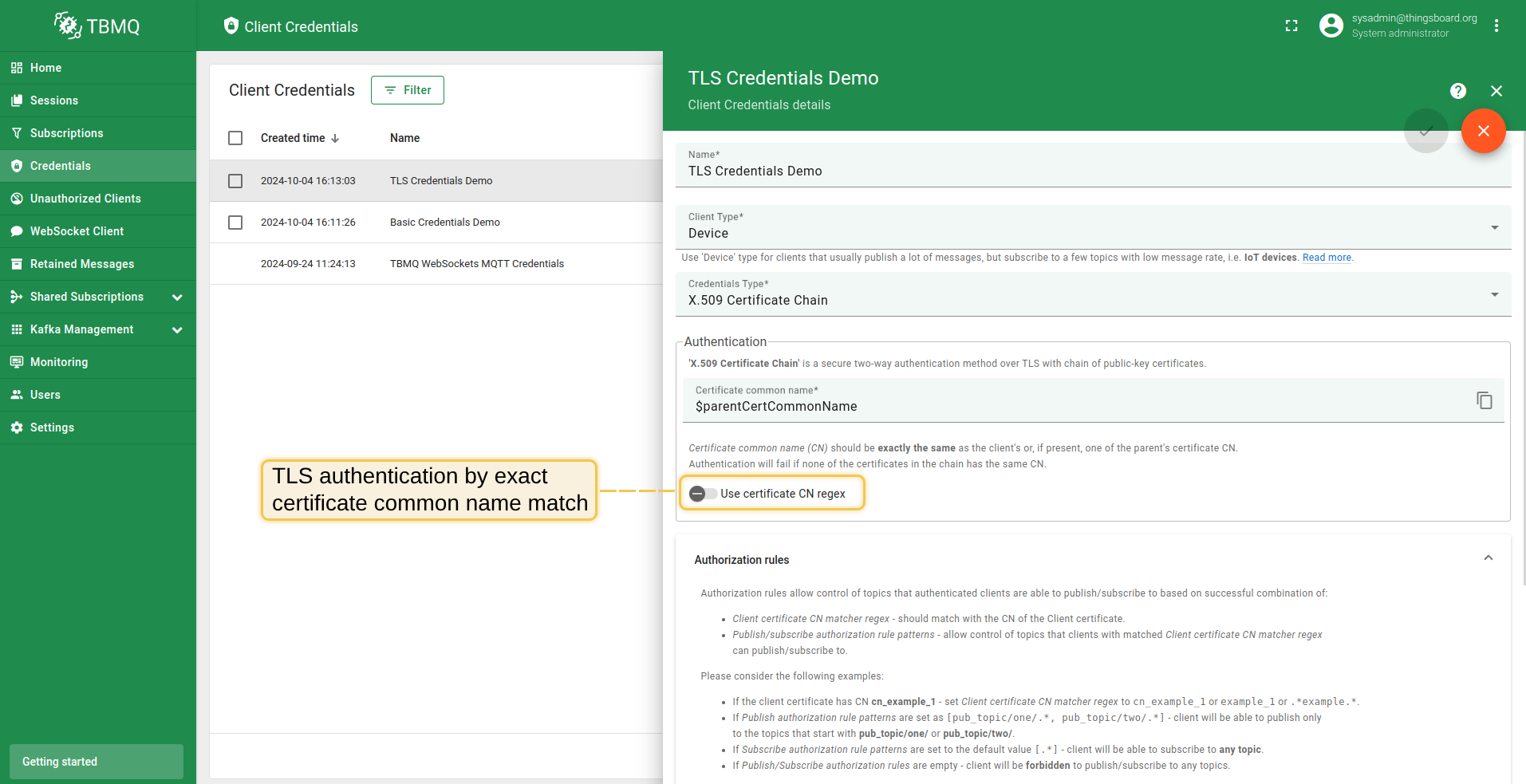
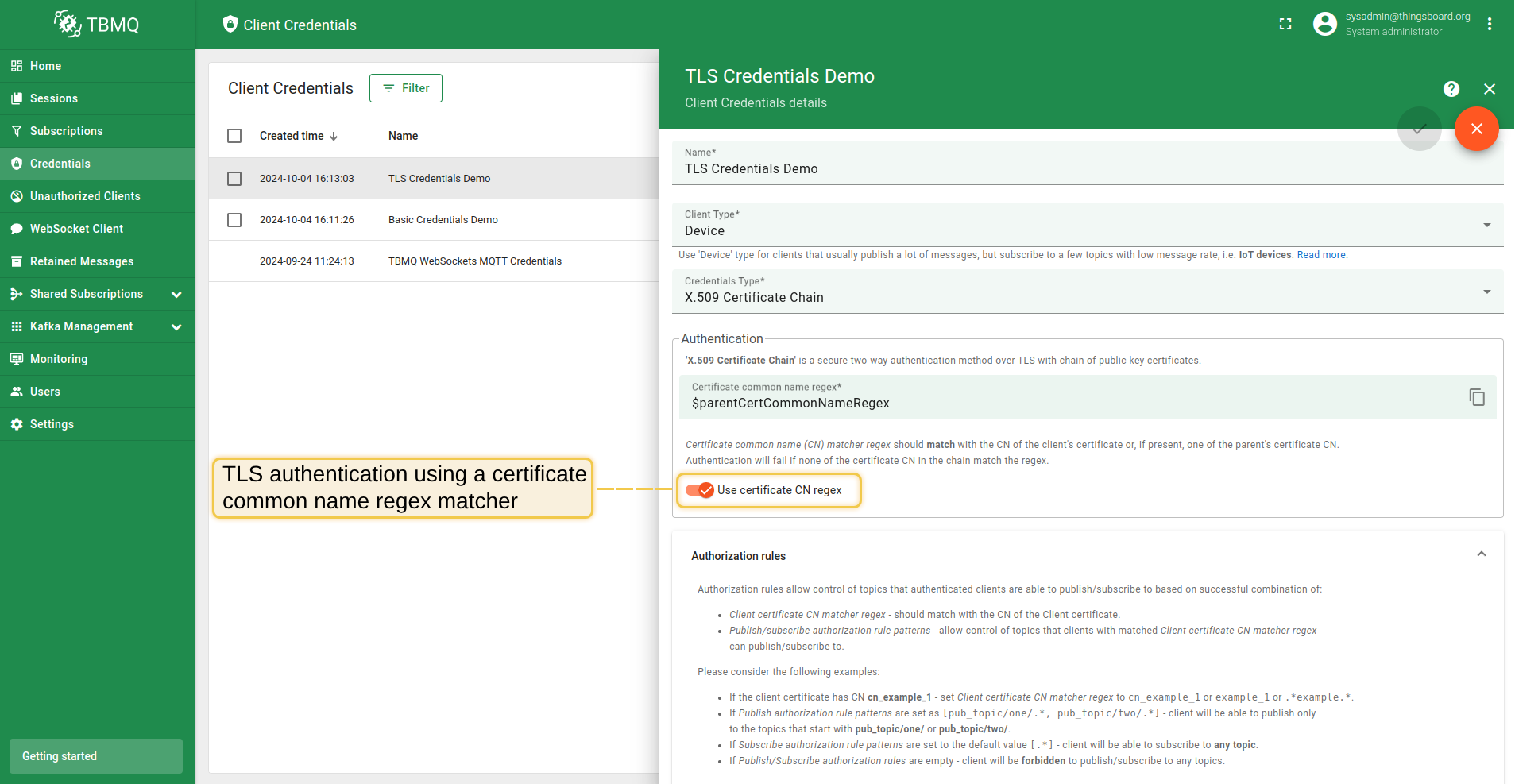
“X.509 Certificate Chain”凭据有一个“Use certificate CN regex”选项,控制凭据的匹配方式。
-
禁用”Use certificate CN regex”时: “Certificate common name (CN)”必须与客户端证书或证书链中父证书(如有)的CN精确匹配。 若证书链中没有任何证书的CN精确匹配,认证将失败。
-
启用”Use certificate CN regex”时: “Certificate common name (CN) matcher regex”必须匹配客户端证书或证书链中父证书(如有)的CN。 若证书链中没有任何证书的CN匹配该正则表达式,认证将失败。
凭据ID
credentialsId的生成方式如下:
- credentialsId =
ssl|$CERTIFICATE_COMMON_NAME; - credentialsId =
ssl|$CERTIFICATE_COMMON_NAME_REGEX。
其中$CERTIFICATE_COMMON_NAME是证书链中证书的通用名,$CERTIFICATE_COMMON_NAME_REGEX是基于正则表达式的字符串,
用于与证书链中证书的CN进行匹配。
授权
用户认证成功后,可限制客户端对可发布或订阅主题的访问。
TBMQ使用正则表达式提供灵活的授权规则控制。
例如,要允许客户端发布或订阅所有以city/开头的主题,应创建值为city/.*的授权规则。
对于TLS类型,授权通过对应MQTT客户端凭据的authRulesMapping字段配置。 凭据值的模型如下:
1
2
3
4
5
{
    "certCnPattern": $certCnPattern,
    "certCnIsRegex": $certCnIsRegex,
    "authRulesMapping": $authRulesMapping
}
其中:
- $certCnPattern - 证书链中应存在的通用名模式。
- $certCnIsRegex - 控制通用名(CN)模式是否作为正则表达式进行匹配的选项。
- $authRulesMapping - 用于配置不同关键字访问限制的映射。
例如,
1
2
3
4
5
6
7
8
9
10
{
    "example_1": {
        "pubAuthRulePatterns": ["example_pub_topic/.*"],
        "subAuthRulePatterns": ["example_sub_topic/.*"]
    },
    "example_2": {
        "pubAuthRulePatterns": [".*"],
        "subAuthRulePatterns": [".*"]
    }
}
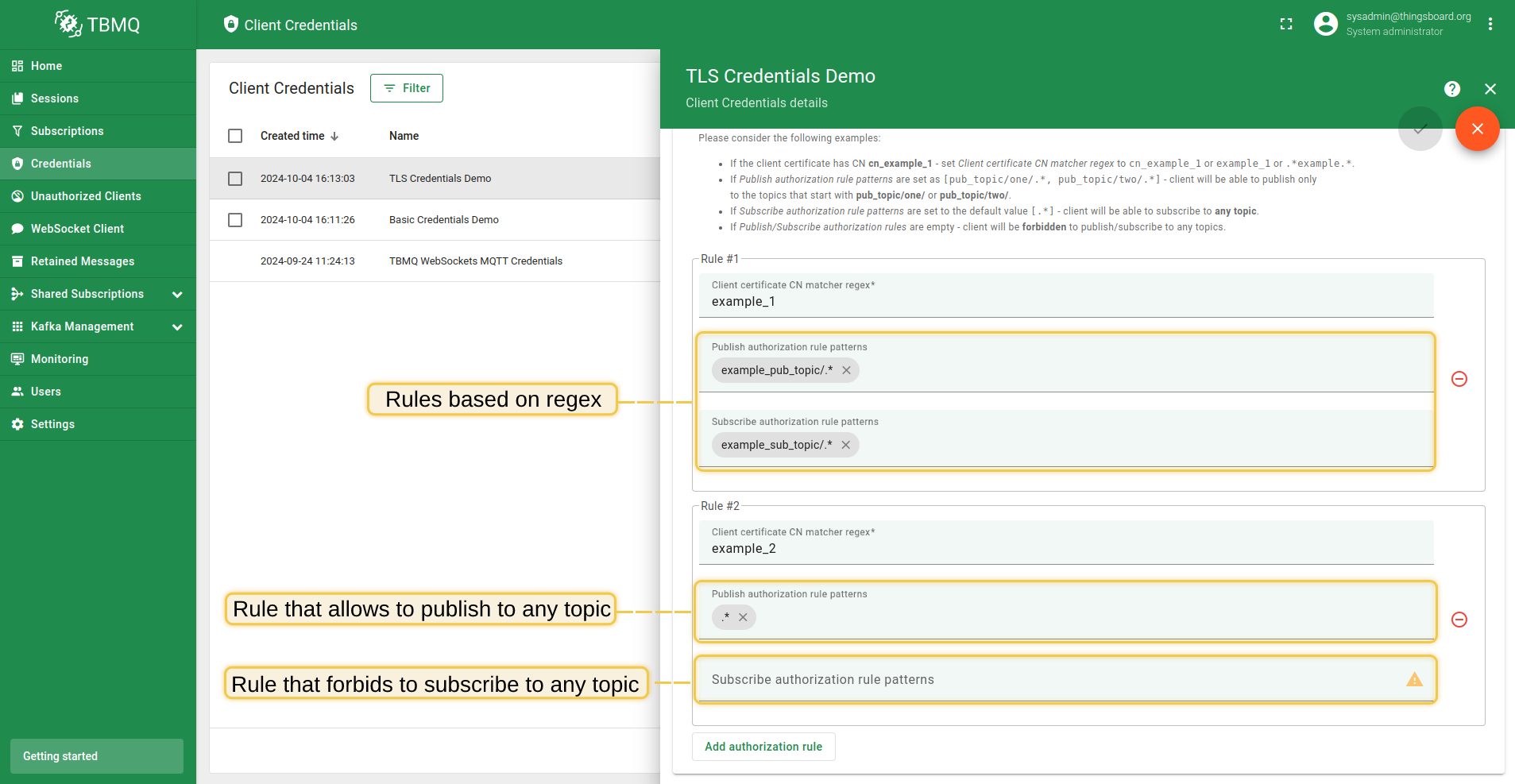
此配置允许证书CN中包含example_1的客户端仅向以example_pub_topic/开头的主题发布消息, 并订阅以example_sub_topic/开头的主题。证书CN中包含example_2的客户端则允许向任何主题发布和订阅。
注意: 如果pubAuthRulePatterns或subAuthRulePatterns设置为null或空列表([]),客户端将无法向任何主题发布或订阅。
示例
X.509证书用于为MQTT over TLS设置双向认证。 以下说明介绍如何使用X.509证书将MQTT客户端连接到TBMQ。
具体而言,有两种策略可用于建立客户端与TBMQ之间的连接:
- X.509证书链。
配置TBMQ信任来自特定信任锚点(中间证书)的所有客户端证书。 此特性在证书轮换时无需手动更新每个MQTT客户端凭据。 - X.509证书。
配置TBMQ接受使用预配置客户端证书的特定设备连接。
步骤 1. 准备服务器与 Client 证书链若自托管 TBMQ,请按 MQTT over SSL 指南配置服务器证书。 配置完成后,准备 pem 格式的 CA root 证书。MQTT 客户端将使用该证书校验服务器证书。 将 CA root 证书保存到工作目录,命名为 “ca.pem“。 Step 2. 生成 Client 证书链需生成具有合理 Common Names (CN) 的证书链。将使用中间证书为设备签发证书。 例如,证书链 CN 可如下:
使用以下命令为各级链生成自签名私钥、证书签发请求和 x509 证书。 命令基于 OpenSSL 工具,工作机通常已安装: 步骤 2.1 生成 root 证书 生成 Root 证书和私钥,使用以下命令。提示时请填写正确的 CN: 示例输出,CN 为 *company.com*步骤 2.2 生成 intermediate 证书 生成 intermediate 密钥和证书请求,使用以下命令。提示时请填写正确的 CN: 示例输出,CN 为 *group.company.com*生成 intermediate 证书,使用以下命令: 示例输出步骤 2.3 生成 device 证书 生成 device 密钥和证书请求,使用以下命令。提示时请填写正确的 CN: 示例输出,CN 为 device123.group.company.com生成 device 证书,使用以下命令: 示例输出最后,需将证书自 device 证书至 root 依次拼接为链: 命令将输出各级链的私钥和证书。后续步骤将使用 device 私钥文件 deviceKey.pem 和证书链 chain.pem。 步骤 3. 在 MQTT Client Credentials 中配置 Intermediate 公钥进入 TBMQ Web UI -> Authentication -> Credentials -> Create new or update exising one。 选择 X.509 Certificate Chain 类型,粘贴 intermediateCert.pem 的 CN。 步骤 4. 信任证书MQTT 客户端建立安全 TLS 连接前,签发其证书的 CA (Certificate Authority) 必须被信任。
若证书由知名公共 CA 签发,默认已受信任。
若 TBMQ 与 clients 均使用同一 CA 签发的证书,无需额外配置。
若为其他私有或内部 CA,需将 CA 证书 ( 执行以下命令将 CA 证书导入 truststore。 步骤 5. 测试连接执行以下命令,通过安全通道向 TBMQ 上报温度数据: 自签名 服务器证书的类似命令: 请将 YOUR_TBMQ_HOST 替换为您的 TBMQ 实例 host。 |
步骤 1. 准备服务器与 Client 证书若自托管 TBMQ,请按 MQTT over SSL 指南配置服务器证书。 配置完成后,准备 pem 格式的 CA root 证书。MQTT 客户端将使用该证书校验服务器证书。 将 CA root 证书保存到工作目录,命名为 “ca.pem“。 步骤 2. 生成 Client 证书使用以下命令生成自签名私钥和 x509 证书。 命令基于 openssl 工具,工作机通常已安装: 生成 RSA 密钥和证书: 生成 EC 密钥和证书: 命令输出为私钥文件 key.pem 和公钥证书 cert.pem。 后续步骤将使用这两个文件。 步骤 3. 在 MQTT Client Credentials 中配置 Client 公钥进入 TBMQ Web UI -> Authentication -> Credentials -> Create new or update exising one。 选择 X.509 Certificate Chain 类型,粘贴 cert.pem 的 CN。 步骤 4. 信任证书MQTT 客户端建立安全 TLS 连接前,其证书必须被信任。
若证书由知名公共 CA 签发,默认已受信任。
若为自签名证书,需将 client 证书 ( 执行以下命令将证书导入 truststore。 步骤 5. 测试连接执行以下命令,通过安全通道向 TBMQ 上报温度数据: 请将 YOUR_TBMQ_HOST 替换为您的 TBMQ 实例 host。 |
下一步
-
快速入门指南 - 本指南提供 TBMQ 的快速概览。
-
安装指南 - 学习如何使用 Docker 配置 TBMQ 或在 AWS、GCP、Azure 的 K8S 环境中部署。
-
配置指南 - 了解 TBMQ 配置文件和参数。
-
MQTT 客户端类型指南 - 了解 TBMQ 客户端类型。
-
与 ThingsBoard 集成 - 了解如何将 TBMQ 与 ThingsBoard 集成。