PROXY Protocol 是一种简单协议,用于在多层代理或负载均衡器之间安全传输连接信息(如客户端IP地址)。
TBMQ同时支持 PROXY Protocol v1 和 v2,可接收并处理真实的客户端IP和端口, 这对于准确审计、限流、访问控制及理解客户端连接的实际来源至关重要。
- PROXY Protocol v1:人可读的基于ASCII的格式,在TCP流前添加连接元数据(如IP地址和端口)。
- PROXY Protocol v2:更高效的二进制格式,提供与v1相同的信息,但支持更多协议且在高吞吐量环境下性能更好。
使用PROXY Protocol,TBMQ可根据客户端真实IP地址记录、过滤并应用策略,否则该地址会被代理或负载均衡器遮蔽。
PROXY Protocol工作原理
PROXY Protocol在TCP流的开头追加有关原始客户端连接的 元信息。 此元数据由代理或负载均衡器在任意协议特定数据(如MQTT CONNECT包或TLS握手)之前 发送。
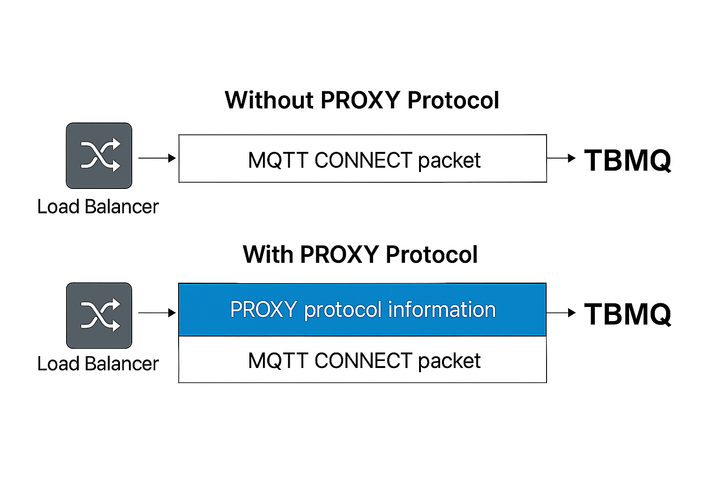
当客户端通过支持PROXY Protocol的代理连接TBMQ时,连接流程如下:
- 代理接受客户端的TCP连接。
- 代理立即发送包含以下内容的 PROXY Protocol头:
- 客户端的 源IP 和 端口。
- 代理的 目标IP 和 端口。
- 协议类型(TCP over IPv4或IPv6)。
- 启用PROXY Protocol的TBMQ首先读取此头,提取真实客户端信息,然后继续处理应用数据:
- 对于明文MQTT/WS连接:TBMQ随后处理MQTT CONNECT包。
- 对于TLS加密的MQTT/WS连接:TBMQ解析头后继续进行 TLS握手。
- 在 PROXY Protocol v1 中,此头以 ASCII 格式发送,例如:
1
PROXY TCP4 192.0.2.1 198.51.100.1 12345 1883\r\n
- 在 PROXY Protocol v2 中,头为 二进制 格式,更紧凑,适合高性能系统。
这意味着TBMQ将每条传入连接的前几个字节视为PROXY Protocol数据,然后才解释为MQTT连接。
何时使用该协议?
在以下情况下应在TBMQ中启用PROXY Protocol:
- TBMQ部署在支持PROXY Protocol的 负载均衡器 或 反向代理(如HAProxy、AWS NLB、NGINX)之后。
- 需要捕获客户端的 真实IP地址,用于:
- 准确 记录 客户端连接详情。
- 应用 基于IP的安全策略 和 限流。
- 基于真实客户端来源的详细 审计 和 分析。
TBMQ将客户端IP地址作为 客户端会话信息 的一部分存储。 此IP地址也用于 Unauthorized Clients 功能,TBMQ在其中跟踪认证失败的客户端的连接尝试。 拥有正确的IP地址有助于识别未授权访问尝试的来源并改进安全监控。
若不使用PROXY Protocol,TBMQ只能看到代理或负载均衡器的IP,无法区分代理后的各客户端。 启用PROXY Protocol可确保TBMQ在连接时收到实际客户端IP和端口。
重要:除非代理已正确配置为发送PROXY Protocol头,否则 不要 启用PROXY Protocol。启用后,TBMQ期望每条TCP连接开头都有PROXY Protocol头。
如何启用该协议?
要在TBMQ中启用PROXY Protocol支持,需更新MQTT监听器配置。
- TBMQ v2.3之前:PROXY Protocol设置 全局 应用于TBMQ中所有MQTT监听器,无法 为每个监听器单独配置。
1
2
3
4
5
# MQTT listeners parameters
listener:
  # Enable proxy protocol support. Disabled by default. If enabled, supports both v1 and v2.
  # Useful to get the real IP address of the client in the logs, for session details info and unauthorized clients feature
  proxy_enabled: "${MQTT_PROXY_PROTOCOL_ENABLED:false}"
将环境变量 MQTT_PROXY_PROTOCOL_ENABLED 设为 “true”。
- TBMQ v2.3起:除全局设置外,还可 按MQTT监听器 配置PROXY Protocol。 按监听器设置默认为未设置,继承全局值。 若显式设置,按监听器值将覆盖全局值。
1
2
3
4
5
6
7
8
9
10
11
12
13
14
15
16
17
18
19
20
21
22
23
24
25
26
27
# MQTT listeners parameters
listener:
  # Enable proxy protocol support as a global setting for all listeners. Disabled by default. If enabled, supports both v1 and v2.
  # Useful to get the real IP address of the client in the logs, for session details info and unauthorized clients feature
  proxy_enabled: "${MQTT_PROXY_PROTOCOL_ENABLED:false}"

# Per-listener overrides (inherit global if unset)
  tcp:
    # Enable proxy protocol support for the MQTT TCP listener. Unset by default – in this case it inherits the global MQTT_PROXY_PROTOCOL_ENABLED value.
    # If explicitly set, supports both v1 and v2 and takes precedence over the global setting.
    # Useful to get the real IP address of the client in the logs, for session details info and unauthorized clients feature
    proxy_enabled: "${MQTT_TCP_PROXY_PROTOCOL_ENABLED:}"
  ssl:
    # Enable proxy protocol support for the MQTT TLS listener. Unset by default – in this case it inherits the global MQTT_PROXY_PROTOCOL_ENABLED value.
    # If explicitly set, supports both v1 and v2 and takes precedence over the global setting.
    # Useful to get the real IP address of the client in the logs, for session details info and unauthorized clients feature
    proxy_enabled: "${MQTT_SSL_PROXY_PROTOCOL_ENABLED:}"
  ws:
    # Enable proxy protocol support for the MQTT WS listener. Unset by default – in this case it inherits the global MQTT_PROXY_PROTOCOL_ENABLED value.
    # If explicitly set, supports both v1 and v2 and takes precedence over the global setting.
    # Useful to get the real IP address of the client in the logs, for session details info and unauthorized clients feature
    proxy_enabled: "${MQTT_WS_PROXY_PROTOCOL_ENABLED:}"
  wss:
    # Enable proxy protocol support for the MQTT WSS listener. Unset by default – in this case it inherits the global MQTT_PROXY_PROTOCOL_ENABLED value.
    # If explicitly set, supports both v1 and v2 and takes precedence over the global setting.
    # Useful to get the real IP address of the client in the logs, for session details info and unauthorized clients feature
    proxy_enabled: "${MQTT_WSS_PROXY_PROTOCOL_ENABLED:}"
示例
1
2
3
MQTT_PROXY_PROTOCOL_ENABLED=true        # PROXY protocol 全局启用
MQTT_TCP_PROXY_PROTOCOL_ENABLED=false   # MQTT TCP监听器显式禁用PROXY protocol -> 禁用
MQTT_SSL_PROXY_PROTOCOL_ENABLED=        # TLS监听器PROXY protocol 设置未设置,继承全局设置 -> 启用
重要说明:
- 当
proxy_enabled设为true时,TBMQ自动支持 PROXY Protocol v1和v2。 - 此设置确保TBMQ正确解析每条TCP连接开头发送的PROXY Protocol头,在任意MQTT或TLS特定数据 之前。
HAProxy
要使用PROXY Protocol将真实客户端IP转发给TBMQ,按如下配置 HAProxy:
1
server tbmq1 192.168.1.100:1883 send-proxy
send-proxy:指示HAProxy向TBMQ发送PROXY Protocol v1头。- 将
192.168.1.100:1883替换为您的TBMQ broker的IP和端口。
要使用PROXY Protocol v2,改为:
1
server tbmq1 192.168.1.100:1883 send-proxy-v2
send-proxy-v2:向TBMQ发送PROXY Protocol v2头。
可在此处查找启用PROXY Protocol的完整HAProxy配置指南 here。
AWS Network Load Balancer (NLB)
要配合 AWS NLB 使用PROXY Protocol,需启用 PROXY Protocol v2:
- 确保NLB为 TCP 或 TLS 类型。
- 使用AWS CLI启用PROXY Protocol v2:
1
2
3
aws elbv2 modify-target-group-attributes \
 --target-group-arn <your-target-group-arn> \
 --attributes Key=proxy_protocol_v2.enabled,Value=true
注意:AWS NLB仅支持 PROXY Protocol v2。
或者,在Kubernetes环境中配合AWS NLB启用 PROXY Protocol v2,在Service定义中添加以下annotation:
1
service.beta.kubernetes.io/aws-load-balancer-proxy-protocol: "*"
*为所有源IP启用 PROXY Protocol v2。
详见官方 AWS文档。
其他负载均衡器
不仅限于HAProxy或AWS NLB——任何支持PROXY Protocol的负载均衡器均可与TBMQ配合使用。 例如 Google Cloud Load Balancer、Azure Load Balancer、NGINX 或其他反向代理。
配置步骤简单:
- 根据所选负载均衡器的 官方文档 在其上启用PROXY Protocol。
- 在TBMQ端启用PROXY Protocol(全局或按监听器,取决于您的版本)。
双方正确配置后,TBMQ将正确解析PROXY Protocol头并捕获真实客户端IP和端口,无论使用哪种负载均衡器。
注意事项
- 若TBMQ启用了PROXY Protocol但代理/负载均衡器未使用,TBMQ将无法解析初始字节,可能拒绝连接。
- 若TBMQ禁用了PROXY Protocol但代理/负载均衡器启用,TBMQ会将PROXY Protocol头误解为MQTT或TLS数据的一部分,导致连接错误或协议解析失败。
- 启用PROXY Protocol支持时,确保所有到TBMQ的连接均通过正确配置的代理。
- 仅当TBMQ部署在受信任代理之后时才应启用PROXY Protocol,因协议允许代理定义客户端IP。
注意:TBMQ对PROXY Protocol支持并非协议无关。 启用PROXY Protocol时,所有连接必须包含PROXY头。 不支持在同一监听器上混用带和不带PROXY头的连接。 未来版本可能引入更灵活的处理以支持混合连接类型。