产品定价 立即试用
目录
如何将 M5Stack Timer Camera F 连接至 ThingsBoard?

概述

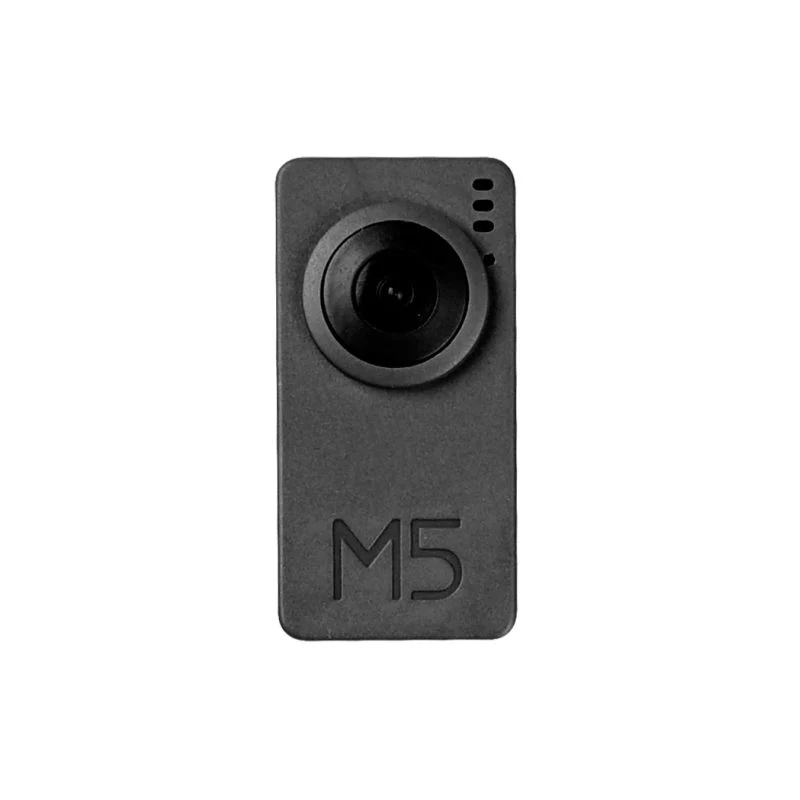
M5Stack Timer Camera F 是基于ESP32-D0WDQ6-V3的鱼眼摄像头模块,板载8 MB PSRAM与4 MB Flash。
OV3660传感器300万像素,DFOV 120°,最高分辨率2048×1536。
采用超低功耗设计,板载RTC(BM8563)可输出IRQ信号,用于睡眠与定时唤醒(睡眠电流低至2 µA)。
内置270 mAh电池,定时拍照(每小时一张)可续航超过一个月。
支持Wi-Fi图像传输与USB口调试,底部HY2.0-4P可扩展其他外设。
板载LED状态指示与复位键,便于程序开发与调试。

本指南将介绍如何在ThingsBoard上创建设备安装所需库与工具
随后将修改代码并上传到设备, 并查看运行结果及通过导入的仪表板在ThingsBoard上查看数据。 设备将借助客户端与共享属性请求功能与ThingsBoard保持同步。
同时,我们将使用共享属性RPC 请求控制设备。

前置条件

继续本指南前,需具备:

在ThingsBoard中创建设备

为简化流程,我们将在界面中手动创建设备。

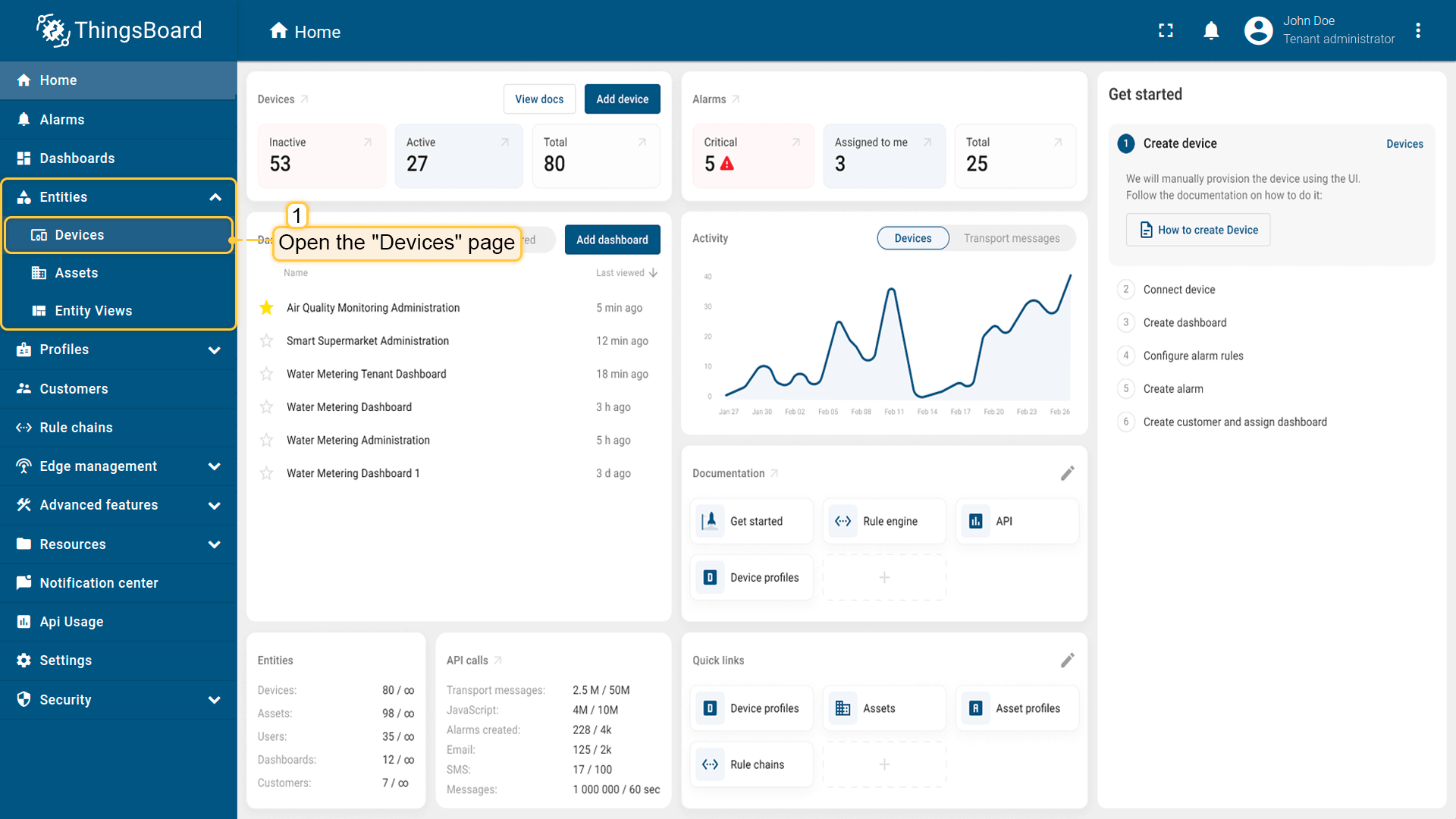
  • 登录ThingsBoard实例并进入 实体 > 设备 页面。

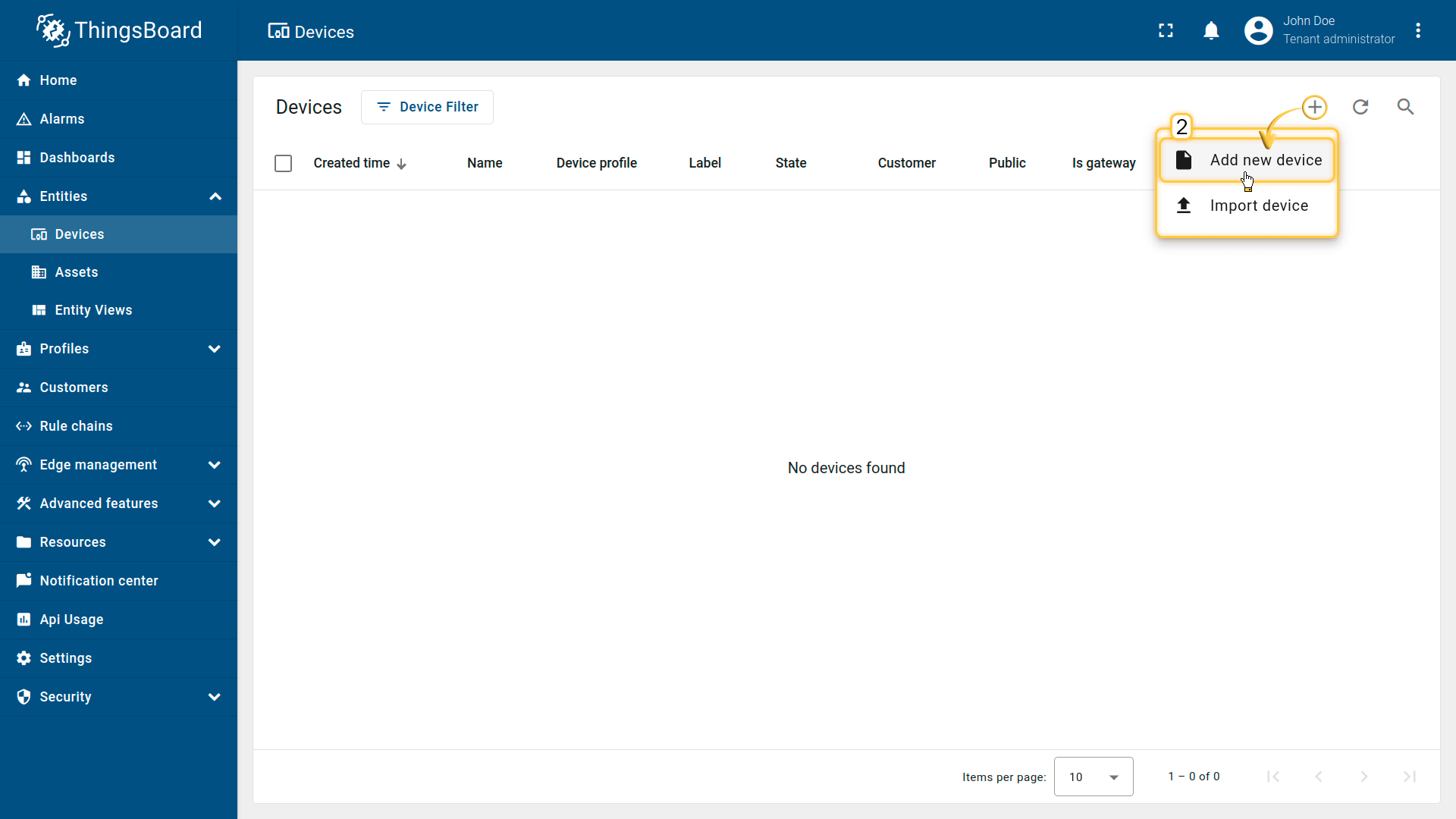
  • 点击右上角 ”+” 按钮并选择 添加新设备

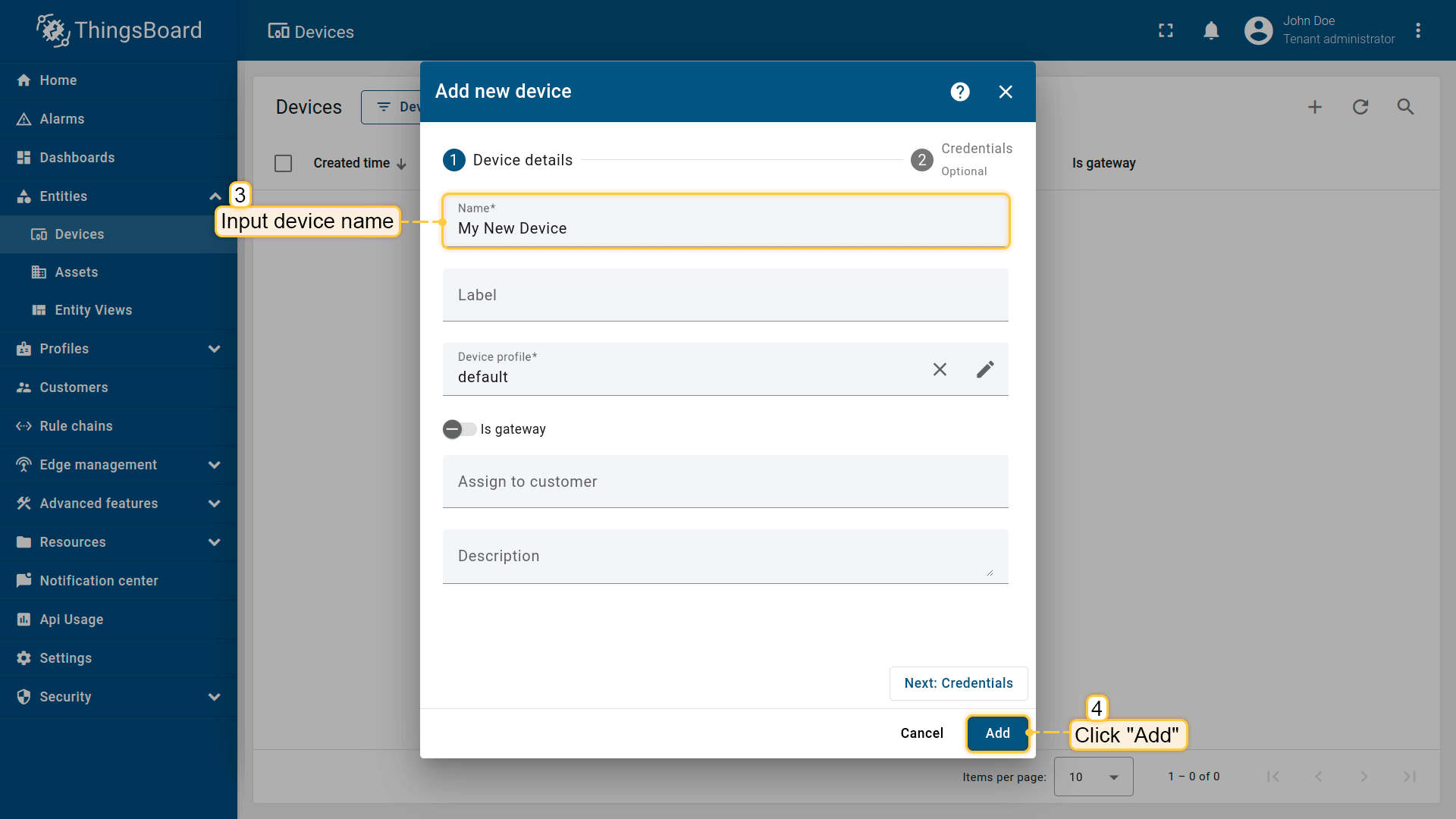
  • 输入设备名称,例如 “My Device”。其他字段可保持默认,点击 添加 创建设备。
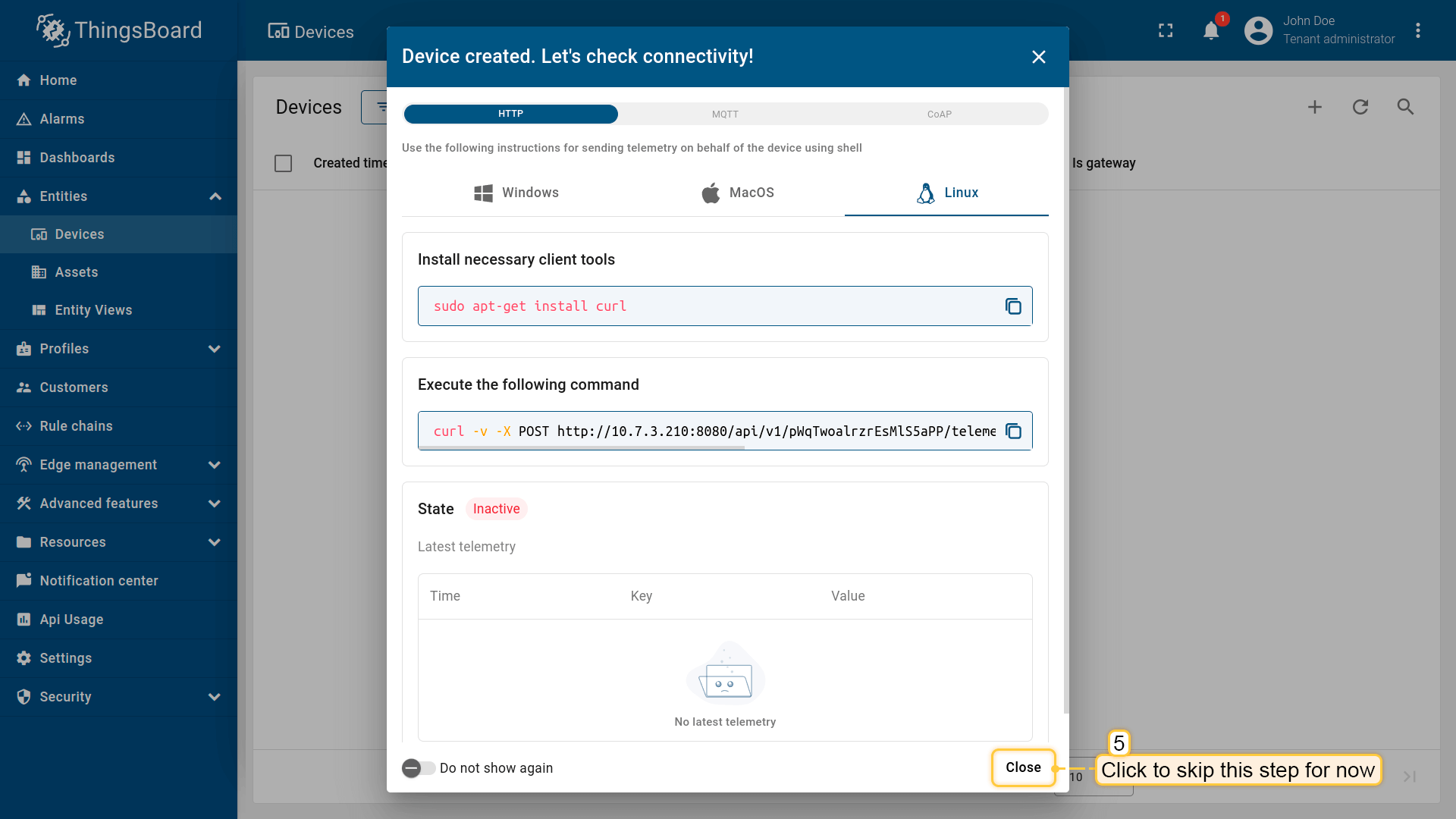
  • 设备已添加完成。

安装所需库和工具

为Arduino IDE安装开发板:

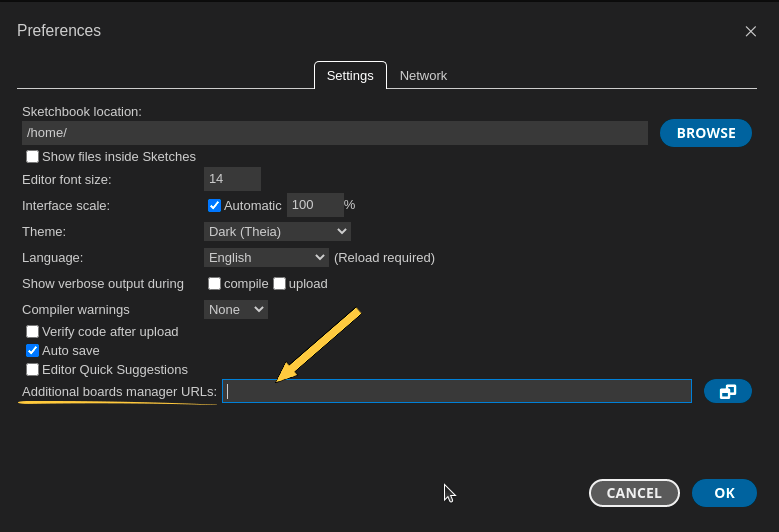
进入 文件 > 首选项,将以下URL添加到 附加开发板管理器网址 字段。

1
https://m5stack.oss-cn-shenzhen.aliyuncs.com/resource/arduino/package_m5stack_index.json
然后进入 工具 > 开发板 > 开发板管理器 并安装 M5Stack by M5Stack Official 开发板。
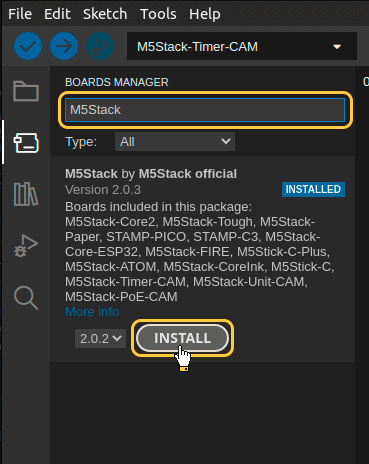
安装完成后,通过 工具 > 开发板 > M5Stack > M5TimerCAM (Or M5Stack-Timer-CAM in older ESP-IDF versions) 选择开发板。

用USB线连接设备与电脑,并在 工具 > 端口 > /dev/ttyUSB0 中选择设备端口。

端口随操作系统不同而不同:

  • Linux下为 /dev/ttyUSBX
  • MacOS下为 usb.serialX.. 或 usb.modemX..
  • Windows下为 COMX。

安装ThingsBoard Arduino SDK需执行以下步骤:

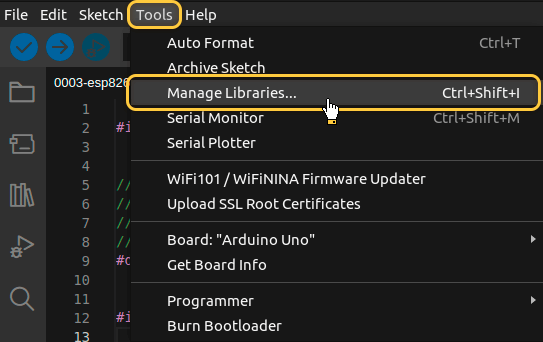
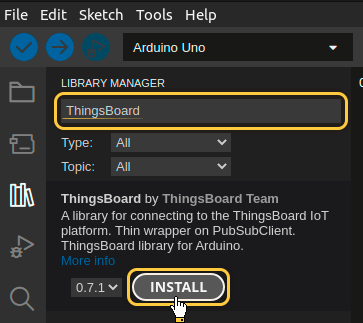
  • 进入 工具 选项卡,点击 管理库

  • 在搜索框中输入 ThingsBoard 并点击找到的库的 安装 按钮。

文档警告图标

所有示例代码均需ThingsBoard库版本 0.14.0.

至此已安装全部所需库与工具。

连接设备到ThingsBoard

连接设备前,需先获取其凭证。
ThingsBoard 支持多种设备凭证类型,本指南使用默认自动生成的访问令牌(access token)。

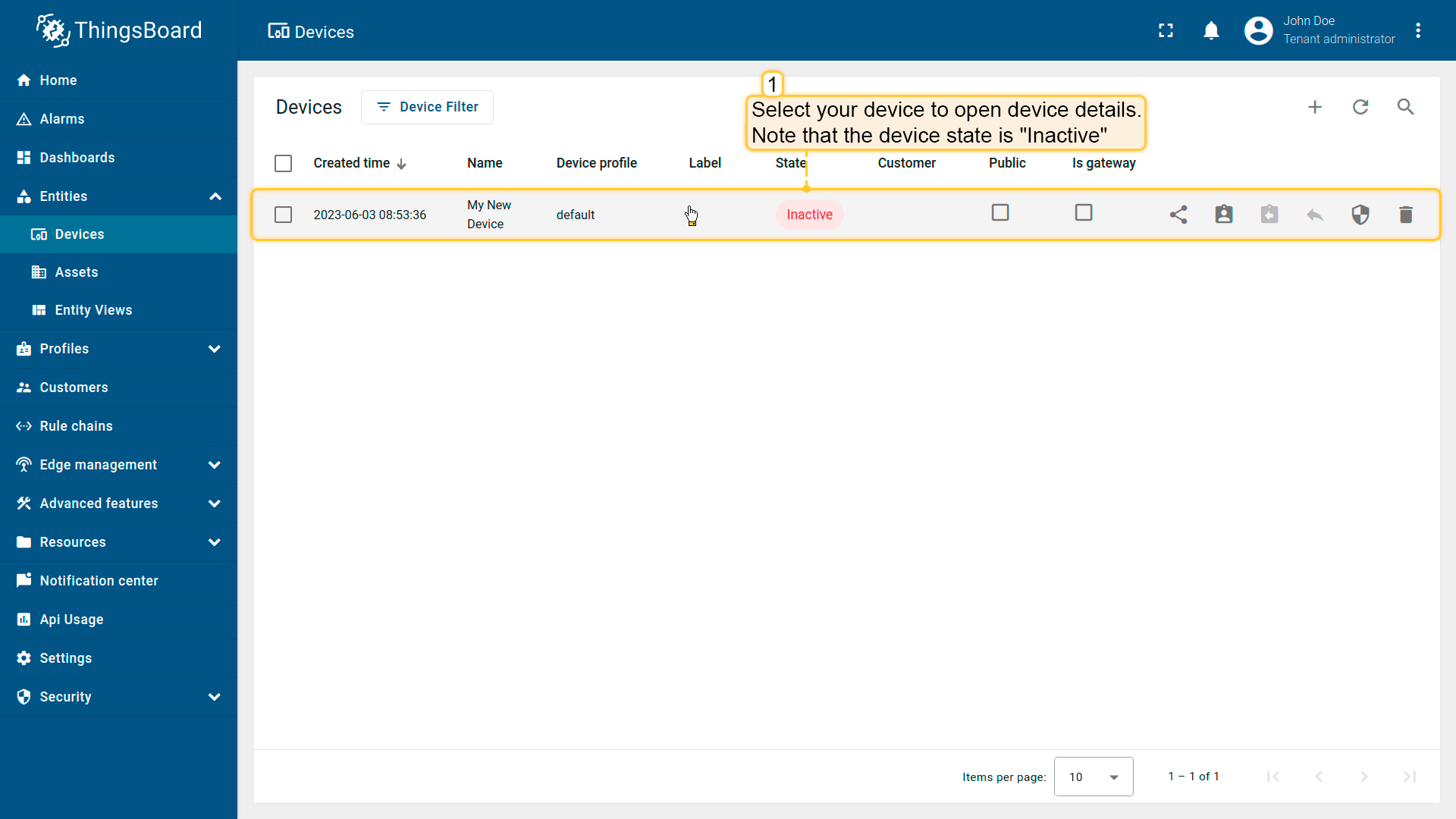
  • 点击设备列表中的行以打开设备详情。

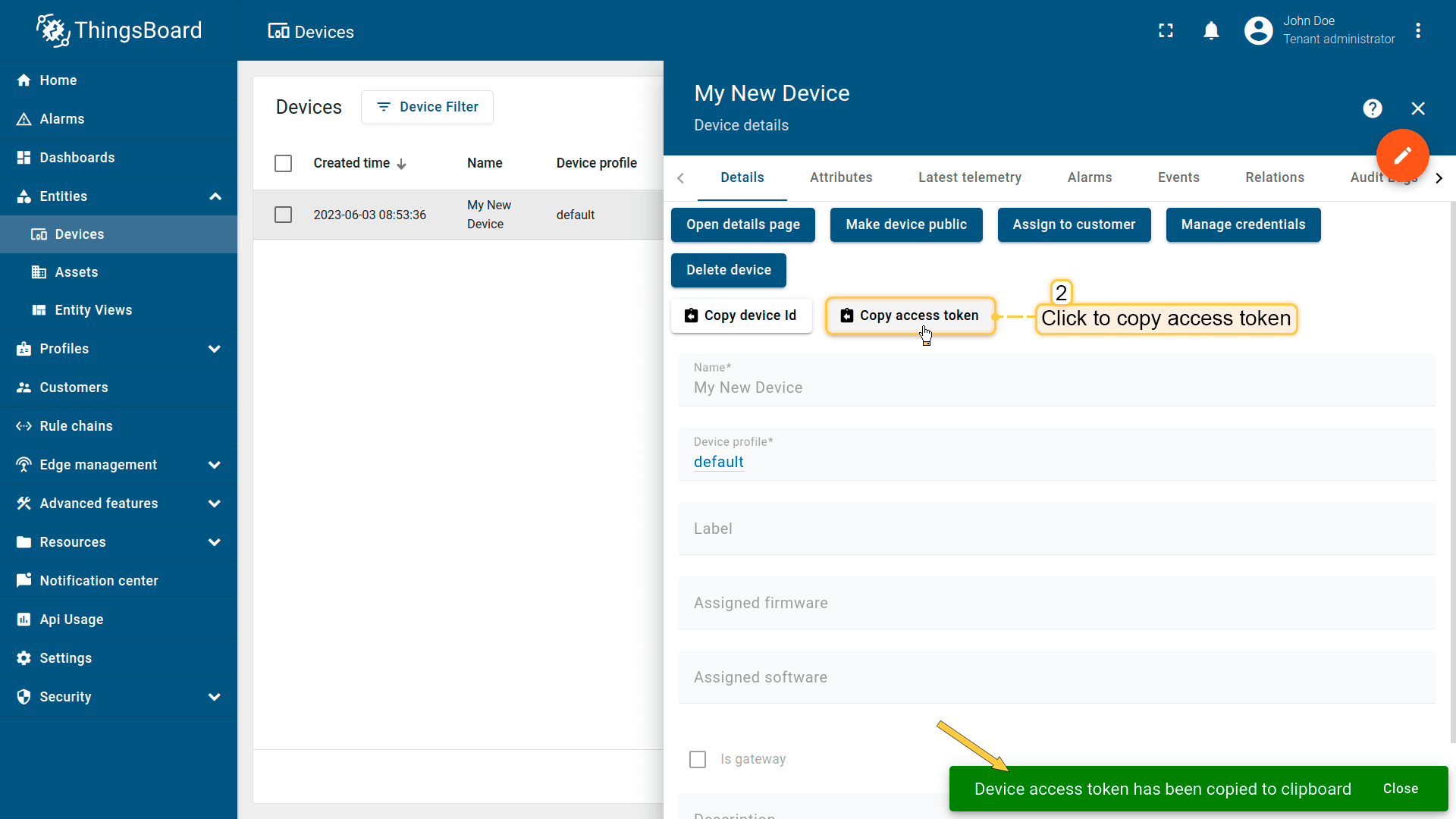
  • 点击“复制访问令牌”。令牌将复制到剪贴板,请妥善保存。

Now it’s time to program the board to connect to ThingsBoard.
To do this, you can use the code below. It contains all required functionality for this guide.

1
2
3
4
5
6
7
8
9
10
11
12
13
14
15
16
17
18
19
20
21
22
23
24
25
26
27
28
29
30
31
32
33
34
35
36
37
38
39
40
41
42
43
44
45
46
47
48
49
50
51
52
53
54
55
56
57
58
59
60
61
62
63
64
65
66
67
68
69
70
71
72
73
74
75
76
77
78
79
80
81
82
83
84
85
86
87
88
89
90
91
92
93
94
95
96
97
98
99
100
101
102
103
104
105
106
107
108
109
110
111
112
113
114
115
116
117
118
119
120
121
122
123
124
125
126
127
128
129
130
131
132
133
134
135
136
137
138
139
140
141
142
143
144
145
146
147
148
149
150
151
152
153
154
155
156
157
158
159
160
161
162
163
164
165
166
167
168
169
170
171
172
173
174
175
176
177
178
179
180
181
182
183
184
185
186
187
188
189
190
191
192
193
194
195
196
197
198
199
200
201
202
203
204
205
206
207
208
209
210
211
212
213
214
215
216
217
218
219
220
221
222
223
224
225
226
227
228
229
230
231
232
233
234
235
236
237
238
239
240
241
242
243
244
245
246
247
248
249
250
251
252
253
254
255
256
257
258
259
260
261
262
263
264
265
266
267
268
269
270
271
272
273
274
275
276
277
278
279
280
281
282
283
284
285
286
287
288
289
290
291
292
293
294
295
296
297
298
299
300
301
302
303
304
305
306
307
308
309
310
311
312
313
314
315
316
317
318
319
320
321
322
323
324
325
326
327
328
329
330
331
332
333
334
335
336
337
338
339
340
341
342
343
344
345
346
347
348
349
350
351
352
353
354
355
356
357
358
359
360
361
362
363
364
365
366
367
368
369
370
371
372
373
374
375
376
377
378
379
380
381
382
383
384
385
386
387
388
389
390
391
392
393
394
395
396
397
398
399
400
401
402
403
404
405
406
407
408
409
410
411
412
413
414
415
416
417
418
419
420
421
422
423
424
#include <Arduino_MQTT_Client.h>
#include "esp_camera.h"
#include <WiFi.h>
#include "soc/soc.h"
#include "soc/rtc_cntl_reg.h"

#include <Server_Side_RPC.h>
#include <Attribute_Request.h>
#include <Shared_Attribute_Update.h>
#include <ThingsBoard.h>
#include <esp_heap_caps.h>

extern "C" {
#include "libb64/cencode.h"
}

constexpr char WIFI_SSID[] = "YOUR_WIFI_SSID";
constexpr char WIFI_PASSWORD[] = "YOUR_WIFI_PASSWORD";

// See https://thingsboard.io/docs/getting-started-guides/helloworld/
// to understand how to obtain an access token
constexpr char TOKEN[] = "YOUR_ACCESS_TOKEN";

// Thingsboard we want to establish a connection too
constexpr char THINGSBOARD_SERVER[] = "localhost";
// MQTT port used to communicate with the server, 1883 is the default unencrypted MQTT port.
constexpr uint16_t THINGSBOARD_PORT = 1883U;

// Maximum size packets will ever be sent or received by the underlying MQTT client,
// if the size is to small messages might not be sent or received messages will be discarded
constexpr size_t MAX_MESSAGE_SIZE = 100U * 1024;

// Baud rate for the debugging serial connection.
// If the Serial output is mangled, ensure to change the monitor speed accordingly to this variable
constexpr uint32_t SERIAL_DEBUG_BAUD = 115200U;

// Maximum amount of attributs we can request or subscribe, has to be set both in the ThingsBoard template list and Attribute_Request_Callback template list
// and should be the same as the amount of variables in the passed array. If it is less not all variables will be requested or subscribed
constexpr size_t MAX_ATTRIBUTES = 3U;

constexpr uint64_t REQUEST_TIMEOUT_MICROSECONDS = 5000U * 1000U;

// Definitions for camera pins
#define PWDN_GPIO_NUM -1
#define RESET_GPIO_NUM 15
#define XCLK_GPIO_NUM 27
#define SIOD_GPIO_NUM 25
#define SIOC_GPIO_NUM 23
#define Y9_GPIO_NUM 19
#define Y8_GPIO_NUM 36
#define Y7_GPIO_NUM 18
#define Y6_GPIO_NUM 39
#define Y5_GPIO_NUM 5
#define Y4_GPIO_NUM 34
#define Y3_GPIO_NUM 35
#define Y2_GPIO_NUM 32
#define VSYNC_GPIO_NUM 22
#define HREF_GPIO_NUM 26
#define PCLK_GPIO_NUM 21

// Attribute names for attribute request and attribute updates functionality

constexpr char BLINKING_INTERVAL_ATTR[] = "blinkingInterval";
constexpr char LED_MODE_ATTR[] = "ledMode";
constexpr char LED_STATE_ATTR[] = "ledState";
constexpr char PICTURE_ATTR[] = "photo";

// Initialize underlying client, used to establish a connection
WiFiClient wifiClient;

// Initalize the Mqtt client instance
Arduino_MQTT_Client mqttClient(wifiClient);

// Initialize used apis
Server_Side_RPC<3U, 5U> rpc;
Attribute_Request<2U, MAX_ATTRIBUTES> attr_request;
Shared_Attribute_Update<3U, MAX_ATTRIBUTES> shared_update;

const std::array<IAPI_Implementation*, 3U> apis = {
    &rpc,
    &attr_request,
    &shared_update
};

// Initialize ThingsBoard instance with the maximum needed buffer size, stack size and the apis we want to use
ThingsBoard tb(mqttClient, MAX_MESSAGE_SIZE, Default_Max_Stack_Size, apis);

// handle led state and mode changes
volatile bool attributesChanged = false;

// LED modes: 0 - continious state, 1 - blinking
volatile int ledMode = 0;

// Current led state
volatile bool ledState = false;

// Settings for interval in blinking mode
constexpr uint16_t BLINKING_INTERVAL_MS_MIN = 10U;
constexpr uint16_t BLINKING_INTERVAL_MS_MAX = 60000U;
volatile uint16_t blinkingInterval = 1000U;

uint32_t previousStateChange;

// For telemetry
constexpr int16_t telemetrySendInterval = 2000U;
uint32_t previousDataSend;

// Picture buffer
char *imageBuffer;

// Flag to send a picture
volatile bool sendPicture = false;

// List of shared attributes for subscribing to their updates
constexpr std::array<const char *, 2U> SHARED_ATTRIBUTES_LIST = {
  LED_STATE_ATTR,
  BLINKING_INTERVAL_ATTR
};

// List of client attributes for requesting them (Using to initialize device states)
constexpr std::array<const char *, 1U> CLIENT_ATTRIBUTES_LIST = {
  LED_MODE_ATTR
};

/// @brief Initalizes WiFi connection,
// will endlessly delay until a connection has been successfully established
void InitWiFi() {
  Serial.println("Connecting to AP ...");
  // Attempting to establish a connection to the given WiFi network
  WiFi.begin(WIFI_SSID, WIFI_PASSWORD);
  while (WiFi.status() != WL_CONNECTED) {
    // Delay 500ms until a connection has been succesfully established
    delay(500);
    Serial.println(WiFi.status());
    Serial.println(WL_CONNECTED);
    Serial.println(".");
  }
  Serial.println("Connected to AP");
}

/// @brief Reconnects the WiFi uses InitWiFi if the connection has been removed
/// @return Returns true as soon as a connection has been established again
const bool reconnect() {
  if (WiFi.status() == WL_CONNECTED) {
    return true;
  }

  // If we aren't establish a new connection to the given WiFi network
  InitWiFi();
  return true;
}

bool initCamera() {
  camera_config_t config;
  config.ledc_channel = LEDC_CHANNEL_0;
  config.ledc_timer = LEDC_TIMER_0;
  config.pin_d0 = Y2_GPIO_NUM;
  config.pin_d1 = Y3_GPIO_NUM;
  config.pin_d2 = Y4_GPIO_NUM;
  config.pin_d3 = Y5_GPIO_NUM;
  config.pin_d4 = Y6_GPIO_NUM;
  config.pin_d5 = Y7_GPIO_NUM;
  config.pin_d6 = Y8_GPIO_NUM;
  config.pin_d7 = Y9_GPIO_NUM;
  config.pin_xclk = XCLK_GPIO_NUM;
  config.pin_pclk = PCLK_GPIO_NUM;
  config.pin_vsync = VSYNC_GPIO_NUM;
  config.pin_href = HREF_GPIO_NUM;
  config.pin_sscb_sda = SIOD_GPIO_NUM;
  config.pin_sscb_scl = SIOC_GPIO_NUM;
  config.pin_pwdn = PWDN_GPIO_NUM;
  config.pin_reset = RESET_GPIO_NUM;
  config.xclk_freq_hz = 20000000;
  config.pixel_format = PIXFORMAT_JPEG;
  config.fb_count = 1;
  config.frame_size = FRAMESIZE_240X240;
  config.jpeg_quality = 10;

  esp_err_t err = esp_camera_init(&config);
  if (err != ESP_OK) {
    Serial.printf("Camera init failed with error 0x%x", err);
    return false;
  }

  sensor_t *s = esp_camera_sensor_get();
  // initial sensors are flipped vertically and colors are a bit saturated
  s->set_vflip(s, 1);        // flip it back
  s->set_brightness(s, 1);   // up the brightness just a bit
  s->set_saturation(s, -2);  // lower the saturation

  return true;
}

bool captureImage() {
  camera_fb_t *fb = NULL;
  fb = esp_camera_fb_get();
  if (!fb) {
    return false;
  }
  encode((uint8_t *)fb->buf, fb->len);
  esp_camera_fb_return(fb);
  return true;
}

void encode(const uint8_t *data, size_t length) { 
  size_t size = base64_encode_expected_len(length) + 1;
  base64_encodestate _state;
  base64_init_encodestate(&_state);
  int len = base64_encode_block((char *)&data[0], length, &imageBuffer[0], &_state);
  len = base64_encode_blockend((imageBuffer + len), &_state);
}

/// @brief Processes function for RPC call "setLedMode"
/// RPC_Data is a JSON variant, that can be queried using operator[]
/// See https://arduinojson.org/v5/api/jsonvariant/subscript/ for more details
/// @param data Data containing the rpc data that was called and its current value
void processSetLedMode(const JsonVariantConst &data, JsonDocument &response) {
  Serial.println("Received the set led state RPC method");

  // Process data
  int new_mode = data;

  Serial.print("Mode to change: ");
  Serial.println(new_mode);
  StaticJsonDocument<1> response_doc;

  if (new_mode != 0 && new_mode != 1) {
    response_doc["error"] = "Unknown mode!";
    response.set(response_doc);
    return;
  }

  ledMode = new_mode;

  attributesChanged = true;

  // Returning current mode
  response_doc["newMode"] = (int)ledMode;
  response.set(response_doc);
}

/// @brief Processes function for RPC call "setLedMode"
/// RPC_Data is a JSON variant, that can be queried using operator[]
/// See https://arduinojson.org/v5/api/jsonvariant/subscript/ for more details
/// @param data Data containing the rpc data that was called and its current value
void processTakePicture(const JsonVariantConst &data, JsonDocument &response) {
  Serial.println("Received the take picture RPC method");
  StaticJsonDocument<1> response_doc;

  if (!captureImage()) {
    response_doc["error"] = "Cannot take a picture!";
    response.set(response_doc);
    return;
  }

  sendPicture = true;

  // Returning picture size
  response_doc["size"] = strlen(imageBuffer);
  response.set(response_doc);
}

// Optional, keep subscribed shared attributes empty instead,
// and the callback will be called for every shared attribute changed on the device,
// instead of only the one that were entered instead
const std::array<RPC_Callback, 2U> callbacks = {
  RPC_Callback{ "setLedMode", processSetLedMode },
  RPC_Callback{ "takePicture", processTakePicture }
};

/// @brief Update callback that will be called as soon as one of the provided shared attributes changes value,
/// if none are provided we subscribe to any shared attribute change instead
/// @param data Data containing the shared attributes that were changed and their current value
void processSharedAttributes(const JsonObjectConst &data) {
  for (auto it = data.begin(); it != data.end(); ++it) {
    if (strcmp(it->key().c_str(), BLINKING_INTERVAL_ATTR) == 0) {
      const uint16_t new_interval = it->value().as<uint16_t>();
      if (new_interval >= BLINKING_INTERVAL_MS_MIN && new_interval <= BLINKING_INTERVAL_MS_MAX) {
        blinkingInterval = new_interval;
        Serial.print("Updated blinking interval to: ");
        Serial.println(new_interval);
      }
    } else if (strcmp(it->key().c_str(), LED_STATE_ATTR) == 0) {
      ledState = it->value().as<bool>();
      digitalWrite(LED_BUILTIN, ledState ? HIGH : LOW);
      Serial.print("Updated state to: ");
      Serial.println(ledState);
    }
  }
  attributesChanged = true;
}

void processClientAttributes(const JsonObjectConst &data) {
  for (auto it = data.begin(); it != data.end(); ++it) {
    if (strcmp(it->key().c_str(), LED_MODE_ATTR) == 0) {
      const uint16_t new_mode = it->value().as<uint16_t>();
      ledMode = new_mode;
    }
  }
}

// Attribute request did not receive a response in the expected amount of microseconds 
void requestTimedOut() {
  Serial.printf("Attribute request timed out did not receive a response in (%llu) microseconds. Ensure client is connected to the MQTT broker and that the keys actually exist on the target device\n", REQUEST_TIMEOUT_MICROSECONDS);
}

const Shared_Attribute_Callback<MAX_ATTRIBUTES> attributes_callback(&processSharedAttributes, SHARED_ATTRIBUTES_LIST.cbegin(), SHARED_ATTRIBUTES_LIST.cend());
const Attribute_Request_Callback<MAX_ATTRIBUTES> attribute_shared_request_callback(&processSharedAttributes, REQUEST_TIMEOUT_MICROSECONDS, &requestTimedOut, SHARED_ATTRIBUTES_LIST);
const Attribute_Request_Callback<MAX_ATTRIBUTES> attribute_client_request_callback(&processClientAttributes, REQUEST_TIMEOUT_MICROSECONDS, &requestTimedOut, CLIENT_ATTRIBUTES_LIST);

void setup() {
  WRITE_PERI_REG(RTC_CNTL_BROWN_OUT_REG, 0);
  ledcAttachPin(4, 4);
  ledcSetup(4, 5000, 8);
  
  imageBuffer = (char *)ps_malloc(50U * 1024);
  Serial.begin(SERIAL_DEBUG_BAUD);
  Serial.println("Camera initialization...");
  if (!initCamera()) {
    Serial.println("Camera initialization failed!");
    ESP.restart();
  }

  pinMode(LED_BUILTIN, OUTPUT);
  delay(1000);
  InitWiFi();
  tb.connect(THINGSBOARD_SERVER, TOKEN, THINGSBOARD_PORT);
  rpc.RPC_Subscribe(callbacks.cbegin(), callbacks.cend());
  shared_update.Shared_Attributes_Subscribe(attributes_callback);
  attr_request.Shared_Attributes_Request(attribute_shared_request_callback);
  attr_request.Client_Attributes_Request(attribute_client_request_callback);
}

void loop() {
  delay(10);

  if (!reconnect()) {
    return;
  }

  if (!tb.connected()) {
      // Connect to the ThingsBoard
      Serial.print("Connecting to: ");
      Serial.print(THINGSBOARD_SERVER);
      Serial.print(" with token ");
      Serial.println(TOKEN);
    if (!tb.connect(THINGSBOARD_SERVER, TOKEN, THINGSBOARD_PORT)) {
      Serial.println("Failed to connect");
      return;
    }
  Serial.println("Connection to server successful");
  // Sending a MAC address as an attribute
  tb.sendAttributeData("macAddress", WiFi.macAddress().c_str());

  Serial.println("Subscribing for RPC...");
  // Perform a subscription. All consequent data processing will happen in
  // processSetLedState() and processSetLedMode() functions,
  // as denoted by callbacks array.
  if (!rpc.RPC_Subscribe(callbacks.cbegin(), callbacks.cend())) {
    Serial.println("Failed to subscribe for RPC");
    return;
  }

  if (!shared_update.Shared_Attributes_Subscribe(attributes_callback)) {
    Serial.println("Failed to subscribe for shared attribute updates");
    return;
  }

  Serial.println("Subscribe done");

  // Request current states of shared attributes
  if (!attr_request.Shared_Attributes_Request(attribute_shared_request_callback)) {
    Serial.println("Failed to request for shared attributes");
    return;
  }

  // Request current states of client attributes
  if (!attr_request.Client_Attributes_Request(attribute_client_request_callback)) {
    Serial.println("Failed to request for client attributes");
    return;
  }
  }

  if (sendPicture) {
    tb.sendTelemetryData(PICTURE_ATTR, imageBuffer);
    sendPicture = false;
  }

  if (attributesChanged) {
    attributesChanged = false;
    if (ledMode == 0) {
      previousStateChange = millis();
    }
    tb.sendTelemetryData(LED_MODE_ATTR, ledMode);
    tb.sendTelemetryData(LED_STATE_ATTR, ledState);
    tb.sendAttributeData(LED_MODE_ATTR, ledMode);
    tb.sendAttributeData(LED_STATE_ATTR, ledState);
  }

  if (ledMode == 1 && millis() - previousStateChange > blinkingInterval) {
    previousStateChange = millis();
    ledState = !ledState;
    digitalWrite(LED_BUILTIN, ledState);
    tb.sendTelemetryData(LED_STATE_ATTR, ledState);
    tb.sendAttributeData(LED_STATE_ATTR, ledState);
    if (LED_BUILTIN == 99) {
      Serial.print("LED state changed to: ");
      Serial.println(ledState);
    }
  }

  // Sending telemetry every telemetrySendInterval time
  if (millis() - previousDataSend > telemetrySendInterval) {
    previousDataSend = millis();
    tb.sendTelemetryData("temperature", random(10, 20));
    tb.sendAttributeData("rssi", WiFi.RSSI());
    tb.sendAttributeData("channel", WiFi.channel());
    tb.sendAttributeData("ssid", WIFI_SSID);
    tb.sendAttributeData("localIp", WiFi.localIP().toString().c_str());
  }

  tb.loop();
}

文档信息图标

Data, send by this device may require increasing of the allowed message size for MQTT on your ThingsBoard instance.
To do this you can modify parameter NETTY_MAX_PAYLOAD_SIZE in thingsboard.yml file, default value on regular setup is 65535 bytes.
Required size depends on chosen resolution and quality.

Click to see dependency between resolution and approximate message size
Framesize parameter value Photo resolution Approximate message size (in bytes)
FRAMESIZE_96X96 96x96 4608
FRAMESIZE_QQVGA 160x120 7200
FRAMESIZE_QCIF 176x144 9792
FRAMESIZE_HQVGA 240x176 12288
FRAMESIZE_240X240 240x240 14400
FRAMESIZE_QVGA 320x240 19200
FRAMESIZE_CIF 400x296 29760
FRAMESIZE_HVGA 480x320 34560
FRAMESIZE_VGA 640x480 76800
FRAMESIZE_SVGA 800x600 144000
FRAMESIZE_XGA 1024x768 294912
FRAMESIZE_HD 1280x720 345600
FRAMESIZE_SXGA 1280x1024 491520
FRAMESIZE_UXGA 1600x1200 921600
FRAMESIZE_FHD 1920x1080 933120
FRAMESIZE_P_HD 720x1280 1036800
FRAMESIZE_P_3MP 864x1536 1776384
FRAMESIZE_QXGA 2048x1536 4718592
FRAMESIZE_QHD 2560x1440 5529600
FRAMESIZE_WQXGA 2560x1600 6144000
FRAMESIZE_P_FHD 1080x1920 6220800
FRAMESIZE_QSXGA 2560x1920 7864320

文档信息图标

请勿忘记将占位符替换为您的真实Wi-Fi网络SSID、密码及ThingsBoard设备访问令牌。

连接所需变量:

变量名 默认值 说明
WIFI_SSID YOUR_WIFI_SSID 您的Wi-Fi网络名称。
WIFI_PASSWORD YOUR_WIFI_PASSWORD 您的Wi-Fi网络密码。
TOKEN YOUR_DEVICE_ACCESS_TOKEN 设备访问令牌。获取方式参见 #connect-device-to-thingsboard
THINGSBOARD_SERVER localhost 您的ThingsBoard主机或IP地址。
THINGSBOARD_PORT 1883U ThingsBoard服务MQTT端口。本指南可使用默认值。
MAX_MESSAGE_SIZE 100U*1024 MQTT消息最大尺寸。应大于图片尺寸 + 约1024或更多。
SERIAL_DEBUG_BAUD 1883U 串口波特率。本指南可使用默认值。
1
2
3
4
5
6
7
8
9
10
11
12
13
14
...

constexpr char WIFI_SSID[] = "YOUR_WIFI_SSID";
constexpr char WIFI_PASSWORD[] = "YOUR_WIFI_PASSWORD";

constexpr char TOKEN[] = "YOUR_ACCESS_TOKEN";

constexpr char THINGSBOARD_SERVER[] = "localhost";
constexpr uint16_t THINGSBOARD_PORT = 1883U;

constexpr uint32_t MAX_MESSAGE_SIZE = 100U * 1024;
constexpr uint32_t SERIAL_DEBUG_BAUD = 115200U;

...

Send data part (By default the example sends random value for temperature key and some WiFi information):

1
2
3
4
5
6
7
8
...
    tb.sendTelemetryData("temperature", random(10, 20));
    tb.sendAttributeData("rssi", WiFi.RSSI());
    tb.sendAttributeData("bssid", WiFi.BSSIDstr().c_str());
    tb.sendAttributeData("localIp", WiFi.localIP().toString().c_str());
    tb.sendAttributeData("ssid", WiFi.SSID().c_str());
    tb.sendAttributeData("channel", WiFi.channel());
...

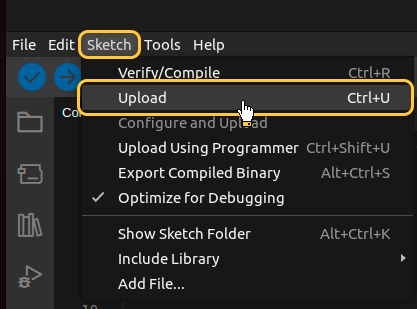
Then upload the code to the device by pressing Upload button or keyboard combination Ctrl+U.
在ThingsBoard上查看数据

ThingsBoard支持创建和自定义用于监控与管理数据、设备的交互式可视化(仪表板)。
通过ThingsBoard仪表板,您可以高效管理与监控IoT设备及数据。下面为我们的设备创建仪表板。

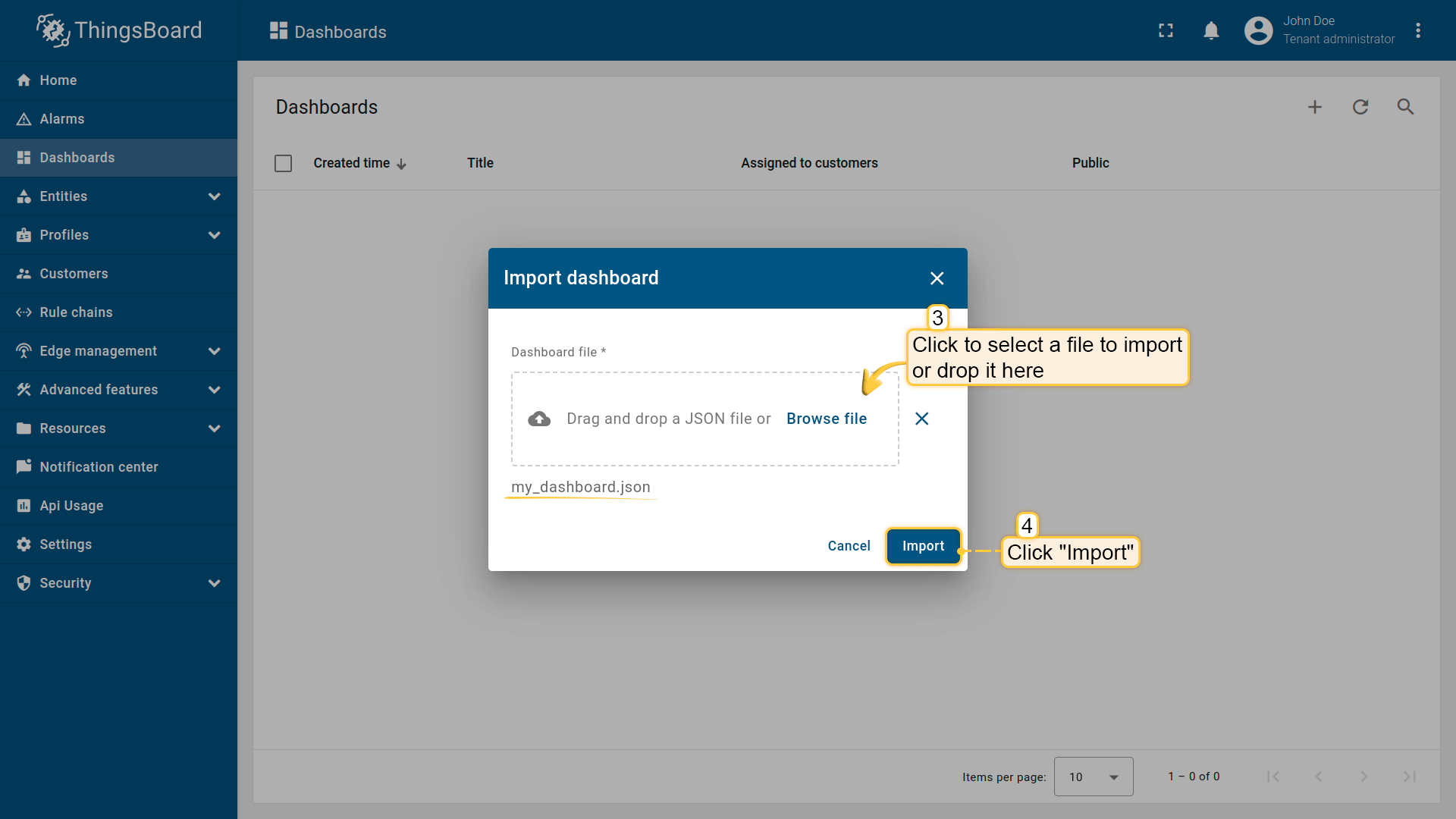
将仪表板添加到ThingsBoard需要导入。请按以下步骤操作:

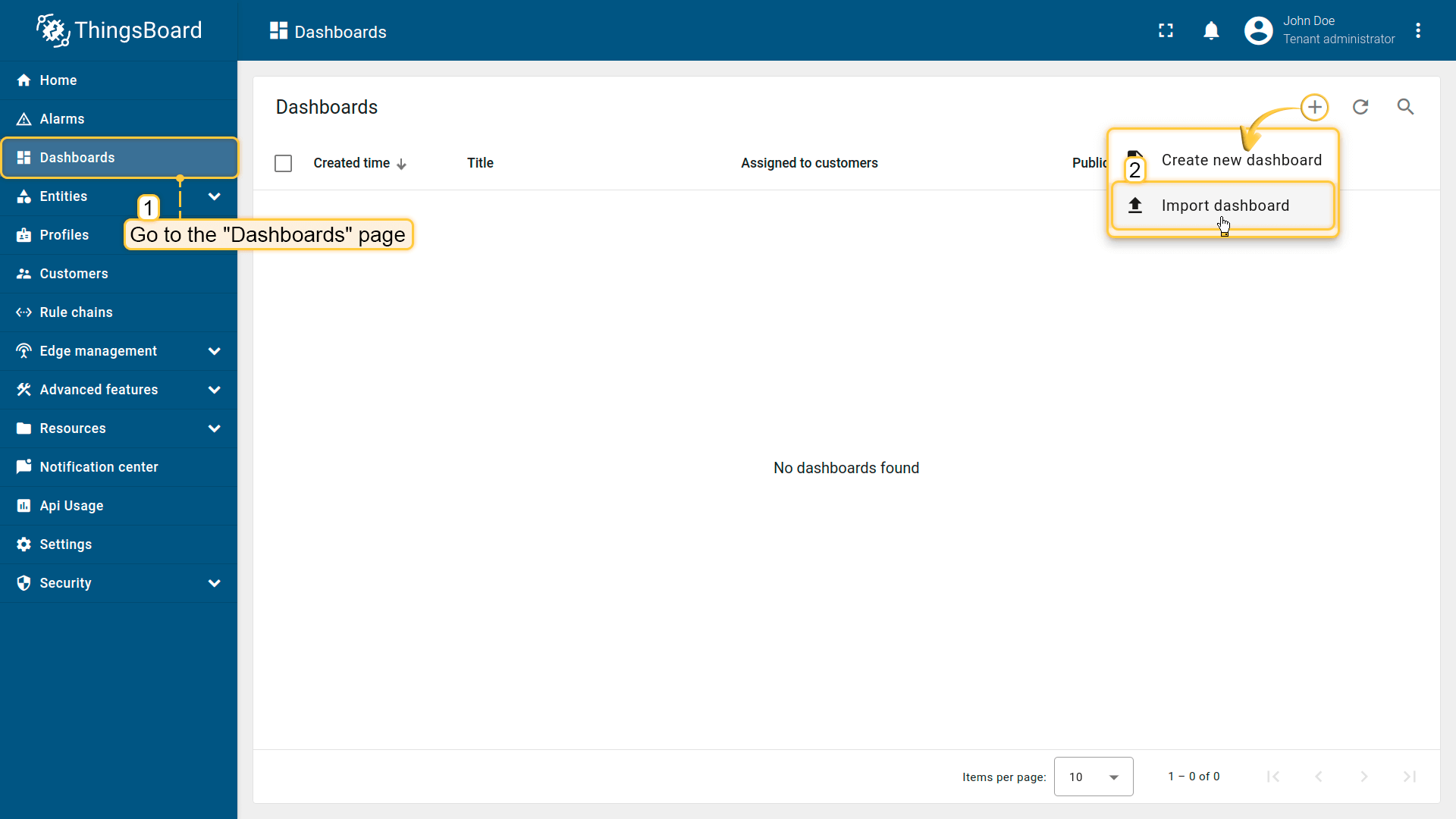
  • 进入 仪表板 页面,点击右上角 + 按钮并选择 导入仪表板

  • 在仪表板导入窗口中上传JSON文件并点击 导入 按钮。

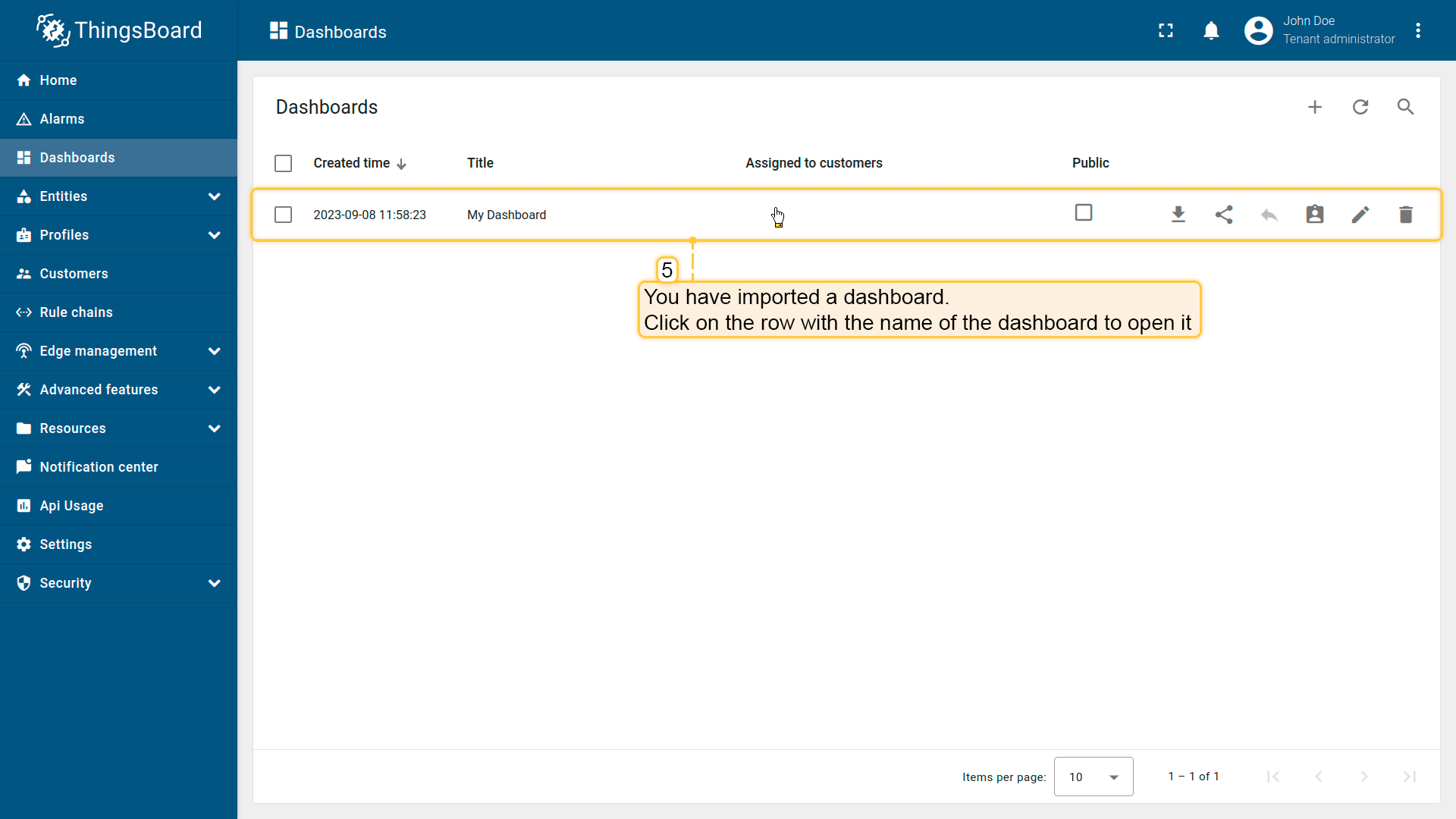
  • 仪表板已导入。

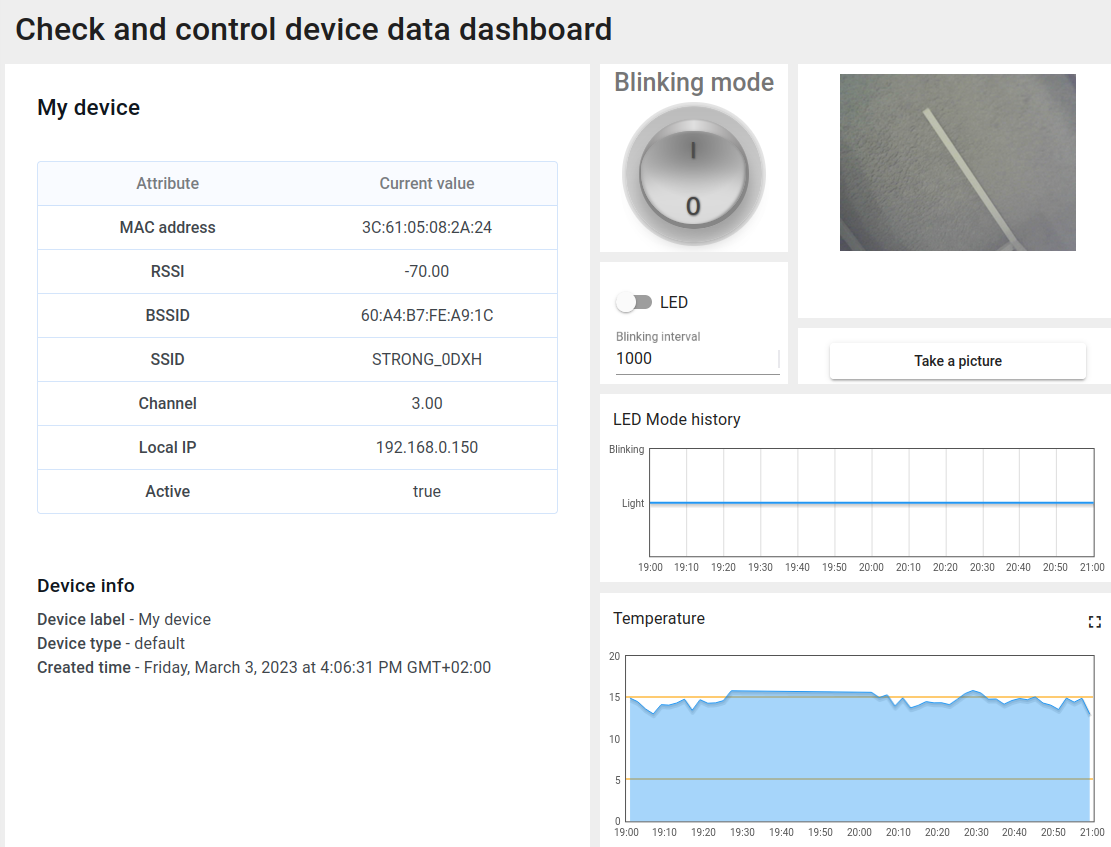
检查并控制设备数据仪表板结构:

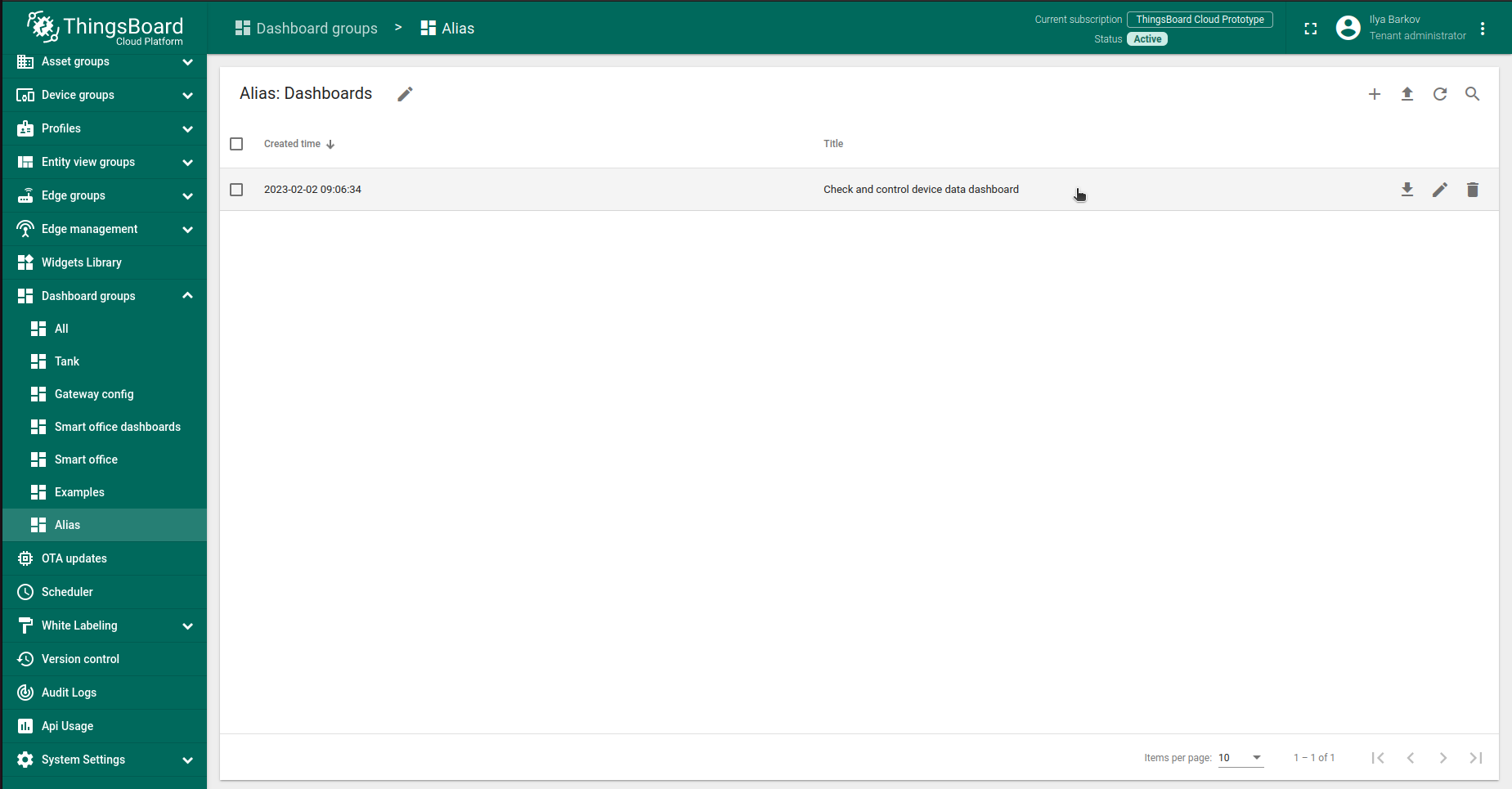
  • 点击表格中的仪表板以打开导入的仪表板,查看设备数据。

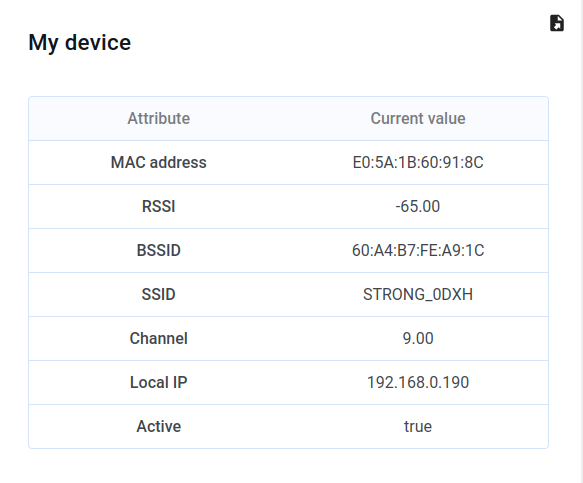
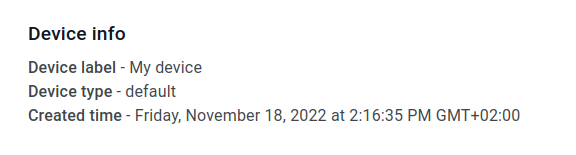
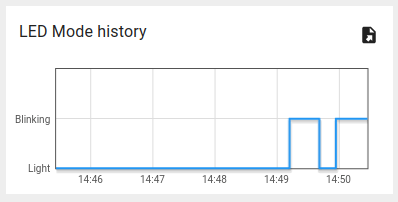
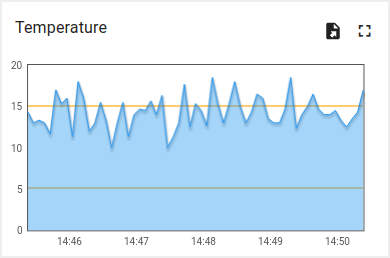
  • 检查数据和控制设备的仪表板视图。

  • 从设备接收的属性。

  • ThingsBoard服务器上的设备信息。

  • 查看LED模式变化历史的部件。

  • 查看模拟温度历史的部件。

使用客户端和共享属性请求同步设备状态

为在启动时从ThingsBoard获取设备状态,代码中实现了相应功能

以下为示例代码的相关部分:

  • 引入模块以使用API功能:
    1
    2
    3
    4
    5
    6
    7
    8
    9
    10
    11
    
    ...
    #include <AttributeRequest.h>
    ...
    Attribute_Request<2U, MAX_ATTRIBUTES> attr_request;
    ...
    const std::array<IAPI_Implementation*, ...> apis = {
      ...
      &attr_request,
      ...
    };
    ...
    

    需在代码中定义要使用的API。

  • 属性回调:
1
2
3
4
5
6
7
8
9
10
11
12
13
14
15
16
17
18
19
20
21
22
23
24
25
26
27
28
29
30
31
32
33
34
35
36
37
...
void processSharedAttributes(const JsonObjectConst &data) {
  for (auto it = data.begin(); it != data.end(); ++it) {
    if (strcmp(it->key().c_str(), BLINKING_INTERVAL_ATTR) == 0) {
      const uint16_t new_interval = it->value().as<uint16_t>();
      if (new_interval >= BLINKING_INTERVAL_MS_MIN && new_interval <= BLINKING_INTERVAL_MS_MAX) {
        blinkingInterval = new_interval;
        Serial.print("Updated blinking interval to: ");
        Serial.println(new_interval);
      }
    } else if(strcmp(it->key().c_str(), LED_STATE_ATTR) == 0) {
      ledState = it->value().as<bool>();
      digitalWrite(LED_BUILTIN, ledState ? HIGH : LOW);
      Serial.print("Updated state to: ");
      Serial.println(ledState);
    }
  }
  attributesChanged = true;
}

void processClientAttributes(const JsonObjectConst &data) {
  for (auto it = data.begin(); it != data.end(); ++it) {
    if (strcmp(it->key().c_str(), LED_MODE_ATTR) == 0) {
      const uint16_t new_mode = it->value().as<uint16_t>();
      ledMode = new_mode;
    }
  }
}
...
// Attribute request did not receive a response in the expected amount of microseconds 
void requestTimedOut() {
  Serial.printf("Attribute request timed out did not receive a response in (%llu) microseconds. Ensure client is connected to the MQTT broker and that the keys actually exist on the target device\n", REQUEST_TIMEOUT_MICROSECONDS);
}
...
const Attribute_Request_Callback<MAX_ATTRIBUTES> attribute_shared_request_callback(&processSharedAttributes, REQUEST_TIMEOUT_MICROSECONDS, &requestTimedOut, SHARED_ATTRIBUTES_LIST);
const Attribute_Request_Callback<MAX_ATTRIBUTES> attribute_client_request_callback(&processClientAttributes, REQUEST_TIMEOUT_MICROSECONDS, &requestTimedOut, CLIENT_ATTRIBUTES_LIST);
...

共有三个回调:

  • 共享属性回调:专用于共享属性,主要接收包含闪烁间隔的响应,以确定合适的闪烁周期;
  • 客户端属性回调:专用于客户端属性,接收LED模式与状态信息,收到后保存并应用这些参数;
  • 请求超时回调:在属性数据请求超时时触发,用于处理超时。

此功能使设备在重启后能保持实际状态。

  • 属性请求:
    1
    2
    3
    4
    5
    6
    7
    8
    9
    10
    11
    12
    13
    
    ...
      // Request current states of shared attributes
      if (!attr_request.Shared_Attributes_Request(attribute_shared_request_callback)) {
        Serial.println("Failed to request for shared attributes");
        return;
      }
    
      // Request current states of client attributes
      if (!attr_request.Client_Attributes_Request(attribute_client_request_callback)) {
        Serial.println("Failed to request for client attributes");
        return;
      }
    ...
    

    为使回调能接收数据,需向ThingsBoard发送请求。

使用共享属性控制设备

还可通过共享属性更新功能修改闪烁周期。

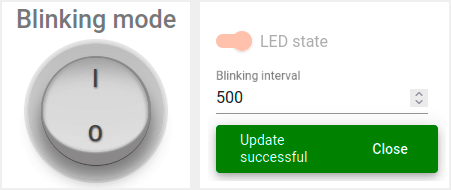
  • 修改闪烁周期只需在仪表板上更改数值即可。

  • 按勾选图标应用后,将显示确认消息。

在关闭闪烁时改变状态,可使用同一部件中的开关:

  • 仅当关闭闪烁模式时方可操作。

实现该功能使用变量 “blinkingInterval”,出现在以下代码中:

  • Connecting modules to use API functionality:
    1
    2
    3
    4
    5
    6
    7
    8
    9
    10
    11
    
    ...
    #include <AttributeRequest.h>
    ...
    Attribute_Request<2U, MAX_ATTRIBUTES> attr_request;
    ...
    const std::array<IAPI_Implementation*, ...> apis = {
      ...
      &shared_update
      ...
    };
    ...
    

    使用属性请求功能需引入相关模块并将其作为所用API的一部分。

  • 共享属性更新回调:
1
2
3
4
5
6
7
8
9
10
11
12
13
14
15
16
17
18
19
20
21
22
23
24
25
26
27
28
29
...

void processSharedAttributes(const JsonObjectConst &data) {
  for (auto it = data.begin(); it != data.end(); ++it) {
    if (strcmp(it->key().c_str(), BLINKING_INTERVAL_ATTR) == 0) {
      const uint16_t new_interval = it->value().as<uint16_t>();
      if (new_interval >= BLINKING_INTERVAL_MS_MIN && new_interval <= BLINKING_INTERVAL_MS_MAX) {
        blinkingInterval = new_interval;
        Serial.print("Updated blinking interval to: ");
        Serial.println(new_interval);
      }
    } else if(strcmp(it->key().c_str(), LED_STATE_ATTR) == 0) {
      ledState = it->value().as<bool>();
      digitalWrite(LED_BUILTIN, ledState ? HIGH : LOW);
      Serial.print("Updated state to: ");
      Serial.println(ledState);
    }
  }
  attributesChanged = true;
}

...
// Attribute request did not receive a response in the expected amount of microseconds 
void requestTimedOut() {
  Serial.printf("Attribute request timed out did not receive a response in (%llu) microseconds. Ensure client is connected to the MQTT broker and that the keys actually exist on the target device\n", REQUEST_TIMEOUT_MICROSECONDS);
}
...
const Attribute_Request_Callback<MAX_ATTRIBUTES> attribute_shared_request_callback(&processSharedAttributes, REQUEST_TIMEOUT_MICROSECONDS, &requestTimedOut, SHARED_ATTRIBUTES_LIST);
...
  • 订阅共享属性更新:
1
2
3
4
5
6
...
    if (!shared_update.Shared_Attributes_Request(attribute_shared_request_callback)) {
      Serial.println("Failed to request for shared attributes");
      return;
    }
...
  • 闪烁相关代码:
1
2
3
4
5
6
7
8
9
10
11
12
13
14
...

  if (ledMode == 1 && millis() - previousStateChange > blinkingInterval) {
    previousStateChange = millis();
    ledState = !ledState;
    digitalWrite(LED_BUILTIN, ledState);
    tb.sendTelemetryData(LED_STATE_ATTR, ledState);
    tb.sendAttributeData(LED_STATE_ATTR, ledState);
    if (LED_BUILTIN == 99) {
      Serial.print("LED state changed to: ");
      Serial.println(ledState);
    }
  }
...

可修改逻辑以实现目标,并添加自定义属性处理。

使用RPC控制设备

可手动切换LED状态,并在常亮与闪烁模式间切换。 可使用仪表板中的以下部分:

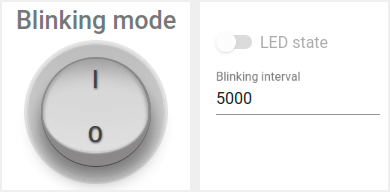
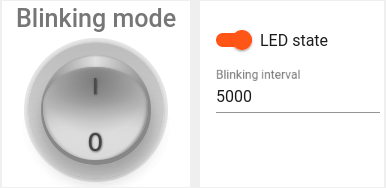
  • 使用开关部件将LED设为常亮。

  • 使用圆形开关部件将LED设为闪烁模式。

注意:仅在关闭闪烁模式时可更改LED状态。

示例代码中实现了 RPC 命令 处理。
实现设备控制使用了以下代码部分:

  • Connecting modules to use API functionality:
1
2
3
4
5
6
7
8
9
10
11
12
...
#include <Server_Side_RPC.h>
...
Server_Side_RPC<..., ...> rpc;
...

const std::array<IAPI_Implementation*, ...> apis = {
    ...
    &rpc,
    ...
    }
...

使用RPC需引入相关模块并将其作为所用API的一部分。

  • RPC请求回调:
1
2
3
4
5
6
7
8
9
10
11
12
13
14
15
16
17
18
19
20
21
22
23
24
25
26
27
28
29
30
31
32
33
34
35
36
...

void processSetLedMode(const JsonVariantConst &data, JsonDocument &response) {
  Serial.println("Received the set led state RPC method");

  // Process data
  int new_mode = data;

  Serial.print("Mode to change: ");
  Serial.println(new_mode);
  StaticJsonDocument<1> response_doc;

  if (new_mode != 0 && new_mode != 1) {
    response_doc["error"] = "Unknown mode!";
    response.set(response_doc);
    return;
  }

  ledMode = new_mode;

  attributesChanged = true;


  response_doc["newMode"] = (int)ledMode;
  // Returning current mode
  response.set(response_doc);
}

...

const std::array<RPC_Callback, 2U> callbacks = {
  RPC_Callback{ "setLedMode", processSetLedMode },
  RPC_Callback{ "takePicture", processTakePicture }
};

...
  • 订阅RPC请求:
1
2
3
4
5
6
...
    if (!rpc.RPC_Subscribe(callbacks.cbegin(), callbacks.cend())) {
      Serial.println("Failed to subscribe for RPC");
      return;
    }
...

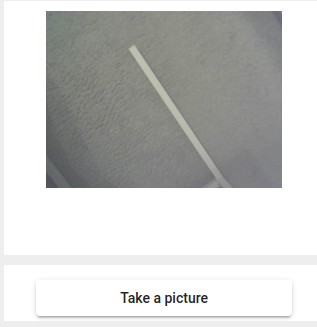
开发板集成摄像头后,可拍照并在仪表板上查看。

  • 可通过按下ThingsBoard仪表板上的按钮从摄像头模块拍照。

通过向设备发送 “takePicture” RPC实现拍照。

以下代码用于拍照。

1
2
3
4
5
6
7
8
9
10
11
12
13
...

bool captureImage() {
  camera_fb_t *fb = NULL;
  fb = esp_camera_fb_get();
  if (!fb) {
    return false;
  }
  encode((uint8_t *)fb->buf, fb->len);
  esp_camera_fb_return(fb);
  return true;
}
...

JSON无法直接传递照片原始字节数组,故需将字节编码为Base64:

1
2
3
4
5
6
7
8
9
...
void encode(const uint8_t *data, size_t length) {
  size_t size = base64_encode_expected_len(length) + 1;
  base64_encodestate _state;
  base64_init_encodestate(&_state);
  int len = base64_encode_block((char *)&data[0], length, &imageBuffer[0], &_state);
  len = base64_encode_blockend((imageBuffer + len), &_state);
}
...

编码后的图片在主循环中发送:

1
2
3
4
5
6
...
if (sendPicture) {
tb.sendTelemetryData(PICTURE_ATTR, imageBuffer);
sendPicture = false;
}
...

可修改代码以实现您的目标,并添加自定义RPC命令处理。

总结

现在您可以轻松将M5Stack Timer Camera F连接到ThingsBoard并开始发送数据。

进一步了解可查阅ThingsBoard文档, 学习创建仪表板可视化遥测、 配置告警规则实时监控设备行为等核心功能。

发现即插即用硬件,助力您的解决方案
合作伙伴图标